


Here’s how I upgraded the hard drive in a Sony Vaio PCG-V505DXP laptop.
It had an older 60GB 4200RPM IDE HDD (Toshiba MK6021GAS) installed. The original one failed and I decided to upgrade it with a faster one.
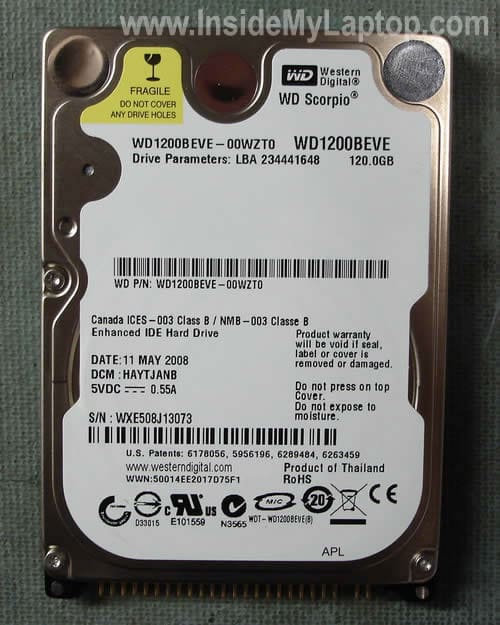
I installed an inexpensive 120GB 5400RMP WD Scorpio IDE drive (WD12000BEVE) and it works like a charm.
The drive replacement procedure is pretty simple and here it is.
First of all, unplug the battery. The HDD compartment is located on the bottom under the cover.
Remove five screws and remove the cover.

Now remove two screws securing the HDD brackets to the base.
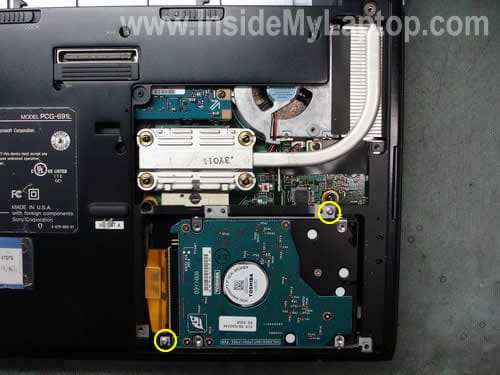
Carefully lift up the HDD and unplug it from the connector on the motherboard.
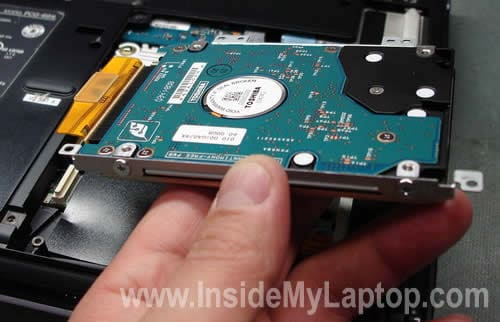
Now you can unplug the cable.
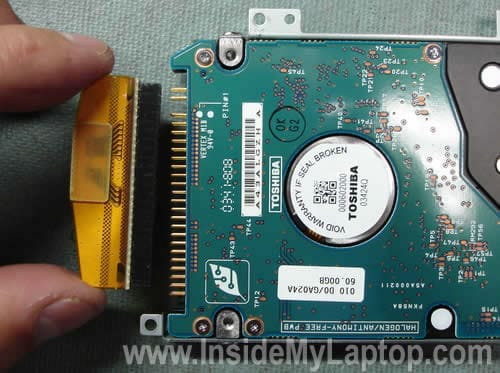
You’ll have to transfer mounting brackets to the new drive.
There is one bracket on each side.
Remove the bracket from the right side.
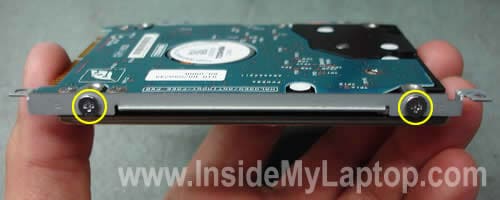
Remove the bracket from the left side.
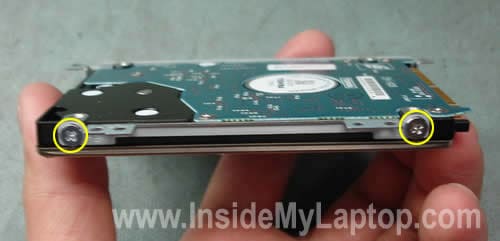
You’ll have to use an IDE drive, not SATA.
Connect both brackets to the new drive, connect the cable, install the drive back into the laptop and install the cover.
As you understand, the new drive comes without software. In order to install the operating system and applications you’ll have to run recovery discs.
Hopefully, you’ve created a set of recovery CDs or DVDs while your old hard drive was in a good working condition. If not, you’ll have to contact Sony and purchase recovery discs from them.
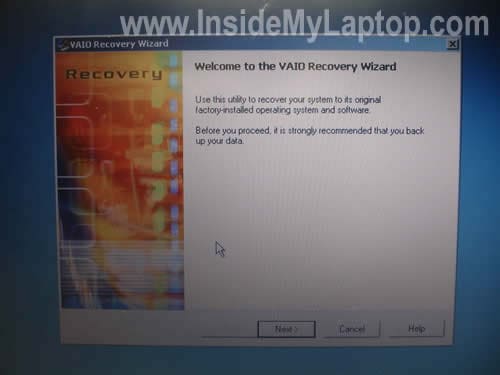
Boot your laptop from the first recovery disc and follow the wizard on the screen. This process will reimage your new HDD to factory defaults.
A.Friedman
Hi,
A few years ago I successfully upgraded the hard drive in my Vaio PCG-V505EC to a 160Gig. I recently purchased a new 360gig and using Norton Ghost V9 managed to upgrade once again but the additional space is not recognized. I am guessing their might be a limit to how much the bios can address but can not confirm this. Any suggestions?
Any chance may have restored with Norton improperly? Everything works but I just don’t see the additional storage (even with partition magic).
Thanks for your help
Roy Cox
can you help me in replacing my dc power jack on my PCG-GRX670
Sony laptop. Any help will be much appreciated
Jim Elias
Did as per guide and no probs except Recovery Disc applications will not load, says incompatible files for this model.
Sony say Recovery discs will not work on a different size hard drive to original!!!
Says cannot supply copies of applications due to copyrite (B***T) Can’t find a way out of problem.
Jim
IML Tech
Jim Elias,
I didn’t know that the recovery disc is somehow locked to the hard drive size. If the original hard drive is still in a good working condition, you can try reinstalling factory software on the original hard drive and then cloning it to a larger drive.
J Manning
I have a Sony PCG GR 414 SP the hard drive has failed I have recovery disc but says It cannot find Operating system when loading so I guess the hard drive has had It can u tell me an alternative Drive that I maybe able to replace It with and how I go about doing It
Many Thanks John
IML Tech
John,
Did you try booting from the recovery disc? Did you go though the whole recovery process?
Dave
A.Friedman
A few years ago I successfully upgraded the hard drive in my Vaio PCG-V505EC to a 160Gig. I recently purchased a new 360gig and using Norton Ghost V9 managed to upgrade once again but the additional space is not recognized. I am guessing their might be a limit to how much the bios can address but can not confirm this. Any suggestions?
Any chance may have restored with Norton improperly? Everything works but I just don’t see the additional storage (even with partition magic).
The Vail PCV-V505 series does not see ant thing above 137 GB. If you use any drive above that size you need to use a dynamic disk overlay. This should be available on the installation. disk that shipped with or is available for download from the manufacture of the hard drive you installed
IML Tech
Dave,
Make sure you are running the latest BIOS. Update the BIOS if there is a newer version available on Sony site. It’s possible that they fixed this with the BIOS update.
After the update try using Partition Magic again.
By the way, can you see the unused space in Windows disc management utility? Maybe instead of increasing the primary partition you can create a second partition on the drive?
wade
I have a sony vaio pcg-v505bcp the gov. removed the hard drive, and now I see i need a cable to attach a hard drive. Can you help me find a replacement cable that will work for this laptop? Thanks Wade.
IML Tech
wade,
Try calling sparepartswarehouse.com, they carry a lot of parts for Sony laptop. They can find the part number and order it for you directly from Sony.
Terry
Hi, regarding the 2nd image shown above, I would like to replace my fan because it wasn’t spinning at all, and my CPU heats up really fast, was wondering if you know how to remove that back cover that is partially covering the fan? and how would you go about in replacing it? thanks, and sorry if this is not in the right topic forum, but its does show the closest image to fan replacement, BTW read your instruction on how to replace the hard drive, really useful, did it myself when my hard drive needed an upgrade due to insufficient space.
IML Tech
Terry,
I’m not sure, but I believe that in order to remove the cooling fan, you’ll have to disassemble the entire laptop. I think the fan is mounted on the motherboard, and the motherboard has to be removed.
Even though you can see the fan, it doesn’t mean that you can easily remove it.
On my last Sony laptop, I also could see the fan on the bottom, but it took me about 1.5 hours to replace it.
Here’s the picture: https://www.insidemylaptop.com/images/Sony-Vaio-VGN-SZ-series/take-apart-laptop-10.jpg
Dee
I have a PCG-V505DX and need to replace the sound card. Do you have a tutorial for this?
Many thanks!
Dee
David
I have a Sony PCG-V505BCP and just rec’d my HD connector, when I start it up, it won’t reconz. the hard drive. What can it be? the connector itself you think?
IML Tech
David,
I cannot tell without testing the laptop.
1. Try reconnecting the hard drive cable on both ends – motherboard and hard drive itself.
2. Enter the BIOS setup menu and try loading default settings. Check out if the hard drive will appear in the BIOS after that.
3. Probably try replacing the hard drive cable.
Erin
I have the same problem. I called tech support to re install my software for a clean start. I was instructed to press F10 and restore from the partition. It shut down in the middle. I then purchased the Sony recovery disk as instructed and it still won’t recover . The computer just shuts down at about 20-24% progress. I don’t know the “whole recovery process” but I assume just putting in the recovery disk is what you mean. I guess I need to replace the hard drive also. I see there may be a problem with a larger hard drive (from a post above). Ideas on where I can purchase a replacement hard drive – nothing fancy, just want to get it working again for basic quicken. I have a Sony Vaio PCG-K45 (Mobile Intel Pentium 4 Processor 538, 512 MB RAM, 80 GB Hard Drive). It was slow – but working fine before I started this whole process. Any help would be appreciated. Thank you 🙂
“I have a Sony PCG GR 414 SP the hard drive has failed I have recovery disc but says It cannot find Operating system when loading so I guess the hard drive has had It can u tell me an alternative Drive that I maybe able to replace It with and how I go about doing It
Many Thanks John”
Did you try booting from the recovery disc? Did you go though the whole recovery process?
Harish
Hi – I have a V505BX – its original HDD is 40GB and dead. I got 80GB HDD but it keeps complaining about BAD POOL and dies with BSOD.
Please help,
thanks
emr
nice info.. thx
Laura Brody
I have a Sony Vaio PCG-V505AX laptop. I got it when the previous owner brought it in with a crashed HD. They decided to abandon it. I opened it up, added memory, a new CMOS battery and a new HD. It has been working great for a couple of years. Th CD/DVD drive is mucho flakey, so I got a replacement off of eBay.
The problem is that I can’t figure out how to open up the unit so I can swap the DVD drive. I must be missing a screw or two. Any words of wisdom?
Thanks!
IML Tech
Laura Brody,
If the DVD drive mounted inside the laptop case, it’s likely you’ll have to remove the top cover assembly in order to replace the drive.
Maybe something like in this guide: https://www.insidemylaptop.com/how-take-apart-sony-vaio-vgn-sz-series-laptop/
wasim akhtar
i want to format Drive ‘C’ but it required password. I tried many password but failed. After THREE attempt a number appear which is “00119”.
PLEASE guide what will be the ORIGINAL password ? so that I can format the old window by new one.
Thanks & regards.
IML Tech
wasim akhtar,
I guess you are talking about the hard drive password.
You will not be able to access with hard drive if you forgot the password. If you forgot the password, you’ll have to replace the hard drive.
Steve D
Excellent info for replacing mem and HD thanks alot 🙂
Velo
I have a Sony VAIO 1 To, 8 Gb RAM touch screen. it gives me a bi problem. Every time I turn on the laptop…only the VAIO symbol appears, afterward there is nothing. I’d like if someone can help me… Model: SVF15AC1QL (2013)
Thank you in advance
IML Tech
@ Velo,
Try to narrow down the problem.
1. Try removing RAM modules one by one and test the laptop with only one RAM module installed. If one of the modules failed, the laptop might not boot properly.
2. Try disconnecting the hard drive and start the laptop. Will it bypass the VAIO logo with the hard drive disconnected?