

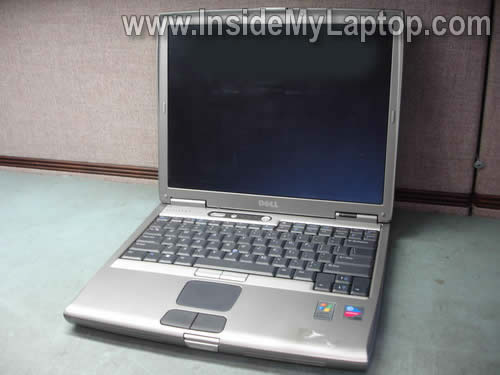
In this guide I show to remove and replace the cooling fan in a Dell Latitude D600 laptop.
In this model the cooling module is buried deep inside.
Also you can use this guide for cleaning the cooling module and removing dust from the heat sink.
If your laptops shuts down on its own without any warning, most likely it happens because of overheating. Make sure the fan works and the heat sink is not clogged with dust.
Before you start, turn off the computer, unplug the AC adapter and remove the battery.
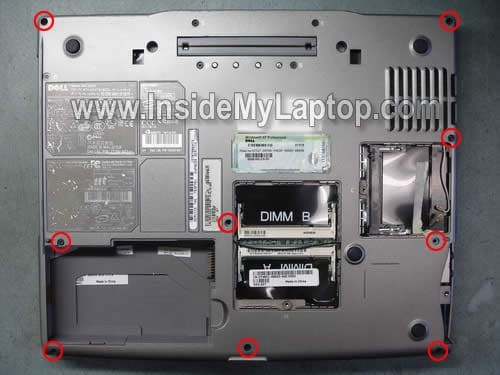
STEP 1.
Remove all marked screws from the bottom.
STEP 2.
Lift up the switch cover with a small screwdriver. Continue removing the cover with your fingers.

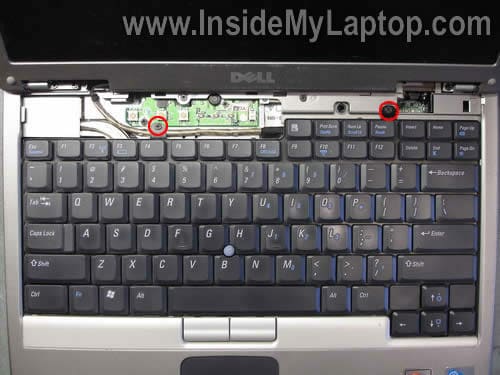
STEP 3.
When the switch cover is removed you can access two screws securing the keyboard. Remove these screws.
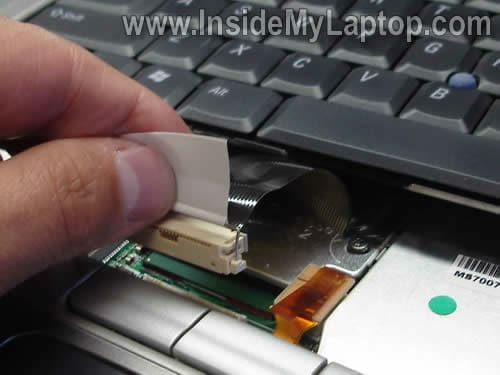
STEP 4.
Lift up the keyboard and access the cable. Disconnect the keyboard cable from the motherboard.
STEP 5.
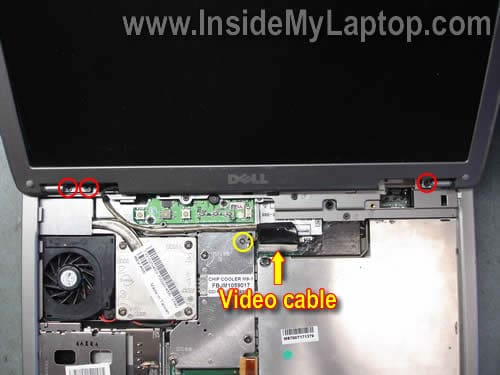
Remove three (red) screws securing the display hinges.
Remove one (yellow) screw securing the video cable ground.
Disconnect the video cable connector from the motherboard.
STEP 6.
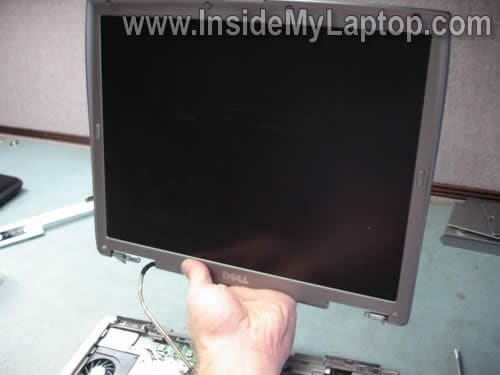
Remove the LCD assembly.
Take a look at this guide for the screen removal instructions.
STEP 7.
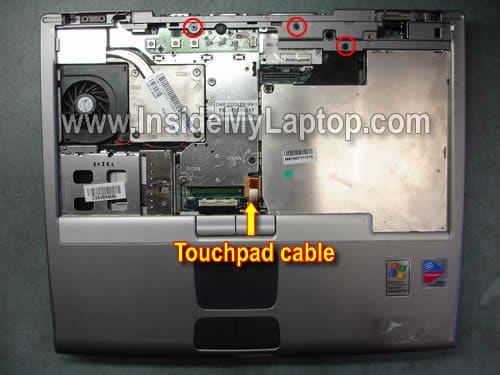
Remove three screws securing the top cover.
Disconnect the touchpad cable from the motherboard.
STEP 8.
Start separating the top cover from the base with your fingers.

STEP 9.
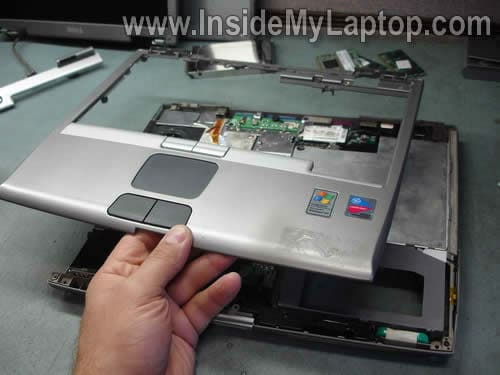
Remove the top cover assembly.
STEP 10.
Now you can clean up the cooling module using compressed air.
In order to replace the fan, continue laptop disassembly.
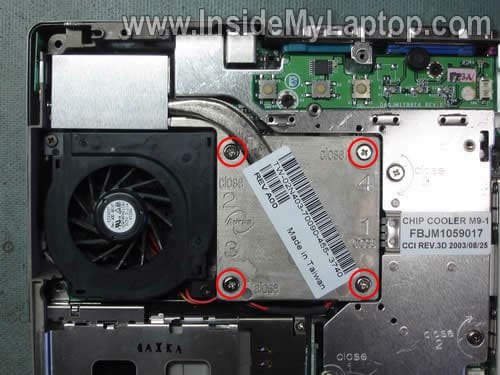
Loosen four screws securing the heat sink. Lift up and remove the heat sink.
STEP 11.
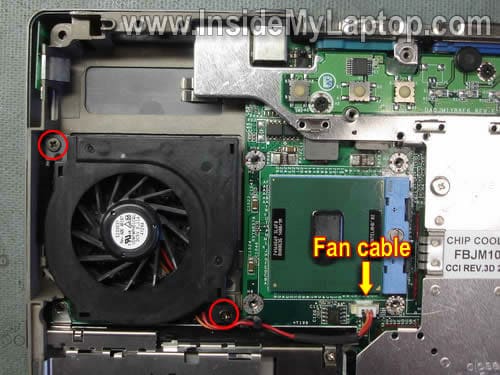
Remove two screws securing the cooling fan.
Disconnect the fan cable from the motherboard.
STEP 12.
Remove and replace the cooling fan with a new one.
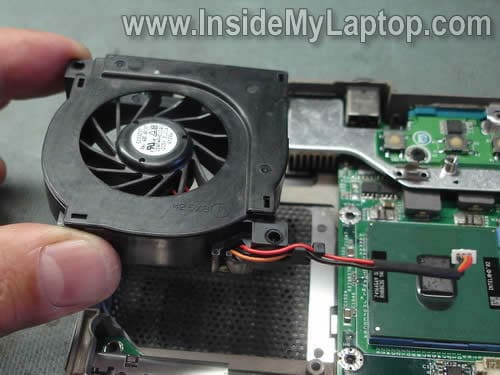
When you install the heat sink back in place don’t forget to apply thermal paste.
faiz mandeel
i have a dell latitude d520 is this the same way for replacing the cool fan
Henry Boriskin
Thank y ou so much for your instructional article on the removal of the cpu fan for the Dell. However, I do not believe that you were using a Dell Latittude D600. The fan for the D600 is located in the right hand corner and is working intermitantly. I removed it and it bench tested O.K. I will now have to test the supply 5 V. Any Suggestions? Thanks again for the help.
kareem
thanks for the guide, i have the same dell d600 that works fine except the fact that the heatsink fan is not working! i already cleaned up the dust from the fan and heatsink and put a thermal glue and it didn’t fix the problem, then i replaced the fan with another one that i got from a broken dell D600 and i had the same result!! so is there any thing else that could possibly cause this problem? any suggestions will be most appreciated. thanks.
IML Tech
kareem,
Not sure 100% but if another known good fan doesn’t work, there must be a problem with the motherboard. Apparently the motherboard cannot control the fan properly. Just a guess.
jcnichol02
I just found this and it is quite helpful thank you.
I think is a Dell design by default. The fan will spin up when needed but not run all the time. I have found some software via a google search that allows the fan to run at full speed all the time, so far it has dropped my temp by 10 degrees and counting.
Pepe
Great tutorial. It was of great help to me. I have just cleansed my laptop’s fan and it now runs much more quiet.
THANK YOU.
Jerry
Very useful, fan is now replaced, but I ran into another problem. The display hinges are now locked so that the display is in the vertical position. Any hints gratefully received
Thanks, Jerry
Cementhead
Thanks a lot for this. Very helpful!
Terry Storie
I need to know how to install the cooling fan in a Dell latitude…”C-600″, instead of the D-600
IML Tech
Terry Storie,
You’ll find laptop disassembly instructions in Dell Latitude C600/C500 Series Service Manual
Chelle
My boyfriend replaced the cooling fan for his Dell laptop, now he receives a caps lock error code upon start up, though I don’t believe it will start up. Is there a way to fix this? How do we fix it?
nico1951
TENGO PROBLEMA CON LA TARJETA MADRE DE LA LAPTO DELL LATITUD CPX NO PASA CORRIENTE AL VENTILADOR EL MISMO ESTA BUENO LO PROBE Y FUNCIONA NECESITO COMO UMA GUIA EL DIAGRAMA DE DICHA LAPTO GRACIAS
ATT
JOSE AGUIRRE
David D
My old Dell 600 runs painfully slow and this is with both win xp and when i boot ubuntu, so my suspicion is that this a hardware prob. The unit seems a bit hot as well so I’m going to use your tutorial to open it up and blow out any dust in the fan. My question is what’s the best way to test the fan with the laptop cover removed?
IML Tech
@ David D,
Does it have enough memory installed?
You can start using the laptop and at the same time watch the fan activity. Eventually the fan has to start and run for a while. Does it start at all in your laptop?