


In this guide I explain how to replace broken screen on a HP Pavilion dv3 laptop.
Before you start, make sure it’s turned off and battery removed.
STEP 1.
You’ll find two screw seals in lower left and right corners of the display.

Remove these screw seals with a sharp object and glue somewhere on the bezel so they don’t get lost.
After that remove both screws securing the bezel.

STEP 2.
Carefully insert your fingers under the screen bezel.

STEP 3.
Start separating the bezel from the display cover.
You can help yourself with a piece of soft plastic. In this example I’m using a guitar pick.
Work slowly, try not to break too many latches securing the bezel. 🙂

STEP 4.
Continue removing the bezel.

STEP 5.
Removing it in the hinge area probably will be the hardest part of the entire replacement process.

STEP 6.
Finally, it’s removed.

STEP 7.
Remove two screws securing the mounting brackets.
By the way, the web camera is a separate module.

STEP 8.
Remove four screws from the bottom of the display assembly.

STEP 9.
Carefully unplug cable from the web camera module.

STEP 10.
Remove three screws from the right mounting bracket.
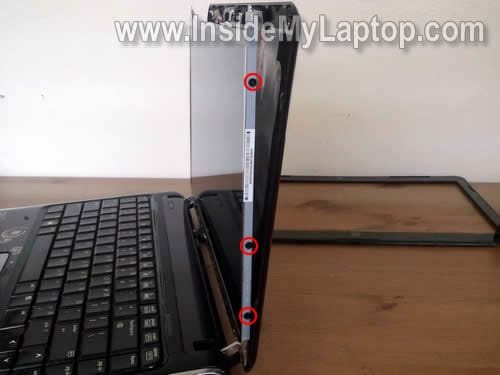
STEP 11.
Remove three more screw on the left mounting bracket.

STEP 12.
Carefully separate the LCD assembly from the display cover and place it face down on the keyboard.

STEP 13.
The web camera cable secured to the back with sticky tape.
Separate the web camera cable.
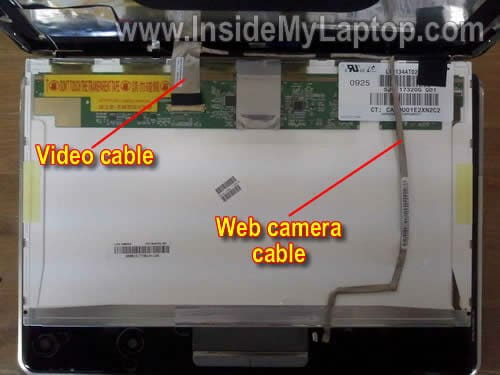
STEP 14.
Remove sticky tape securing the connection and unplug the video cable.
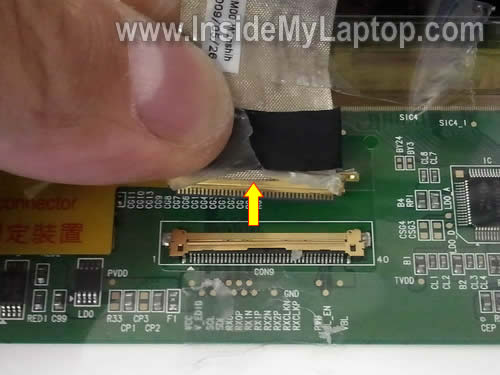
STEP 15.
Remove the broken LCD screen and replace it with a new one.
Assemble the laptop back together following from step 15 to step 1.

In my computer I had the following LCD installed: LTN134AT02.

rs salazar
Thank you for this helpful instruction, it saved me money! I made a donation to help your cause.
Bob
Ashley
I had a question about the inverter. My screen for my dv3-2000 crack after a fall and I bought and replaced it just fine. The problem is that the new one does not light up when every is installed back. It functions as it once did just the backlight to the screen does not work. Above you said your dv3 didnt need to be supported by an inverter, is that the case for mine? I have a 13.4-inch WideScreen (11.65″x6.54″) WXGA (1366X768) HD Glossy LED.
IML Tech
@ Ashley,
LED screens do not need an inverter.
Jack Thomas
Before I begin this process I need some additional information. firstly, I’m not convinced my screen is the actual problem. My screen frequently flickers. Often when I adjust the position of the screen the problem is temporarily corrected. This leads me to believe there may just be a faulty connection. this guide helps me get to the video cable connection on the screen, can you provide instructions for accessing the video cable where it attaches to the video card. thanks so much in advance.
Tarak Majumder
Your information huge help me..thank you very much.
Innocent Hillary
Thank bro for your info……….