


In this guide I explain how to remove the screen and inverter board from a Dell Studio 1737 or Dell Studio 1735 laptop.
In order to take apart the display assembly it has to be removed from the base first.
I explained how to remove the display assembly in my previous disassembly guide (steps 1-17).
Let’s take it apart and remove the screen and inverter.
STEP 1.
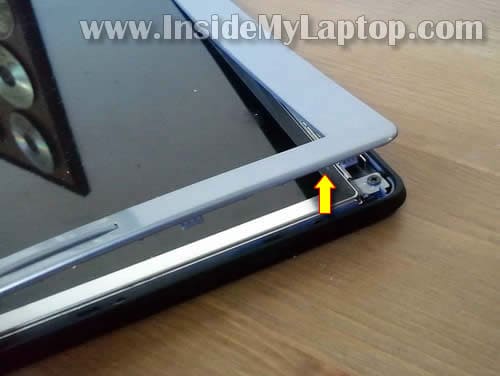
There are no screws securing the display bezel to the display cover but there are many plastic latches.
You can two of these latches on the following picture.
Start separating the bezel from the cover with your fingers. Wiggle the bezel until latches underneath are disengaged.
STEP 2.
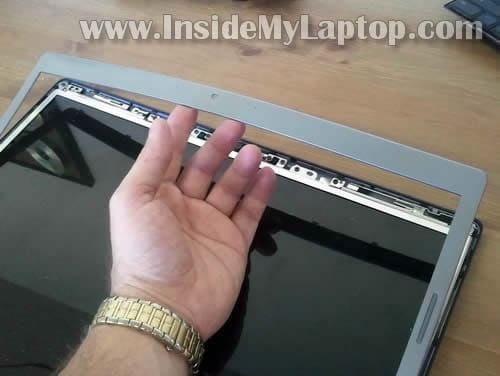
Continue removing the bezel.
STEP 3.
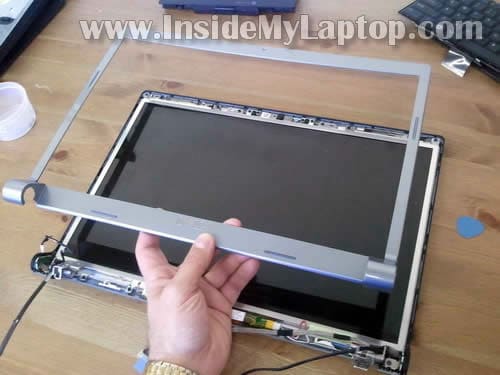
The bezel has been removed.
STEP 4.
The inverter mounted on the lower part of the display panel.
The inverter works as a power supply for the backlight lamp inside the screen.
When inverter fails, the backlight goes off and the image become very dim.
If your screen has become very dim, try replacing the inverter board first. If it doesn’t help, most likely you’ll have to replace the LCD because it has a bad backligh lamp inside.

STEP 5.
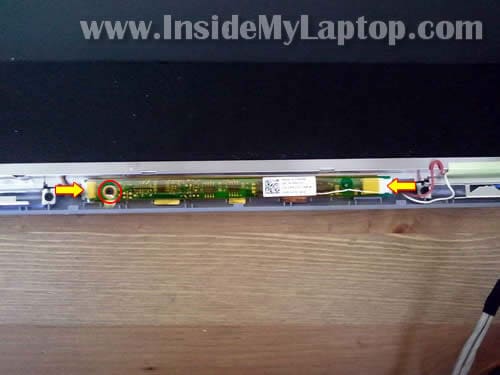
Disconnect cables from both sides of the inverter. Simply unplug two white connectors.
Remove one screw securing the inverter board to the display cover.
STEP 6.
Now you can remove the inverter board and replace it with a new one if needed.

STEP 7.
Now you are ready for the LCD removal.
Remove six screws securing the LCD and carefully separate it from the display cover.
Finally, unplug the video cable on the back.
Replace the screen with a new one if needed.

Topzturvins07
Thanks for this upload, but I have a Dell Inspiron 1564 Laptop and the display isn’t working, I think there is a problem with the inverter, but How can I find the inverter because the laptop is very different from these ones you have on display?
Thanks
Topzturvins07
IML Tech
Topzturvins07,
Dell Inspiron 1564 uses a LED-backlit LCD screen, so there is no inverter board.
You can find instructions for removing the LCD screen in this Dell service manual.
Before you replace the screen, make sure it’s actually the screen problem.
Test your laptop with an external monitor. If external monitor shows the image but it will not appear on the laptop screen, most likely it’s bad LCD screen or bad video cable.
If you cannot get any image on the external monitor, there is chance of motherboard failure.
Chris
With your guide I replaced screen myself. Saved tons of money.
Thank you very much.
A.J.
hello there, I loved your post on how to take the screen apart. I replaced the inverter because it was making noise and the screen was being kinda wacky. After replacement I now have no noise coming from the screen but i can barely see the contents on the screen. I tried to turn the back light up and nothing happens. Is it possible that the screen itself is bad? Any help would be great
Camsti
How can I see if it is the inverter and not the graphic card thats broken?
The upper fourth of the screen is perfectly allright but the lower 3/4 is flickering like the frequenses and hertz´ is totally wrong. Its both in BIOS and when I start Windows.
If I connect a HMDMI or VGA-cable to an external screen the output is fine.