

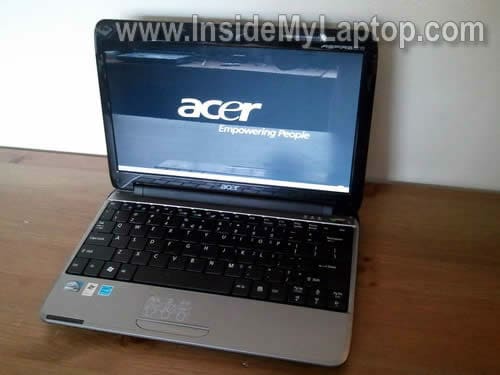
Today I show how to remove and replace screen in an Acer Aspire One A0751h netbook (Model ZA3).
This tutorial may work for some other Acer Aspire One models. If it works for you, please mention the model in comment after the post.
Before you start, make sure the netbook turned off and battery removed.
STEP 1.
There are six rubber seals on the display bezel.
You’ll find six screws securing the bezel under these seals.
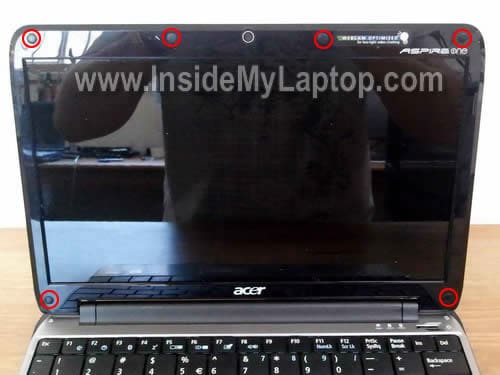
You can remove the screw seal with a sharp object.
After screw seals removed, glue them somewhere so they don’t get lost.
Remove all six screws found under the seals.

STEP 2.
Start separating the bezel from the display cover with your fingers.
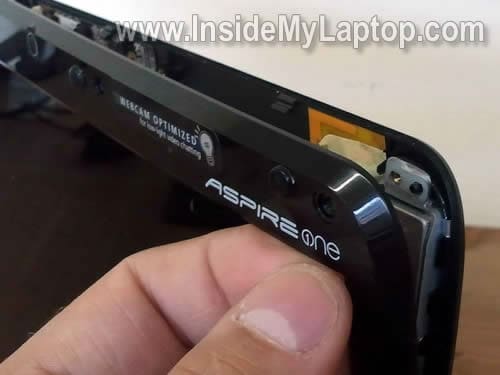
STEP 3.
Continue separating the bezel until it’s removed.

STEP 4.
The bezel has been removed.

STEP 5.
Remove two screws from the right screen mounting bracket.

STEP 6.
Remove two more screws from the left mounting bracket.
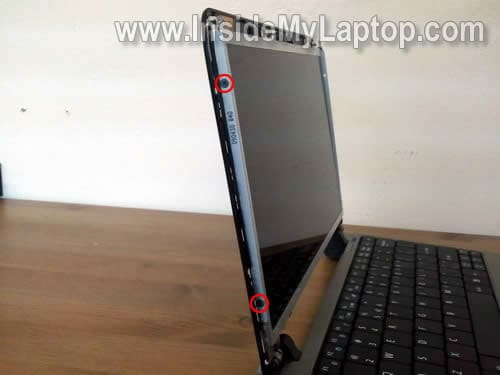
STEP 7.
Disconnect the web camera cable.
Separate the microphone from the cover (it’s glued to the cover with double sticky tape).

STEP 8.
Now you can separate the screen from the display cover.

STEP 9.
Place it the front side down on the keyboard.
Carefully separate the video cable from the back (the cable glued to the back with double sticky tape).
Disconnect the video cable from the connector.
Now you can remove the screen and replace it with a new one.

The best way to find a new compatible screen is searching by the model number.
In my Acer Aspire One A0751h netbook I had the following model installed: B116XW02
This is a 11.6″ LED-backlit LCD.

In the previous post I explain how to disassemble the same Acer Aspire One A0751h netbook.
Brian Barcus
Thank you so much for clearing something up for me I couldn’t rectify on numerous other
websites. What I thought was an inverter board on the top of my netbook (since there wasn’t one on the bottom-and is very similar) was the microphone, as your picture clearly shows.
I’ve been to many places looking for the answer and there it was-plain as day in the picture above, a microphone-not an inverter, then it clicked. My netbook, an Acer Aspire One, uses
an LED screen which doesn’t need an inverter because there is no CCFL Bulb in an LED.
If I wasn’t so poor I’d give you a $100 for that picture-like they say, a picture is worth a thousand words. THANK YOU for posting this.
Brian Barcus
I’m sorry I meant a Camera – not a microphone. What I thought was an inverter was a Camera.
THANKS AGAIN!
Mike Dearden
Great help. Many thanks. My laptop has a charging problem and it looks as though I’ll have to replace the main circuit board as it is all integrated. Anything to look out for when removing this?
Cheers
Chris D
Does anyone know where to get a replacement video cable – the one from the mobo to the display? I cannot seem to find it anywhere…Thanks in advance!
Abdulsamad
I want to know can I change the processor of this netbook for sake of upgradation
Alex
Thank you very much kind sir, it was surprisingly an absolute doddle! I’ve messed around with laptops before and are a real pain, but your instructions were very clear and concise.
Valerie
thank you so much, it is so clear and nicely explained.
I’m looking towards changing the inverter could you locate it in the pictures?
would you by extraordinary chance have the model number of the inverter in your laptop (if you still have it?)
whatever, your posting was really useful
nick
I have recently had a problem with my aspire one netbook , when you switch it on some times the screen is completely green and then when it boots the background has various patches of purple colour – these go if you wiggle the laptop lid up and down but come back and make the screen very difficult to read. It is out of warranty and acer want large amounts of cash to even look at it. I followed you instructions to open the screen to check if any cables were loose but everything was in tight – do you have any ideas on what else to try.
IML Tech
nick,
First of all, test your laptop with an external monitor. If the problem appears only on the laptop screen and external video work normal, the problem is somewhere inside the display panel.
Turn on the laptop while it’s disassembled. Try moving the video cable. If moving the cable affect video on the laptop, probably it’s bad cable. Replace the cable.
If moving the cable doesn’t affect image on the screen at all, probable it’s bad LCD screen. In this case replace the screen.
nick galleyt
thanks – it appears to be a cable problem – replacements seem to be about $25 on ebay as far as I can see
regards Nick
Kirsty
Help!!
I have a white screen!
First of all the laptop did the usual green on te screen, so took it apart and wiggled around the cable, screen would work so I thought I’d have a quick look for a broken wire at which point screen went white! I have replaced the video cable but still have a white screen?
Beeln plugged in to a monitor and works fine but I find it odd that a cable could cause the screen to blow?
Thanks
Kirsty
anh
wew it just happened today my screen goes red on dark colors can anyone help?
Raquel May M. Carino
What should I do in my Acer Aspire One D270 limited Edition the LCD is broken I connect it on the monitor but still nothing is Display only white but before it’s working just the time i delete something in the software I dont know what is that what should i do ?
IML Tech
@ Raquel May M. Carino,
I don’t think this laptop is worth fixing anymore.