

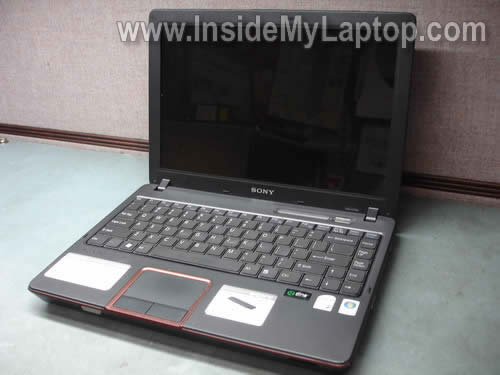
This guide will help you to remove and replace the keyboard on a Sony Vaio VGN-C series laptop.
I’m fixing a Sony Vaio VGN-C250N model but most likely you can use these instructions for the entire VGN-C line.
If it works for you, please mention the model number in comments below.
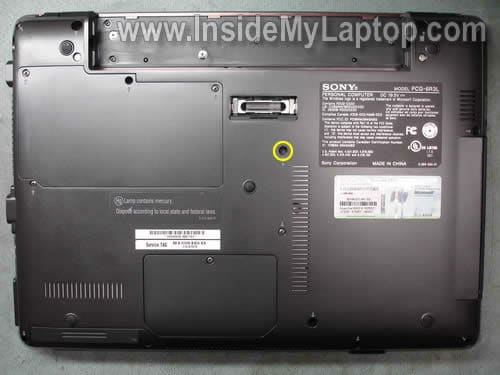
Also, I found another model number on the sticker: Model PCG-6R3L.
STEP 1.
Turn off the computer and remove the battery.
Remove one screw from the bottom.
STEP 2.
There are for small latches located above the function keys.
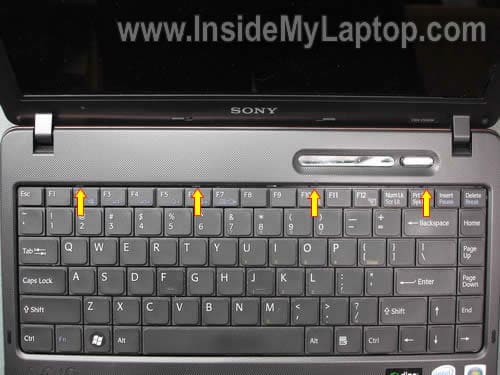
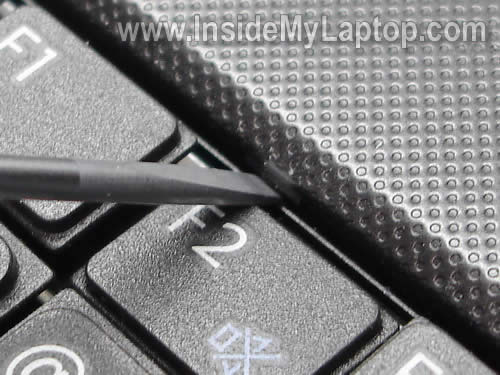
Push on latches with a small screwdriver to release the keyboard.
STEP 3.
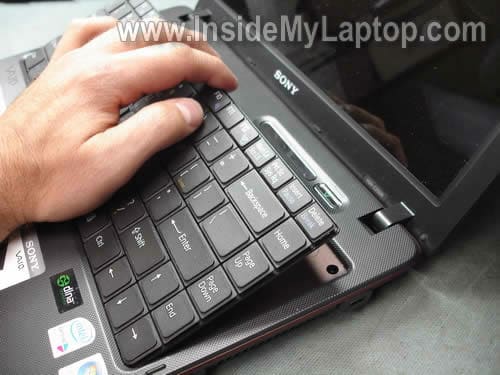
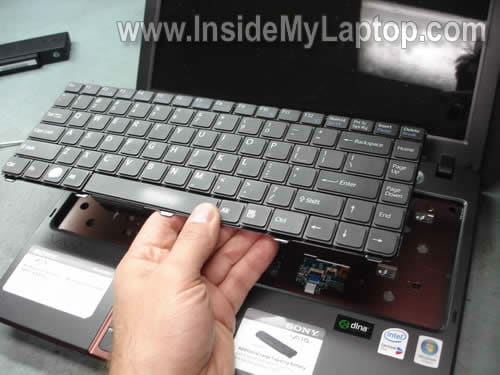
Carefully lift up the keyboard and place it upside down on the palm rest.
STEP 4.
Now you can access the cable connector on the motherboard.
Unlock the connector first and after that pull the cable after that.
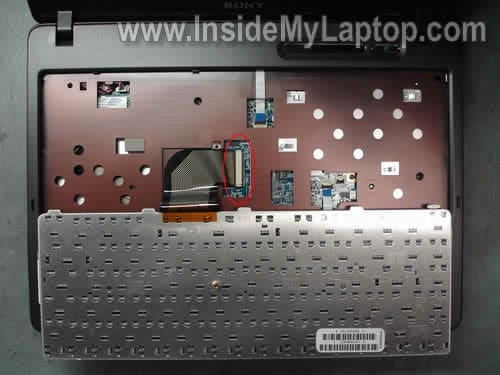
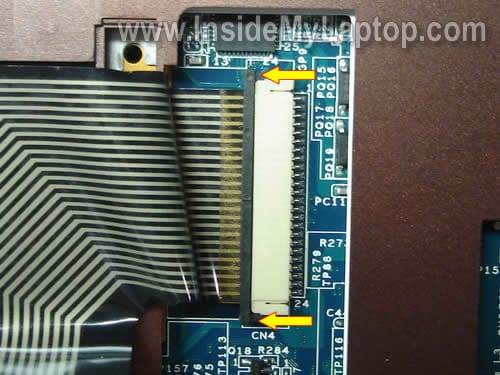
In order to unlock the connector carefully move the black clip to the direction shown by two arrows.
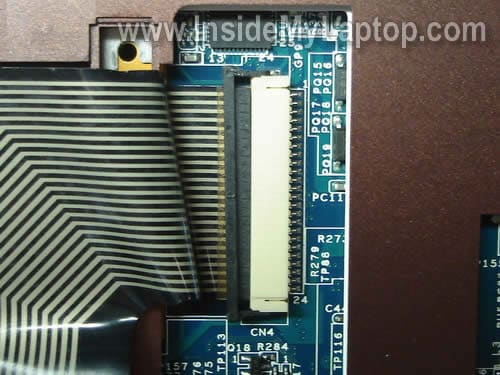
On the following picture the connector is shown in the unlocked position.
STEP 5.
Now you can pull the cable from the connector and remove the keyboard.
In my laptop the cable was glued to the top cover with sticky tape.
Replace the keyboard with a new one.
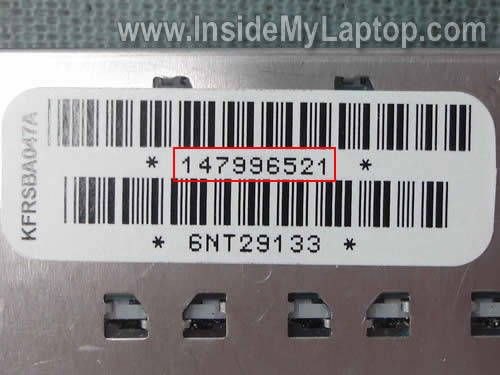
You can search for a new keyboard using the part number from the original one.
In my laptop the part number was 147996521.
Brian
This is very helpful I hope I dont mess anything up though! Thanks
Joe
Thanks for the info. Steps worked for my vgn-nr series.
Hani
Thank you very much, it worked for my laptop also:
SONY VGN-C13G
Hani
10/03/2010
Mel Kirksy
I need to replace a x key on mySony Vaio odel Number is PCG-7L1L.
Thanks,
Mel
johnny
works fab with my: Sony Vaio VGN-NS31S
Maryland Techs
This also applies to VGN-C190G, VGN-C190GMH, VGN-C190GC, VGN-C190P, and VGN-C190PW on PCG-6P1L models
delvi
thanks it helped me too………. very very good keep it up!!!!!!!!!!!!!!!
addidnugroho
yahuudddd… Thx, this tutorial make precautious for me before i reassemble it.
David Richards
I have a Sony Vaio PCG-7A2L (also called a VGN-FS640W). These instructions worked well for this model as regards lifting up the top panel above the keyboard. Once out, though, I found there are 4 more screws holding the very top of the keyboard that must be removed before you can take the old keyboard out. One more thing: the lone screw on the bottom holding the keyboard in place for this model is in a slightly different place, but the correct one has an arrow pointing to it like it shows in the photo above, just to the right in a different place, though.
Harry
I picked up a used one on ebay and installed it myself (kudos to your tutorial).
VGN-C13G/B
Eugene
I’ve stumbled upon your blog looking for how to remove/replace the keyboard on my vaio vgn-cr. In addition to removing the main screw, there are two more screws under the battery (very short, with a rather wide top). They need to be unscrewed as well. Hopefully this will save someone from making more dents and scratches on the laptop than is necessery.
Lori
It was very helpful, although, my laptop required all three little screws in the back to be removed or else the keyboard would not come loose.
Victor
Not sure whether it will work for my Sony Vaio VGN-CR21 to remove the keyboard. Those 4 latches which are mentioned in this guide are not so visble on my VGN-CR21. The distance between the keybord and top plastic cover is less than 1 mm and you can hardly see if anything is there in that narrow channel. What to push and in what direction to push? If there are some latches are those part of the keybord itself, part of the top cover or part of something else? It would be good if Eugene can give some more details as it seems that VGN-CR is more specific model.
JIMMY NAVARRO
THANKS VERY VERY MUCH IT WORKS . VERY VERY NICE DETAILED INSTRUCTIONS ,,BUT, I WANT TO KNOW IF THERE’S A WAY TO CLEAN THE KEYBOARD FROM SPILLED STICKY JUICES DONE BY KIDS..?RATHER THAN TO REPLACED IT WITH NEW ONE.?
Hannington opondo
Well thanks for this info with the good elaborating images i did remove my damaged keyboard but i cant find new one to replace where can i get one i am in kenya. My model is VGN-FE48G/H. 2007.
Many thanks
Hans
Thanks alot! I really appreciate this info! Now i know how to change a laptop keyboard. =D
smit
Thanks a lot, the information is very seful, my old sony laptop kb having issue, some of the key is not working, hope i will fix it or replace a key bord.
IML Tech
@ smit,
Just replace the entire keyboard. You cannot fix individual keys if they failed.
nick
Thanks, this was helpful. I know that it’s jus the ribbon cable that is broken, but it looks like I need to replace the entire keyboard.
adnan
Sir i want to buy this SONY Vaio VGN-C13G key board. please reply me by mail. i am from Pakistan.
IML Tech
@ abnan,
I don’t sell any parts. I’m just writing laptop disassembly guides.