

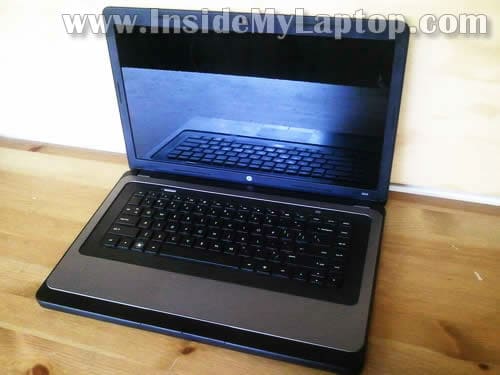
In this post I explain how to disassemble HP 2000. I will remove main laptop components and show how to access area under the top cover.
I’ll go through the following major disassembly steps:
STEP 1-7: Accessing RAM. Removing the hard drive and DVD drive.
STEP 8-15: Disconnecting and removing the keyboard.
STEP 16-19: Removing the top cover assembly. Accessing the internal components.
Before you start the disassembly process make sure the computer turned off.
STEP 1.
Unlock and remove the battery.

STEP 2.
Remove one screw securing the memory cover.
Lift up and remove the cover.
Under this cover you can access both memory slots and wireless card. It’s not necessary to remove them for the purpose of my disassembly so I’ll leave them connected to the motherboard.

STEP 3.
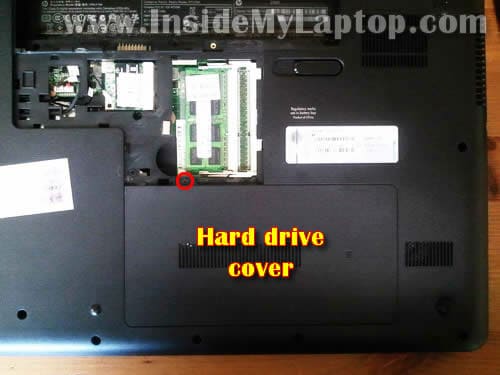
Remove one screw securing the hard drive cover.
Lift up and remove the cover.
STEP 4.
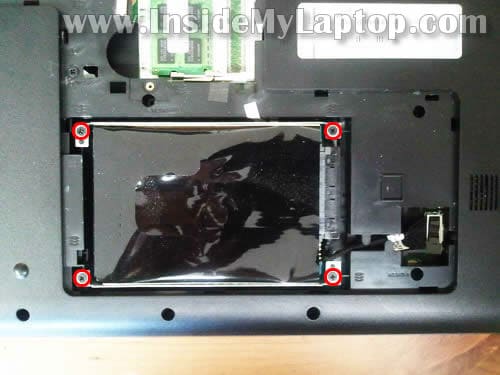
Remove four screws securing the hard drive mounting bracket to the base.
STEP 5.
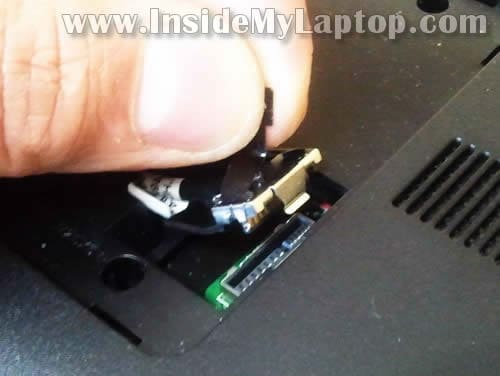
Disconnect the hard drive cable from the motherboard.
Simply lift up the connector by the black belt located on the top of the connector.
STEP 6.
If you are replacing or upgrading the hard drive you’ll have to disconnect the cable and mounting bracket.
The mounting bracket secured by four screws (two on each side).
Transfer the bracket and cable to the new hard drive.

STEP 7.
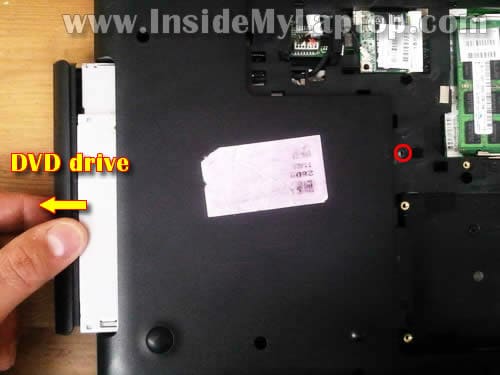
Remove one screw securing the DVD drive.
Pull DVD drive to the left and remove it.
STEP 8.
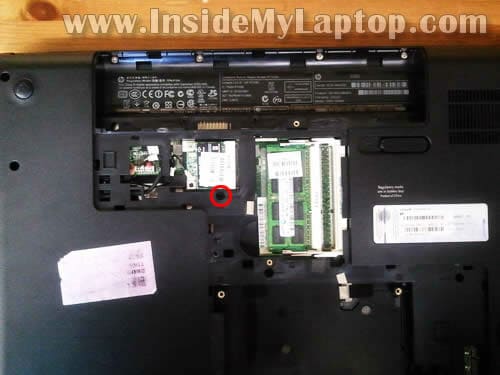
Remove one screw securing the keyboard. This screw is located close to the wireless card.
STEP 9.
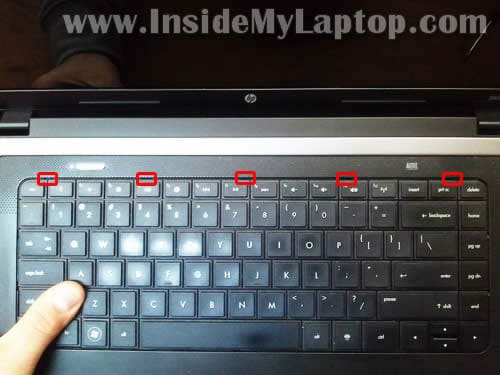
The keyboard is secured to the top cover by five latches.
STEP 10.
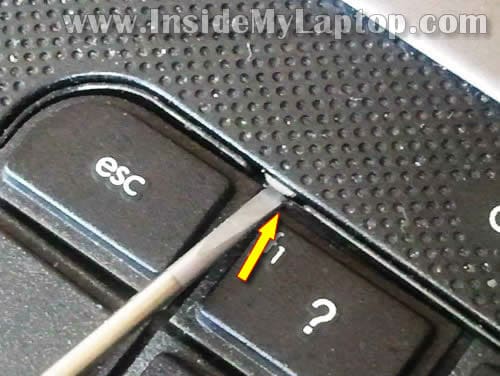
Push on the left latch with a small screwdriver and at the same time lift up the keyboard a little bit so the latch doesn’t lock back in place.
While lifting up the left side of the keyboard, push on the next latch and so on.
STEP 11.
After you unlock all latches you should be able to lift up the top side of the keyboard.
Be careful, the keyboard still attached to the motherboard.
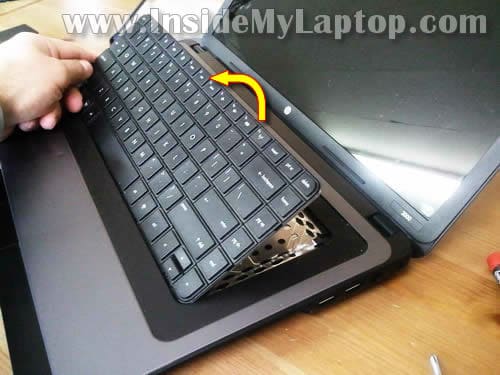
STEP 12.
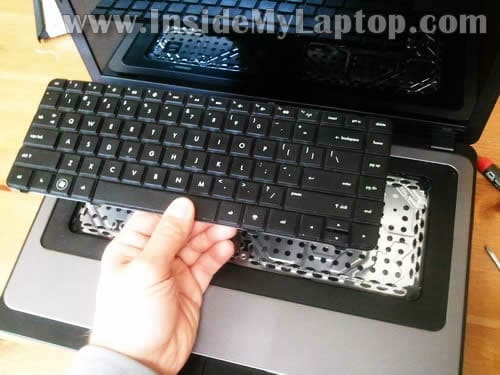
Turn the keyboard upside down and place it on the palmrest.
Now you can access the keyboard connector. In the next two steps I explain how to unlock the connector and release the keyboard cable.
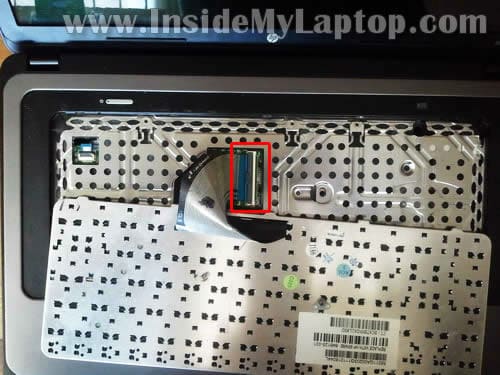
STEP 13.
The keyboard connector has a moving part – brown locking tab.
Carefully lift up the left side of the tab with your fingernail. It will open up at a 90 degree angle.
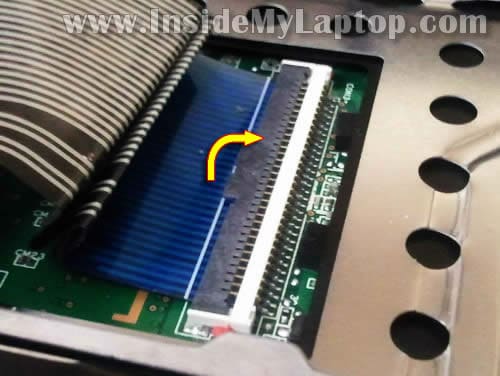
STEP 14.
On this picture the connector shown in the unlocked position.
Now you can pull cable from the connector.
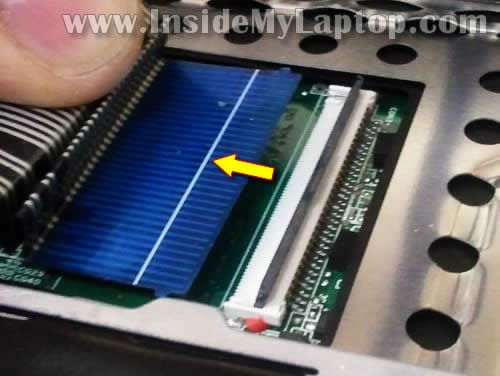
STEP 15.
Lift up and remove the keyboard.
STEP 16.
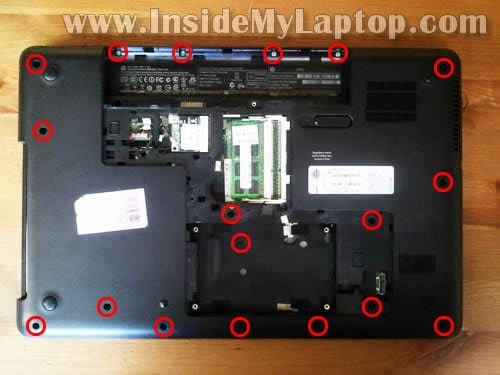
Remove all screws from the bottom.
STEP 17.
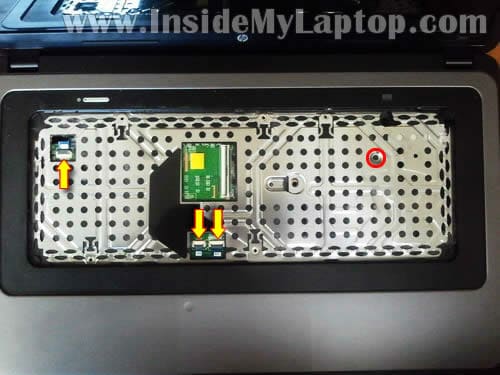
Remove one screw securing the top cover assembly.
Disconnect three cables (from left to right):
– Power button cable.
– Touchpad button board cable.
– Touchpad cable.
STEP 18.
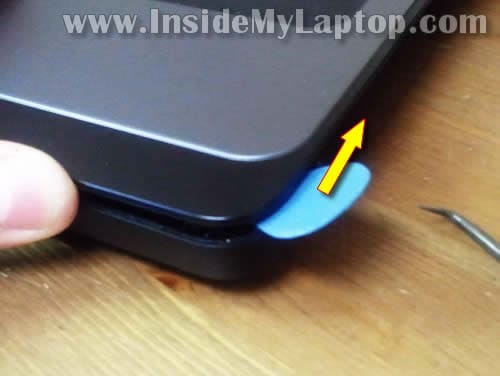
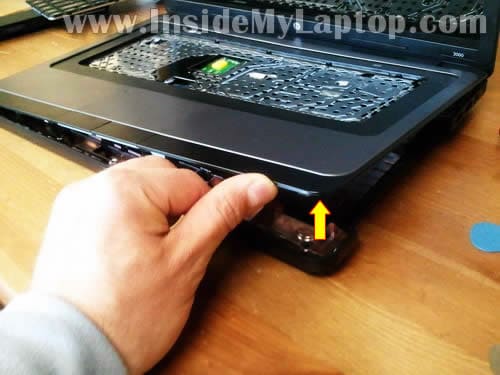
Start separating the top cover assembly from the bottom cover.
You can use a piece of soft plastic (I’m using the guitar pick) for that. Insert it between the top cover and bottom cover and move along the side.
STEP 19.
Continue removing the top cover with your fingers.
STEP 20.
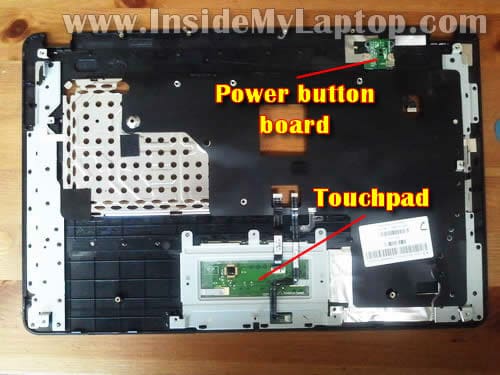
The top cover removed.

Here’s the bottom side of the top cover assembly.
Here you can access the power button board and touchpad.
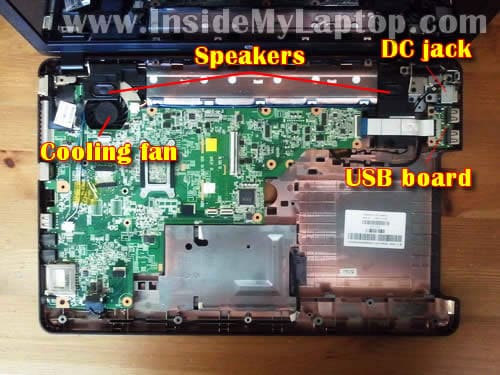
When the top cover removed you can get access to the following internal components:
– Cooling fan.
– Speakers.
– DC jack.
– USB board.
– Motherboard.
In HP 2000 the DC jack attached to the cable. If the jack fails, you can unplug it from the motherboard and replace with a new DC jack harness.
In one of the previous guides I explained how to replace HP 2000 LCD screen.
Rick
Great tutorial. I was having the common jack issue (not charging) on this exact HP model
laptop and was able to disassemble according to your precise instructions. I do want to note
that there are three screws on the inside of the battery compartment that aren’t mentioned or shown that need to be removed to allow removal of the top cover of the bottom of the laptop.
If you pull up on the top cover you could break it if these aren’t removed. I had this issue and
couldn’t figure out why the cover wouldn’t come off until I realized these screws were still holding it down. Once removed problem solved. It is a minor thing but not knowing what I was doing didn’t
help when this issue occurred. Other than that it was a breeze. Thanks so much for your help.
Couldn’t have done it without you!!
Brady
Very handy. I had a liquid spill and was trying to inspect the MB. was trying to pull the keyboard and top bezel together but was finding a that hidden screw under the keyboard to be a problem. did find water damage on the MB next the the power button connection. Not sure If I’ll try to get a new MB or not yet.
IML Tech
@ Brady,
Try cleaning up the liquid damage with toothbrush and alcohol. Let it dry and test the laptop after that. This can help.
I’ve done it multiple times and my success rate is pretty good.
ayemon
I have cleaned the fan of hp 2000 from a dealer before the cleaning my laptop was charging in one hour and now it is taking 2 hrs to charge fully after the dust cleaning.is there a problem with the jack or did he replac that.what is the spec in terms of volts for the HP DC Power Jack and how i can i check ifits genuine or not.Pl;ease reply as soon as poosible. thanks?????
IML Tech
@ ayemon,
I don’t think there is a problem with the jack. If the battery charges properly, the jack is working properly.
Gavin Russell
@IML Tech im having problems with my pc over heating t just came back from the repair shop and i really dont wanna send it again anyway you can help??
DAMON
HAD A SPILL OF GATORADE ON MY KEYBOARD AND NOW MY COMPUTER WILL NOT POWER UP OR DO ANYTHING NO LIGHT NOTHING. IM ASSUMIMING THE MOTHER BOARD IS TOAST . ANY SUGGESTIONS? tHANKS
IML Tech
@ DAMON,
First of all, stop trying to turn it on. The laptop has to be disassembled for liquid spill diagnostics.
Here’s an example.
Sean
Do you know the replacement part number for the DC plug on the HP 2000?
IML Tech
@ Sean,
You don’t need the part number for that.
Search on eBay for “hp2000 dc jack”. There are plenty of them for $10-20.
Jonathon
There is a small object lodged Into my headphones jack… How do I fix that?
Matthew Tobias
Hi, Do you know if and where the lid switch is located on one of these machines? I replaced the Screen but i still have no display.
IML Tech
@ Matthew Tobias,
Probably somewhere on the motherboard. I think it’s a magnetic lid close switch.
Find a small magnet inside the display. Close the display and find the location of the switch under the top cover.
Are you sure the problem was related to the screen?
louis
Where is the cmos battery?
Ellis D.
Hey anyone know the wiring scheme for the dc jack. mines burnt out, same machine. i have another one from an HP G60-519WM. But the ends to plug it into the board is different. Can I use this? The charge cord is the same as my other for my 2000.
IML Tech
@ Ellis D,
A new DC jack for HP 2000 cost about $8. I would suggest buying a new one instead of modifing HP G60 jack. If you do it wrong, you can fry the motherboard.
roberta
I have progressed to having removed the keybd and all the screws. I cannot separate the base on the side where the SD card slot is. Please give suggestions
Kory Moore
I need to fix an HP 2000 laptop power port
kris
hi, i have a hp 2000 but it wont start. no response at all even on battery or in ac/dc, but whenever i connect my charger, the led light besides the dc jack is lighting/blinking(blue light). Could you tell me if what is wrong here. I have a Aluratek Ac adapter input:100-240 ~ 50-60Hz 1.4A Max. Output 19v—3.43A
Jeff
How much would it cost to replace my keyboard and screen on my HP 2000-2b19WM
Bonnie
My Hp 2000 notebook keeps saying that the drive that windows is installed is locked…. How do you unlock it? PLEASEEEEE HELP!!!!!
Sam
i cannot locate a diagram where the internal battery (cmos?) is located.
Roberto
I’am having issues with my headphone jack.. I plug in my logitech speakers and I only get them to work by wiggling the jack around. How Can I try to fix this issue?.. Thanks in advance, will wait for your response.
Greg
My laptop will not boot up. I accidentally lifted the cage where the CMOS battery is located. Can it still be fixed? Thank you!
samina
my laptop model is hp 2000 and my connecter wire break plz can u tell me where did I purchase
rhaine
i cant open my HP 2000 . THE screen went black but i see the images on thr screen when i use flashlight. . ive tried so many ways like press and hold power button for 30-60 secons and putting back the battery,or plug the charger but it didnt work. .whay should i do??. i have the same model of HP as yours
Jojo
I have an HP 2000 – 2d29WM which was just given to me because my friend spilled beer on it. Now before he gave it to me, he had a tech friend take it apart, inspect it, and fix what he could. Basically he changed the keyboard, cleaned it, dried up the beer. After he put it together again he told my friend that everything works except for the fan, which is what the laptop would say on the screen when your booting up. So I took possession and took it to a shop and had the fan replaced. The shop tech told me that it wasn’t the fan but the motherboard. So my laptop turns on and works fine but when its booting up it says to turn it off because you can cause damage to it since the fan won’t turn on. Do I have to replace the motherboard, or just a part? where can I go and what’s a good price for a new motherboard? I’m not computer savvy, but I’m not gullible either and I don’t think the $200 the tech wanted to fix it was right. Whatever money I can save from those $200 to fix my laptop I will donate to your cause. Please help!
CJ
Where is the screen inverter on the hp 2000 model? Do I have to take the whole base apart to get to it?
Thanks
Mijo Gracanin
Thank you for useful tips. It helped me dust of my HP 2000!
Conrad
Hi, I followed the guide when opening my laptop to clean the cooling fan and now it’s not booting at all. What could be the reason?
IML Tech
Conrad, the most common issue in cases like that is poorly connected cables. Check all connections. Make sure all cables are seated properly.
Conrad
I have checked and rechecked and everything is connected accordingly. One thing I don’t understand is when i remove the laptop charger the power button blinks but when I press it nothing happens.
IML Tech
Not sure what’s going on. It’s impossible to troubleshoot problems like that over the internet. If the laptop worked before the disassembly and stopped working after, most likely this is some kind of connection related issue. You can start re-assembly from bare minimum.
1. Leave just the motherboard and RAM module. Test if the system works with an external monitor.
2. If it works with external, connect the display and test again.
3. Connect the hard drive and make sure it boots.
And so on and on until you find the culprit or it starts working properly again.