

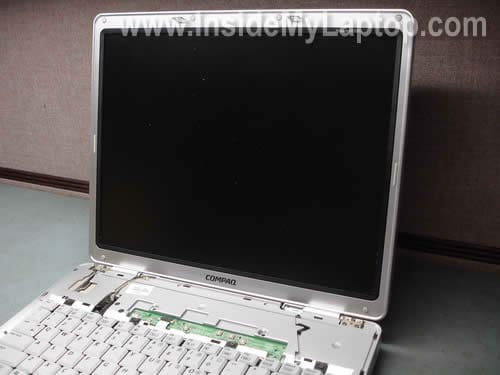
In this post I explain how to remove inverter and replace screen on a Compaq Presario m2000 laptop.
It’s way easier to take apart the display panel when the it is separated from the base. You’ll find instructions for removing the display panel in my previous guide, just follow steps 1,2,3,9,10.
It is possible to take apart the display while it’s still attached to the base but it will be harder to remove the bezel.
Before you start make sure the computer is turned off and the battery is removed.
STEP 1.
There are six screws securing the display bezel to the cover. These screws are hidden under six rubber seals. You’ll have to remove these seals first.
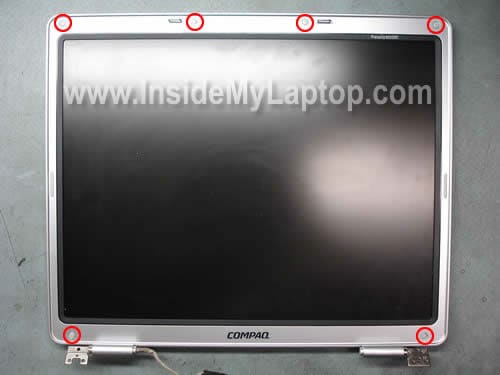
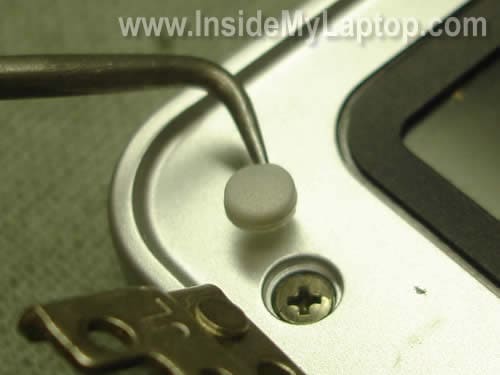
Remove screw seals with a sharp object. These seals have a sticky bottom. You can glue them somewhere on so they don’t get lost.
STEP 2.
Insert your fingers under the bezel and start separating it from the display cover.

Continue separating the bezel.
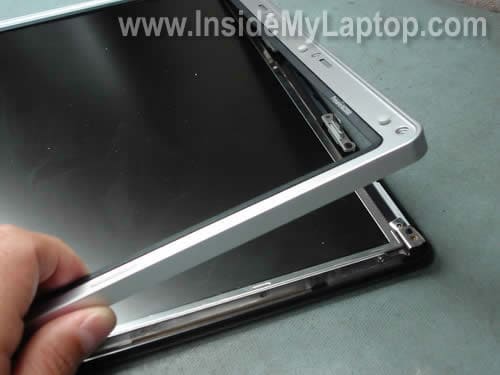
It might take some time to release the bezel from hinge covers. It will be even harder if the display is still attached to the base as I mentioned at the beginning.

Finally, the display bezel has been removed.

STEP 3.
The inverter is mounted below the screen. There are no screws securing the inverter.
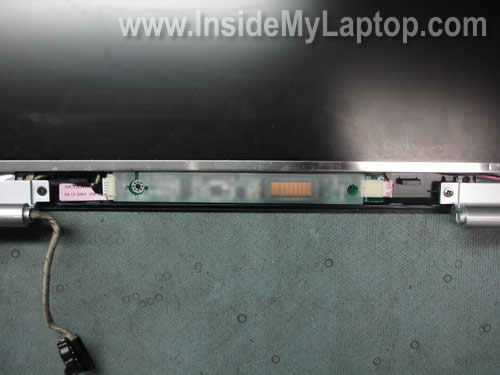
Remove the ivnerter board from the display assembly and disconnect cables on both ends.
The left cable provides power from the motherboard and the right cable supplies power to the CCFL (backlight) lamp.
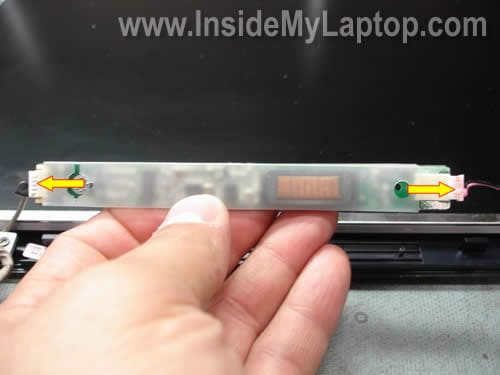
Now you can replace the inverter board with a new one if needed if necessary.
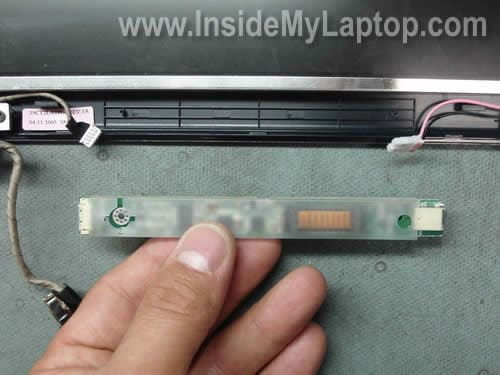
STEP 4.
Let’s proceed to the LCD removal.
Remove two screws from the right mounting bracket. Do the same with the left side.
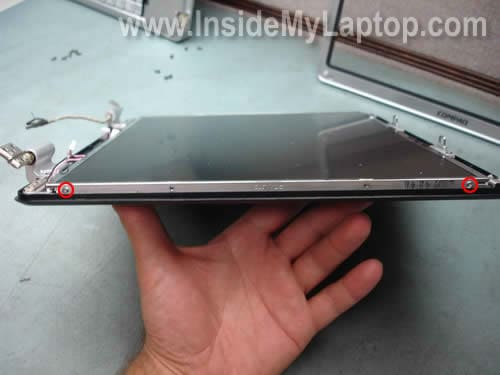
Separate the LCD from the display cover.

Now you can access the back side and disconnect the video cable.

Remove sticky tape securing the connection and uplug the video cable.

Now you can remove the LCD and replace it with a new one if necessary.

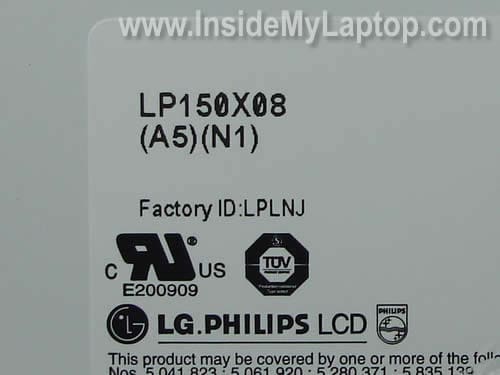
The best way to find a new replacement screen is searching by the part number printed on the original one.
In my laptop I had this one: LP150X08 (A5)(N1).
ScienTux
Many thanks, with slight modifications worked also on my compaq R4125US.
Steve
I went through the entire procedure and replaced the screen but now there is now display on the screen both the old one and new one – i am also not able to switch to external monitor please advice.
IML Tech
Steve,
Why did you replace the scree? Was it cracked?
Make sure the video cable is plugged correctly. It’s possible the cable is not making good connection with the LCD screen.
ToughBook
I have a Compaq R4000 (similar to ScienTux’s R4125US mentioned above). Just yesterday the screen started failing – a couple of times I was able to get the backlight on again (plugging/unplugging the power supply, pushing on the ‘lid closed’ sensor (thin rubber button on the upper right top of laptop base, near the hinge)), but then it wouldn’t work anymore. The image is there (but dim), and I can see a quick flash of light when I push/release the ‘lid closed’ sensor. Also works fine when connected to external monitor.
Here’s the question: Buying and replacing the inverter seems pretty straightforward (I’ve opened up the Compaq a few times in the past (added RAM under the keyboard, replaced a fan, etc.), and I’m willing to try that, but I don’t think it’s worth getting a replacement screen (if a bad backlight is the problem), both the cost doesn’t seem worth it anymore, plus the risk of being unable to even use an external monitor (as experienced by Steve above).
Any ideas from my symptoms as to the likelihood that it’s just the inverter? Anything else I can test to confirm/deny the cause before I shell out some money and take the laptop apart again (admittedly separating the bezel scares me a bit)? Thanks in advance!
IML Tech
ToughBook,
Most likely this is related to the inverter or backlight lamp failure. There is a good chance that a new inverter board fix the problem.
I would definitely try replacing just the inverter board first. Do not buy a new LCD screen at this point. A new inverter shouldn’t be very expensive.
Replacing the inverter and LCD screen shouldn’t damage the laptop unless you are doing something wrong.
Here’s the official service manual for Compaq Presario R4000 and HP Pavilion zv6000 Notebook PC. Just in case if you need it in the future.
ToughBook
Second question: Would you be able to email ScienTux and ask them what ‘slight modifications’ to your instructions they needed to do for the R4125US? You can give them my email address so they could reply directly to me, or ask them to post it on your site. Thanks again!
Sneha
Hello,
I am having compaq M2000 Laptop, and in my screen there are different colored linings are showing up and it’s annoying and spread over whole screen with vertical strips.
I got technical to review it and said I need to replace LCD of the laptop, I searched on ebay with the link you gave above, but how will I know that it is compatible with my laptop? or any compaq M2000 can work on my model?
IML Tech
Sneha,
Just to confirm that you have a failed LCD, test your laptop with an external monitor. If it’s just a bad screen, the external video still should work fine.
The best way to find a compatible screen is searching by the full laptop model number OR you can search by the LCD screen model number (located on the back of the screen).
Curt
My screen just failed on my R4000. It’s been working on and off for the past month and now it doesn’t turn on. There no light, but you can see the images faintly on the screen. I’m going to try the inverter first. Where’s the best place to but an inverter?
IML Tech
Curt,
Try SparePartsWarehouse. If you buy from them, most likely you’ll get a brand new inverter directly from HP but it could be expensive.
The other (cheap) source would be eBay.
abed
I have a problem with my Presario M200 Screen, when I push on the top left corner of the screen it works well, but I should keep pushing on it, if I release it goes down and I cant see any thing, I tried the laptop on external screen and it works well ..
I sent it to a technical and he said i need a new screen .
can you help me plz …
many thanks
IML Tech
abed,
I think your technician is right. Most likely this is LCD screen failure. You’ll have to replace the screen.
Curt
I just replaced the inverter on my R4000 and the screen came on when I powered up. Then came the problems:
1. I noticed that when I used screen dim/brighten controls at some settings the screen would stay on but flicker.
2. The screen went black again three times, especially when I put a load on the laptop – playing an MP3 and looking at an image file. When I pressed and released the cover closed/open button the screen came back on for a couple of minutes and then went black again.
I guess the next step is to replace the back light. Does this mean I have to purchase and replace the entire LCD screen?
Thanks in advance for your help.
IML Tech
Curt,
You are correct. If the screen still goes dim even after replacing the inverter board, most likely this is backlight lamp failure.
The backlight lamp mounted inside the LCD screen and very hard to replace.
When you have a failed backlight, I would suggest replacing the whole LCD screen.
Curt
Now I just replaced the LCD screen and it’s doing the same thing – screen going black after a couple of minutes except it’s making a high pitched whining sound before the screen goes black. Maybe the new inverter is bad. I’m going to try the old one. Any other ides? Cables or Power supply perhaps?
IML Tech
Curt,
Could be inverter failure.
Curt
Well my old inverter was even worse! The screen was black and never came on at all. This is back to where I started weeks ago. The new inverter was very inexpensive, about $7. The actual HP part was about $65. I wondering if the quality of the new inverter just isn’t there. I hate to pay another $65 for the HP one and find out that it’s something else.
IML Tech
Curt,
The screen doesn’t turn on with the old inverter at all but it turns on for a while with the new inverter.
Maybe the new inverter is not compatible?
Curt
I just remembered that the vendor that sent me the new inverter actual sent two of these because the first one was lost for a while. I just tried the second new inverter and the same exact results as with the previous new inverter and new LCD screen. You get the high pitched whine and then the screen goes black.
I have left off both the keyboard and screen bezels for testing. Could this have something to do with it? The volume cable is plugged in and the keyboard bezel is just sitting on the front of the laptop. It’s not pressing on any buttons or sensors.
I’m not sure what I’m missing here.
IML Tech
Curt,
If you getting the same problem with a few different inverters (I assume it’s the correct part), this could be defective LCD screen. Maybe it has a bad backlight lamp.
It’s very hard to troubleshoot backlight problems without known good test equipment.
Curt
I’ve been assuming the inverter part is correct. I bought it on eBay for $7 and they sent me two identical inverters. So at this point, I can’t assume anything. I don’t have known good test equipment. Have you ever heard of the problem I described in my last couple of posts being a bad inverter? What about the noise before the screen goes black. If I had to guess I’d say that noise comes from the gas in the backlight and it not getting enough power. So this means that the inverter is bad or something else that feeds the inverter. What is the power source that feeds the inverter?
Dankanator
Thank you. This helped me out 100% as this was my first attempt with a laptop and I was 100% successful. I cannot donate money but this will make the wife very happy, cheers.
pete
I’ve got a M2010US laptop. The screen has about a 2 inch vertical band on the left that is darker than the rest of the screen. The line between the dark and normal part is very distinct. Would this be the backlight going out, as opposed to the inverter? I would think the inverter going out would cause the entire screen to be affected.
IML Tech
pete,
Nope, it’s not related to the backlight lamp or inverter board. The screen is still bright, it means the backlight lamp and inverter work properly.
In your case most likely it’s just a failing LCD screen. You’ll have to replace the screen.
This is correct. When inverter or backlight fail, the entire screen goes very dark.
BOB
My M2000 displayed a yellow vertical line so I Purchased a New LCD screen, installed it is displaying the same yellow line that made me rip appart the old one. The supplier thinks it may be the video cable/ribbon. Of course It out puts perfect to an external moniter.
S.Ramachandran
Dear Lap top technician ,
your article has given me the boost to put my hands in to my two laptops , kept aside due to some problem .
now , i can work freely with your approach .
good luck to you.
Tam
hp dv4t-1200. lcd screen is very dim, external vga works. i did the following
1. replaced new inverter – still failed
2. tested lcd screen with another laptop – lcd screen backlight is okay.
3. the lid switch connector seems to works ok – system able to go to sleep mode…
4. disconnected lid switch connector – no change
5. not sure what to do next. thanks for help.
nimesh
dear technician,
i have presario m2000 compaq it has problem to the lcd have a many colored lining but not a broken so how can i try to remove that line please guide……me i m not try to replace or open lcd
IML Tech
@ nimesh,
First, you have to test your laptop with an external monitor. If you have same problem on the external monitor (many colored lines), this is graphics card failure. If that’s the case, your laptop not worth fixing because the whole motherboard has to be replaced.
If the problem appears ONLY on the laptop screen and external image shows up correctly, this could be one of the following:
1. Bad connection between the video cable and motherboard or LCD screen. Try reseating the video cable on both ends.
2. Bad video cable. Try replacing the cable.
3. Bad LCD screen. Try replacing the screen.
I cannot tell which one is causing the problem without testing the laptop.
Chad
IML Tech,
I havea M2000 presario that has a problem with the screen being completely gray when you boot it up. after doing some research I felt that it was the inverter. So I just replaced the inverter with a new exact model inverter and the same happens as before. The external video continues to work, and everything lse boots, but the screen stays the same gray. Help! I dont know what else I could do!
tristan
my compaq prestario m2000 says it failed media test and to check cord. what do i do?
Ramesh Das
Hi I have hp dv4t, my screen has parallel flickering lines. When I press on bottom of the screen, I get good picture (no flickering). Do you think this is cable problem or lcd screen problem.
nacho arg
Great site so much to learn that let solve the problem or not but well you dont go away with nothing
hails from argentina and again thanks the page is amazing.
Mark
Great article, exactly the information I required. Many thanks.
don alexander
ok nice but how to get cable out of HINGE? dont show that? my screen works fine until you open it past 30-40 degrees used to be 60 then 50 etc. what happens is it fades to all pink and weak pic but all there. thanks.
ed
If the screen costs $100 and the inverter board must cost something, then I am thinking of leaving off the monitor since the laptop has now been replaced with a netbook which takes up less space and doesn’t weight so much. I am thinking of just using the keyboard to bring in internet to my tv monitor. Is there anything else I need to know just to leave off the monitor. I might rehing the housing of the monitor just for a dust cover but I was thinking of leaving it off all together. Someone mentioned that the wifi receiver might be on the monitor side of the computer. Any ideas?
I liked you explanation for everything on this page and found it most helpful.
Barry
Loved yr pics and instruction.Just changed my inverter because of darkish circular shadow near bottom.Still there,but no problem really.As you say,bezel tricky to remove at hinges.Could not remove wi fi connect so worked without.Thank you.