

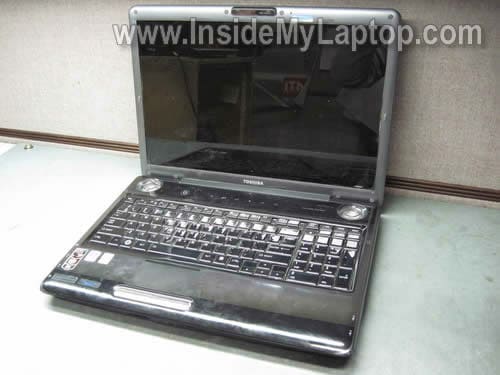
In this guide I explain how to clean the cooling fan in a Toshiba Satellite P305D laptop. Also this guide should work for the following Toshiba models: Satellite P300, Satellite P300D, Satellite P305.
My customer complained that his computer overheats and shuts off while running a game. Apparently, the heat sink got clogged with dust and needed a good cleaning.
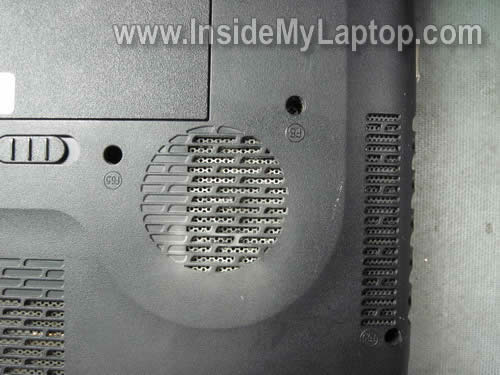
There is no easy access to the cooling fan in a Satellite P305D. You can see the fan grill on the bottom but the fan is covered with a perforated metal sheet.
Blowing air into the grill will not be enough for cleaning the cooling module.
You can get better access to the fan under the keyboard. Let’s remove the keyboard.
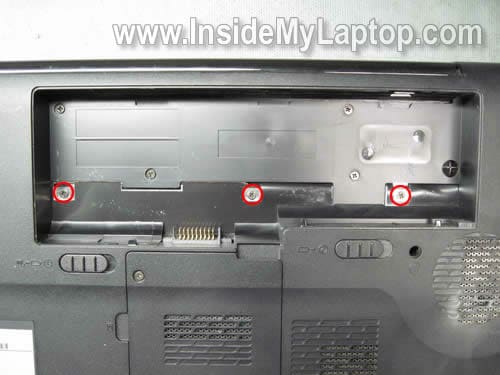
Remove three screws located in the battery compartment.
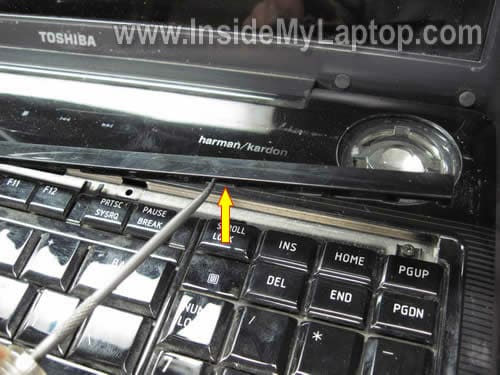
Carefully lift up and remove the keyboard bezel.
Remove two screws securing the keyboard.
Lift up the keyboard and place it upside down on the palm rest. It’s not necessary to disconnect the keyboard cable from the motherboard.
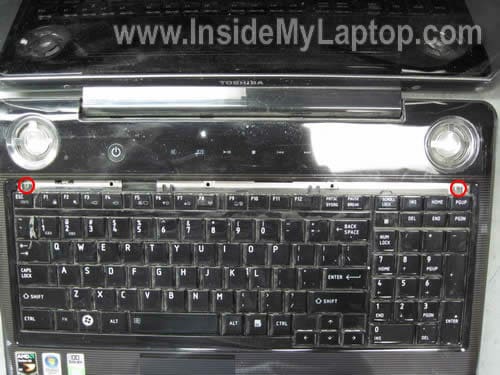
The cooling fan is still covered but at least now you can blow air into the fan and remove all dust from the cooling module.
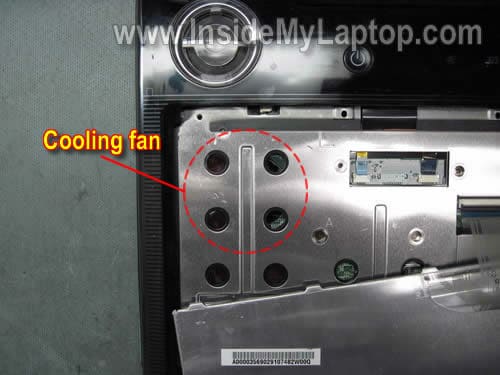
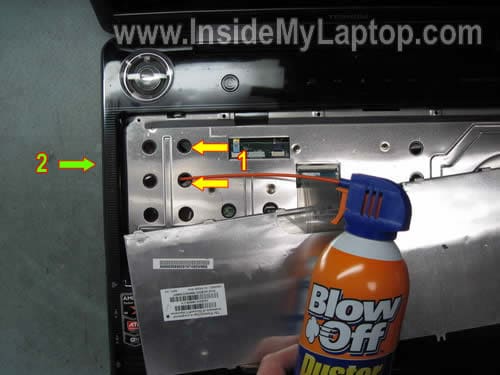
First. Blow air into the cooling fan through two holes on the top cover.
Second. Change the direction and blow air into the fan grill on the side. Also, blow air into the air intake on the bottom.
Change air direction two-three times until there is no dust coming out of the laptop.
tyrone dearden
mate thank you very much this helped me out alot lol i snapped the lil flap thing to the keyboard tho but you cant really tell lol but thank you very much
Justan Alias
I love you forever. This was super helpful. Thanks!
hana
thank you very very much for all the information ..it really helps me…good luck
Ravi Kawade
Lol… me(14 yrs) and my dad have a LT Satellite laptop and we opened all the screws to clean the fan.. It wasn’t working and after around 2-3 minutes of usage it would overheat. So we dissected the laptop and found a huge hair ball in the fan slot… Lol. My dad snapped the keyboard cable and now we have to use a USB keyboard. My first experiance…
ana23
does this work for toshiba satellite a300d too?
IML Tech
Ana23,
You can try cleaning the cooling fan without taking it apart. Buy a can of compressed air and blow air into the fan grill on the bottom of the laptop. After that blow air into the grill on the side.
naomi
How about a Toshiba Satellite M500?
Heather Rivers
I tryed this and my satellite p305d is still cutting off i even keep a platter tray layed up side down under it so the sides of the computer does not get covered up and it still runs hot and cuts off just not as much as before
Johvy
Hello there,
Not sure if it the place to ask questions…
Im wondering if all Toshiba P300 series spare parts can fit one another.
I have a P300-1EI (PSPCCE-03L006FR) laying around with some defect parts (main board mainly); will the screen, motherboard and keyboard fit (form factor) in a P300-19P?
In advance thank you for your input.
Mike
Hey, I was wondering if you had the model of the fan for this. I could take it all apart but I don’t want to have it lying around in pieces while I wait for the fan to come in the mail. All I need is the fan model/a link to ebay or something where I can buy it. Also, when I took this apart I goofed and replaced my gpu thermal pad with thermal paste…duh. If you know the thickness of the thermal pad I need to get one of those too.
Thanks.
IML Tech
@ Mike,
I believe that Satellite P305/P305D laptops use similar fans.
I don’t remember the thickness off the top of my head. Probably about 1 millimeter.
By the way, instead of buying just the fan you can buy the entire cooling module with thermal pads included. Also available on eBay. Just make sure to contact the seller and confirm if the new fan assembly comes with thermal pads.
LINDA
Wow. I followed your instructions exactly for our Satellite P305D-8900 and it now runs very quietly and stays cool. Blew in compressed air and fine dust came out. No hairballs or substantial lint, but whatever came out made all the difference. Thank you so much for sharing your knowledge! I am sure you have extended the life of our laptop.
Mike
Thanks i found your explanations very useful but my case is a different. My Toshiba laptop is P100. Please what do i do
IML Tech
@ Mike,
For Toshiba laptop disassembly guides you can visit IrisVista.com/tech/
But it’s not necessary to disassemble the laptop for cleaning the fan. Just find an air compressor or buy a can or compressed air and blow into the fan grill not he bottom and side.
This should help.
graeme
Hi
I see lots of guides on how to disassemble toshiba satellites but i dont see any for equiums i am taking apart toshiba equium a300d-13x i am stuck at removing top cover assembly there are 3 cables with zif connectors ive never seen before with what looks like a metal tab on either side of connector i am hesitant about forcing it i would be grateful if you have any info
graeme
IML Tech
@ graeme,
I think this model is similar to Toshiba Satellite A305.
Check out the disassembly guide posted on irisvista.com
graeme
Thanks for the reply no that models similar but has 1 screw retaining the top cover assembly but the EQUIUM has 6 theres a clip on youtube showing you the disassembly but the guy doesnt talk and you cant see clearly how he unclips them the connectors look like these
https://www.flickr.com/photos/39255469@N00/sets/72157625699936073/
graeme
IML Tech
@ graeme,
This connector doesn’t have a lock. You simply pull the cable out of the connector. When ready to assemble, push the cable back in.
graeme
Heres the link to the youtube clip you can see it says satellite a300 but its the Equium you can see the cable about 5.44 just before he removes the top cover
http://www.youtube.com/watch?v=tfNSZeRVZz0