

If your Toshiba Satellite L305D stopped showing video on the screen, there could be an easy fix for this problem.
First of all, test the laptop with an external monitor. If the external image appears to be fine, the next step is checking connection between the video cable and motherboard.
In this model the screen might stop working because the video cable gets disconnected from the motherboard.
I have seen a problem like that on a few different Satellite L305D and L305 laptops.
Apparently, the display cable is a little bit short and overtime it might get loose.
In order to access the cable connector you’ll have to remove the keyboard first.
Using a sharp object lift up and remove the keyboard bezel.
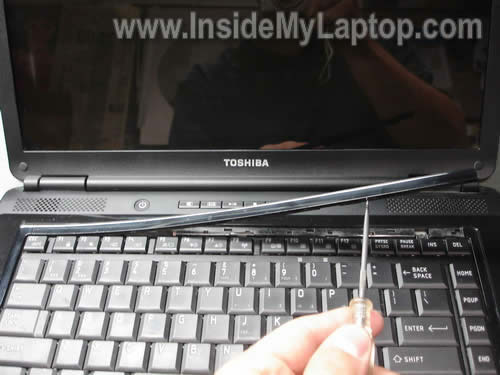
Under the bezel you’ll find two screws securing the keyboard. Remove both screws.
Lift up the keyboard and place it upside down on the palm rest. Be careful, it is attached to the motherboard.
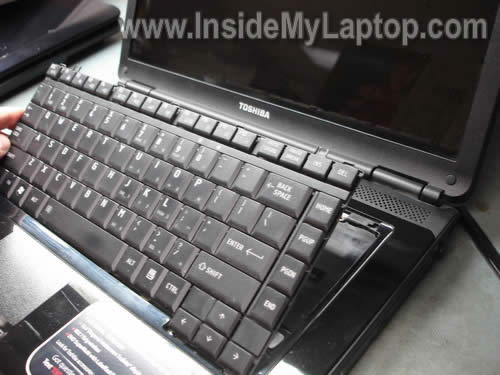
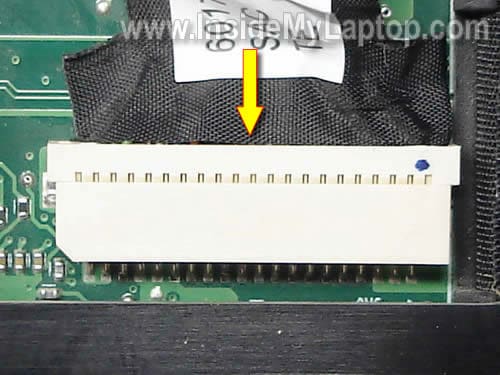
Now you can access the video cable connector.
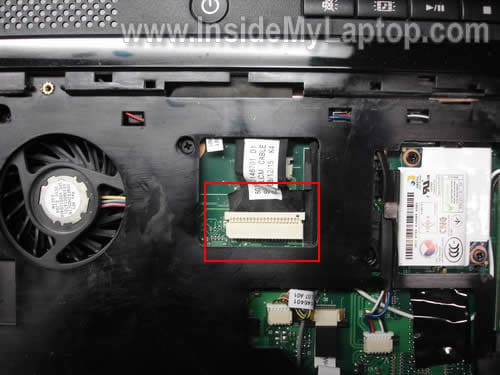
If you look very closely, you’ll see that the video cable is not seated properly and is half way out.
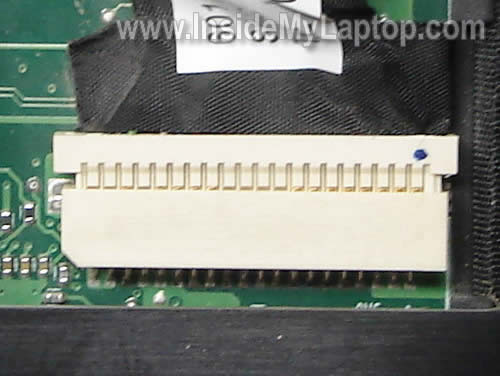
Plug the video cable back into the connector and test the laptop now. Does it help?
My previous post explains how to fix power port on Satellite L305.
boetix
I have acer aspire 4715z with problems on the lcd, which only shows a white / light without seeming the least writing or drawing.
approximately situated where the damage? on the lcd, the inverter or something else?
thanks for the reply.
IML Tech
boetix,
It’s not the inverter failure. That’s for sure. You still can see the white screen, so it’s not inverter or backlight lamp failure.
1. Try reconnecting the video cable on the back of the screen. It’s possible the cable got disconnected or not seated correctly.
2. If reconnecting the cable doesn’t help, it’s either bad LCD or motherboard. I cannot tell. I’ve seen both causing the same white screen.
ty
I have a toshiba satellite L305D that I need to replace the screen on. Can you please provide the additional steps. I will gladly make a donation.
Thanks
jDave VanHove
Thanks, I thought I had an inverter or screen problem on my Toshiba Satelite, L305 but your post helped me find the cable unplugged.
Thanks again,
Dave
Dave VanHove
IML Tech,
I used your information to fix my computer and I made a small donation. Great idea, and I hope it works for you.
Thanks,
Dave
Chuck Mason
This was exactly my problem. I was told it was probably inverter but I found this site and checked this connection before buying the part and works perfectly now.
thanks,
Chuck
Matt
How about a funky color screen?
Getting green snow on the boot up and it’s all out of whack color-wise in Windows. Toshiba L305.
I’m guessing it’s the video cable going bad…which is weird because all I did was unplug it from the motherboard doing another repair! I’ve tried playing with the connection but can’t get it to show properly.
(oh and the repair was for the broken power jack…works & looks great once I got that up and running!)
Thanks…great site!
-Matt
IML Tech
Matt,
Did you test laptop with an external monitor? I assume the external image is fine?
Take a closer look at the connection between the video cable and motherboard.
Take a look inside the connector on the motherboard. I hope you didn’t bent pins inside the connector (happened to me before a few times).
Again, make sure the cable seated correctly. If the problem still there, I guess you should try replacing the video cable.
Maybe reconnecting the video cable killed it.
Chris
YOU BEAUTY!!! This fixed mine, thank you so much, was looking at a repair costing £100+!!
Matt
Yep looks to be. External image fine. Just replaced video cable, same screen showing.
Looks like one of the pins on the connector to the motherboard is missing…if it’s supposed to be, OK. If not, may be where my issue lies…and yes, all I did was unplug it initially then on the re-plug and re-boot I got this.
I thought initially it was just bad Windows drivers…but that wouldn’t affect it in BIOS…I’ll give it a shot there, but otherwise it’s likely the shop for this.
Thanks!
David.
Thanks so much! This worked for me! I was going to replace my screen before I read your post!
hassan
i have alaptop (Dell inspiron 1525) when i installing the Video Driver the system sudenlly stop and death screen appear!!!
please help
bgg
I have tried everything you have showed on the websites, nothing is working for me. I have no idea what to do anymore, please somebody gives me a hint what to do next!!! Please help me
thank you
D.Cox of TLB Entertainment
mY WIFE COMPUTER HAD BEEN LIKE THIS FOR OVER A YEAR AND WE HAD BEEN USING AN EXTERNAL SCREEN BUT ,tHIS REALLY HELPED ME SUPRISE MY WIFE FOR HER bIRTHDAY! yOU BE BLESSED! AND COME HANG OUT WITH US ON FACEBOOK!
yOUR fRIEND
D.Cox
rey
HI pls help,i have a toshiba satellite pro L300.no display on boot up.but with power .i tried on a external display like monitor,same no display also..pls help thanks..
Michelle
Holy Cow!!!! I’ve been without my laptop for about five months! Thanks sooooo much!!!!!
Blink
Hi there, I am having the same problem… I tried to do this but nothing happened. My laptop works on external screen but I can’t use it always like this. Is there any other issue that causes this to happen?
IML Tech
@ Blink,
If the laptop works with the external monitor, most likely your motherboard still operates properly.
Your problem could be related to one of the following: failed LCD cable or failed LCD screen.
You said reseating the video cable didn’t help, so I assume it’s not connection related issue.
By the way, you should try reseating video cable connector on the back of the screen. Maybe it got loose.
Danshibai
@ Blink,
Hi there, I am having the same problem… I tried to do this but nothing happened. My laptop works on external screen but I can’t use it always like this. Is there any other issue that causes this to happen?
If the laptop works with the external monitor, most likely your motherboard still operates properly.
Your problem could be related to one of the following: failed LCD cable or failed LCD screen.
You said reseating the video cable didn’t help, so I assume it’s not connection related issue.
I have same problem as Blink and I reseated in both connection and still black screen.
What else can I do ?
By the way, you should try reseating video cable connector on the back of the screen. Maybe it got loose.
Hi, same here and did reseated video cable in both connection and still the black screen.
What else can I do ?
IML Tech
@ Danshibai,
1. Try replacing the video cable.
2. Try replacing the LCD screen.
I cannot tell which one is failing in your laptop without testing it with spare parts.
Blink
Hello again and thanks a lot for answering. I sent my laptop to repair and it turned out it was a problem with the mother board. It works, but some chips (or that’s what they said) weren’t sending the power to the monitor. So they fixed it and I was able to use it for a day. The next day when I turned it on it didn’t work again. I sent it, they said it was the same thing and fixed it again. I used it without turning it off, instead of that I put my laptop on sleep mode to use it again the next day. I did these the whole weekend but a program asked me to restart so I did it and surprise, it didn’t show anything again.
I sent it again yesterday and they said probably the motherboard wasn’t able to take the repair at all. I am upset because I payed them and they said it was going to work fine after that…
I just have a question, is it possible something else is going on and they haven’t noticed? They replaced the inverter too, by the way, and charged me it because it wasn’t working either (or that’s what they said…) and none of the other parts seem to be the problem.
Thank you and sorry if I make mistakes, english is not my language.
IML Tech
@ Blink,
It’s hard to tell. If they were able to fix laptop video temporarily by replacing some chips on the motherboard, probably this is motherboard related problem.
I don’t think so. Laptop backlight problems not related to the CMOS battery.
Blink
I forgot to say this: I read it could be the CMOS battery. I am not sure what this does and also I don’t trust the people who are “fixing” my computer. Could it be that? If it doesn’t work again I will ask for my money and take it somewhere else.
Blink
Thank you again. So it is possible to repair the mother board? Becuase they said now it is possible I need a new one, but I don’t get why it works fine if I put it on sleep mode and not when I restart it.
IML Tech
@ Blink,
I don’t know. I don’t repair laptop motherboards on the component level. If a motherboard fails, we replace it with a new one.
R
My video cable looked seated fine and I was about to order an inverter to try to get my backlight working but after reading this article I unplugged and replugged the video cable and now it’s working fine….thanks….so I guess it just wasn’t making good contact…this laptop hardly ever gets moved so it was puzzling.
Don
I followed your suggestion to open up under the keyboard and look to see if the video cable was slipping out of place. I found that mine had and in less than 3 minutes I had the cable back in tight and the keyboard back together. THANKS A MILLION !!! This is an amazing tip !!! Worked perfectly. I had already tried replacing the Inverter and that did not fix the problem. I don’t really do much traveling with my laptop so I am not sure how the cable got loose but once again… Thanks for your tip. It saved me from buying a new laptop !!!
Don
Cole
i have the same problem i have replaced bulb, screen, inverter, cable and still no luck, SOMETIMES during rebooting the external monitior will work, do you think i have a bad mobo or what else should i replace first.
Kevin Still
I completely unplugged mine and replugged it back in and it worked! Thank you!
Jen
The screen on my son’s Toshiba turned white and I was totally freaking out. Did not want to take it in, since the warranty expired, and I did not want to buy him a new one just to play games. Found your website, followed your instructions and it is now working perfectly! Thanks for your help!!!
Juan David
Thank you, this work for me.
Luis
Hello,
I have the same problem than here but with the Satelite A200-25c that stopped showing video on the LCD screen. Any suggestion will be recognized.
Thanks in advance
IML Tech
@ Luis,
First of all, test the laptop with an external monitor. Plug the external monitor cable into the VGA port on the laptop and turn on the laptop. It should recognize the external monitor and show the image.
Does your laptop work with the external monitor?
HARISH
i have toshiba c655 laptop. My laptop is working fine when display cable removed and it’s working with an external monitor. But my lap display is also working on another laptop. When i connect the display video cable it’s showing me white blank screen. Please help me how to solve this issue in my laptop…..
IML Tech
@ HARISH,
When you get a solid white image, it means the screen is not getting data signal from the motherboard.
It’s either bad display cable, LCD screen or motherboard.
If you tested the LCD screen and cable with another laptop and it worked, it means you have a problem with the motherboard.
Probably something is wrong with the video connector. If that’s the case, you’ll have to replace the motherboard or use the laptop as is with the external monitor.
I don’t know how to fix this problem on the component level.
David Shefts
I have two Toshiba L305 and one had this problem. I opened the second and found Toshiba had used Hot glue on the second PC and it held the plug in place. The original machine with the problem had a piece of yellow tape across the male.female junction to hold the plug in. It did not.
Rob Burns
I have a Toshiba Satellite L505D-S5983 laptop of my brothers that stopped working on him, so I took a look at it sence I know about computers and he dont.
The problem its haveing is that the whole time he had it. At night before bed he would just close the lid and in the morning and it would be on the same screen he was looking at the previous night. So one morning after waking up he went to lift the lid and all he got was a black screen. There are two green lcd lights that light up in the front below the spacebar. I can hear the fan kick on and possible the hard drive. But there are no lights on the keyboard for like the Num Lock and the Cap Lock. I have a Toshiba Satellite L655-S5096 which i needed a DVD Drive so I swaped my brothers out with myne. And now when I start up my brothers laptop the dvd drive opens. I have already tryed taking the memory out and checking each by them selves. Tryed with taking out the hard drive out and starting it and then turning it off and putting the hard drive back infrom his laptop and restarting with no luck. Also took battery out and unpluged it and held down the power button for a minute and tryed starting it with just the battery and just the power cord and both and still so action. I tryed hooking a HDMI from the laptop to the tv with no luck and i even tryed using a old monitor and connected the VGA end to the laptop and before turning on the laptop the monitor had a green light on and when i turned on the laptop while it connected to the monitor the green light went to a yellow light. I also help a light in front of the monitor screen to see if anything shows up like it shows to do online…
Thats about it on what I tryed. Any suggestions would be very much helpful on helping to troubleshoot this more to see if its worth keeping or is the motherboard fried..
Thanks, Rob