

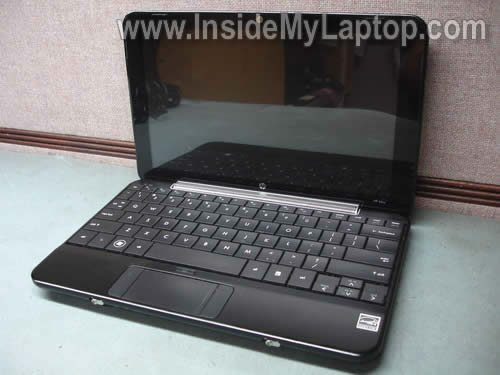
In this guide I explain how to remove and replace the keyboard on a HP Mini 1033CL notebook.
If you have another HP Mini and the guide works for you, please mention the model number in comments below.
Start disassembly with removing the battery.
Unlock the battery by moving the latch 1 to the left.
Lift up the battery by moving the latch 2 to the right.

Remove the battery.

Remove two screws securing located in the battery compartment.

The keyboard is secured in the top cover by four small knobs on sides.
In order to remove the keyboard from the base you’ll have to push it through these knobs.

Start removing the keyboard from the top side.

Continue removing it from the top cover.

Move it towards the display so you can access the cable connector underneath.

Unlock the cable connector to release the cable.
Lift up the black connector clip with your finger nail. It will pop up at a 90 degree angle.
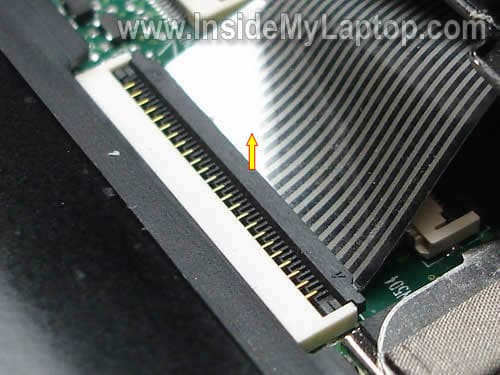
On the picture below you can see connector in the unlocked state.

Now you can pull the cable and remove the keyboard.

Search for the replacement keyboard using the part number from the sticker on the back side.
In my case the part number is 496688-001 (USA model).

In the previous post I explain how to remove keyboard from HP 2133.
IML Tech
I just received another HP Mini laptop with a faulty keyboard.
Product: HP Mini 1000
Model: HP Mini 1100
Looks like I’m going to use same disassembly steps in order to replace the keyboard.
charles philip
Please I am looking for the black zif cable connector clip for the keyboard cable of my HP mini1000 netbook. I was trying to take out my hp mini keyboard cable and the zif connector lock clip broke off as a result, I cannot connect the keyboard.
Tracy
How do I change the LCD cover on my HP MIni 110
Megan
Thanks for posting this! It was very helpful in fixing my HP Mini keyboard.
Fred Kelly
Since I never found info to help me.., thought I’d share what I learned. While replacing keyboard on DV6700 had to replace ribbon cable from power button board to system board. For the ZIF connector at the power button board – pull ZIF connector outer plastic edges axially away from connector…, on the sides (white or brown). Cable then comes out with zero force – dont’ wiggle this end of the cable till you pull the ZIF side plastic pieces out. Should come out with no effort. Once that end of the old ribbon cable is out of the ZIF connector…, insert new ribbon cable in the ZIF (not which side goes up) with ZIF plastic side pieces out – takes zero force. Once the ribbon cable is “in”, push plastic ZIF pieces back in to lock. On the other end of the ribbon cable (at the system board), I had a LIF (Low Inertion Force) connector. After attempting to learn all I could about it.., finally figured out there were no moving parts. Simply pull ribbon cable straight out (opposite of the ZIF where you never pull without the ZIF unlocked), push new cable into the LIF – should go easy if you use a new cable. I purchased a new cable on ebay for less than $5 (find it on ebay by searching for 431437-001). Good luck
mike
Great tutorial, works on the Hp Mini 1151 NR also.
mitote
Thank you so much Fred Kelly about the LIF-connector. I wasted an hour to understand how it works.
tora
Great tutorial, mine was HP Mini 1000 with model 1116NR and works with this tutorial technique. Thanks for sharing.
Joseph
I am still in the dark. I have an HP notebook 15 and I broke the ZIF CONNECTOR that connects to the keyboard. Can you please tell me if I can find this part and where. Thank you