


In this guide I explain how to replace failed keyboard on Asus Eee PC 900 laptop.
In my case a few keys stopped working
If yo do everything correctly, the whole replacement procedure shouldn’t take more than 15 minutes.
Before you start, turn off the computer and remove the battery.
STEP 1.
The keyboard secured on the top with three spring loaded latches.
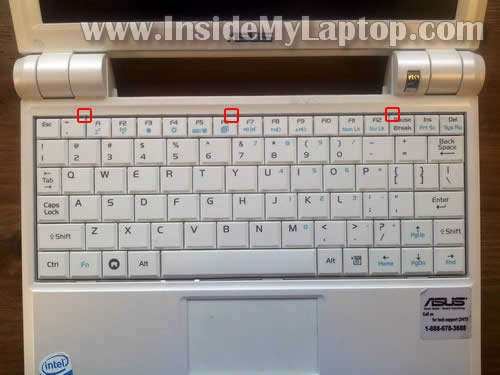
Push on each latch with a small screwdriver and at the same time lift up the keyboard a little bid so the latch stays in open position.

STEP 2.
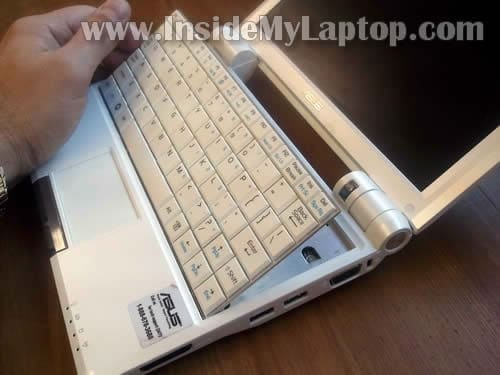
After all latches are released you can lift up the top side as it shown on the following picture.
Be careful, it’s still connected to the motherboard.
STEP 3.
Move the keyboard towards the LCD screen and access the connector.
The connector has to be unlocked.

STEP 4.
You unlock the connector by moving the brown piece about 2 millimeters towards the display.
The brown piece must stay attached to the white base.

On the following picture the connector shown in the unlocked position.
Now you can pull the cable from the connector.

STEP 5.
Finally, remove the failed keyboard from the laptop and replace it with a new one.

Glenn
If only I could find something this clear for replacing the screen.
IML Tech
@ Glenn,
Here it is: http://geekgreek.com/2010/12/replace-the-screen-on-the-eee-pc-901-2/
In order to replace the screen you’ll have to disassemble the laptop and remove the top cover assembly but it shouldn’t be very difficult if you follow the guide.
Good luck!
Susan
I totally appreciate your clear concise easy to follow directions. Only one problem. The third picture down must be magnified 8,000 times. All that is visible on my machine is a tiny piece of metal that doesn’t seem to budge. And how does one manage to release all three levers while simultaneously lifitng the keyboard with only two hands? I have been fiddling with this for about one-half hour and the latches aint unlatching and the keyboard ain’t lifting. One would think this would be the simplest part of the process. Ha!
IML Tech
@ Suzan,
Do it one by one.
Start with the left one. Push the lock inside the case and at the same time lift up the left side of the keyboard. While lifting it up push on the second lock and then on the third one.
You don’t push them all at the same time.
Joe
Make sure you put the right model # V072462AS2 in your Eee PC 900 (also marked on back of the keyboard V072462AS) .It does look exactly like the original Eee PC 701 model # K00126291. They are not interchangeable and do not work if you swap them…that’s what I discovered today since I have both models.
Spilling water or coffee destroys keyboards on Eee even if you let them dry out for several days most keys will again work but a few don’t.
Shittu Olalekan
Please I have just acquired a Asus Mini Eee PC Seashell Series. Recently some of the keys on my keyboard started malfunctioning. They type letterings different from what is inscribed on the keyboard. Also I dont seem to understand most of the signs written in Arabic there. I would appreciate any suggestion.
arvin
Please advice me what to do to my Mini Eee PC 1005 HA. Some of the keys are malfunction and the worst thing is everytime I open my notebook it automatically type characters such as =, ‘, 9 continuously in search tab . Do cleaning is advisable to fix the problem, Is it cause by virus, or do I need to replace the entire keyboard? Any sugeestion?
IML Tech
@ arvin,
Sounds like some keys are stuck. You’ll have to replace the keyboard with a new one.
Rob
“The brown piece must stay attached to the white base”
When I removed my keyboard, I noticed that the brown tabs part has dissapeared somewhere?
can’t seem to find it.
Do you have re-installation instructions as well (simple as it may be)?
Geoff Brown
Please can you help, replaced keyboard with brand new one thought all was fine but a few keys type the wrong number or letter in.
is there an update or something i need to change in the computer settings ?
joe
Very clear instructions, thank you! Worked perfectly.
Rob
Can I replace the black keyboard with a white one, are they interchangeable on the same Asus model? I think a white one would look good on a black netbook!
Thanks!
IML Tech
@ Rob,
I think you can do that if the white keyboard was designed for the same model.
albert kolstad
Hi,
After successfully changing my screen on an eeepc900, pushing my keybord back in place, it will not stick. How come?
albert
Nancy Johnson
Great set of instructions! Just replaced my keyboard-took less than 10 minutes.
Sean
Very clear and precise instructions. I was able to switch out the keyboard in about 10 minutes. Thank you!