


In this guide I explain how to remove and replace the broken LCD screen in a Gateway M7 series laptop. I’m fixing a Gateway M-6846 laptop. It also says Model No.: SA1 on the bottom. Most likely my guide will works for some other Gateway laptops. If it works for you, please mention the laptop model number in the comments below.
Turn off the laptop, unplug the power adapter and remove the battery.
STEP 1.
There are three hinge covers on the bottom of the display panel. We’ll have to remove these covers first.

Insert a sharp object under the hinge cover and lift it up. Continue removing the cover with your fingers.
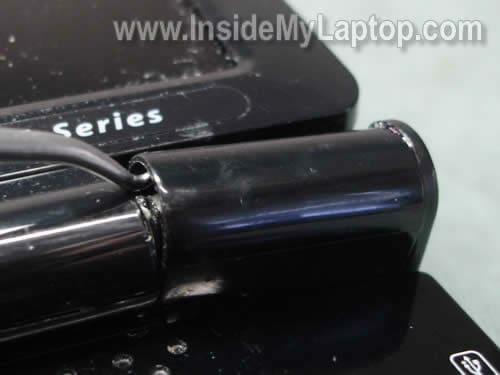
The hinge cover has been removed.
Remove two other hinge covers.

STEP 2.
There are six screw covers on the screen bezel.

Remove screw covers with a sharp object.
Remove all six screws found under the covers.

STEP 3.
Start separating the screen bezel from the display cover.
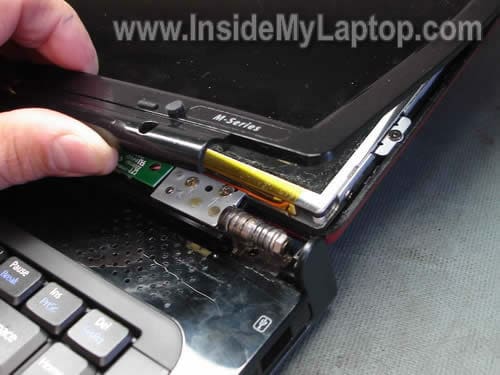
Continue removing the screen bezel.
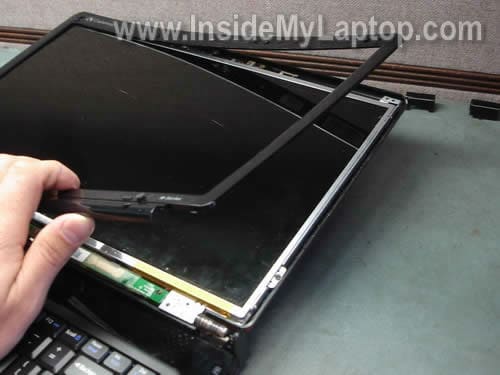
The screen bezel has been removed.

STEP 4.
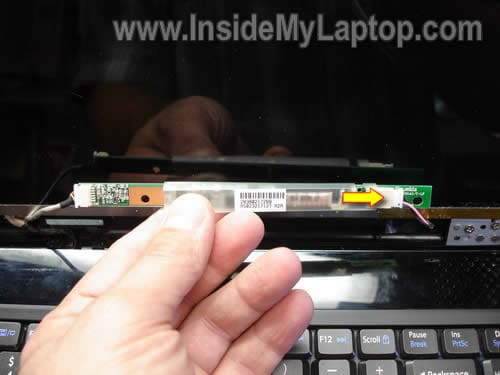
The screen inverter board mounted below the LCD screen.
Remove one screw securing the inverter board.

Unplug the LCD screen backlight cable from the right side of the inverter board.
I’m not replacing the inverter board, so I’m not disconnecting the cable on the left side.
STEP 5.
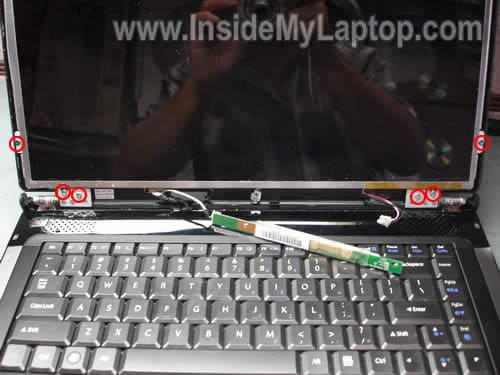
Remove six screws securing the LCD screen hinges and mounting bracket.
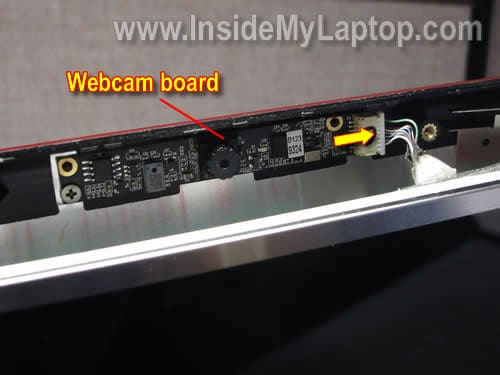
Before you can separate the LCD screen assembly from the display cover, you’ll have to unplug cable from the webcam board.
Now you can separate the screen assembly from the display cover and access the video cable connection on the back of the screen.
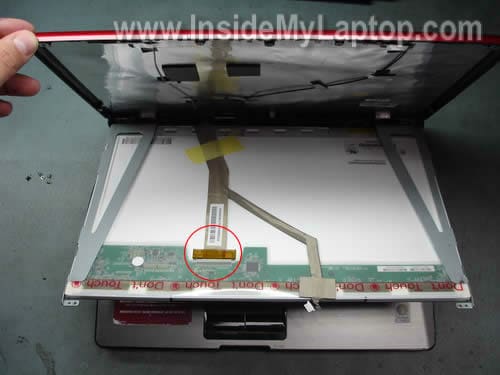
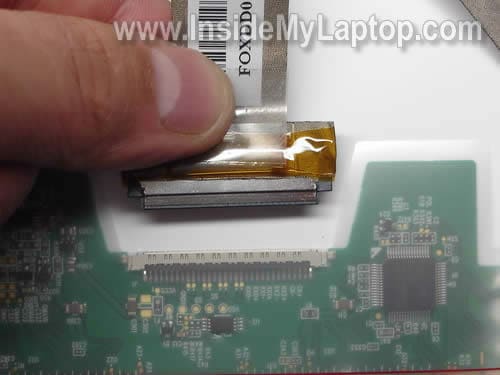
Unplug video cable from the LCD screen connector.
STEP 6.
Remove two screws securing LCD screen to the mounting bracket.
Remove two more screws on the other side of the screen.
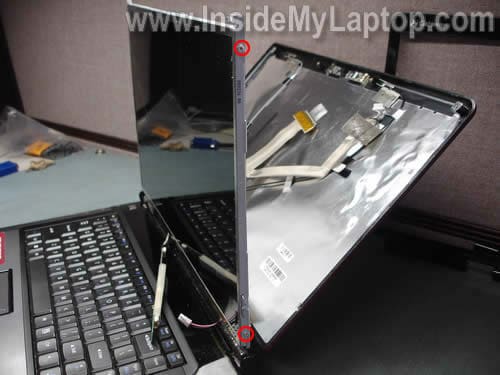
Now you can remove the broken LCD screen and replace it with a new screen.

In the next guide I explain how to remove and replaced defective keyboard in Gateway M-Series laptop.
James Thew
Found this really usefull,
I have a t6330u and the screens recentcly started flickering and jumping around, it only does however when the screen is being moved / on certain angle so i presume its the ribon cable, is the ribon cable connector on the mobo of this laptop easy to find or is it burried as ive tried to have the front off it to gain access to the cmos battery only to fail at removing the top.
Thanks
Jimmy
Nathan
Great guide!
My parents recently broke their M-6878 screen.
My father wanted to throw it away and buy a new one!
Well with your guide and myself; We saved them a few $$$’s.
The guide was spot on; except for a small point.
Step 6.
There are two other screws on the other side of the mounting bracket and there is a velcro type adhesive that has to be pealed off the webcam video cable – Very small points.
Again thanks for the guide.
IML Tech
Nthan,
I think I mentioned two more screws on the other side of the screen in the step 6, didn’t I?
Michael Rawlings
It worked for the M-7315U / SA6
chris daly
AMAZING JOB! I WAS GOING TO THROW IT AWAY! I HAVE AN M SOMETHING ALL I KNOW IS THAT THE PICS WERE PERFECT! I CAN’T BELIEVE HOW EASY IT WAS.
Dion Fridie
Hi,
I do you sell any hinge covers? I broke one. Plz contact me
IML Tech
Dion Fridie,
I don’t sell any parts. I’m only providing disassembly instructions.
Maybe you can find hinge covers on eBay?
BETTY NEWBOLD
My son has a Gateway MD2614U 15.6″ LAPTOP with a black screen. Just yesterday his pc died, had to take it in for repair. After picking it up his monitor was on for about 8 hrs and then died again. We figure the problem is with the screen but can’t understand why it would have been lit after repair. The tech wants to charge over $200 to replace the screen. Yesterday’s repair was $200, Total it would equal more than pc cost! So he’s trying to see if he can replace screen himself. He has been using the laptop plugged into a desktop monitor.
1) Can we assume that there is no problem with the inverter or otherwise he would not be able to see image on desktop monitor?
2) If you have built in webcam is there a different screen to purchase?
IML Tech
BETTY NEWBOLD,
Didn’t he offer any warranty on his repair? Most repair shops offer at least 30 days warranty on labor and parts.
It’s possible the new LCD screen is defective.
Also, take a very close look at the laptop screen. Can you see a very faint image? If yes, there is a chance the inverter board is bad.
Nope, the webcam is located on a separate board. You should be able to use the same screen for laptop with or without webcam.
BETTY NEWBOLD
TO CLARIFY STATEMENT BELOW – It wasn’t the screen that the repair shop worked on. The laptop had simply ‘crashed’ and that is what they ‘restored’. The fact that the screen was back on with images was simply a byproduct of that …. they indicated another $200 to work on or replace the screen.
Thanks
My son has a Gateway MD2614U 15.6″ LAPTOP with a black screen. Just yesterday his pc died, had to take it in for repair. After picking it up his monitor was on for about 8 hrs and then died again. We figure the problem is with the screen but can’t understand why it would have been lit after repair. The tech wants to charge over $200 to replace the screen. Yesterday’s repair was $200, Total it would equal more than pc cost!
Didn’t he offer any warranty on his repair? Most repair shops offer at least 30 days warranty on labor and parts.
IML Tech
BETTY NEWBOLD,
Please provide more information about the laptop failure:
1. Can you start the laptop at all?
2. Do you see anything on the screen? Maybe a very fain image?
3. Can you use the laptop with video on the external monitor?
Your previous description “Laptop died” or “Laptop crashed” tells me nothing. You have to be more detailed.
BETTY NEWBOLD
Sorry for the delay in responding the info requested. We purchased an inverter for the laptop. Once installed, there was visual on screen for about half hour. Then it went mostly black and just flikered. After a time, it will come back on and then goes off again. Yes, the laptop can be used with an external monitor.
So then, it appears it may be the backlight as was suggested before and, therefore, the entire screen needs to be replaced…….unless you have any other suggestions, that is what we intend to do. I appreciate your time and responses.
YOUR LAST RESPONSE:
Please provide more information about the laptop failure:
1. Can you start the laptop at all?
2. Do you see anything on the screen? Maybe a very fain image?
3. Can you use the laptop with video on the external monitor?
Your previous description “Laptop died†or “Laptop crashed†tells me nothing. You have to be more detailed.
Kim Brown
IML Tech-
I have a Gateway NV5302u. The screen went black so I took it in for repair. The tech assured me that it just needed a new backlight but it would take 2-4 weeks for them to send it out. The computer works with an external monitor, so I would rather just keep it and fix it myself. Your guide is helpful, but do you know where I can find some guidance on fixing just the backlight without replacing the screen? I have replaced an inverter on another laptop before but the backlight seems more complicated.
Thank you.
Phat
Hey i got the same laptop. The same M-6846 but my model is SA6. If i buy the same series screen work it work and can you send me a link where you got your screen at?
adam r
Okay. Have a gateway m7317u and lcd had a weird bubble in it but worked. Just put in replacement lcd… laptop powers up… but nothing on lcd… screen is black… no faint image… nothing… any suggestions?
IML Tech
adam r,
1. Could be bad connection between the video cable and LCD screen.
2. The new screen is bad or not compatible.
Can you install the old screen back into the laptop and see if it works? If the old screen works, it’s possible your new screen is bad.
Lisaflojo
I have a Gateway MX6956 Laptop. My LCD has gone dark to black. There is a faint image on the screen and occasionally, on Start Up the screen will flicker full color with a pink hue then go dark again. I have been using an external video monitor to run the laptop. I recently replaced the fan.
I would like to know if this problem is the LCD or the inverter board.
Thanks
Lisa
brendan forkner
also works on t series 6330u model laptop. the middle hinge cover has a screw on the bottom, and theres 4 screws on each side of the screen bracket, those are the only differences. thank you for the helpful guide! 🙂
brendan
lisa, sounds like it could be the gpu in the laptop. might wanna have it looked at
IML Tech
Lisaflojo,
You mentioned that your screen flickers with a pink hue. This description sounds like the backlight lamp failure which is located inside the LCD screen.
I would say most likely this is LCD screen failure, not the inverter board.
Meredith
We have an SA1 laptop, which was primarily used by my husband. He would often pick it up by the screen (Yes I’d always cringe and nicely mention that wasn’t a good idea, but he said it could handle it) and sure enough, a year later it started having screen issues. For a little while, he would bend it certain ways (yes physically bend the lcd screen) to get it to go from blue to the screen showing up. I believe this is what kept causing the problem to get worse, and eventually, it’s pretty much a fully non working monitor. It still shows color to it, like a solid blue, or lines of pink going through it. It’s now hooked up to the tv in the bedroom, using this as the monitor, and allowing for netflix watching and all. Anyway, I would LOVE to fix this, as I often go to sleep earlier than him, and having him surf the web on a 32 inch screen in the bedroom, is just not the best for sleeping.
I am pretty mechanically inclined (started taking apart my radio and atari in grade school and junior high) and for years worked in the electronics industry. Years ago, I built several systems, but it’s been long enough, that I just don’t know that I remember enough to trouble shoot.
Here’s my question. I’m wondering if this could be the lcd cable, and not the lcd. I guess I was wondering this, because of the way he’d treat the monitor and the strain he’d put on the connection between the body of the laptop and the monitor. Should I replace both, or start with one and then if it doesn’t work, replace the next?
Thanks for your help!!
IML Tech
Meredith,
It’s hard to tell without testing laptop with another working screen.
Most likely this is LCD screen related failure. If you have to guess, try replacing the LCD screen first.
Janice Adler
I have an m7315U and recently, the screen flickers if the screen is at the angle you usually have it at to use it. If I keep it opened ALL the way, it’s fine..but not practical to use that way. Talked to 2 computer repair shops in my area today and they won’t touch laptops. I’m thinking either the ribbon cable isn’t plugged all the way in or is being pulled out when the screen is in an upright position. When it starts flickering, in the usable position and I “press down” on the top of the screen, I can get it to stop flickering. Would love your thoughts. I’m tempted to take it apart and take a look. Love your website…excellent directions and super good info. Merry Christmas to you and yours.
David
I have a Gateway M465E & looks similar to my laptop removing the keyboard i’m persuming.
Javier
I have a gateway m-7348u laptop and it has a thin green line on the left side running vertical from top to bottom of the screen, do you have any idea whats the problem and how to fix it or what to replace. Your help will be very appreciated.
Gary
Can some explain what the differance is between a SA1 and a SA6 ? I see this alot on the M-series laptops that appear to look the same. Thanks in advance……..
Chris Green
I donated $5. This guide was fantasic. Gateway.com has ZERO help when it comes to stuff like this, unlike HP, for example, that will have detailed maintenance/replacement guides. This was really helpful to me and the pictures and explanations were fantastic. Thanks for doing this.
IML Tech
@ Crhis Green,
Thank you for the donation. I’m glad to help.
AK_907
I have a new Screen in the mail, should arrive soon. and I believe it has the Wires removed from the Motherboard. Do you know if it is hard to remove the wires from the motherboard. if that is where it connects.
and my computer is a M-7315u Model. Looks exactly the same as the computer in the photos
Patricia
Thank you my daughters Gateway Series M-6337 had a bad screen problem, but your direction made dis assembly a piece of cake. Now I just need a screen cheap…