

This guide explains how you can remove and replace the LCD screen, video cable and inverter board on a Dell display.
These instructions should work for many different Dell models.
Example 1. The inverter board is located under the LCD panel (not common).
In this example the display panel has been removed from the rest of the laptop case.
In most cases it’s not necessary to remove the display.
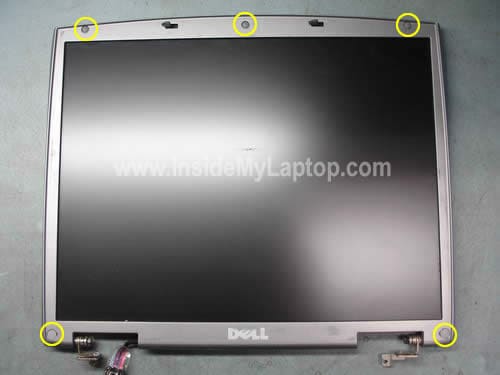
Remove three rubber screw seals on the top and two plastic screw seals on the bottom of the display bezel.
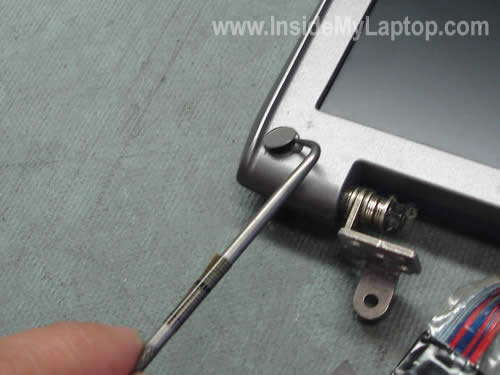
After all five (or more) seals are removed, you can remove screws securing the bezel.
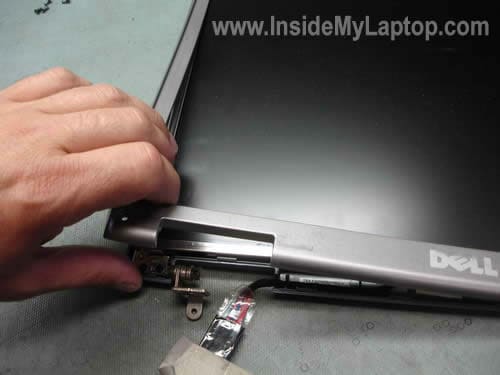
Separate the bezel from the display assembly with your fingers.
There will be many plastic latches holding the bezel and the cover together.

After all latches unlocked, you can remove the bezel completely.
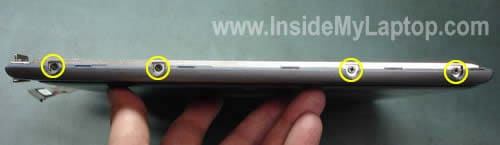
Remove four screws on each side of the display panel. These screws secure the LCD panel to the display hinges.

Carefully lift up and remove the LCD panel from the cover and place it upside down on your desk.
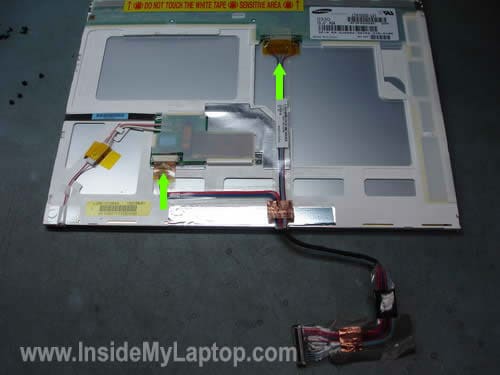
Unplug the video cable from the screen and from the inverter board.
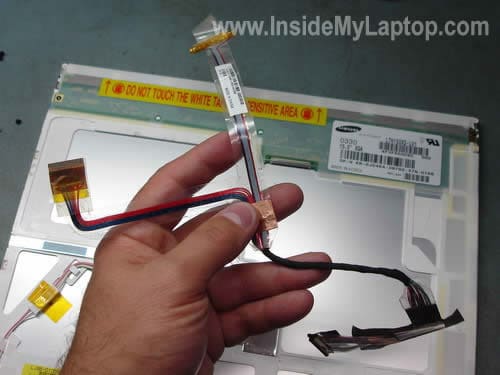
Remove and replace the video cable if necessary.
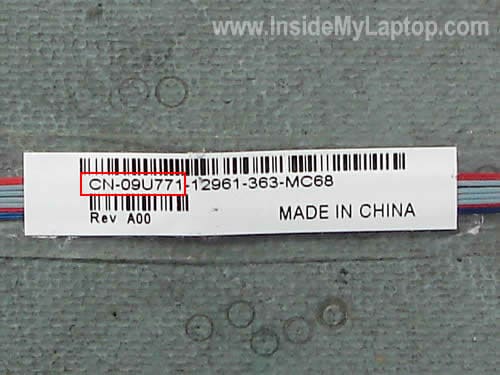
You can search for a new cable by the part number located on the sticker.
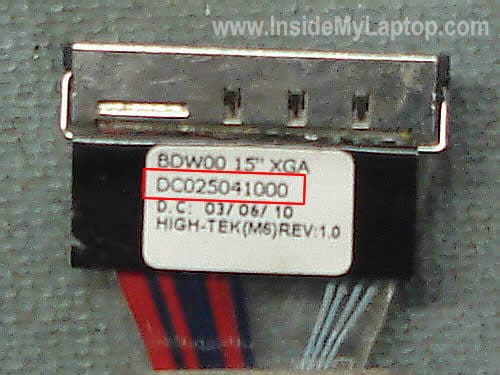
Alternately, you can search for a new video cable by the part number located on the connector.
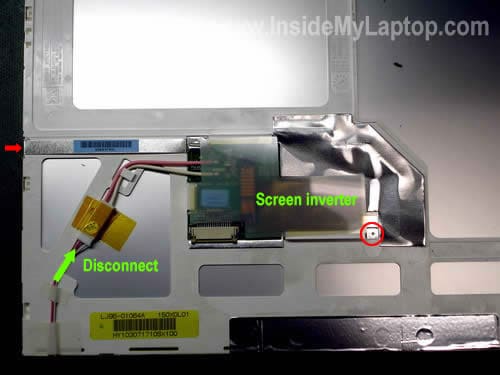
Remove two screws securing the inverter board. One screw is marked with the red circle, another one is pointed with the red arrow.
Disconnect the backlight lamp cable from the inverter board.
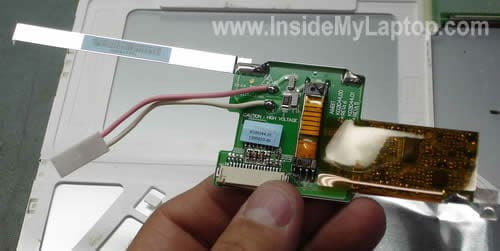
Now you can remove and replace the inverter. You can search for a new inverter by the part number located on the old inverter.
Example 2. The inverter board attached to the LCD frame (more common).
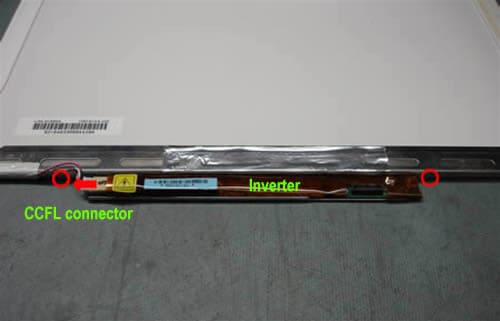
In some Dells the inverter board is mounted into a metal bracket on the bottom of the LCD panel.
Before you can remove the inverter, you’ll have to remove the LCD panel from the display as it explained in the first example.
After that remove two screws securing the inverter (marked with red circles) and unplug the CCFL (backlight) cable.
Now you can remove the inverter from the bracket and replace it if necessary.
barbara
more a question. i have a sony vaio vgn s 170.
i broke the ldc screen . so i brought a new one. now it still dont work, im am trying to buy a new video cable, an i cant find one for that model to save my soul from —-. is the any boby out there who knows where i can locate this item?
again its a sony viao vgn s 170 modle #pcg-6c2l
if anybody can help please barbara.
barbara
where do you buy parts for a sony vaio vgn s 170
model#PCG-6C2L, i need a new video cable for my laptop. can anyone tell me who i can order one from i need help thanks barbara.
IML Tech
barbara,
You can search for Sony Vaio VGN-S series LCD cables on eBay.
Susanna
My computers LCD is only half lit is the inverter the problem or should I go buy the whole screen?
IML Tech
Susanna,
Does it mean that one side of the screen (left or right) is completely black?
Dina
Hi,
For a week or two, one-third of my screen was fairly dark — not completely black, I could still see what was on the screen in that area, but it was much more difficult to see. Just yesterday, my whole screen would very suddenly go dark. I could see that the laptop was still working, but I could barely see what was displayed on the screen. When booting up, the screen worked fine, but after being on for a minute, the entire screen would just suddenly go dark. Now, the screen goes dark immediately, even while the laptop is still booting up. Is this a problem with the inverter or the LCD screen?
Any suggestions/advice are much appreciated!
Dina
D C Ross
That sounds like the backlight is dying. You’ll need to replace either the Cold Cathode Fluorescent Light (CCFL) tube at the bottom of the LCD panel or the Inverter that powers it.
Replacing the inverter board is usually easy — Just follow the directions given above. From what you described it’s possible that the CCFL tube itself is burned out, and that requires opening up the LCD panel itself and doing a little soldering. A replacement CCFL or inverter will run you about $10 or so, but if you don’t feel comfortable with a soldering iron then I would suggest getting some help with replacing the tube. It’s not that difficult, but if you mess it up you could ruin your LCD panel instead of repairing it.
Aaron Z
Hello, I have a Dell Inspiron 1720 and for the last week my screen has been randomly blacking out. If I restart the computer it usually fixes the problem but not always. At times, I can still see what is on the screen but it is very dark. Today I noticed that the 3 inches on left side of my screen are getting darker. I also noticed that is happens more often when I am running on battery power vs being pluged into the outlet. It seems like a very similar problem to the one above. What do you recommend I replace and where do you recommend I buy the parts from? Thanks Aaron
christian
hello about one six’s of my screen is black can you tell me were i can fin on for my laptop my laptop is a Sony – VAIO Laptop with Intel® Coreâ„¢ i3 Processor – Silvery White
Model: VPCEB15FX/WI | SKU: 9766549
Kyle
I have a Dell Inspiron 6000
For a long while now, my screen has flickered to a completely white screen.
All I had to do was push the video cable back into the motherboard, and it was fine.
Now, the screen is totally black and I can’t fix it; the video cable is kind of coming apart, so I’m pretty sure that’s all I’ll need to fix it. Am I right?
carrol
I have a Psario V500 and the desktop started to freeze and now I got colorful vertical lines. I thought maybe the video card was going bad. I hooked a monitor up to it and the picture appeared fine on the monitor. So maybe it’s the inverter?
IML Tech
carrol,
It’s not the inverter problem, that’s for sure. You still can see the screen, so the inverter and backlight lamp work fine.
It’s either bad LCD screen (more likely) or failed video cable (less likely).
Can you get image back to normal if you torque the screen a little bit? If yes, this is bad LCD screen.
Maria
Hello! I bought a replacement screen for my vaio vgn fw and i managed to replace it, but, I have a question, the video cable shold go all the way in? My video cable is taped to the screen, should it go all the way in in the screen socket or just touch the socket? I am having problem witht his, if it wasnt for this my screen would be fixed today….Thank you in advance, Maria
IML Tech
Maria,
The video cable has to be plugged into the socket, not just touch the socket. Why are you asking? You cannot plug it all the way into the socket?
Take a closer look into the socket on the LCD screen. Does it have a row of very thin pins? Make sure there are no bent pins inside the socket on our new screen.
Again, the video cable connector has to be plugged in.
Bogdan
Hello,
One of my laptop Dell Inspiron 6000 is having problems. When i boot the machine the screen is on just for 5 seconds and is more like red/pinkish, after that is black. If i look closer i can see that the LCD is working but there’s no light. What could be wrong? Please help me 🙁
IML Tech
Bogdan,
Sounds like backlight lamp failure. The backlight lamp is mounted inside the LCD screen and very hard to replaced.
When backlight fails, I suggest replacing the whole LCD screen.
This guide explains how to replace LCD screen in Dell Inspiron 6000 laptop.
Here’s one suggestion. If you decide to replace the LCD screen, buy one which comes with inverter board installed.
If you install a wrong screen (not compatible with the inverter) the brightness will not work properly.
I found that with Dells it’s always better to replace LCD screen with inverter together.
Abdullah
please help me! my laptop fell down a few days ago.. the day after the half right of the screen started flickering and after that it went black.. after i reboot my laptop the screen works fine but after a little while it half right starts flickering and goes black!! it is not like turned off but it has light and its just black color! please help!
Ken
Dell Inspiron 9400/E1705 (PP05XB): top one third of LCD screen displays properly while bottom two thirds of LCD screen is black. External display is fine….Dell video diagnostics pass without error. Bad LCD?
Eli
Hello, I have a sony laptop and i brought a new screen, but when i turned it on the screen was all white. I tried to fix the video cable because thats what i though was wrong but my screen is still white. Before I put the new screen the laptop was working perfectly. Is it the video cable or no? pleasee help.
Pomax
What if I want to hook up a second LCD panel as an “external” monitor? Is there a way to, if I have a working second LCD panel and inverter board, connect it to the VGA or Digital video port somehow to turn it into a second screen? (I have a DELL inspiron 9400/e1705)
Ronan
Hello, I have an advent monza c1, my son stood on it and it wouldnt start. i thought the motherboard was broken but iused a hdmi cable to connect to my television and it works.
i took the laptop apart and put it back together again, now two thirds of the screen works perfectly but one third of the screen is just white.
Do you think this is the inverter or a damaged screen?.
Thank you.
IML Tech
@ Ronan,
This is not inverter related failure, that’s for sure. You still can see part of the screen, it means the inverter works properly.
Your description sounds more like LCD screen failure. I would try replacing the screen.
John Horton
Hello. I have a dell 9200 I bought and replaced screen and inverter it won’t come on just dark ,
do I need to uninstall driver and let system reinstall on start up ? all connections are ok i think
IML Tech
John Horton,
No driver necessary. If the new screen is OK and compatible, it should turn on right away.
Denn Mark Fulgencio
I have a compaq presario HP laptop and i was really mad about what i did before it turned into black screen. When I inserted the charger, the backlight disappears and didn’t came back for another start up. I think it was the cable wire of LCD or the inverter? What do you think so? Can anybody help me? Thank you…
IML Tech
@ Denn Mark Fulgencio,
It’s impossible to tell what is causing the problem without testing the laptop with spare parts.
If you have to guess, try reseating the video cable connectors first and then replace the inverter.
Nina Balderson
I have a problem with my Dell inspirion 1520. The keyboard does not work, but external keyboard will. I have replace it but still not working. In the bios it says keyboard diabled. I bought this at a flea market, so I do not have admin password. Any help will be appreciated.
Naveen
Thanks for a great post!!!
I have a Dell inspiron 3521 laptop.my system is old now, I just simply want to rwmove the whole lcd panel from the laptop and use external Tv but as ypu know that in some dell notebooks, you need to have working lcd panel attached(even broken) for pre assessment during bios. If inbuilt display is not detected or workong, then there are beeps. And you cannot go past the preassessment and you cant use external display!!.
Yesterday, I disassembled my ldc panel. I found out that the intervert board is having three cables attached to panel. One is detachable(which is for led I guess) and two flex cables(which are basically attched or soldered with lcd panel. So I could remove the inverter completelty.
What I was to achieve is that, I dont need the lcd panel at all. So I thought if I just connect the inverter board(detached from panel) with a ldvs cable to motherboard, the system would assume that working inbuilt panel is there and then it will move me to use the external screen through hdmi. I am 50 successful in it. I removed the very small connector attaching inverter board to lcd panel(other two soldered flex cable still attached), and then checked, the system passed the assessment test and external display worked. Now, I want to detach remaining two soldered flex cable attched on inverter board and check, but a little scared if it will work or not. And since , it is soldered flex cables, if I remove them, I dont have means to resolder them perfectly on inverter board. Just need your expert advice, it is worth detaching the soldered flex cables? Will it work?