

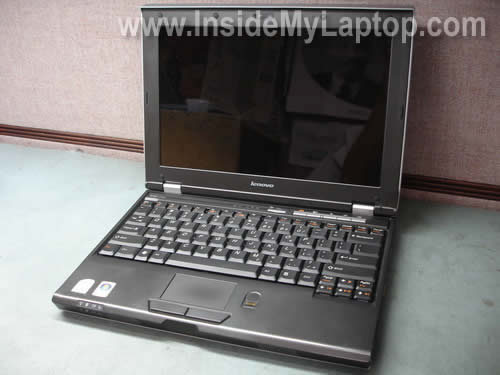
In this guide I explain how to disassemble a Lenovo 3000 laptop.
I will remove the keyboard and replace the launch board (aka button board).
As an example I took a Lenovo 3000 v200 model but I believe the disassembly will work for other models in Lenovo 3000 line. If my instructions work for you please mention the model in the comments below.
The launch board is a board with the power and volume control buttons located under the keyboard bezel.
I’m replacing the launch board because one of the volume control buttons got stuck in the pressed position and because of that the volume is set to maximum all the time.
When I try turning it down, the volume slider goes up by itself. Cleaning the button with alcohol and contact cleaner didn’t help and I decided to replace the board.
DISASSEMBLY INSTRUCTIONS.
First of all, turn off the computer, unplug the power adapter and remove the battery.
STEP 1.
Insert a small flat head screwdriver under the keyboard bezel and carefully lift it up.
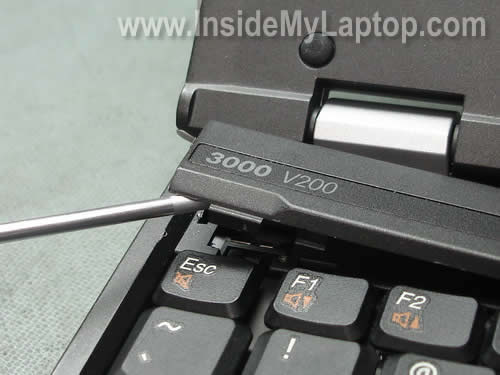
Continue removing the bezel with your fingers.
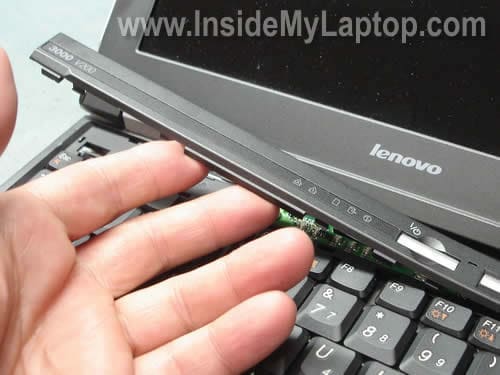
STEP 2.
The launch board is located above the keyboard.
In order to release the launch board cable we’ll have to remove the keyboard first.
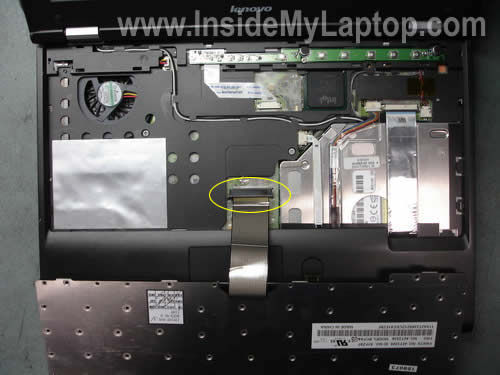
Remove one screw securing the keyboard.

Lift up the keyboard as it shown on the picture below.
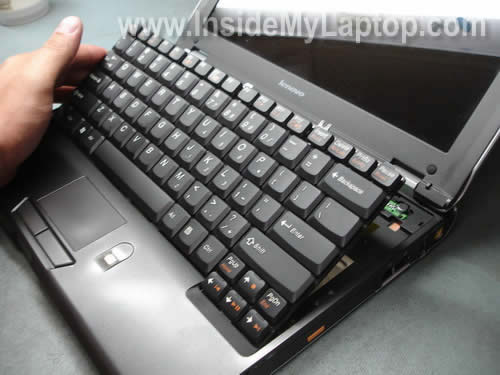
Turn the keyboard upside down and place it on the palm rest.
If you are replacing only the launch board, it’s not necessary to disconnect the keyboard from the motherboard.
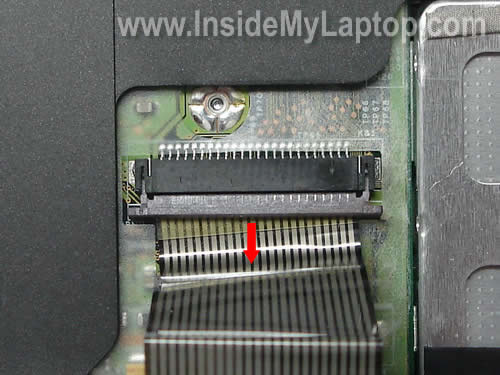
If you decide to remove the keyboard, you’ll have to unlock the connector first.
On the picture below you can see the connector in the unlocked position.
Now you should be able to release the cable and remove the keyboard.
STEP 3.
Remove two screws securing the launch board.
Disconnect the launch board cable from the motherboard.
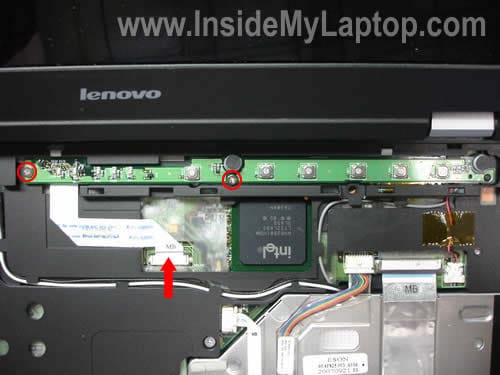
Lift up and remove the launch board.

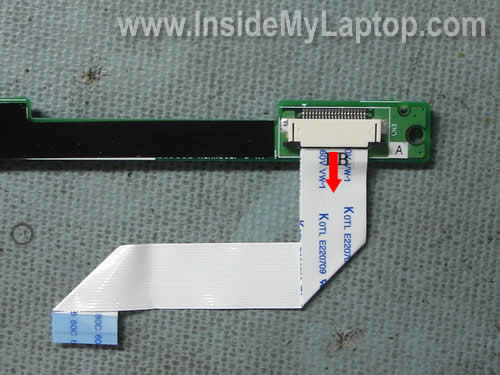
Transfer the flat ribbon cable to the new launch board and install it back into the laptop.
Faraz Ahmad
same method for the lenovo 3000 N200.
Thanks for the guide
Marshall Davis
Almost the same for 3000 N100 – launch board cover needs to be removed starting at the right, cover is wider, going up to and including the gray screen hinge covers, and there are 2 screws on the top of the keyboard – I only replaced the keyboard, but the launch board looked almost exactly the same pre-removal. Thanks for the info!
Phil Stratus
My experience with my 3000 n100 was similar to Mr. Davis’, except that on my keyboard connector, there did not seem to be the locked/unlocked issue. My keyboard connector was white and anchored down with two metal pieces that I could not dislodge and was afraid to try to force. I just pulled — GENTLY — on the ribbon and it easily slid out. I merely paid attention to which side was ‘up’ when I took it out and inserted the replacement in the same direction (stiff piece of extra plastic facing down). I, too, only replaced my keyboard and the only other thing I’ll mention — which admittedly is a bit off topic — is that my keyboard (purchased off ebay from Hong Kong at a cost of $7 + shipping of about that) while it was listed as being for this model 3000, and is identical in most respects, has perversely moved around the function keys so that I’m now sort of confused as to how to reassign them (if that’s even possible). So if you’re a novice do-it-yourselfer make sure you get a good image of the keyboard replacement including the orange function keys (if you use those and they’re important to you). Otherwise, thanks to this site I’m up and running again and have all new keys. Thanks so much!!!
Chris
On a 3000 n100, I noticed it was easier to pry up the launchboard by “popping” the tabs on the sides of the launchpad with a small screwdriver.
My keyboard had 2 screws holding it down. The one that’s circled in the image above and one just above the ESC key.
I also found locking tabs on the white keyboard connector. They were black and on each side of the connector.
Thanks for posting this!
Balaji
Almost Same for my Lenovo Y410. Except It has 2 keypad holders. Unscrew and install keyboard same as you explained.
Thanks for the post
David
Great step by step instructions. I removed the keyboard only in my Lenovo 3000 N100. The ribbon connector unlocked just as you illustrated as did everything else.Thank you.
Doug Varrieur
Thanks Pal,
The 5 and 6 key quit working on the Lenovo three days out of warrenty. The IBM service people gave an estimate of $300.00 to repair. After reviewing your post I pulled the keyboard in 5 minutes, found a new one on Amazon for 22 bucks and ordered it.
Thanks again,
Doug
tresho
I just replaced the keyboard for my Lenovo 3000 N200 0769 laptop using the part #42T3338, an exact replacement for the original, several of whose keys had quit working after 2 years of heavy daily use. This part # has 2 screws holding it down, one where illustrated & the other above the F1 key. In addition, an official Lenovo 3000 service video shows 2 screws accessible only from the battery compartment that are supposed to be removed before the keyboard is removed. I don’t know what they connect to, but I removed them also.
The key difference was the keyboard’s ribbon cable connector, very different from what is illustrated in Step 2. My keyboard ribbon cable actually was attached from above, not below as illustrated here. There were 2 separate latch pins on either side of the ribbon connector, each about 3 mm high and 1 to 3 mm wide. Each latch pin has to be moved up about 1.5 mm to release the ribbon cable. If not fully moved up, the ribbon cable is still partly clamped in position. It would be easy to damage or destroy the latch mechanism if you are too rough. High magnification and bright lighting are important so you know what you are doing.
To reassemble, put the ribbon cable into the connector’s slot as far as it will go, hold in place while very gently pushing each latch pin back down into locking position.
Cameron Art Museum
Thanks for the instructions. I had 5-6 keys go dead after a drop of coffee hit the keyboard so i purchased a replacement from Amazon.
I have the Lenovo 3000 N200, the new keyboard works great, and is even faster and more responsive than the old keyboard. It should be repeated that this replacement kb is labeled in a different manner than the original. The “Fn” keys are labled incorrectly. I rarely use these keys anyway, Im happy to have my T, Y and backspace back!
praveen
Thanks so much for the instructions. They worked great for my lenovo y410 keyboard replacement. Kudos!!
Ryan Matthews
Bro,
Thank you for the instructions. I had spilled coffee on my Lenovo 3000 N100 last week. I have ordered a new keypad from e-bay and I am waiting on it. BTW can some one please advise me whether some cleaning should be done before I replace the keypad??? Thanks
IML Tech
Ryan Matthews,
It depends on the spill. You’ll have to remove the keyboard and take a closer look underneath. If there is no liquid under the keyboard, no cleaning necessary.
Ryan Matthews
IML Tech
Thanks buddy
itech
It works for Lenovo g430, although I had to remove the three screws after taking out the battery. Thanks.
rocky
can you plz .. post a guide on how to remove dvd drive in lenovo 3000 g430…
joan
when taking things apart and putting them back together — how critical is it use new screws? the lenovo manual says use new ones, but i’m wondering if it’s such a bad idea.
IML Tech
joan,
I disassembled thousands of laptops and never used new screws. 🙂
amanda mcroberts
hi i have a lenovo g550 would this also work for this type of model???plz help
Ravindra
Dear Sir,
It seems to me that the instruction to remove the keyboard of Lenovo 3000Y 500 are different. Please post the same.
Thanks …..
Kathleen
When putting my Lenovo 3000 N100 back together, I can’t get the launch board cover (above the keyboard) back on flat. I’ve removed it / replaced it / removed it many times and I always get a bow in the middle. It still works fine and I can push the power on but it just takes a little more of a mush because you have to push the cover down too.
Any ideas? Thanks
IML Tech
Kathleen,
I guess you’ll have to remove the cover again and take a closer look at the bottom part of the cover.
Maybe you have a broken/damaged/bent latch in the middle?
Auni Jaffer
Thanks
Dante Vecchio
does anybody know where i can find the disassembly guide for a lenovo g550?
i have googled it again and again with no luck
plz help
JaNel
Thanks so much!!!! I just used it to replace my Lenovo 3000 N100.
Marcin Chrupek
Thanks a lot
Camilo
Hi I have a Lenovo 3000 n200 laptop. I clean it all, but i dont remember the connection cable of the wireless card. The white cable where it goes? TR1, R2 or TR2? and the black cable where it goes, TR1, R2 or TR2
Mike
Thank you,
directions close enough to get my 3000 n100 keyboard removed and replaced. Well written instructions.
Derek S.
I have a G530 4446 and the instructions are a bit different
(having to unscrew the 4 screws hidden under the battery
To lift the launch board) but, the rest were pretty much on
Point removing the keyboard.
Thanx for the asst., Laptop Guy
Spicmoh
Hi, just replaced keyboard on Lenovo 3000 N200, perfect instructions except one little difference – there are two screws holding down the keyboard (the other is on the left side 🙂 )
thx
screen
can somebody help me i cant make better britghnees , those buttons f10 and f11
they are not working maybe i need to push something else!
Wayne
Could i reset the CMOS from here, i can’t see the battery in the pics. Would i have to come in from the other side?
In that case would you have a guide for fully taking apart this laptop, i have tried before and i couldnt get it.
Simental Claudia
Hi
I have a laptop lenovo g550 model L08S6Y02 and I forget the password boot the laptop, told me to take the battery CMOS is removed, but I opened the back and we could stack, could you please help me?
Please¡
Thank you!
Asif
my lenovo 3000 n100 keypad is short. when i press 6, n is also written and when i press 5, b is also written. plz help
Paul Hanson
I spilled chardonney wine on my Lenovo 3000 N 100 laptop (not a lot… accidently hit my glass & contents went flying all over). I immediately shut system down, unplugged it… turned it upside down & allowed it to drain. The next day I booted it up, but could not enter the password because multiple characters were entered when I tried. So I shut it down and removed the battery& keyboard. (Your illustration here helped immensly.) I soaked the keyboard in warm water, then warm distilled water, then isopropol alcohol. I let it dry overnight and put it in a closed container of rice to make sure it is dry. However, I see that wine had gotten on the platform below the keyboard. How do I access the components (motherboard?) below the keyboard to make sure they are cleaned if necessary? (I have not yet tested it to see if what I have done so far was helpful.)
Deb
Thanks a lot.. It is a great article
Tavi
The people where the keyboard typed multiple characters are more lucky than me. My keyboard doesn’t type anything when i press any key!!!. I just spilled a quarter gallons from a 250 ml glass and my keyboard doesn’t do anything. Where can i buy a laptop keyboard or repair mine??
Tavi
The thing that i really wished to say is that my laptop is a bit different than yours. It is a lenovo laptop, i think its’s 3000 but the keyboard is not linked to the bezel. Any help???
Athar Ali
Thanks buddy it was helpful for me
JV
Family member asked to set up leveno 3000 c200 for basic t internet and emailing. Received it with wiped clean, no OS. Put in OS disk and attempted to go into bios to set from cd. Cant get into bios , don’t have password. Broke down laptop to get cmos battery out. It was sodered onto motherboard. Took it off. I found a replacement at computer store. Can I just soder it back on? I have never sodered anything before.
IML Tech
JV,
Just watch a couple of tutorials on Youtube. It’s not that difficult but you need a soldering gun.