

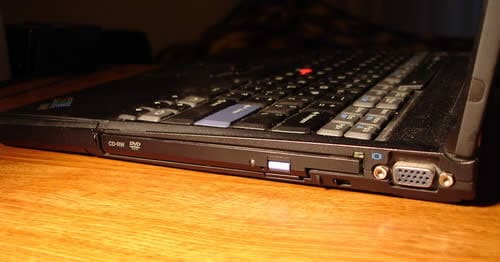
In this guide I explain how to remove a CD or DVD disc from a failed optical drive or not working laptop.
Let’s say the computer does not turn on but there is a disc stuck inside the optical drive and you want to get it out.
I think most people know this trick but some don’t.
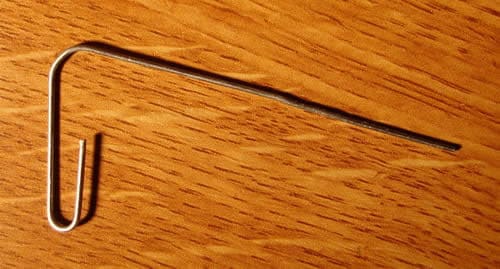
All you need is a paper clip straightened out as it shown on the picture.
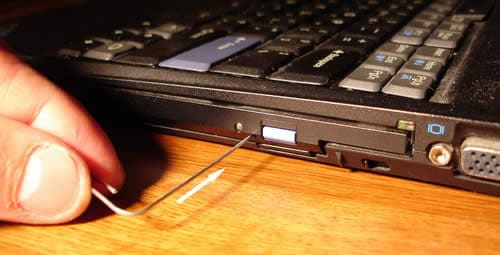
As an example I’ll take my IBM ThinkPad T42 laptop.
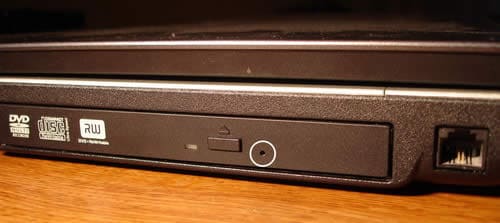
There is a small hole located on the front panel close to the eject button. Insert the paper clip inside the hole and slowly push it in.
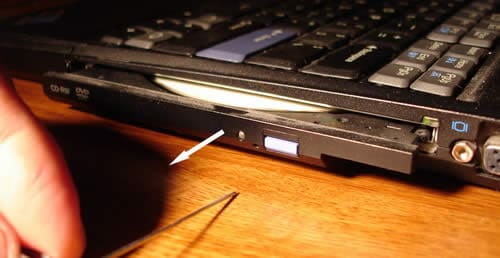
The optical drive will open up. Now you can remove the disc and close the drive.

All laptop optical drives are similar and most of them have this “secret” hole.
I took this picture from a HP Pavilion zv5000. The hole is marked with a white circle.
This picture was taken from a Toshiba Satellite A105.
In you have a slot loading optical drive, on the other hand, you cannot use this method. You’ll have to disassemble the laptop and remove the optical drive completely. After that you’ll have to disassemble the drive and remove the disc.
Tony Vigil
On my laptop the following occurs:
After I turn it on, and it boots-up “as normally it does”, I start to use it.
Then after a short period of time, the display blanks out? I have looked for some kind of “programmed delay built into the laptop”, and checked the set-up programs and icons, to try to resolve the problem.
There is a icon for the display, where you can select the display background as well. All to no “avail on my part”.
I would like the display to stay on until I turn the laptop “off” as it normally should do.
Instead…I have to move the mouse alittle bit, each time the display blanks out and get dark black, but as soon as I juggle the mouse a bit or two, here comes the display back “on again”?
What gives here? Hmmmmm
Tony Vigil
vigilaw@hotmail.com
Amit malik
Simple……. remove ur screensaver!!
Jordan Blake
You mean you’re Screen Saver is set to a blank screen?
crazeydaisey
thankyou thankyou thankyou!!! my computer panic is now aborted thanks to your express cd removal whoever you are i officially love you!!!
jeeves
Thanks guys! it worked
Bashaji
Thanks for suggetion. It is really worked out.
JPmainsupreme
You could not have made it any easier for me!! thanks!! 🙂
Jackie Jordan
I have a hp laptop and my cd disc is stuck. I tried the paper clip and it still didn’t work for me. Do you have any other suggestions? If so,please let me know. Thank you
Mike
My Laptop(samsung R60plus) DVD drive stays open, refuses to close when powered on, but can be closed when shutdown. D laptop recognises it, i can play cd or install program by holding on to d drive door. It makes a click like sound and led light blinks when d door is pushed inside, then it comes out again. Pls what can i do to make d drive door stay closed while powered on?
lalalface
My laptop is a dell and you just putthe disk in but, theres no hole for mines so what can I do? I try playing a DVD on Media, but it keeps saying, “Empty disk D:” and now I cant eject it so what am I to do?
lalalface
Jackie Jordan, try pressing Crtl + J and it might eject the cd if thats the answer your looking for because it helped with me.
Isaac
Thank you… it’s working
Rachel
Thank you sooooo much!I almost lost my sims 3 pets game and everyone knows those things aren’t cheap.
Biskie
Thanks so much for your help! Cheers!
Hannah
I love you…you rescued my Sims 3!
mario
god damn! it work! thanks you a lot.. it help me so much! < &_&.. thanks.. GREAT!~!!!!!!!!!!
Oris
Hi!
I have multiple problems right now. I forgot my windows 7 password and there’s a cd stuck, I found that hole, I did the same as described but it doesn’t eject the disc at all. I have a Samsung Serie 7. Please, some illumination!!! Thanks!
Noneofurbeeswax
THANK U SOOOOO MUCH U SAVED MY LIFE!!!
Joe
Well… The PaperClip broke in it…. How do I get it out…?
Julie
It worked!!! Thanks
Barb
Did not work, I tried several times. I think the DVD might be holding it back, may not be in correctly.
Jess
thankyou so much! saved my after exam gaming!
vincent
Thank u very much it helped
Lauren
OMG thankyou sooo much. You saved my life!!!!! Can’t live without my lord of the rings DVDs
Manan
God! You saved me from dying with slap of my father ! I love you man!
Liz
THANK YOU!! ABSOLUTE HERO.
Fletch
Absolute hero saved me life!!
Regan
I have a “Slot Load Drive” and there is no hole to put a paper clip into, though I wish there were. More than I can say! This type of loading system was my only reservation with this laptop and turns out I should have listened to that little voice! Can anyone please help me with this type of drive refusing to eject a DVD? Please? When I press the Eject button there is an odd louder than normal type of “grinding?” noise. Perhaps better described as a stuttering? I’ve also gone under the Start menu to the drive itself and right clicked on it and selected Eject to the exact same result. I’d truly appreciate any and all help you may be able to give. Thank you in advance and have a wonderful weekend!
IML Tech
@ Regan,
You are correct, there is no way to open up this drive from outside.
If the drive failed, you’ll have to remove this drive from the laptop. After that remove a few screws from the cover on the drive an rescue the disc.
What is your laptop model?
Jb
Wow….wow….wow….I was SO frustrated….and wham this worked!
Carmen
What an awesome trick! Thank you! Just saved the disc with my wedding pics on!
BTMD
Thanks Brother!
Jen
What if I have that optical drive hole but inserting the pin does nothing? How could I possibly be doing something so simple so wrong? Ugh!
thankful student
Thank you so much !!! I was setting up my printer and the CD had gotten stuck.
life saver you are
Vijja
Oowww, thank you so much!! i was panic and don’t know how to open it!
lynn
I have a dell alienware pc which is new. I put the cd in the slot and now it won’t come out. I see no reject button or whole. I don’t know what else to do. thanks for the help
Elle
Thanks a ton. Managed to remove the cd. It was driving me nuts 🙂