


In this guide I show how to disassemble a HP Pavilion dv2 model. I’m taking it apart in order to replace the motherboard.
HP Pavilion dv2 motherboard comes with the processor attached to it and the motherboard is not very expensive. If the motherboard failed it might make sense to repair the laptop.
Make sure the computer is turned off before you start taking it apart.
STEP 1.
Remove the battery.

STEP 2.
Loosen five screws securing covers on the bottom. Lift up and remove all covers.

STEP 3.
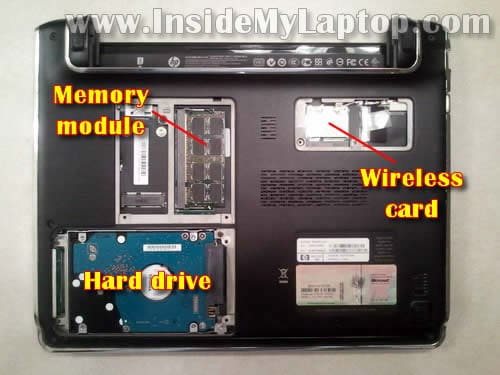
Under these covers you can access the hard drive, memory module, wireless card.
NOTE: HP Pavilion dv2 has only ONE memory slot.
It’s not necessary to remove the memory module and wireless card for the purpose of my guide. I’ll leave them connected to the motherboard.
STEP 4.
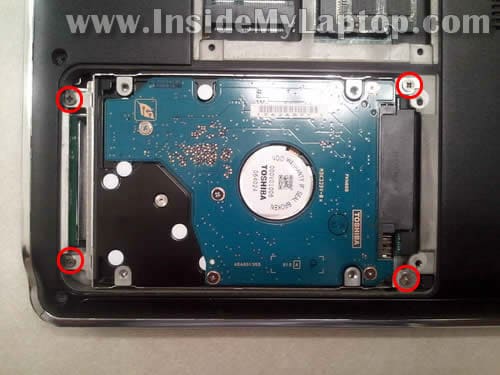
Remove four screws securing the hard drive mounting bracket.
STEP 5.
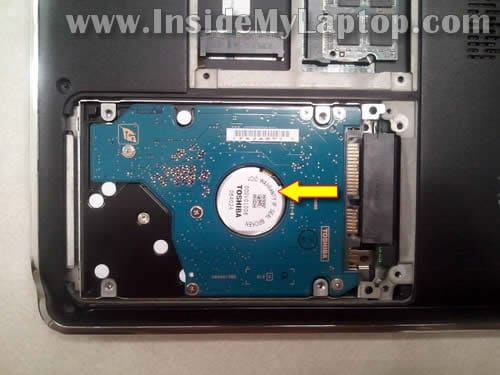
Slide the hard drive assembly to the left to disconnect it from the connector on the motherboard.
STEP 6.
Lift up and remove the hard drive assembly.
If you are replacing the hard drive you’ll have to transfer the mounting bracket to the new drive.
You can use any 2.5″ SATA hard drive.

STEP 7.
Remove two screws from the bottom. These screws securing the keyboard.

STEP 8.
Lift up the upper side of the keyboard and move it towards the screen.

STEP 9.
Here’s where to find the keyboard cable connector.
It’s necessary to unlock the connector and release the cable before removing the keyboard.

STEP 10.
In order to unlock the connector you’ll have to lift up the left side of the locking tab with your fingernail.
The locking tab will open up at a 90 degree angle.
It must remain connected to the brown connector base.

STEP 11.
On the following picture the same connector shown in the unlocked position.
Now you can pull the cable from the connector.

STEP 12.
Remove the keyboard.

STEP 13.
Remove screws from the bottom.

STEP 14.
Remove screws securing the top cover assembly.
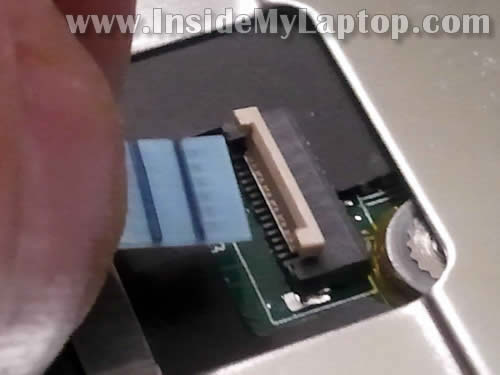
Disconnect the touchpad cable.

You disconnect the touchpad cable same way as the keyboard cable.
STEP 15.
Remove the top cover assembly.

STEP 16.
Here’s a view on the laptop with the top cover assembly removed.

STEP 17.
Remove three screws securing the cooling fan.
Unplug the cooling fan cable from the motherboard.

STEP 18.
Lift up and remove the fan.
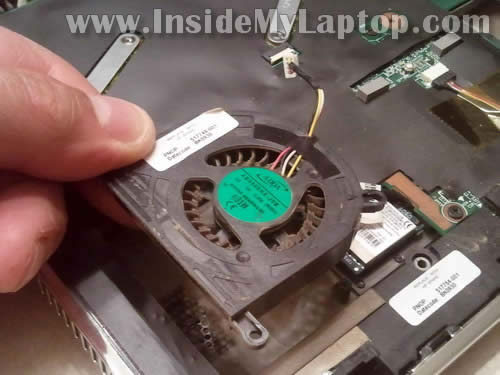
STEP 19.
Remove five screws securing the side cover.

STEP 20.
Remove the side cover.

STEP 21.
Disconnect the RJ-45 (LAN) jack cable from the motherboard.

STEP 22.
Lift up and remove the RJ-45 (LAN) jack assembly.

STEP 23.
Disconnect two antenna cables from the wireless card.

STEP 24.
Disconnect the video cable connector from the motherboard.
The video cable connector located close to the wireless card.

STEP 25.
Remove one screw from the VGA connector.

STEP 26.
Remove all screws securing the motherboard.
Disconnect the following cables from the motherboard:
1. Bloetooth module cable.
2. Speaker cable.
3. DC power jack cable.
4. Webcam/microphone cable.

Here’s how to unplug the Bluetooth and speaker cables.

Here’s how to unplug the webcam/microphone cable.

Here’s how to unplug the DC jack cable.

STEP 27.
Start removing the motherboard from the left side.

STEP 28.
Carefully lift up the motherboard. There is one more cable to disconnect on the right side.
This is the switch board (on/off button) cable.

Unplug the switch board cable.

STEP 29.
Now you can remove the motherboard.

Here’s the laptop bottom cover with the following components still attached:
– Speaker.
– DC power jack.
– Switch board aka Power button board aka on/off button board.

On the bottom side of the motherboard you can access the CMOS battery and heatsink
As I mentioned before, the processor (CPU)Â is soldered to the motherboard. It cannot be removed, upgraded or replaced.

austine
hi i have an hp dv6 laptop the power jack is showing orange color light but is not charging and even if i remove the battery the laptop is not coming on, please i need an urgent solution……….
John
wow wonderful article
Nia
hi, i got this laptop and its broken only after 1 year i used. same problem like austine. can power on but screen not showing up. so fade up, i lock it in box. not open it almost 1 and half year now :{ its cost a lot money to take it repaired at shop. wishing for miracle hoping maybe u can help,please..should i change the motherboard only?
IML Tech
@ Nia,
That’s exactly the problem I had with my laptop.
1. Try replacing memory. Could be just bad memory module.
2. If replacing the memory doesn’t help, try replacing the motherboard. It’s about $70-80 on eBay.
Karl
Thanks for this tutorial. Love my dv2 for it’s size but the hard drive is making noise and I am thinking about replacing it and the fan. I want to use the laptop for a home recording studio and the thing makes too much noise! The microphone will pick it up no matter how I try to mask it.
Thanks.
Karl
Richard
how to do to remove the keyboard, i am not able to pull it, it looks like its going to break
IML Tech
@ Richard,
Make sure all keyboard screws removed on the bottom of the laptop.
Also, it’s possible the keyboard secured to the top cover with double sticky tape.
Lift it up slowly.
Peter Dew
A very good article but you miss telling me what I would like to know. I have the same notebook, HP Pavilion dv2, model 1015ee, and there is an identical empty slot next to the RAM module, clearly seen in your pictures above, but I can’t find what it is for. Do you know, please ?
Aka
Does it mean i can’t re apply thermal paste between the cpu and heat sink since the cpu is soldered to the mother board? My laptop is overheating a lot even after cleaning the fan. Any tips?
IML Tech
@Aka,
This is not correct. You still can remove the heatsink and apply new thermal paste on the CPU.
Aka
Oh ok then. Thanks a lot! Hopefully after reapplying the thermal paste it wont overheat anymore.
Stein
Hi! Do you know how to remove the heatsink? Thanks
IML Tech
@ Stein,
There should be a few screws securing the heatsink. Remove screws and carefully separate the heatsink from the motherboard.
Karl
This was great. My system would not boot up. The hard drive would spin and the LED’s would come on but that was all. I tried new memory but that did not help. Get a new mother board from eBay and used this article to swap the MB. It booted right up after the swap. Thanks for great article.
ace
Dv2. I have a problem with my screen and i want to setup my bios to install new os and I want to use external monitor. The fn+f4 doesn’t work is there any way to display my external monitor? thank you in advance.
AC
Hi. I would like to replace the motherboard of my dv2 1010au laptop. What is the exact model number of the motherboard that I should buy? And do you recommend buying replacements instead of the original ones? Thank you.