

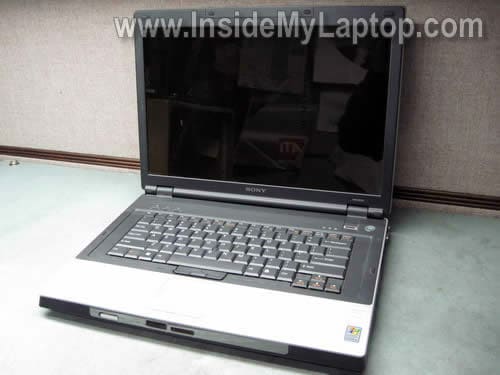
In the following guide I explain how to disassemble a Sony Vaio VGN-BX series laptop.
In my case, I’m working with a Sony Vaio VGN-BX760 model.
STEP 1.
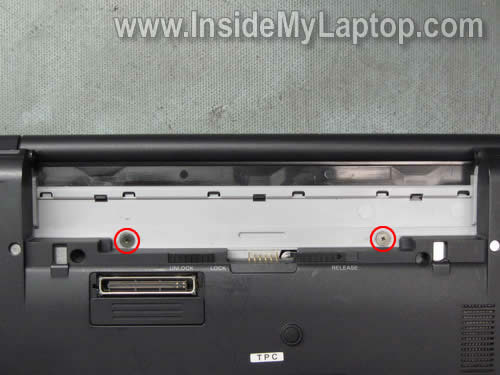
Turn off the computer, unplug the AC power adapter and remove the battery.
Remove two screws found in the battery compartment. These screws securing the keyboard cover.
STEP 2.
Remove two rubber screw seals. You’ll find two screws hidden under those seals.
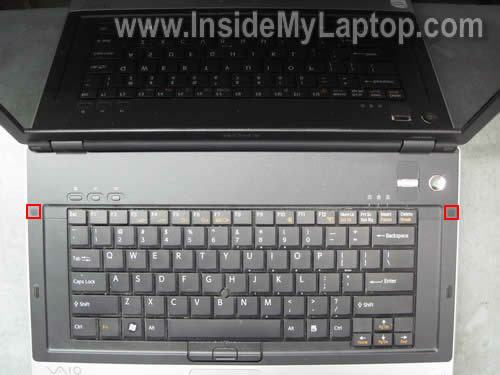
You can remove the screw seal with a sharp object. The bottom part of the seal is sticky. Glue the seal somewhere so it doesn’t get lost.

STEP 3.
Start removing the hinge cover from the top cover.
Be careful because the power button board and finger scan device are attached to the cover and connected to the motherboard.

STEP 4.
Remove the hinge cover.
Now you can access the ribbon cable and disconnect it from the motherboard.
It might be not necessary to disconnect this cable, simply move the cover aside and secure it somehow. I’m showing how to disconnect the cable just in case if you have to.

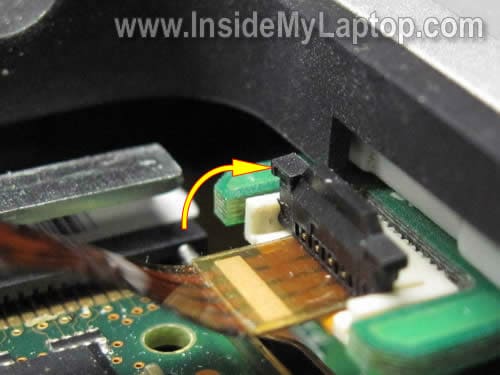
In order to disconnect the connector you’ll have to lift up the locking clip about 2 millimeters. After that you can pull the cable from the connector.
The locking clip (dark brown) must stat attached to the connector base (white).

STEP 5.
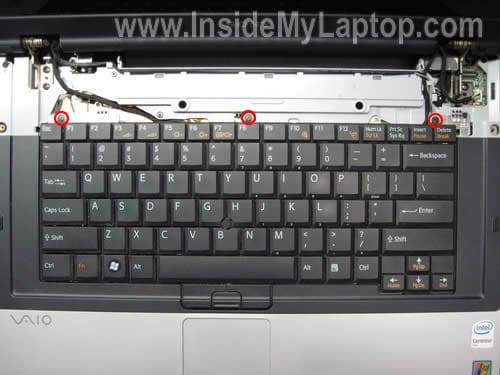
Remove three screws located above the function keys.
There are two ribbon cables connecting the keyboard to the motherboard:
1. The pointing stick cable.
2. The keyboard cable.
STEP 6.
Move the keyboard towards the display so you can access the pointing stick cable.

STEP 7.
Unlock the connector and release the cable.
STEP 8.
Carefully turn the keyboard upside down and access the cable connector underneath. The locking clip must stat attached to the connector base.

STEP 9.
Unlock the connector and release the cable. The locking clip must stat attached to the connector base.
Now you can remove the keyboard completely.

STEP 10.
Remove all screws securing the aluminum cover.

STEP 11.
Remove the cover.
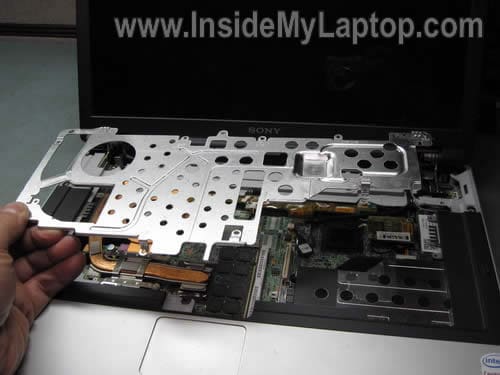
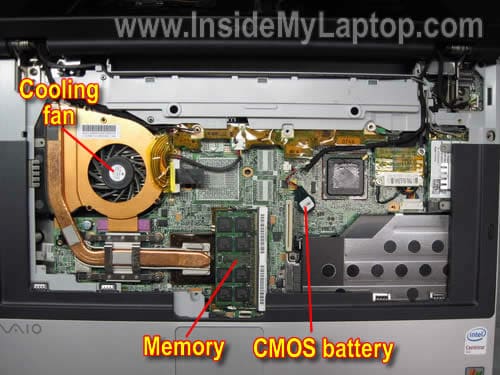
Under the cover you get access to the cooling fan, memory module in the internal slot, CMOS battery.
STEP 12.
Remove/loosen five screws securing the heat sink and cooling fan assembly.
Disconnect the cooling fan cable.
You’ll have to disconnect the video cable from the motherboard because the fan cable routed under the video cable harness.

STEP 13.
Remove the heat sink and cooling fan assembly.

STEP 14.
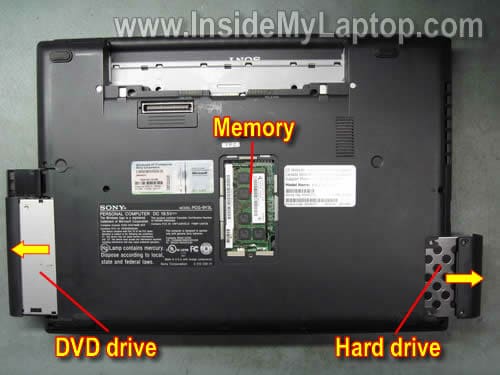
Remove the memory module from the internal slot.

Another memory module, hard drive and optical CD/DVD drive can be access and removed from the bottom.
Andrew Scott
This is an excellent guide. Thank you very much!
gerard
hey what if the wire that goes into the back gets loose and no longer powers the laptop.. it looks like that part comes out and can be replaced.. is that true or not true.. do you know? Pls get back. Thank you.
IML Tech
gerard,
Not sure what you are asking about. Are you talking about the power socket inside the laptop? The place where you plug the AC adapter?
If the power jack is loose, you’ll have to disassemble the laptop and take a closer look at the jack. In most cases the jack can be replaced.
Michael
This is a great guide. I have a question about the monitor. I replaced the monitor on the computer I have, same model BX760.
There was a small rectangular magnet on the right side of the monitor. What is it for if anything? Strange thing too… I can’t get the computer to standby or hibernate when the cover is closed.
Is the magnet related and if not what do you think it could be?
Thanks in advance
Michael
IML Tech
Michael,
Yes, it’s related.
Your laptop has a magnetic lid close switch. The switch is located somewhere under the laptop top cover.
When the display is closed, the magnet activates the switch and the laptop goes into standby or hibernation mode.
If you removed the magnet, you’ll have to install it back into the display. This will fix standby/hibernation issue.
Michae
Dear IML Tech
You are the best!!
I actually tried to put the magnet back before with no luck at all. I was within about an inch of getting into the right position when I actually installed the new monitor and never knew it. I did find out where to position it and now it works perfectly!
Thanks again!!!!!
stephane
HI,
Last week, my SONY battery failed and I bought a new no-SONY battery. But unfortunatly, a special program must switch off my laptop !
Have you alredy met this problem and have you got a solution ? My laptop is a VAIO 417 M.
Regards,
Steph from France
Paul
Hi im working on a Sony Vaio VGN-BX51VN unfortunately ive got to the part where you remove the power button but ive damaged the ZIP ribbon cable the brown part has come off is there any way to fix this?
stephen
i have also damaged the power button ribbon cable,do you know where i can find a replacement and also how do you tell which way round it inserts? thanks great tutorial,only wish i saw it before i tried to repair lol.
cata_o
Thank you very much. I was able to replace my memory in minutes!
TV
I am fixing the touchpad left click button if possible on a Sony BX540. It is depressed or pressed in too far, it still works, but I feel it could be easily bent back. Is that a possibility or pointless?
IML Tech
TV,
I believe both touchpad buttons are part of the top cover assembly.
Apparently, in your laptop the left button is broken. If that’s the case, you’ll have to replace the whole top cover assembly.
The palmrest/touchpad assemble for Sony Vaio VGN-BX540 available on ebay.
francis
hello, thanks for your guidelines a lot of help gives us to be courageous to open our laptop! need to ask i have a vaio vgn 196sp try to find the cmos battery is not the same as it in the module you have the only thing i did not go far yet is to look under the mainboard . is it in pin type? need to reset the bios password. thanks for the help!!
Ben
Have a Sony Vaio vgn-bx196sp although the motherboard is slightly different to the one pictured particularly the type of heatsink and its location.
Now the problem, the laptop switch on and seem to be working but no display even to the external monitor.
What can i do please. Cant afford the repair cost for now and would want to DIY first and see if i will be lucky.
Dee
is there any place to get a KB for a VGN BX760 without paying $130 for it?
IML Tech
Dee,
I couldn’t find any. :/
It looks like the keyboard part number is 1-417-806-21 but when you search on Google or even eBay, it either brings no results or finds very expensive replacements. I guess it’s a rare keyboard.
Choky
please explain why after i’m disassemble my laptop then asemmbling it again, the monitor wouldn’t on ?
IML Tech
Choky,
It depends on how far you disassembled the laptop.
Could be one of the following:
1. Memory module not seated correctly.
2. The video cable not plugged correctly.
3. The CPU is not locked in the socket, etc…
Test your laptop with an external monitor. Can you get image on the external monitor?
Jim
Greeting bro,
I would like toreplace the modem/nic assembly. Do youknow the part number for this assembly and do you have a pictorial assembly instruction set for this application? Thank you for your time.
VIk
hi
tried putting win7 on my vaio (with a damaged lcd, but was working with an external monitor. Now it won’t output anything via vga out?
any cheap lcd options or maybe a docking station as a work around?
Thank you for your time.
V
Shahriar
Thanks Thanks
Many Many Thanks for the guide
Shahriar
Hello Sir,
I am using Sony Vaio VGN-BX196VP. When i playing any game or watching any movies then my laptops goes Very Warm & The Cooling Fan runnig very fast and its make sound of air flowing. Is there anyway to make my laptop allways cool or any way to reduce the air flow sound. And i wanna use Boot from USB but their is no option on Bios. How can i enable it.
My O.S.- Win7 32 bit & WinXP
Ram- 1.5 GB
HDD- 80 GB
Thank You
IML Tech
@ Shahriar,
It’s possible your laptop running very hot because the heatsink clogged with dust. You should be able to fix it by cleaning the heatsink.
The best way would be removing the keyboard (as it shown in the step 8) and blowing compressed air into the fan.
Not sure about booting from the USB drive. Does your laptop support it at all?
Here’s something to try.
1. Plug USB drive into the laptop.
2. Enter BIOS setup menu.
3. Check bootable devices.
4. If you see USB drive in there, make it the first bootable device.
Save settings and restart.
Shahriar
Hello Sir,
I opened my laptop & fully clean the Fan only. But I did not touch on the heat sink because in my laptop i can move out the Fan separately. Is that ok or i have to do anything more.
Thank You
dchet
Dvd front cover came off……how does it go back on……..
IML Tech
@ dchet,
Normally you just place it in the right position, apply some pressure and clip in. There should be three or four plastic latches holding the front cover.
If it doesn’t stay in place, apparently these latches are broken. In this case you’ll have to purchase a new cover.
BobbyC
Hi
Great manual on disassembling the laptop, really clear and I used your HP DV6500 as well. I’ll be donating :-).
Do you know where I can get a replacement keyboard from Also, the hinges on my Vaio VGN-BX are knackered and the lid can not stand up by itself. Do you know how I can replce them and where I could get the part?
Many thanks in advance
BobbyC
IML Tech
@ BobbyC,
I think you can find both parts on eBay.
palxeno
dear friend
i am using sony PCG-FR215S laptop(XP home edition,1GB RAM,1.2GB PROCESSOR) since more than 8 years but from last year my laptop fan is making noise and runs very slow.i was tring to change fan or upgrade RAM AND CPU performance how can i get these part or is it worth while doing it in your view. please guide me through this problem.i love my laptop ..my first laptop..
IML Tech
@ palxeno,
Take a look at this service manual for Sony PCG-FR series laptops. It has laptop break down and part numbers. Could be helpful.
The link to the manual located closer to the bottom of the page.
chris
hi,
first off all- My English is not the best, but i try.
please, can you help me? I got a Sony vaio vgn bx 195 vp . and i belive the matherboartdis defekt.
I got a Chance to bay me a Motherboard from a vgn bx 190 sp.
do you Know can work the on my …195 vp is this the same Moatherboard.
Regards hugs from Chris – Byern
IML Tech
@ chris,
Sorry, I don’t know if these motherboards are interchangeable.
It looks like both laptop are from the same model line VGN-BX. There is a good chance the replacement will work but I’m not sure 100%.
Lua
I am a girl, and i could understand it.
which means your site is GREAT.
😉 Thank u man.
Didi
Hi, I have a sony vaio vgn-bx194vp and the monitor doesn’t work (it’s black) when I start the computer, so I can’t see anything. Can you help me?
Thank you for the great guide 🙂
brian miller
vgn bx197xp very good but my version is a different layout, half the fan motor is under plastic surround and the heat sink goes best part accross the machine i havent removed heatsink yet but their is no sign of cmos battery. Brian