

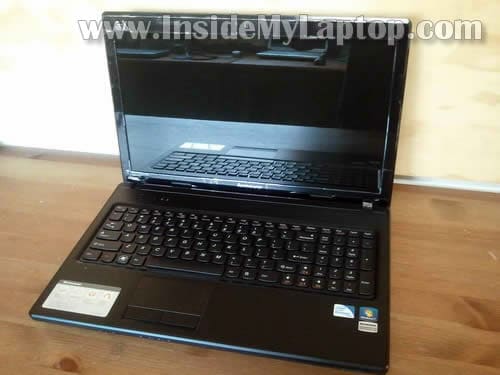
In this post I explain how to upgrade memory or hard drive on Lenovo G570.
To be precise, I’m working on a Lenovo G570 (Model Name: 4334).
Also, at the end of the post I show how to remove and replace the cooling fan.
Make sure the computer is turned off before you start disassembly.
STEP 1.
Remove the battery. Loosen four screws securing the cover on the bottom.
Replacement batteries available here: https://ebay.to/2SQBFzt
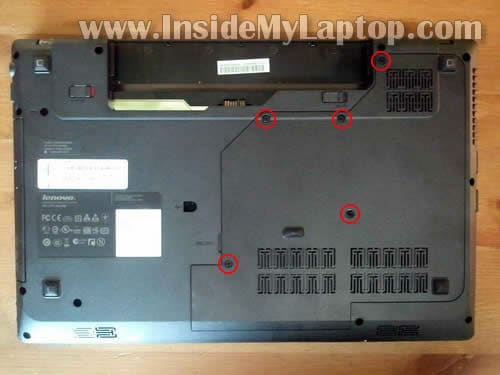
STEP 2.
Lift up and remove the cover.
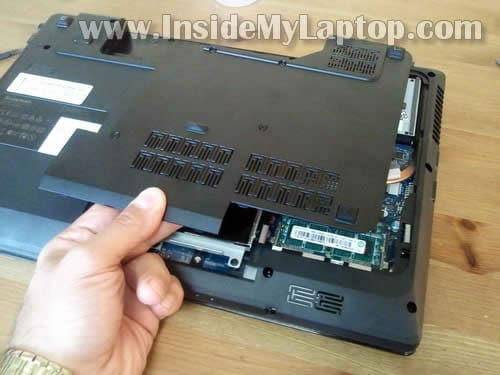
STEP 3.
Remove two screws securing the hard drive.
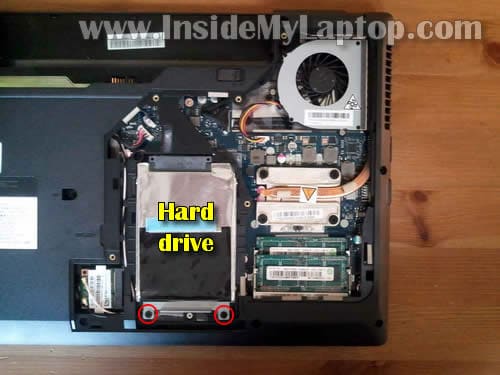
STEP 4.
Slide the HDD to the left to disconnect it from the motherboard.
Lift up and remove the HDD.
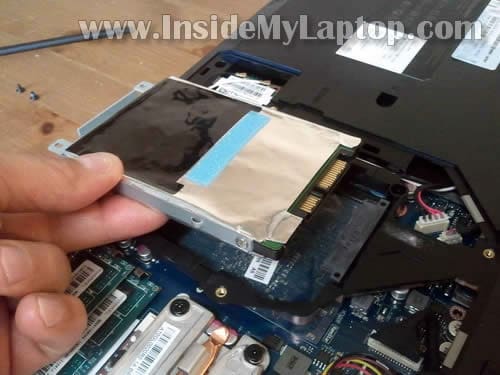
STEP 5.
You’ll have to transfer the mounting bracket and aluminum hard drive shield to the one.
NOTE: I don’t think you’ll need to transfer the shield if upgrading to a solid-state drive (SSD).
Remove two screws on each side of the HDD and remove the mounting bracket.
Carefully pill off the aluminum shield.
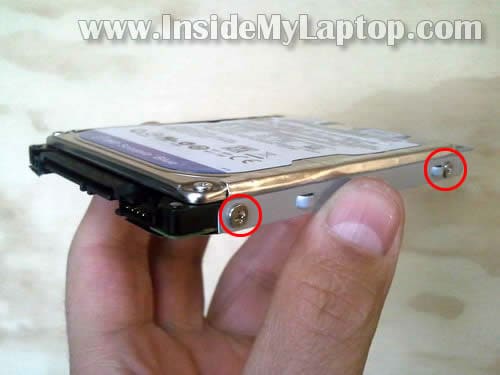
Lenovo G570 has a regular 2.5″ SATA HDD installed.
You can upgrade this drive to any other large capacity 2.5″ SATA HDD or 2.5″ SSD (solid-state drive) which is more expensive but fast and quiet.
I prefer to use known brand SSDs, such as Crucial, Kingston, OCZ.
After replacing the HDD you’ll have to reinstall the operating system.
STEP 6.
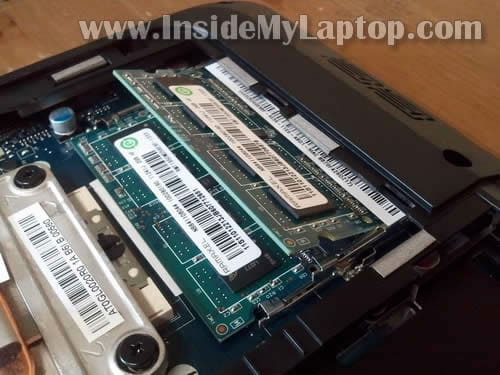
Both memory modules can be accessed on the bottom of the laptop.
In order to remove the memory module you’ll have to spread latches on both sides of the slot.

STEP 7.
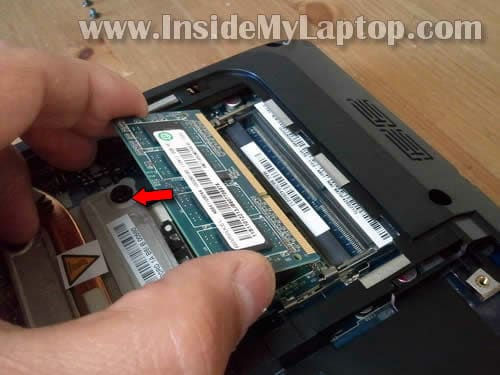
The memory module will pop up at a 30 degree angle.
STEP 8.
Carefully pull the memory module from the slot buy the edges.
Use same technique to remove the second module.
Lenovo G570 (Model Name: 4334) can take up to 8GB RAM.
You can install up to 4GB RAM module into each slot.
RAM used: PC3-10600 DDR3 SDRAM SODIMM 204 pin.
NOTE: your laptop has to run a 64-bit OS to be able to use all 8GB RAM.
REMOVING COOLING FAN.
If the cooling fan started making noise, it can be easily remove and replaced.
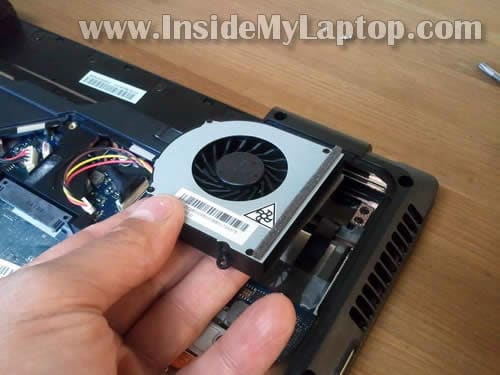
In order to remove the fan you’ll have to disconnect one cable from the motherboard and remove three screws.
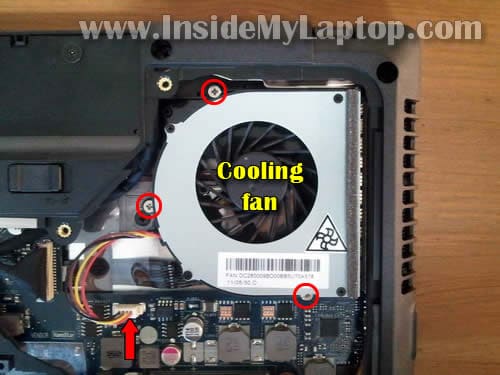
After that lift up and remove the fan.
If the heat sink is clogged with dust, you can clean it with compressed air.
New replacement fans available here: https://ebay.to/38Sp2t7
Shaggers
Hi I forgot my CMOS / boot password so I need to pull the CMOS jumper / battery from the G570…
Lenovo in Australia are USELESS arseholes who have denied all my 3 requests for a user manual.
Can you give me any help on the subject?
I have partly dismantled the case and split the top and bottom parts, but it’s a getting a bit difficult and experience says not to force it.
So I either need a service manual to go by or to get help in finding the cmos jumper or battery location… I am assuming that laptop jumpers may look different to big box MOBO jumpers.
IML Tech
@ Shaggers,
It has laptop disassembly instructions and this is the official service manual.
I doubt that removing the CMOS battery will remove the BIOS password. Not sure how to do it on Lenovo laptops. Hopefully you’ll find the way to clear the password.
Ben
This is awesome, I just need to know if I can go one step further and replace and upgrade the CPU to an i5. even if you just let me know whether I can or not it would be greatly appreciated.
Max
Which RAM did you upgrade to? Mine came with 6gb installed and now im having difficulties finding the 4gb stick so they can both match up by getting rid of the 2gb stick. The part number on the 4gb stick is RMT3020EC58E9F1333 and the manufacturer is Ramaxel Technology. Thanks in advance.
IML Tech
@ Max,
This is PC3-10600 non-ECC Unbuffered DDR3-1333.
You should be able use any other brand memory with this one. Just make sure it’s PC3-10600 module.
raju
Hi
Two days back i taken lenovo g570(2350) .i installed oracle apps .but the graphic card drivers are not support that one.while i enable the graphic card drivers in the lap top monitor display was blinking.could you please tell me what the problem.
guian
Hello!, i find it very useful the tips that you shared..by the way, can i used different brand for memory upgrades?.for example Kingston ValueRAM 4G DDR 1333Mhz PC-10600 CL9 1.5V Unbuffered Non-ECC and Intel PC3-10600 DDR3 SDRAM SODIMM 204 pin? Thank you sir!
Amit
Hi ,
Is it possible to upgrade Graphic card
Amit
Hi
Many thanks for your post.
Great help, i will soon try to upgrade my laptop to include an extra SSD hard drive.
I’ll let you know how it goes.
regards
Amit
Oliver
Hi I am going to buy the same laptop model (g570 4344), and I want to buy extra ram at the same time and was wondering if it came with two 2gb modules or one 4 gb module, so i know whether or not to buy one 4gb module or one 4gb module
IML Tech
@ Oliver,
In my case the laptop had two 2GB modules installed. Most likely you’ll have same configuration in your laptop too. The only way to confirm that is removing the bottom cover.
Phil
I found it hard to remove the cover, there was 5 screws in my G570 and on the left side I could not open or left it out so I just had to left high enough to add the extra memory module. by the way thanks for showing this picture .now I know to upgrade my lenovo HHD..
Johnny
Hey will this take the 2.5″ 12.5 millimeter high drives?
Boob
It would have been nice if you had mentioned whether it is SATA II or SATA III
I cant find it in the specs, I did find in the Intel M HM65chipset will support 2 x sataIII 6.0GBS
but whetehr the MOBO on this Laptop has it cinfigured that way WHo knows ?
it would make sense .. good Info to have so If you Buy An SSD and it is only SATA II you can save some money and buy a SATA II 3.0GBS SDD but you would be stupid to buy that if it can use the SATA III , they are only like 10-30 dollars more but perform much faster
of course a SATA II compared to the piece of shit 5400 RPM HDD is going to be like Night and Day
difference But the extra boost in performace to the sATA III 6.0 would be nice…
SO is it SATA II or III? also what about mSATA? is there a slot for that ???
then no need to replace the HDD just add the mSATA and get the same night and day performace increase….. SO is there an mSATA slot and is it 3.0Gbs or 6.0 ?
Anna
Hello
I have never upgraded RAM before. Do I just swap the RAM cards and that’s it? Or do I have to do anything when I reboot the laptop such as fiddle with any software?
Thanks
IML Tech
@ Anna,
Yes.
The new memory should be detected and configured by the laptop automatically.
TRENT (boob)
OK I UPDATE MY POST – IT IS A SATA III PORT FOR THE MAIN HDD AND ALSO OPTICAL DRIVE
I REMOVED THE SEAGATE st500lm012 500GB sata ii 5400 RPM SAMSUNG AND
REPLACED IT WITH AN adatA 128gb ssd (LENOVO SUPPORT SAID THIS LAPTOP DOES NOT SUPPORT ssd’S lol ) I HAD TO LAUGH AT THEM ANY WAY COMPARED TO THE CRAPPY HDD THAT COMES WITH THE SSD IS KIKIN THE BUTT, DOUBLED MY 3DMAR06 SCORE!
ALSO BOOT TIME OF HDD 54 SECONDS WITH THE SSD 23 SECONDS
AND REBOOT TIME IS 17 SECONDS.. ALL WITH STOCK MEMORY
SO I SWILL SOON REPLACE IT – THIE MOBO CAN DO DUAL CHANNEL WHICH DOUBLES THE BANDWIDTH AND NUMBERS OF MEMORY OPERATIONS SO THIS LAPTOP IS CRIPPLED BY THE SINGLE 4GB MODULE (THEY SHOULD HAVE USED 2X2GB)
SO NOW I WILL REPLACE THE MEMORY WITH 2X4GB OF SOME GSKILL MEMORY AND NO DOUBT MY 3DMARK6 SCORE WILL INCREASE BY ABOUT 33% MORE
SO DOUBLE YOUR MEMORY WITH 2 STICKS AND ADD AN SSD YOU WILL GET A HUGE NIGHT AND DAY DIFFERENCE WITH THE LAPTOP PERFORMANCE
SO FOR ABOUT 125-160 DOLLARS YOU CAN ADD AN SSD AND 2X4GB MEMORY AND HAVE A KICK ASS LAPTOP- EASILY BEATING LAST YEARS ALIENWARE OR ASUS GAMING RIGS
Amon
Hello! Can I put a graphics card as an upgrade in Lenovo G570? Also, can it support a 2TB HDD? I want to upgrade my laptop to the extreme. The best graphics card, RAM and HDD supported by G570. Thanks!
Manny
Can I upgrade the processor to i7?
pat
I have this meachine and want to upgrade. How can I now that I have a 64 bit OS?
IML Tech
@ pat,
Click on System in Control Panel.
Look at the system type. It’s either 32-bit or 64-bit OS.
Patt
This article on the G570 is great. I changed out my memory to 2x4G, and the BIOS picked it up as 8G, but didn’t change to 2T .. still single channel. When I tried to get into Setup on boot .. it asked me for a password which I never did establish before. Will removing the CMOS battery (on theG570) erase the unknown existing password?
IML Tech
@ Patt,
I really doubt it. Lenovo laptops are secure and most likely removing the CMOS battery will not help.
Louis
Hello,I was wondering what ram I must use an would I be able to upgrade intel to i5 or i3?
blackmazda
Hello
i have never upgrade ram , type of lenovo is G475 where is the second slot of ram or maybe i should replace the 2 gig ram with 4 gig ram
matt
Hi,
I own the same computer, Lenovo G570 with Intel Core i5-240M dual-core processor with Intel graphics 3000 and 4 gb 1333 DDR3 dual-channel Ram.
First,
Is is possible to upgrade that graphics card in this specific laptop?
Second,
is intel core i5 good or bad as a dual processor?
Third,
Could you explain in detail of how i could set up a better RAM?
Smart
hi I Have lenovo G570 LAPTOP WITH 4GB RAM , 500 HARD DISK, windows7 32 BIT, 32 BIT, INTEL I3
I would like to change this into 64 bit for adobe after effects is this possible…..
help me out….
IML Tech
@ Smart,
It’s necessary to reinstall Windows OS from scratch but instead of using 32-bit installation CD use 64-bit.
Ronnie
Hey I opened up the back of my g570 to clean it out. I did that fine, with the help of your instructions. thank you for those :0) however my wireless is not working now. it shows a red X over the wireless bars. a friend says I may have knocked the card loose but I can’t see where. can you help?
SubhraS
Thnx a lot! my g570 was not booting & out of warranty. Removing HDD & replacing it did the trick. Thanks again!!
swiftandsilent
For a Lenovo G570 4334, can anyone describe the steps to upgrade the Pentium B950 CPU to a Core i5 or i3? I figure it needs a BIOS update but will it work power wise with the current cooling fan/heatsink? Anyone tried this before? What else is needed? TIA swifty
faisal
hi
my name is faisal
i owned th lenovo g570 laptop from past 2yrs
withing the last 2 yrs . i didnt face nay problem but suddenly a month back it started creating problem for me ..
when i checked out in the service centre here ..
they are saying my internal hard disk is corrupt .. and the cd-drive is also not working …
when i asked the technical department for the reason they arent saying anything … whasts the problem .. that has my harsdisk to get corrupt…
i hardly used to use the latop for my projects….
and when i asked for the parts replacemnet cost they say it wil cost around 8500-9000
so i dont know what to do … whether to replace it ..
or anyidea do u have what wil be the cost..
u can u give me any suggestion what to do
or what is the problem regarding it ..
plzz help me i am very tensed .. becuz i need to work on my ty projects from now onwards…
i have given for servicing at ethecis .co.in in lower parel..
so plzz kindly guide me what to do .. to the laptop..
or where is the lenovo main centre…
awaiting ur reply
Eldeib
@ Faisal
Replacing your Hard Drive isnot abig issue you can do it yourself instead of giving it to a technician
Just buy anew hard drive and open the case as shown above and install the new hard drive
1 TB HDD = 100 $ Approx.
sachcha
Hi, I have a HITACHI PN35K5T laptop with 80GB HDD and 1GB RAM. I need to increase my HDD. Is it worthwhile to replace another HDD and RAM?
IML Tech
@ sachcha,
I guess it’s up to you. This is an older laptop but it can handle up to 2GB RAM total.
Kumar
can u tell where the cmos battery is located because i forgot my bios password so i have to reset it I’m having lenovo g570 thnk s in advanced
Autumn
Hello, I have the Lenovo G570 laptop and recently my sister stepped on it and broke the hard drive, I need to replace it. the issues I’m having is the hard drive it came with is 2.75″ not the standard 2.5″. If I order a 2.5″ will it still work?
HDD model WD7500BPVT-24HXZT3
7500GB
5400rpm
2.75″
I’m stuck looking up this same hard drive its generally a couple hundred dollars where I can get a comparable 2.5″ for $60-$100.
I also don’t understand why they didn’t put a standard size HDD in, as it seems this model generally has a 2.5″, unless I’m completely missing something
Thanks
IML Tech
@ Autumn,
You have a regular 2.5″ SATA drive installed. You can buy any 2.5″ drive and it should work.
Here are dimentions of a 2.5″ drive (from Wikipedia): 2.75 in × 0.275–0.59 in × 3.945 in (69.85 mm × 7–15 mm × 100 mm) = 48.895–104.775 cm3.
max
@ronnie he probably did not do that, he may have just disabled it, check if the little wifi switch is infact on, look on the side of the laptop below the LEDs, to the left, under the mosuepad, make sure it is on, then press FN+f5 and enable wireless network card, GoodLuck
Utsav
I am unable to pull the cover of my laptop…have loosen all the screws….how to pull it….please elaborate this step please
IML Tech
@ Utsav,
There are hidden latches securing the cover to the bottom of the laptop. If ALL screws are loose, you’ll have to apply some upward pressure to remove the cover.
Insert a small flathead screwdriver between the cover and the case and lift it up.
Bapuji
HI Sir,
My name is Bapuji,
I bought a LENOVO G570 with model 20079 from last year.It has inbuilt 2 GB RAM and 320 HDD.Just I want to upgrade to 8 GB Ram with 500Gb HDD.
Can I upgrade it??????
Please reply me as soon as possible.
I need a solution.Becz I am doing some SAP course that needs practical, thats why needs at least 8gb with 500gb HDD.If it can’t be, then I should go for a new.
Radda Radda
Can you make a guide on how to do this on a Lenovo G450?
IML Tech
@ Radda Radda,
Take a look at this user manual for Lenovo G450/G550 laptop.
J. Keyser
my laptop sat for a yr & half without being plugged in or used. IT now won’t fire up at all. I”ve checked the power cord and the LED light is on so do not think that is the problem. So I’m opening it up to check that the power source is plugged in inside. It was shipped, so am hoping it got dislodged in shipping. Any other ideas on what it could be are welcome. thanks
IML Tech
@ J.Keyser,
Try removing the battery for a while. After that plug in the AC adapter and try turning it on again. This might help.
Born257
I have a laptop Lenovo G570 Notebook (4334). Can I connect a Kingston SSD mS200 60GB mSATA MLC SMS200S3/60G
Vlad
Hello
Can i instal this ram CRUCIAL CT51264BF160BJ, 4GB DDR3, 1600MHz, CL11 and this SSD KINGSTON SV300S37A/120G, 120GB, 2.5″, SATA 3 on my lenovo G570 . Thank you for your answer
Rob
Hi, great site.
Today my Levono G570`s hard drive died.
With the information you have given I can repair it.
My problem is…how do I re-install the operating system, which was Windows 7 Premium Home edition. My laptop did not come with a disc?
And I could not back the computer up to disc as it would not format the disc to allow it.
I only bought the laptop in Oct/Nov 2012.
Many thanks,
Rob
IML Tech
@ Rob,
Probably you can call Lenovo and buy the restore disc from them.
Or you can search for an OEM Windows 7 Home Premium image on pear-to-pear network. Download and burn on a DVD. Install the OS and after that activate it using the license key from the bottom of your laptop. NOTE. It has to be an OEM software, not retail.
Castor Padamada
Hi! My Lenovo G570’s fan isn’t spinning I think. There was no air coming out from the sink. And if I watch an MKV file, after a few minutes the CPU percentage at the Task Manager goes up to 100% and the video will lag. It also happens while browsing at times. What to do? Thanks!
IML Tech
@ Castor Padamada,
It’s very easy to access the fan on this model.
Here’s what you can do.
Remove the service cover as it shown in the step 2. Turn on the laptop and play a video file. Keep an eye on the cooling fan.
If the fan doesn’t spin, probably it’s bad and has to be replaced.
Castor Padamada
If the fan is not spinning, can it be repaired? Also, can this laptop run Windows 8.1? Thanks!
IML Tech
@ Castor Padamada,
You can easily replace the fan. A new fan cost only $10-15 on Amazon.
I found device drivers for Windows 8 on Lenovo site, so it should run 8.1.
Castor Padamada
Thanks for the response!
Another question, there’s also a problem regarding my laptop’s wireless capability. I already had installed the correct driver but it can’t detect wireless connections. What to do? Thanks!
IML Tech
@ Castro Padamada,
Take a look at the device manager. Make sure the wireless card is enabled.
The wireless card can stop working because of one of the following:
1. It’s disabled in the device manager.
2. The physical Wi-Fi switch (if present) is turned off.
3. Corrupted driver.
4. Failed Wi-Fi card.
yashpatil
Hello
I have noticed a days that my laptop is lagging when i play my games after giving it for reparing. Before giving my laptop it was working great. Is that if my fan is not working the games are not working? Please help me. I hope u do. U can email me to. my laptop is lenevo G570. model no- 200179
Chase
I have this exact model and installed 2 8GB 12800 RAM modules. The BIOS only has room for 4 digits, so it shows that I have 1638MB installed, but when I boot Windows, 16GB is installed.
HEX Ho
I use a Lenovo g470.
Managed to take out the HDD with the caddy.. Then I took out the 4 screws but struggled to remove the HDD. Gave up and reinstalled e HDD.
Thanks to your website, I realized I need to peel the aluminum seal.. Guess that voids my warranty.
Have migrated successfully to my SSD and enjoying the speed now.
Just dropped you this note to say THANK YOU!
kenneth santiago
how did you remove your dvd rom and replaced with a hard drive, do you have link for the parts needed for that, or a guide on how remove the dvd rom and install second hard drive?
IML Tech
@ kenneth santiago,
What is your laptop model? I cannot tell without knowing that.
CHiRAG RAVAL
I have lenovo G570, it has 2gb RAM and 250 HDD,
Is it dual core processor or P4? I dont know..
I also want to upgrade it to 6gb RAM And 1TB HDD.
Please give me instruction.
Thank you.
Steve
Hi, an issue with my g570 is when booted up A disc error occurred comes up, states to Press Ctrl Alt Del to restart. this does nothing but go back to the same screen. Have put the hard drive in another laptop and same thing, so i think that is the issue. Google searches suggest to disconnect sata cables to do a re-boot to recovery. is there a diagram for this. As unfortunately i do not have a recovery disc saved. Cant find anything on the lenovo website that will help.
Thanks
Steve
bill
Lenovo G570
Taken Laptop apart; can’t find the CMOS motherboard battery either. Does anyone know where it is
located?
Thanks in advance