

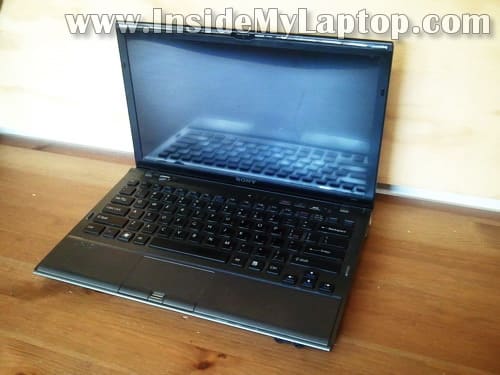
In this guide I’ll be taking apart a Sony Vaio VPCZ1.
I’ll show how to remove the keyboard/palmrest assembly in order to access the internal components.
You can use this guide for accessing the hard drive (which is mounted inside the case), memory modules, optical DVD drive and wireless card. Also, when you remove the palmrest assembly you can access the cooling fan and clean it up.
In this particular case I’m taking apart Sony Vaio VPCZ1290X model.
STEP 1.
Make sure the commuter is turned off.
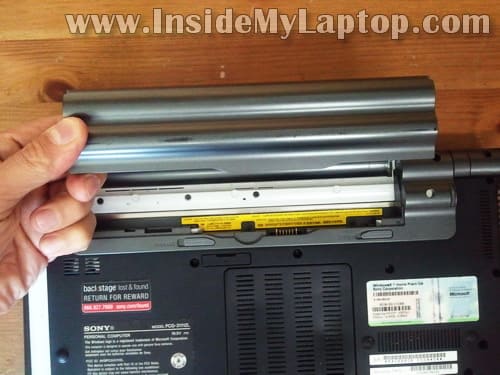
Unlock and remove the battery.
STEP 2.
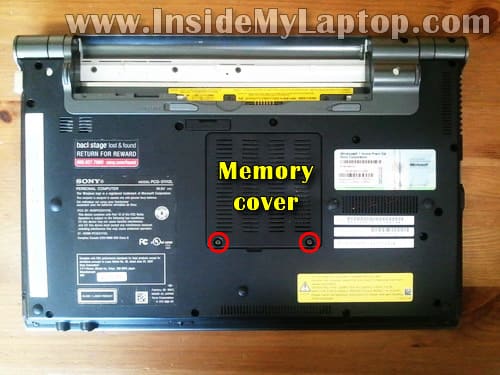
Remove two screws securing the memory cover.
Lift up and remove the memory cover.
STEP 3.
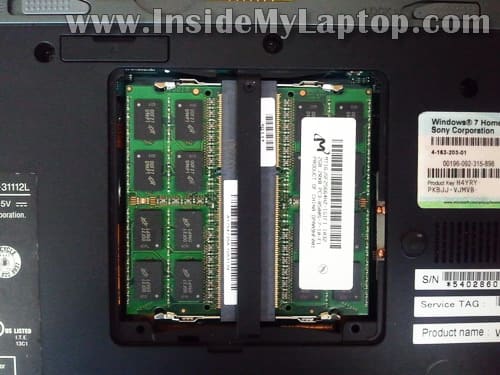
Both memory modules can be accessed on the bottom.
Sony Vaio VPCZ1 laptop uses DDR3 memory.
This laptop can handle up to 8GB (2x4GB) DDR3-12800 SODIMM memory modules.
STEP 4.
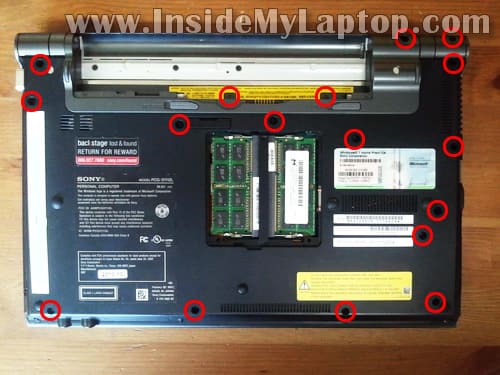
Remove all marked screws from the bottom.
STEP 5.
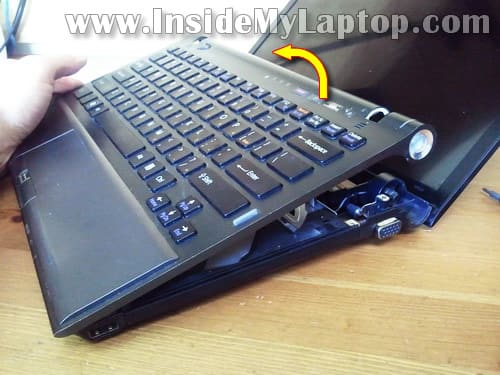
Make sure the display is moved back as much as possible.
Lift up the upper side of the keyboard/palmrest assembly.
STEP 6.
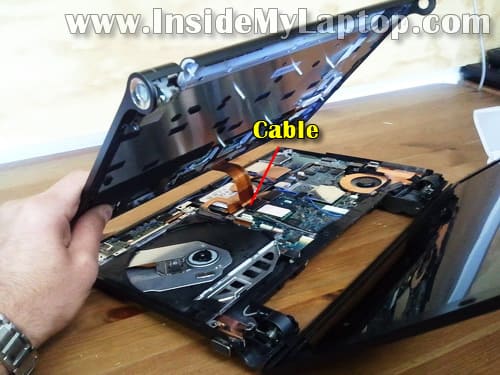
Continue removing the keyboard/palmrest assembly. Be careful, there is a cable connecting the assembly to the motherboard.
STEP 7.
Unplug the palmrest assembly cable from the motherboard.
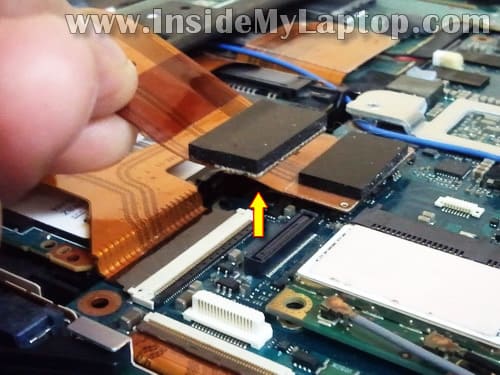
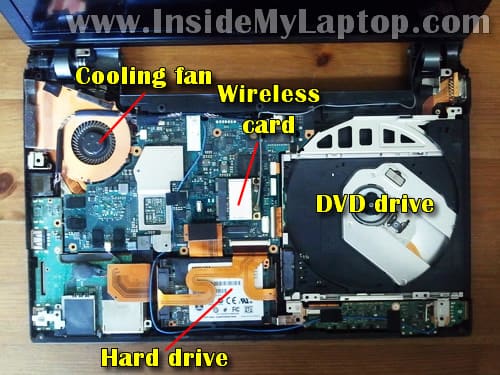
When the palmrest assembly removed you can get access to the following internal components:
– Cooling fan.
– Wireless card.
– DVD drive.
– Hard drive.
In my Sony Vaio VPCZ1290X I had two SSDs (Solid State Drives) sandwiched together and configured as RAID 0.
Jens Holm
Hi
I just did this, but now most of my keyboard-functions do now work. Tochpad, mousebuttons and so on. The green power led does not work, and the only keys that work are :1, s, ø,’,z,<, f1.
I have tried reconnecting the cable, but it doesnt seen to help. Any ideas to help?
Thank you!
IML Tech
@ Jens Holm,
I cannot tell what’s going on without looking at the laptop but most likely this is some kind of connection related issue.
Check all connectors you unplugged during the disassembly process.
Joe
how to clear cmos notebook sony vaio model PCG-61112W / VPCCW1ZEG, i have unplug the cable CMOS but bios password not clear, please help me, thank’s
Jayson
Can you teach me how to change cooling fan vpcz1
IML Tech
@ Jayson,
I don’t go that far in my guide but in order to replace the cooling fan it’s necessary to remove the motherboard from the laptop. The fan is mounted to the bottom side of the motherboard.
Neesh
What type of sata cable is required to connect the sandwiched raid ssd drive to a desktop mobo.
Gary
it could be possible changing the i5 built in cpu with an i7 one?
IML Tech
@ Gary,
You cannot replace built-in CPU.
Chris
There were two more screws to be removed before lifting the keyboard out.
very small ones at the fron edge of the back cover.
Phil M
I just stumbled on the 2 screes as well Chris. However they are stuck fast.
Any hints on how to relax a stubon little screw?
IML Tech
@ Phil M,
You can try heating up the screen with soldering gun and try removing it after that. The heat should make the lock tight stuff soft.
Bear T.
Hello. I just purchased a larger SSD for my vaio… and I came across the fact that it has no easy access lid on the bottom for me to replace de SSD.
If I open my laptop as instructed in this tutorial, will I be able to replace the SSD installed inside with the new one? The new one is a “laptop” SSD, 2.5″.
Thanks in advance!
IML Tech
@ Bear T,
You cannot install a 2.5″ SSD into this laptop. This laptop uses 1.8″ SSDs.
carlo
Is it possible to lube or oil the cooling fan shaft to reduce the loud noise?
Thank you.
IML Tech
@ carlo,
Most likely yes and I’ve done it before on other laptops.
Unfortunately, you’ll have to remove the motherboard in order to access the fan.
carlo
@IML Tech
<>
Thank you, but will I have to remove more than in your last pic above (step 7)? To access the bottom of the cooling fan. Or can I lube it from the top as shown in the pic? Thanks again.
IML Tech
@ carlo,
You cannot lube the fan from the top. You’ll have to remove the motherboard completely in order to access the other side of the fan. On the other fan you’ll find a sicker in the middle of the fan. When you remove the sicker you should be able to apply a drop of lube on the fan shaft.
Personally, I would recommend replacing the fan with a new one to make sure you don’t have to go through the same disassembly procedure again in the future. Lubing the fan might work but it’s likely the fan will start making noise again.
carlo
Thank you very much for your good advice. Appreciated!
Any suggestions on what type of fan, brand, RPM, heavy-duty fan, model number, Specs?
Thanks again,
IML Tech
@ cario,
If you search eBay for “Sony VPCZ1 fan” you’ll find it. Make sure to buy a genuine Sony fan.
carlo
Thank you IML Tech!
carlo
Have not purchased a new fan yet, still wondering if it is worth it for a 2010′ VPCZ1 laptop? Though, the fan noise is unbearable and makes it impossible to use the laptop in a public library …
Additionally, yesterday Windows 7 would not start and the laptop kept shutting down. Eventually, after a few tries I got it going again by “Launch Startup Repair” in the “Window Error Recovery” page (RECOVER).
***STOP: 0x0000007b (0xFFFFF880009A9928, 0xFFFFFFFFC0000034, 0x0000etc.)
7 Problem Signatures, but NoRootCause
What do you suggest? Should I go ahead and purchase a “MCF-528PAM05 Cooling Fan W/ Heatsink sr8” from ebay? Or get a new laptop altogether?
Thanks for your hints.
IML Tech
@ carlo,
It’s hard to tell what is causing this problem. According to Microsoft, STOP: 0x0000007b error can be virus, hardware or software related.
Yeah, fans for this laptop are pretty expensive. I found a few used on eBay for about $50.
Totally up to you. 🙂
Probably the fan is worth fixing but again, you don’t know what else could be wrong with the laptop.
You can try reinstalling Windows OS from scratch and if the STOP error gone, probably it was software related. In this case replace the fan and use the laptop.
You can try selling it on craigslist as is and use the money for a new laptop.
Ready switch to Mac? Check out MacBook Air. It’s an outstanding laptop with amazing battery life.
carlo
Thanks for the useful information. Received today a “new” Cooling Fan (even though it does not look that “new”).
Quick question before I start the “replacement” operation, will I need a soldering iron? Or is the fan attached to the mother board with screws? Any other hardware or material you think I might need (aside from screw drivers)?
Again, thank you very much.
IML Tech
@ carlo,
No, you will not need one.
carlo
Installed the “new” COOLING FAN and it works great. No more horrible loud fan noise, Quite a workout to get at the bottom of the motherboard.
Problem now is that I might have disconnected the sound system. Neither the speakerphones, nor the headsets work. In the control panel when I try to adjust the volume it says:
“No audio devices are installed”
Any suggestions where/what I should look for before I start reopening the vaio? Thanks,
IML Tech
@ carlo,
Check the audio board. Make sure it’s connected. You can see the audio board on the last picture in the lower right corner, right under the optical drive.
carlo
Thanks IML Tech. I reopened it, everything looks to be connected OK. I slightly moved the blue cable from the audio board (all the way across the motherboard) so that it’s not pinched.
Closed everything with all the screws and restarted the laptop. Now I got the sound icon OK at the bottom of the display, but no sound (not with speakers and not with headsets).
The sound icon is moving on the Volume Meters but no sound.
On the Sound “Playback” window the Realtek Digital Output is green; but both the “Speakers” (2- Realtek High Definition Audio) and the “NVIDIA HDMI Output (Port 1)” (NVIDIA High Definition Audio) say NOT PLUGGED IN.
Any suggestion appreciated.
IML Tech
@ carlo,
It’s hard to tell whats going but I think this is some kind of connection related problem.
Make sure the laptop assembled correctly. Make sure all screws installed in correct spots and not shorting the motherboard.
carlo
Everything looks good. The blue wire out of the audio board seems to have some kinks or bends where it goes through the frame supports, could this be the cause?
IML Tech
@ carlo,
I don’t think this could be the cause.
The blue cable is the Bluetooth antenna cable and it’s not related to audio.
amir
Please help!
My laptop don’t start!
IML Tech
@ amir,
How it doesn’t start? What happens when you push on the power button?
Any video, any lights, etc..?
alfonse
Dear IML Tech,
Thx for this tutorial, i was having a rough time opening my Z12 and finding tutorials !
I have spilled water on my laptop and waited too long to switch it off….
I have located the area which has sustained damage. It s the green board module with the 2 audio jacks under the DVD drive on your last picture. Only 2-3 passive components seem touched in that area (just at the top right corner of the left black foam piece).
Cleaning it didn t had any effect : the laptop does not fire up anymore.
I wonder if :
1. i can buy this module and replace it ?
2. find its schematic and maybe replace one or 2 components ? (i have access to good electronic equipment)
alfonse
Ok, this is the audio module if i read your discussion with carlo. One of the 2 components is 6 pin so an active one i guess, the other one is a resistor or capacitor.
If its only an audio module the laptop should be able to power up without it …? I was thinking i should disconnect the audio board and see if its changing anything. But i have not yet find how to gently remove the flexible orange flat current leads (what’s the English word for that ?) going from the board under the DVD drive.
BTW, do I have to screw everything back to allow the laptop to power up ?
Thx for any advice or answer.
IML Tech
@ alfonse,
I cleaning up the damaged area didn’t work, you should disassemble the laptop to bare system and see if it powers up.
The following components should be enough for bare system: motherboard with CPU, RAM modules and power button.
You can disconnect the hard drive, optical drive, wireless card, other daughter boards.
After you disassembled it to bare system, you should try turning it on with an external monitor connected to the VGA port.
If external video works, connect the internal screen and test again.
If it works, connect other component and test.
George
Hey!
Thanks for this guide.
I followed the very same process to open My sony vaio laptop vpcz11kgx/x. However, the area highlighted in the last image which is the the hard drive doesn t exist. I mean there is not that white piece! There is a green piece ( just like the small part underneath the hard drive in this image).
By the way the reason why I am opened the laptop is to replace the hard drive because when I start my laptop it says that 480 gega from the hard disk are not availble and only about 139 gega are availble. So now it seems like the hard disk isn’t broken down. It doesn t exist at all!!!
Is that right? Or the green part is the hard drive itself?
Please reply, and thank you in advance.
Bmichaels
I am trying to figure out the name of a certain part of the laptop. So at the step where you disconnect the keyboard/touchpad assembly from the motherboard, I managed to break the end of the ribbon connected to the assembly. The broken part is a piece of this larger dark green circuit board. It is located under the touchpad and runs along the boarder. It has several smaller white ribbons branching out (including the orange one to the motherboard). Does anyone know what I’m referring to? If so, any ideas where I should buy it? Thank you in advance for your help.
tech
Perfect! Thank you!
bearmon2010
Hi. I want to know is Sony Viao VPCEG1BFX dual voltage ? It is from America. I want to use it in Portugal with dual voltage adapter for 100-240v.
bearmon2010
Hello ? I am waiting for your answer. Please answer my question:
Hi. I want to know is Sony Viao VPCEG1BFX dual voltage ? It is from America. I want to use it in Portugal with dual voltage adapter for 100-240v.
IML Tech
@ bearmon2010,
You’ll be fine to use this laptop in Portugal. The laptop requires 19.5VDC and this will be provided by the AC adapter which is rated 100-240V.
bearmon2010
@IML Tech,
Oh man, perfect, thanks! I saw my AC Adapter and it is 100-240v. Boy, am I blind. Sorry about that.
Davide
I don’t know the name of the card behind the keyboard.
I need to replace it because the white connector is broken and the keyboard cable cannot be attached anymore.
In this card I can see linked: Speed/Auto/Stamina selector; CMOS battery, Touchpad, power on/off, and another black flat cable (don’t know for what).
I hope that someone can help me.
Thx.
IML Tech
@ Davide,
This is Left Right Keys Touchpad Mouse Board.
Go to ebay and search for this part number: 1-881-481-12
I think that’s your board.
Before you replace the board try this. Insert the cable into the broken connector and secure it with sticky tape. This might help to get connection.
larso
My Vaio VPCZ1 is dead, or almost – starts sometimes but mostly not. When it stars it just dies after a while. I managed to scan memory and chech health if the 256GB sdd – no problem there!
Question: does the SSD has a standard connector?
Can I just pull it out to extract the data to another computer?
/L
IML Tech
@ larso,
No it’s not a regular SATA connector found on regular 2.5″ or 3.5″ hard drives. You have a 1.8″ SSD installed and it has a Micro SATA connector.
In order to connect this SSD to a regular SATA connector you need an adapter. You can find it on eBay if you search for “1.8” Micro SATA adapter”.
It depends. If you have a single SSD installed than yes. Just connect it to an adapter, plug into another computer and pull the data off.
But… it’s likely you have two 128GB SSDs installed and configured as RAID 0 (it was done to increase the speed). If that’s the case, the recovery will be more complicated.
Here are quick steps:
1. You’ll need two adapters and data recovery software which can recover data from RAIDs.
2. You will have to connect both SSDs to another PC with data recovery software installed.
3. You will have to configure virtual RAID 0.
4. Scan the virtual RAID for data and recover it.
Davide
@ IML Tech
The connector is completely spoiled there’s no way to plug in the keyboard, but if I keep the cable pushed on the contacts I can type.
The board you suggested me looks excatly what I need.
Thx a lot.
Eric
Hello
I have a vaio vpcz1. It suffer a drop an right side (right hinge) took the blow.
So right hinge has started to break.
How can I replace it??
Can you help??
Best regards
Irix
Hi
Is the wifi card replaceable with a standard mini pci express card. Will a 1″ x 1.2″ card fit ?
Thank you
IML Tech
@ Irix,
What Wi-Fi card you have installed now?
I believe that mini PCI express card (half height) is your only option for this model.
You can search on eBay for “Vaio VPCZ1 wireless” and find cards available for your model. Just do not confuse WAN cards and Wi-Fi cards.
Protech
@ IML Tech
My Vaio had two 64Gb SSD cards and it got bricked. The cards appears to work fine so I took both out and imaged them using an mSATA cable. I tried creating a virtual image and did file recovery but almost all my files are corrupt.
Any idea?
Thanks
IML Tech
@ Protech,
Did you try to recover data from each image separately? If you did, it’s not going to work.
I believe in this laptop both SSD configured as a RAID 0 (striped disks).
You will have to use a RAID reconstructor software, something like this.
After you reconstruct an image from BOTH drives you should be able to scan it for data using regular data recovery software.
Protech
Thanks for your quick response. Infact that’s the exact tool I used. It did try to reconstruct the raid and produced a .vim file. Then I scanned it using their software recovery tool. It displayed the file tree more or less correctly. The problem is the majority of my files are corrupt. I assume may be it has to to do with the Block size prob so I’m changing that and trying again.
Thanks
IML Tech
@ Protech,
I don’t have a lot of experience with RAID recovery but I think changing block size might help.
Also, after you change the block size, do not run full recovery. Try to recover a few large pictures and see if they are good. If not, try changing the block size again.
This will help to save some time.
Andrei
hi Protech,
how did you manage to read the SSDs? i mean, what type of adapter did you use to plug the LIF Sony connector into in order to read it as external USB?
I’m trying to recover the data as per IMML Tech’s instructions above…
Thanks,
Andrei
Wendy
hi! Was wondering if someone could help me. I have a wireless usb keyboard with mouse ball that does work with my vaio z. The usb ports work with everything else, eternal harddrives, laptop cooler, thumb drives etc. The keyboard works perfectly with other computers but when paired with my laptop it can detect there is a USB wireless keyboard but the keyboard won’t actually work. Sometimes if jiggle it, it will work briefly. Or if I use a USB hub it will work briefly and then stop. I don’t understand what is wrong. It doesn’t feel like a software issue because why would it work if I jiggle around the USB connector… But individually the USB ports and the keyboard work fine >< any ideas?
Rafael Maldonado
Recently I replaced the Cpu fan from my VAIO VPC-Z-1190X. After putting back hardware and screws, there is no sound, no wireless,
No Bluetooth, and the DVD drive not eject while pressing its button.
I know I have to open the laptop again. I need help to identify inside parts to check the wire connections and the correct placement. The fan is working excellent after replaced. Before, the laptop shuttered down frequently or not boot. Windows is running well. The DVD is identified by the laptop. The messages are: wireless is turned off and the adio is turned off. Please if you or any in the forum can help I will appreciate very well. Images about the inside with the connections are welcome.
francois
Thank you,
i had to clean my computer fan and this page helped me greatly !
Joaquin
My Vaio VPCZ1 computer fan spins fast and after a few seconds slow for a couple of seconds, then fast, then slow… All the time.
Do you think it could be because of the fan?
I read these topics, and it seems hard to replace fan without loosing some connections. I have seen my computer internals, and some cables seem very difficult to remove / reconnect for extracting the motherboard. Could anybody give some advices on that?
Thanks.
john
I have tried to open the laptop from other side and the connector socket is broken now on to palmrest side, is there any solution for it or i can find that small circuit board anywhere ?
please help, i am not able to work.
zolee001
Hello
Thank you for this useful post!
I have the same model of VPC-Z1 laptop and sometimes it has sound problem,the realtek sound card missing from the device manager,sometimes only digital output works but mostly “No audio device installed” message.
I hope this is just a contact problem.
Can you tell me some advice?
Thank you
Mark
I need to replace the power jack. I have a new jack, which I can see is an exact match. It’s apparent that I need to remove the motherboard to route the wire, around the fan, to the connector on the motherboard underneath. I removed the keyboard assembly, but only see one screw holding the motherboard (top right). Taking out that doesn’t free up the motherboard. What else do I need to do to to remove the old wire and replace?
Thanks so much
arash
Hi
I have exactly the same problem dear sir CAROL
I do not know what to do…:(
I hope that someone can help me
arash
arash
sorry it was my mistake “CARLO” IS correct!!
carlo January 28, 2014 |
Thanks IML Tech. I reopened it, everything looks to be connected OK. I slightly moved the blue cable from the audio board (all the way across the motherboard) so that it’s not pinched.
Closed everything with all the screws and restarted the laptop. Now I got the sound icon OK at the bottom of the display, but no sound (not with speakers and not with headsets).
The sound icon is moving on the Volume Meters but no sound.
On the Sound “Playback†window the Realtek Digital Output is green; but both the “Speakers†(2- Realtek High Definition Audio) and the “NVIDIA HDMI Output (Port 1)†(NVIDIA High Definition Audio) say NOT PLUGGED IN.
Any suggestion appreciated.
John
i have a problem similar to the very first post after replacing my lcd. i think i may have damaged the push connector that resides just below the wireless card. any suggesttions?
max
i have same model its VPCZ1 but taking charger when plug chrager light on then noting come on then ater is light of no life what is problem
J Wolff
Sony VPC Z11(X Seies seem to have a common problem with fans/cooling. TRY THIS FIRST: These little puppies (partic. the i7’s) run hot- BEFORE disassembling get one of the small ‘can’ air ‘b;asters & blow all of the gunk you can out of the inside through any opening you can get to! I went through this with my Z1190x & it virtually stopped all the fan noise & it now runs cool & its a cheap solution. PS: Do NOT take your VAIO to a “Big Box” store repair place Unless they have a recommendation! _ the idiots virtually wrecked my SSD – filled it partions all over the thing, etc. Now I’m at repacing the SSD with a new one.
Will the Sony Z1190x take Two of the 1.8 form factor SSD for a total of 512?