


In this guide I explain how to remove the keyboard in a Sony Vaio VGN-T350 (model PCG-4E1L) laptop.
This guide might work for some other Sony Vaio VGN-T series. Please mention the model number in comments below if it works for you.
Before you start, turn it off and remove the battery.
STEP 1.
Remove three screws securing the keyboard on the bottom of the laptop.
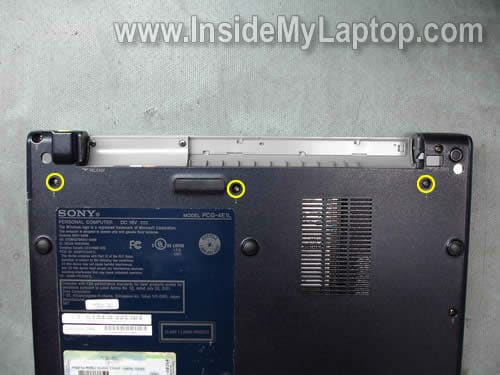
STEP 2.
There are two latches securing the keyboard on the top.
They are located above the F5 key and NumLk key.

STEP 3.
Push on both keyboard latches with a small screwdriver and release the keyboard.

STEP 4.
Lift it up from the laptop case. Be careful, the keyboard is still attached to the motherboard.

STEP 5.
Turn it upside down and place on the palm rest.
Now you can access the cable connector which is located on the right side from the cooling fan.
When the keyboard is removed, you can access the memory slot.
In this laptop you have to use PC2700 DDR333 microDIMM memory module (512MB maximum).

STEP 6.
You’ll have to unlock the connector before removing the cable.
Flip the left side of the brown locking clip up with your fingernail. The brown clip will pop up at a 90 degree angle.
After that you can remove the cable from the connector.

On the following picture the connector is shown in the unlocked position.

STEP 7.
Now you can remove the keyboard completely and replace it with a new one.
The best way to find a new replacement for your Sony Vaio VGN-T series laptop is searching by the laptop part number.
Search for the keyboard part number on the sticker. In my case the part number is 147898681.

Achiel
salam ..
sorry in advance if my language is less good or less politely beg in understandable.
enjoyed reading your article.
I have the same laptop model is Sony Viao PCG-4E1L.
I have had problems with my laltop, CD room and a laptop keyboard damage the laptop then the cd drive is gone … I also gained
with all humility, I beg your assistance. I was upset to get a replacement item is damaged … if you are willing I want to get my replacement of damaged goods included with the cd drivers I needed for my laptp … Can you help me so that I can mendapatkatkan replacement.
thank you very much …
Ken
Thanks for the info! Mine disconnected by accident when I was taking it apart to peek inside and I couldn’t figure out how to get inside this little toy.
Thach Danh
My PCG-4F1L havve 2 latchs 1 locates between Esc and F1 keys, other on Insert/Pause key.
However, the keyboard still stuck at F12 key — Is there something i done wrong ?? Please help !!!
huy
how to change ram ? thanks
Alice
Hi, Could you tell me how to flip brown thing for the connector of keyboard? to left? to right? it’s tight. I’m afraid that I will break it. Thank you.