

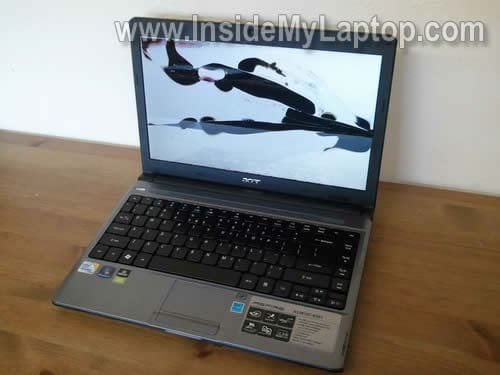
In this guide I explain how to remove and replace a broken screen in an Acer Aspire 3810T laptop.
I’ll be taking apart an Acer Aspire AS3810T-8501 model.
Most likely this guide will work for many other laptops in Acer Aspire Timeline series. If this guide works for you, please mention the model number in comments.
Before you start, make sure it’s turned off and battery removed.
STEP 1.
You’ll find four screw covers on the front side of the display bezel.
Two black rubber covers on the top and two black plastic covers on the bottom of the bezel.
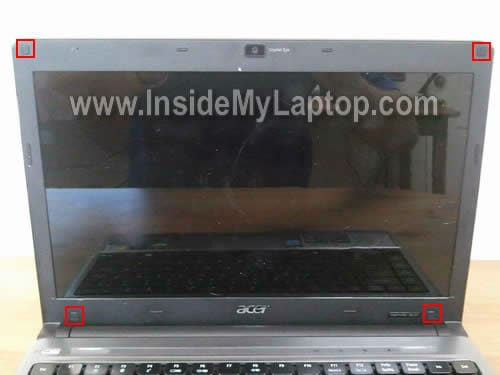
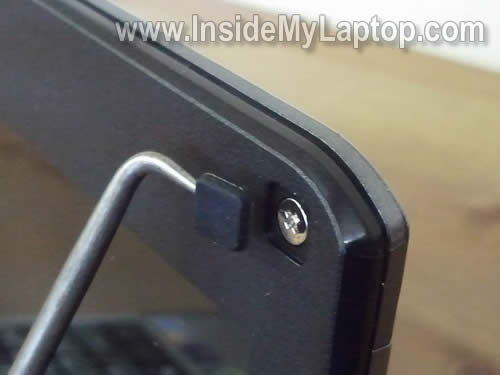
You can remove all four covers with a sharp pick.
All covers have sticky bottom. After the cover is removed, glue it somewhere on the bezel so you don’t lose it.
Remove all four screws found under those covers.
STEP 2.
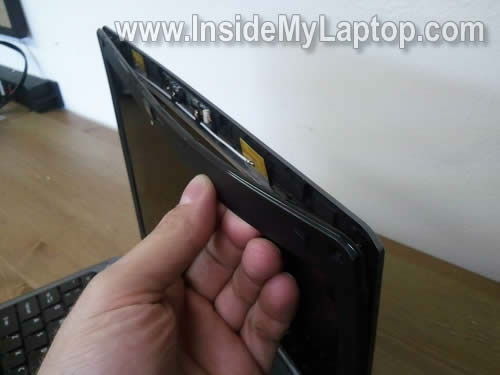
Stats separating the screen bezel from the display cover on the top.
STEP 3.
Continue removing the bezel.
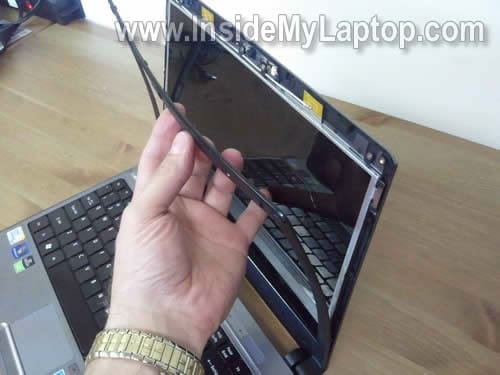
STEP 4.
The bezel has been removed.
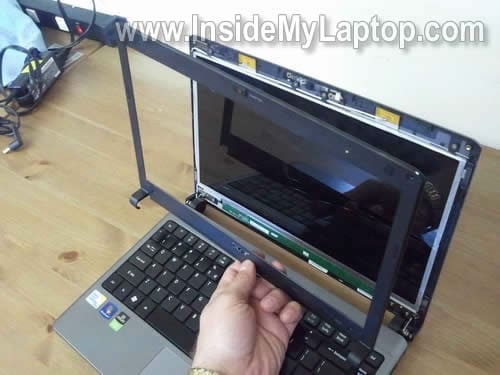
STEP 5.
The LCD secured to the display cover by four metal brackets.
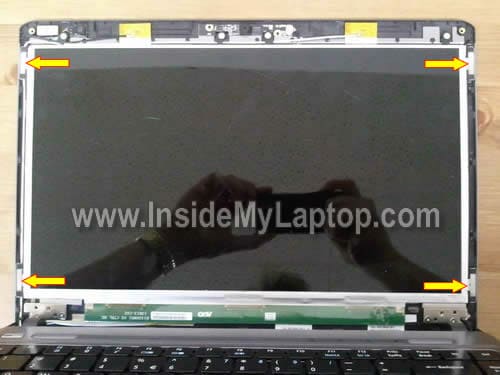
In order to remove the bracket, simply grab it with your fingernails and slide to the side.
On the following picture I’m removing the top left bracket.

On the next picture I’m removing the bottom left bracket.
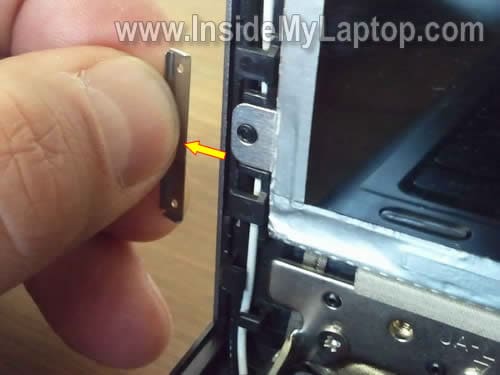
Remove two more brackets on the right side of the display.
STEP 6.
After all brackets are removed, you can separate the LCD from the display cover and place it face down on the palm rest.
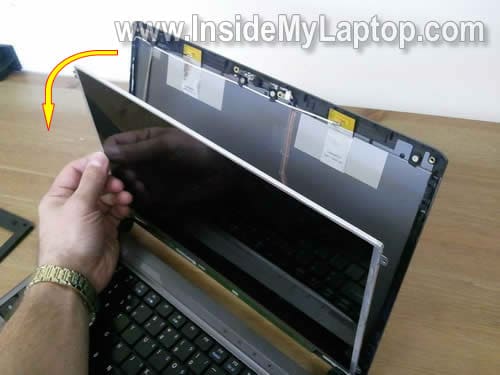
STEP 7.
Now you can access the video cable connector.
Acer Aspire 3810T has a LED backlight LCD screen, so there is no inverter board.
The video cable connected directly to the LCD.

STEP 8.
In order to disconnect the video cable, remove the sticky tape securing the cable and unplug the cable as it shown on the picture below.
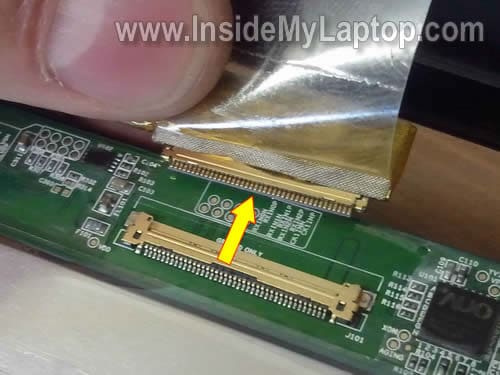
STEP 9.
Now you can remove the broken screen and replace it with a new one.

You can search for a new replacement LCD by the model number printed on the original one.
In my Acer Aspire 3810T I had the following model installed: B133XW01
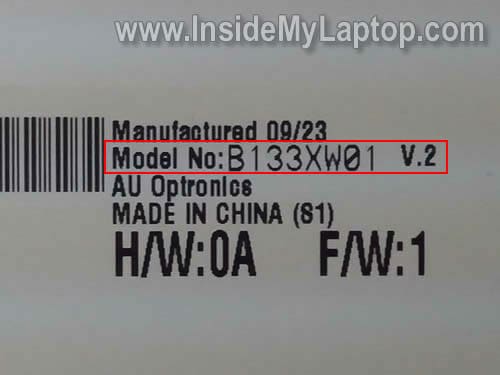
marco
i have a 3810tg with led screen, and i noticed an inverter failure, i suppose, cause screen is dark but i can see images on it. so the screen in itself is healty, but the retroillumination not so.
<On the web this is reperted as inverter failure, but you said that our model doesn't have that part. could you explain me better? Thanks!
IML Tech
marco,
Older LCD screens have a backlight lamp inside which gets power from the motherboard though inverter.
The inverter board works as a power supply for the backlight lamp. When inverter fails, the backlight lamp stops working but screen still has an image. That’s why other sources mention inverter board failure.
In your case, you have a LED backlight screen which doesn’t require an inverter board. Your screen gets power directly from the motherboard (or video card).
In your case it could be bad screen (more likely), bad video cable or even motherboard issue.
Son
Thanks a ton for putting this put, I really appreciate all this effort you put into this site.
I am planning on changing the panel in my Acer 4820TG and this will definitely help. I’m curious whether you know if it’s possible to swap the screen in my 4820TG (14″ 1366×768, 16:9) with a Sony panel that’s also 14″ 16:9 but 1600×900 screen resolution.
From my research, both panels use a 40 pin connector, but I’m not sure if I’m missing anything else. Both panels are LED backlit so I’m guessing I don’t have to worry about the inverter. How the heck is backlight powered w/o the inverter? Is it through the 40 pin connector as well?
IML Tech
Son,
Most likely you cannot use that screen. I believe a screen with different resolution requires a different video cable. This is just a guess.
There is no backlight lamp in LED screen, that’s why there is no inverter board.
lara
This site shines SO much light on the situation… Thank you so much; it’s fantastic!
I have the same problem and was told I needed a backlight inverter. (Obviously that was faulty advice.) You mentioned that it could be a problem with the screen, the video cable, or the motherboard… Is there a way to pinpoint the problem, or should I just replace the screen?
Jordan
Hello!
I also have the 3801t and the screen is coming on, but the backlight is switched off so the screen is dark and and its impossible to see anything.
I suspect the switch that turns the backlight on and off is stuck.
Do you know where this switch is?
I want to trying turning it on.
Thank you!
IML Tech
Jordan,
If you don’t see the lid close button on the top cover, most likely this laptop has a magnetic switch which is located inside the laptop.
The lid close switch doesn’t fail very often. Most likely your problem is not related to the switch.
Do you have a LED screen inside the laptop? Probably yes.
It’s hard to troubleshoot this problem without spare parts. This could be:
1. Bad screen.
2. Failed video cable.
3. Motherboard failure.
Cannot tell which one is bad without testing.
ben
I am having a similar problem. One week ago I closed my laptop w/o turning it of. leaving it like that after a few hours the screen would not turn on. Even when restarted it would not turn on. So a problem with blacklight. The same night playing the screen (moving it open/close for several times) it switched back on again. It worked for about a week, and now I am having the same problem again after closing it w/o turning it off. Only now It will not switch back on again. Do you think it is the swtch? or the blacklight. I think it is the switch… any suggestions how to fix it? thanks.
IML Tech
ben,
Could be bad connection between the video cable and motherboard or LCD screen.
In cases like that I try reseating connections first. Just a guess.
ben
my laptop has a LED screen and 3810T
Alfred
I have a similar dark LCD screen. I am having seven Acer Aspire 3810T-353G25n LAPTOP. Three of them have thesame problems. But when i connect a Monitor to the laptop, i am able to work conviniently through the monitor with the laptop’s LCD dark. Please could you help me through this. Thanks
IML Tech
Alfred,
Maybe this is some kind of BIOS related problem? Check version of BIOS installed on the laptop and then find out if Acer issued an updated version.
Try updating the BIOS.
psychedelik
IML Tech:
Thanks so much for putting up this guide. I’m sure it’ll come in handy one day.
My 3810TZ started getting uneven brightness one day and it looks like there’s a failure of some sort with the backlight near the bottom of the LCD. The entire screen is still visible but the brightness changes from one edge to another. Any suggestions on which part to get?
Thanks!
IML Tech
psychedelik,
It’s hard to tell without testing the laptop with a known good LCD screen.
Most likely it’s either bad inverter or failing backlight lamp inside the screen.
It’s possible the inverter not working properly and doesn’t supply correct voltage to the backlgith lamp OR the backlight lamp itself going bad.
If you have to guess, try replacing the inverter board first. If it doesn’t help, you’ll have to replace the screen.
Nick
Great site!
My screen is “blinky” on my Timeline 4810T-8480. Basically is dark when I open it, but when I start to close the screen it “clicks on” at about a 45 degree angle (and stays on no problem). But it will “go off” (dim to the point of barely there) again if I open it back up fully.
Anyways, opened up the screen bezel as shown above and it turns out that if I manipulate what I assume is the video cable (thickest cord going into keyboard/motherboard area), then I can get the screen to go on and off.
Is this a bad cable? Or is the connection just loose with the video card (not confident on how to open up the rest of the laptop without breaking it to check)?
Zak
I have got a 3810TG, with basically the same screen as this. However at the bottom and in the left hand corner it has some dark patches where the screen is not illuminated! Do you think I should replace the LCD panel? I have taken it apart slightly to have a quick fiddle with some of the fixtures but nothing seems to have worked. What else could I try?
Bjørn Mork
Thanks a lot for the nice and detailed guide!
Just replaced a cracked screen on a 3810TZ-414G32n without any problem, much thanks to this guide. The original panel was a B133XW01 V.2 from AU Optronics while the replacement was a LP133WH2 (TL)(L1) made by LG.
Nan
Hi there: Thank you so much for your website, so much useful information!
I have the same laptop mentioned in this post (Acer Aspire 3810T). The bottom right of the screen has a darkish area after it fell about 2 feet onto a carpet (it was closed). My questions are 1) I am comfortable opening the laptop up, but should I even try? Could it be a loose contact or is something broken inside? 2)can I continue using the laptop like this or will it get worse and stop working one day? Thanks in advance! 🙂
EmJay
I have an Acer Aspire 5542G, with a slightly spiderwebbed LCD screen after a fall while closed. Is the procedure for replacing a screen on this model the same as the one shown, as the models appear to be quite similar in design? Also, how/where can I purchase an anti static wrist strap?
IML Tech
EmJay,
The LCD screen replacement procedure is very similar for many different Acer laptops.
Mike T
First off thanks for the tutorial.
I have the same problem many of you have mentioned with the dark spots in the LCD screen in at 3810t Timeline. In my laptop the problem is caused by the belt that connects the screen’s electronic board to the LCD screen. You can see that belt on the right side of the image in step 7. It comes straight down from the electronic board, is folded at 90 degrees to the right and goes into the screen. The wires in this belt carry the current for the individual backlights of the screen (and possibly others).
In my laptop, the wires in my belt lose their connection where the belt is bent 90 degrees. I found a temporary fix by placing a small non-conducting object (a folded piece of thin cardboard) but after a couple of days it returns and I have to reopen my screen and adjust the cardboard until the lights come on again.
I would be grateful to anyone knows if/where to purchase just a replacement for this belt. I’m currently teaching physics and computers in Africa so sending my laptop back to Acer for a fix isn’t really an option. Any ideas on belt replacements would be greatly appreciated.
WiCKeD
The problem most of you are having with dimming is the power cable for the LED backlights.
Unfortunately, I have not found a direct replacement for this cable. Acer also makes it impossible to contact them if your laptop is out of warranty.
The LED is out on the right side of my 3810T laptop and the next LED in toward the center goes out if I pinch the back. The whole screen also randomly fades in and out every few minutes. Thanks Acer…
Abhi
Great article. thanks a lot for writing this. following these steps was very easy and i changed the screen within an hr.
thanks again.
abhi.
Andre
Does anyone know to remove the front panel of the Acer Aspire one D255. This unit does not have the rubber plugs as described above. It has small rectangular plugs that come out – 4 at top and 1 one each side. Need to replace LCD and unsure how to get at the panel off.
Thanks.
Pictures would be great.
Pavel LOCK'd
Guyz, I’m looking for a better image quality display to replace AUOB133XW01 V2 on my ACER AS3820G. Any suggestings what display can I use?
The best is to find some PVA-matrix. I want a bigger viewing angles and better contrast.
Will be appreciated for assistance.
Einar Iversen
How to change keyboard on this laptop? I need help.
IML Tech
Einar Iversen,
Maybe it’s similar to this Acer laptop: https://www.insidemylaptop.com/take-apart-acer-aspire-one-netbook/
Also, there could be some screws on the bottom securing the keyboard. Make sure those screws are removed.
This is just a guess.
dee ran
Guys its mentioned before. There is a silly stupid design fault with the cable on the back of the lcd panel. You will see there is a flat plastic cable thing that folds right angle and then slots into a connecter.
This folding causes the tiny contacts to lose connection and eventually the thing will crack and you will lose some of the led lights. Over time more and more lights will go out or be intermittent.
No idea why they decided to fold the strip at right angles as it causes so much stress to it and starts dropping power to led lights.
What a crappy way to secure a delicate cable!!! Now acer dont even provide a easy way to replace this cable and so you have to buy a brand new board.
NEVER WILL BUY ACER AGAIN! EVIL PEOPLE I SAVED FOR ONE YEAR TO BUY THE LAPTOP AND NOW AFTER TWO YEARS I AM IN DEPRESSION AS NO LAPTOP AND NO MONEY TO REPAIR. ACER WILL SUFFER ONE DAY!
Evan
Thanks for all your work in these tutorials
I have a cracked screen in a timelineX 1830T-3927
I’ve looked everywhere for a service manual to no avail.
unfortunately i don’t have any screws at the front securing the front bezel. I imagine there might be a couple at the hinges but i don’t know how to get to them
any help greatly appreciated
Emil
Hello, very useful website.
My question is not about screen. I have a 5810TZ-4657, and want to install Broadcom BCM92046 Bluetooth internal module, the same that Acer uses on this model, but mine didn’t come with it. I can’t find where should i connect the module’s cable to the motherboard.
Best regards
Vital
I had the same problem with the crappy ribbon cable design that powers the LCD leds.
As per suggestion found on Ubuntu forum I cut the cable where it broke, separated the wire ends to give some room for soldering and soldered them back together using some thin pieces of copper wire. The job was a realy pain in a butt and I almost gave up a couple of times (since it is really hard to solder those thin wires and some of them broke again a couple of times during the process). I used some electric tape to isolate the wires (also helps a little to prevent them to break again), so the result was a big mess. When I was done it was so late that I did not have any more desire to put things back together, especially that I was not sure that the fix is going to work. Next day after I got home from work I carefully plugged the ribbon cable into the socket and voila! the screen is working again. I’m still not sure how long it will hold on, but at least now it is not the ribbon cable bent but the thin wires I soldered to it. Overall, since I don’t have good soldering skills it was a tough job for me. It could be easier for you or if you have a good friend who can do it but be prepared to have a lot of patience. One more thing since the cable is so tiny I used a pair of magnifying glasses so your hands could be free. Before separating the cable wires try to scrape off the coating to get to bare metal. Otherwise it will be much harder to have a good bond. Just be careful since it is really easy to cut off a piece of cable wire and there is not so much room left on little segment that goes into the socket.
Now I will think twice before I buy another Acer. It looks like they have done such a poor design on purpose since: 1)no way to disconnect the cable from LCD for replacement and 2)bending the cable so much that it has a sharp edge at bending location instead of gentle folding. There is no way Acer does not realise that it is just a matter of time before it would loose connection.
In worst case scenario I will use this laptop attached to another screen but I will not tolerate their attitude and I will not buy a replacement screen under any circumstances. Better invest money into a new laptop (not from Acer for sure).
abac
Thank you to the poster and IML Tech user. This has helped me out A LOT!
I never fix hardware before but i just read this and i just got everything fixed by myself. So pround. hehe
Anyway thank you again. God Bless
Jose
Thanks a lot for the info. I have a Acer 3810T and the backlight is off. I tried a brand new screen and nothing happend. Do you think the problem is the cable?? I found the cable in aliexpress for about us$70 but I dont want to spend the money if that is not the problem. Any Help?
IML Tech
@ Jose,
Have you tried a new inverter board?
If the laptop turns on but the image on the screen appears very dim, most likely it’s either bad inverter board or backlight lamp (which is mounted inside the screen). You tried a new screen and it didn’t help. I guess the next step is replacing the inverter.
rox
just wanted to say THANK YOU!
for me, my screen flickered off and on at times. seemed like a loose connection. it finally went black this afternoon. i took the screen somewhat out and saw the one connection with it’s bent cable and wondered about that. read most of the replies and found the one very unhappy sounding one who thinks that is the trouble with his machine.
i also found this great manual site i wanted to share. 5.99 for a manual and you pay through paypal. the other site i found wanted 19.95.
this shows how to disassemble the entire machine and seems very worth it. great pics. just like yours.
9manuals.com/acer_sm.htm#aspire
i thought i would share.
thank you again. great place to find answers. i love my machine. i hate to have this happen and do not want to buy a replacement screen if it isn’t the problem.
now i only need to know how to check for where the problem is! *s*
Dave
Thank you for taking the time to write this out, your laptop guides are well wrote as always!
Djamal
thanks, I just replaced my screen based on above details and all perfect now !
Angry Bird
Why we can’t get a recall on this design fault … we should send an open letter to them with our signed … they sold these products (AS3810xx …) all over the world and we are suffering … They should do product recall anyway otherwise NO ACER next time !!!!!!!!
Marcos
O would like to know where to find the 3810T inverter board?
O tryed Ebay but I didnt find.
My Acer Timeline model is 3810T – 8847.
First the bottom of the screen started to get dark. A few days later, another part became dark.
I thought the problem might be with the LEDs.
Now, today, the screen went completely dark. I can see the video signal, but all LEDs are turned off.
I conected my notebook in to an external monitor to save my files. It worked perfectly.
I dont know if the problem is the inverter, the LEDs ou all the screen.
Can anyone helpe me?
I would first try to test the flex cable (I dont know tha name of this cable).
Talal
I have Acer 3810T and the backlit is off. I have opened the screen as per your instructions but all the connections seem ok. Shall I try replacing the screen or the inverter board? Where can I get the inverter from?
Thanks.
joe
I have the same problem. Vital, would a new LCD have done the trick? I just need to get mine operational quickly. Thanks.
Marcos
People, where do I find the video cable?
I tried on ebay but not found. I woud like to try first this cable.
If it dont work I will change the screen.
dj cristi
i made a tutorial how to repair backlight : http://djcristi16.blogspot.com/2011/07/acer-3810t-lcd-backlight-broken.html
acer screen broke
Thanks for the instructions insindemylaptop. First the screen started to dim on my acer aspire 3810t. If the slightest pressure was put on the bottom-back of the screen, the entire screen would go dark, and the screen would be fine without the pressure. Now my screen doesn’t work at all. Looking on the web it appears this problem is pretty widespread and Acer doesn’t stand behind their products after 1 year. Live and learn.
John
Thanks for the advice. I have now successfully replaced my screen. Replacement screen cost ~€90. Still have a problem with mike. When top is fully open mike works fine but when I move it vertical the mike stops working. But Ok if I move it past the vertical.
IML Tech
John,
Could be bad cable connection or the cable itself is bad.
You can do the following.
Take apart the display panel so you can access the microphone cable. Turn on the laptop and try using the microphone while moving the cable. If moving the cable “fixes” the problem, probably the cable is bad.
Per
I have the same problem. It is the cable going from the screen to the circuit board that is broken. It is made from thin plastic and it has been folded to fit during instalation. The folding has broken it. In my mind it is an obvious design flaw.I too needed to replace the whole screen including the circuit board to fix it.
Gary
Does the v.2 after the b133xw01 have any significance? I see the one of ebay has v.0 and there are others that have v.3. Is it ok to buy one with v.0? The LCD screen in my laptop has v.2.
BTW thanks for writing up the process…
Vincent Loiseau
Thank you for this guide.
For information, on my laptop, the screen problem was just the ribbon that link the PCB to the LCD itself. The problem is this link is folded and is very fragile. I replaced 2 centimeters of this link by 6 small wire that i’ve welded directly on the ribbon. To weld, i scraped a little part with a cutter.
I’ve got a photo if someone is interested but i don’t know how to post it.
Vincent
Vincent
Images of reparation:
https://plus.google.com/photos/105468447031016423805/albums/5757375943451302929?authkey=COCX3I6Nzt6n7gE
Dilip Shukla
LCD is ok bout outer body with hinges got damaged, can I get a new outer body part.
Kevin Lee
Thanks for the DIY! I was pretty scared at first but my local repair shop was quoting $100 on labor not including parts.
Took it apart myself in under 1 hour :). Lost only 2 screws.
Vital
Is there someone able to answer the question that Gary asked:
Does the v.2 after the b133xw01 have any significance? I see the one of ebay has v.0 and there are others that have v.3. Is it ok to buy one with v.0? The LCD screen in my laptop has v.2.
Thank you.
Vital
I found the answer to my question. Does the v.2 after the b133xw01 have any significance?
Yes it does. The side hinges are important so b133xw01 v.0 or v.3 will not work. So besides b133xw01 v.2 will fit b133xw03 v.2 and LP133WH2-TLA3. B133xw01 v.2 has a flawed design with bent flex cable that will break down at some point in time. The other two are better.
Steve
Does the main video cable come attached to the LCD, ie if I have a faulty video cable, do I have to buy a new LCD because the cable comes attached to it?
AndyN
Thanks for these instructions – also had broken ribbon cable – replacement was a breeze. BTW went with the V.3 with more-expensive matte finish ( from laptopscreen.com ) – looks great.
Ben
Hi,
Thanks a lot for this useful page!
It allowed me to perform an inspection after my aspire 3810 TZ screen stopped working properly (no backlight after my one year old son grabbed it violently).
I followed your tutorial and moved the cable after removing the screen panel.
The laptop is now working again. It may not last a long time but now I know that replacing the screen will do the job if it happens again.
One again, thanks a lot!
Benoit
Dave Hull
Can you still get a new screen cable for the Aspire 3810 TZ ?
IML Tech
@ Dave Hull,
Yes, you can.
New LCD screens for Acer Aspire 3810 TZ laptops available on amazon and ebay.
hectorcrk
Hello found a acer aspire 3410 , and the problem show to flex cable crash.
Buy the 3 lcd scrren (LP133WH2 TLA3 ,b133xw03 v2 and N133BGE-LB1)
and the 3 lcd not working blacklight?¿?¿
video cable damaged??? , connect to external monitor and view it image perfect
press fn and f5 and not present blaclight , alwais dark dark
solutions?? , thanks
Leonard sikute
worked with acer aspire 5253.thanks.
Reece
hi, i have an acer aspire 3810t, i opened my laptop the other day and my screen turned on and worked perfectly but the back light wouldn’t turn on, so i bought another screen and when i plugged it in the same thing happened, i tried restarting it, charging it, letting it run out of charge, disc frag, dic clean up, everything, still won’t work.
thank you, Reece
IML Tech
@ Reece,
If you get the same problem with a new screen, most likely there is a problem with the motherboard.
Also, could be bad display cable.
You cannot tell which one is causing the problem until you replace the cable.