

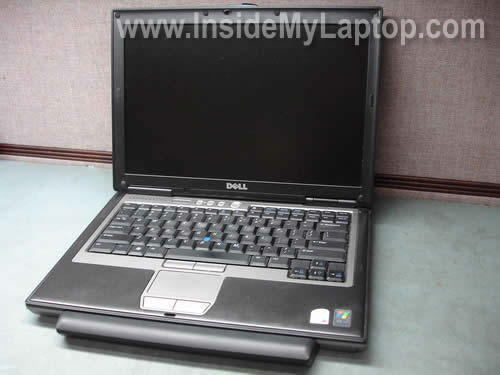
In this guide I show how to remove and replace the keyboard on a Dell Latitude D620 laptop. After you remove the keyboard, you’ll be able to access the memory module installed into the internal slot. Also, you’ll be able to clean the cooling fan and heatsink.
First of all, turn off the computer, unplug the AC adapter and remove the battery.
STEP 1.
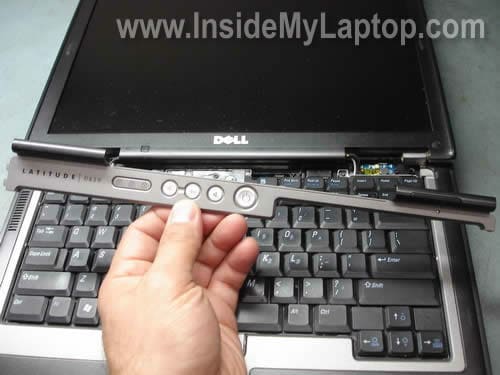
Lift up the right side of the power switch cover with a small flat head screwdriver.
Continue removing the switch cover with your fingers.

STEP 2.
Remove the switch cover.
STEP 3.
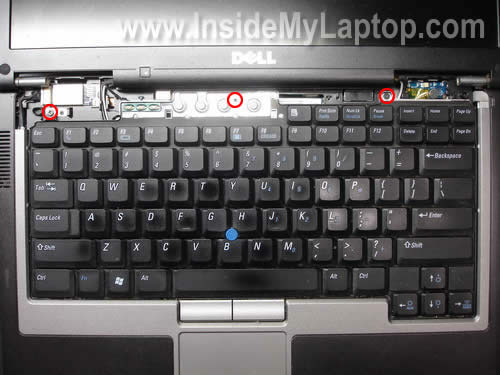
Under the switch you’ll find three screws securing the keyboard. Remove all three screws.
STEP 4.
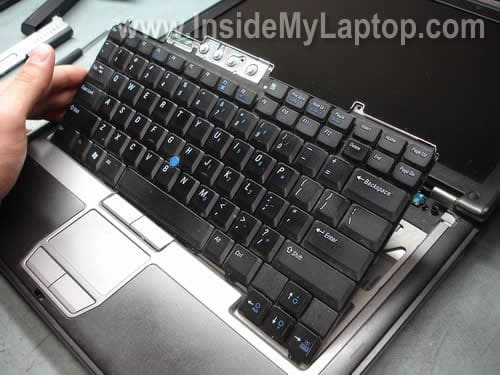
Lift up the keyboard as it shown on the picture below. Before you can remove it completely, you have to disconnect the cable.
STEP 5.
The keyboard cable connector is plugged into the motherboard and the blue holder secures the cable.

Lift up the blue cable holder first.
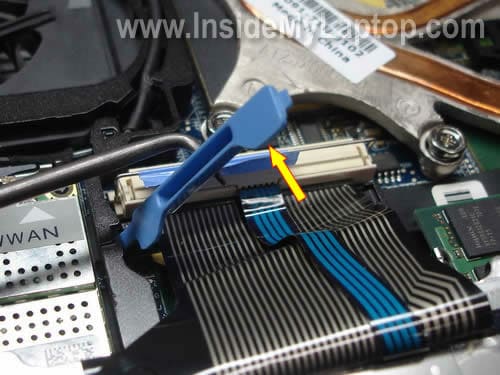
Unplug the cable connector from the motherboard.
Now you can remove the keyboard and replace it with a new one.

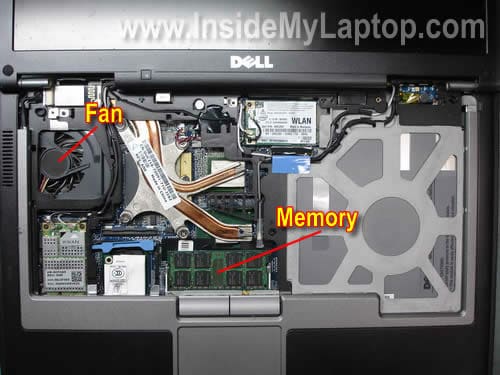
When the keyboard is removed you’ll get access to the memory module installed into the hidden slot.
You can replace or upgrade the memory module if you wish.
Also, you’ll get limited access to the cooling fan. It would be enough for cleaning the fan. You can blow off dust from the fan using canned air or air compressor.
In one of the following posts I explain how to replace the screen on a Dell Latitude D620.
T Hockemeyer
Excellent step by step instructions with photos to remove and replace a dell laptop keyboard. Made it very easy.
R.Ruppert
Thanks! Great help!
anep
thanks, one more thing is my lcd holder loose, i want to know how to replace it
Chainsaw
You can get this information along with instructions on how to remove and replace all the other parts of a Dell Latitude 620 from Dell’s own service manual.
It’s a PITA to print out, though.
krizzyla
Does the Memory support up to 4GB DDR2? This post is very helpful, does your HSPDA modem working properly please post any comment regarding about the modem because my mini modem internal is not working properly. Thanks ahead
D HOLT
Great Info I was able to repair my Dell D620 Laptop in just a couple of minuets
tobe
Good morning ,i have a dell d620 and its being giving me a tough time.i have change from vista OS to window 7 OS and now to XP. the same problem persist. the problem is that it show this strive line on the screen, then blank white surface on the screen. at 1st i though it was was the screen or the flex but after the repairer worked on it..e said it was the on-board VGA…WHAT HE does is to watch the board and dry it with workstation and fix it back.. then it start working well with xp OS..but now xp does not even work with it….so please what do i do?????
Avo
Thanks. Very helpful.
Serenum
Thank you very much!
pcfixer
Thank you! Very helpful.
I had no idea how to remove the connector.
Lori
Thanks! This helped out so much!
Alicia
This was incredibly helpful. Thank you so much for taking the time to put this information together!
Jim
Just wanted to take a minute to thank you for another outstanding guide. I’ve referred to your tutorials many times over the past couple years and have found every single one of them to be perfect in every detail. Great photos and easy-to-understand step-by-step instructions. I’ve come to trust your site even more than most of the manufacturer’s service manuals. Keep up the good work. You are definitely appreciated!
Russ
Thanks dude! Great pictures and description. Took a whole five minutes to replace the keyboard on my daughter’s laptop.
Reztradr
5 minutes is all it took. Thanks for the easy to follow instructions and pictures. I now see that the problem may actually be another area. My finger mouse pad is too sensitive or it’s something else.