

In this guide I will remove and replace the screen and inverter on an Acer Aspire 3620 laptop.
The guide will work for other Acer Aspire models. If it works for your, please mention the model number in the comments below.
Let’s start taking it apart.
Step 1.
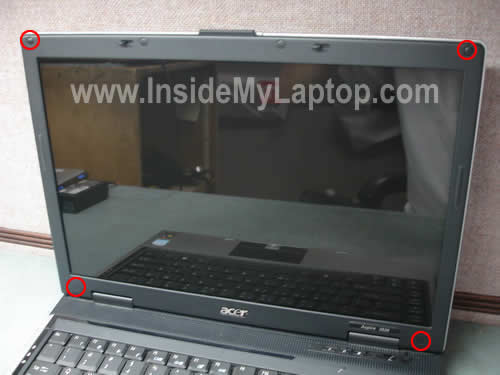
You’ll find four rubber plugs in four corners of the display bezel.
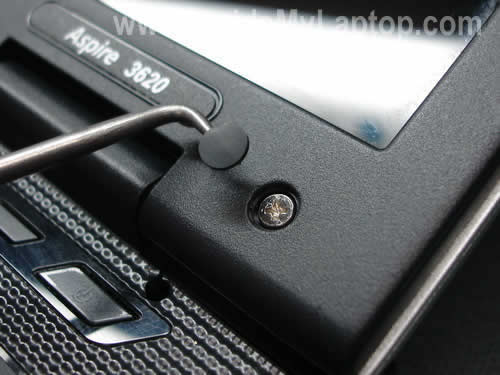
Remove these plugs with a sharp object and glue them somewhere so they don’t get lost.
Remove four screws hidden under the rubber plugs.
Step 2.
Start separating the display bezel with your fingers. I found it’s easier to separate the bezel if you start from the top.

Continue separating it from the cover.
Be careful with the display latch, it has to stay attached to the cover.
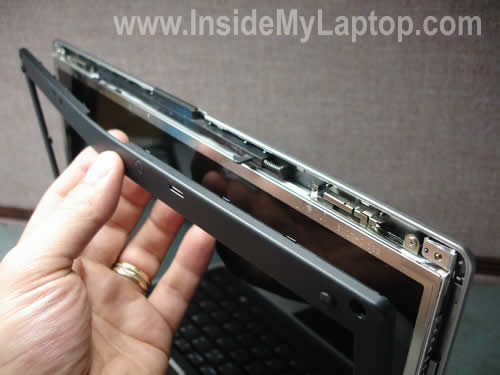
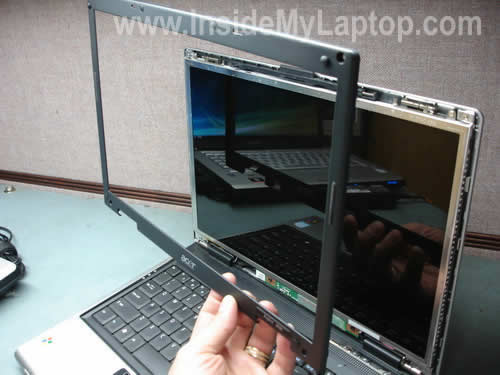
Finally, remove the bezel.
Step 3.
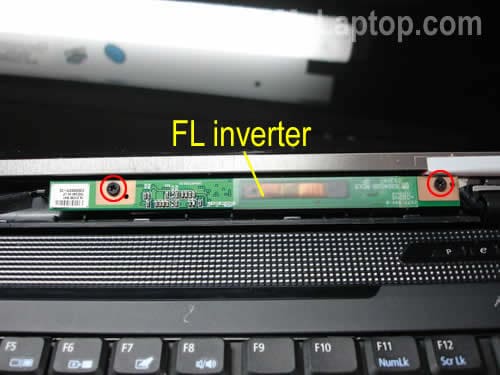
You’ll find the screen inverter board also known as FL inverter mounted below the LCD panel.
Remove two screws securing the inverter board.
Step 4.
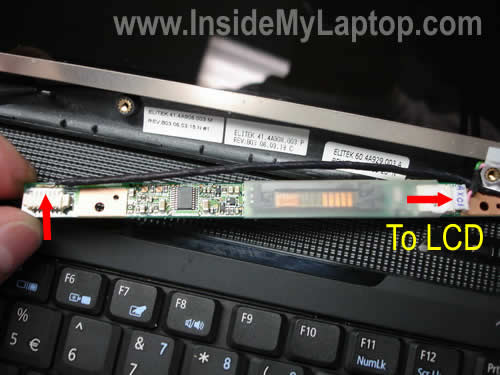
In order to remove the inverter board, you’ll have to unplug two cables.
The black cable on the left side is connected to the motherboard. It supplyis power to the inverter from the motherboard.
The cable one the right side is connected to the backlight lamp inside the screen.
Now you can replace the inverter board with a new one if necessary.
Step 5.
Remove two screws securing the display brackets to the hinges.
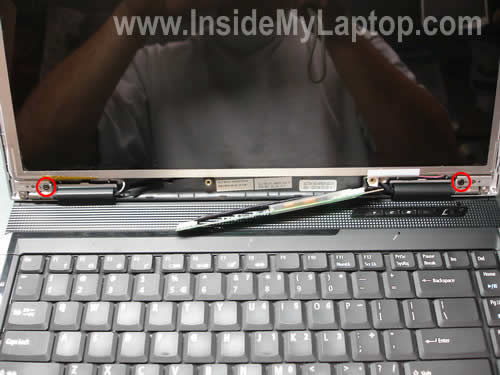
Now you can separate the screen assembly from the cover and access the back side.
Remove clear tape securing the connection and unplug the video cable.
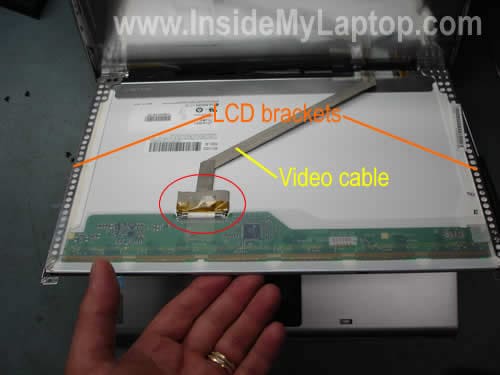
After the video cable is unplugged, you can remove the  screen assembly.
Transfer both side mounting brackets to the new screen.
In my previous post I explained how to disassemble Acer Aspire 3620.
ramalingam
Please explain in detail about Acer Aspire 4720z laptop
IML Tech
ramalingam,
I will as soon as I get one for repair.
By the way, the display disassembly steps will be very similar for most laptops.
1. Remove rubbers seals found on the display bezel.
2. Remove screws found under the rubbers seals.
3. Remove the bezel and you are inside.
jon
is it relitavley easy to replace the screen on a 6920 g? and is there much you can break when you take the cover off?
IML Tech
jon,
I’m not familiar with that model but taking apart the display panel is very similar for most laptops.
Not really. Just be gentle with the video cable connectors, do not touch the controller board (logic board) on the back of the LCD screen, be gentle with the inverter board. Other than that, it’s relatively easy to replace the screen.
talleyhorse
I hate my Acer. But I do need a little help, if you don’t mind! The backlight sometimes works, sometimes not. I’m guessing there is a poor connection. Hoping it’s not a solder situation. I have a 3680 Aspire, which has two additional hard plugs at the top of the bezel, in between the screen latches.
What should I be looking for? How do I get those additional plugs out? I’m not so concerned about scratching the surface, Just don’t want to kill the beast. I’m kind of desperate, as I teach my kids through cyber school, and my main system, an HP laptop has to go in for a motherboard recall. UGH!
Thank you SO MUCH for any help you can provide!
Kerry
AG
This entry was helpful. Would you take a few moments to look at the URL posted below.
It includes pics from my Acer Aspire 5100-301. It has now developed an annoying sporadic green or blue strip on the far right side of the screen.
Is this an inverter issue or just a simple screen replacement?
See here and here
IML Tech
AG,
This is a problem with the LCD screen. You’ll need a new screen or use it as is. The problem is NOT related to the inverter. I’m sure 100%.
Benny
Hello…..I been have problem wireless connection in my laptop gateway mt6451, I guess , I lost configured,when I turn on my laptop,wireless appear on ,then turn off, in does turn on more , somebody can help me to fix this problem……………. I have a router Linksys wrt54g……….. I gonna apreciated, any help…………thank you.
IML Tech
Benny,
1. Go to the device manager, right-click on the wireless adapter and uninstall it. Now restart the laptop and let it detect the wireless card again.
2. Try reinstalling the device driver. You can download the wireless card driver from the manufacturer’s web site.
murray
Have a acer aspire 6920G and have now two screens that were shipped to me, The number on the old screen ( creacked) is the same as the one on the the two new screens. Take old one out and put new one in and I only get vertical lines on it back light comes on. Then i insert old cracked screen and it works fine- except for the crack. What am i doing wrong is there a certain install procedure for this laptop.
Ronald
Thanks for the great detailed photo.
The left side of my Acer 3620 LCD wil sometimes went dark, while the right side is fine. This usually last a few days.
The darkening appears to be analog rather than digital. The edge between the dark side and the normal side is nicely feathered and no pixelated.
Does it sound like an inverter issue to you? Thanks again for your help.
Joey
thanks for the instructions on changing out the LCD. I got the screen changed out, but still no picture. I have an external monitor hooked and have tried sharing the desktop to both displays with no luck. I can see the laptop display flicker when I change settings but no picture. Are there any hardware updates I should do when changing out the lcd? Any other suggestions would be greatly appreciated. Thanks
IML Tech
Joey,
Why did you replace the screen? Maybe your problem wasn’t related to the screen at all?
exp
my Acer 3620 works great. my screen has broken off at the hinges. The screen and the hinges are both broken. The only parts that have remained intact are the black hinge brackets attached to the laptop body above the speakers.
Where can I find the hinges? I know I can find the screens online but I need the hinges or better yet the LCD casing and the hinges, the actual screen still works great but it is completely detached except for wires from the laptop
IML Tech
exp,
Try ebay.
I see both hinges for an Acer 3620 laptop for $20.
Steve
Murray – post 10
How did you get the bezel off your acer 6920g ? I’ve removed ALL the obvious screws on the front but it won’t budge – am i missing something ?
Coleen
Hi,
I have an Aspire 2930 which I spilt water on the other day (big whoops!!) since then the illuminated logo on the lid doesnt turn off in sleep mode, I have to turn it off all together for it to go off. is there a cable I can dissconnect so it stop draining my battery?
Thanks for the info above, it’s help me get so far.
Dajo89
hi, i just was wondering what happen if i remove the LCD but i dont replace it, just leave the laptop without the lcd screen?
IML Tech
Dajo89,
If there is nothing wrong with the laptop, it should start just fine with an external monitor attached to the VGA port.
BiG D
Hi, I have an eMachines d620 laptop and the screen was cracked so I took it apart according to your pictures and instructions. It looks basically the same inside. Anyway, I took it apart as a practice to make sure I could do it. I am still waiting on a screen. But when I put it back together with the cracked screen, all I get is a black screen. It doesn’t seem to be powering on. I put everything back together and it wasn’t working so I took it apart and checked to make sure everything was connected properly. It seemed to be, but still no power. Can you help? Thanks.
IML Tech
Big D,
I assume the laptop was powering up before you took it apart, correct?
Take a look inside the connector on the motherboard. Maybe you accidentally bent pins inside the connector while connecting the cable?
You said there is no power. Does it mean the laptop is completely dead?
Anders
To Steve
Did you get the brackets off of you acer 6920g? I have the same problem, can`t reach the bottom screws.
gerry
hello, my acer 3623wxci periodically displays this message:
hardware malfunction, call hardware vender for support
nmi: parity check/memory parity error
system halted
then the laptop freezes, the only way i can reboot is to turn off the power. it still works fine after i turn the power back on.
also what is the biggest hard drive that can be installed ?, right now i only have 40 gb . can the hard drive be purchased anywhere or must it come from acer ?
ps: great website
Gunnar
Just a quick note to let you know how much I appreciate your site and the time you put into helping. Many thanks.
tallboy
My Acer extenza 5420 has a white border around the screen
does it call for a screen or inverter replacement.
IML Tech
tallboy,
If you can see the screen (or part of the screen) and it’s bright, your problem is not related to the inverter.
Francis
Hi, my Acer Aspire 3620 Notebook failed to work after my nephew unintentionally plugged into a faulty AC power socket . Is there such a thing as a fuse in the Aspire 3620 Notebook that could have blown??
Cos’ if that’s the case, then I can rely on your instructions at https://www.insidemylaptop.com/clean-cooling-module-acer-aspire-3620/ to open up the notebook to replace the fuse?
Thanks with appreciation
Francis from Malaysia
IML Tech
Francis,
Yes, it’s possible but I cannot pint you to the fuse. In most laptops the fuse is located somewhere close to the DC power jack.
You’ll have to remove the motherboard, find the fuse and test it with a multimeter. If the fuse is open, solder a new one.
Yes you can. My guide will help you to remove the motherboard but you’ll have to search for the fuse on your own. Again, it’s located somewhere close to the DC jack.
Moon
Hi I feel really terrible, one month back I bought this Acer Aspire 6920g everything seem so perfect until one day I noticed that cracks started showing up both on the right and left hinges. Now my question is what should I do? Should I just ignore it or the situation might get worse. Need help searched a lot of forum and majority of the users complained about the same problem and all of them Acer users
IML Tech
Moon,
Is it still under warranty? Contact Acer and explain what’s going on. Maybe they will fix it under warranty.
Josh
Hey,
i have an acer aspire 3050 . My Screen Cracked and I got the same computer from a guy on e bay .
so i could replace it . but i was wondering what tools i need.
is it easy to replace ? just UNSCREW and screw back ?. or is there more than that. ?
if you could e mail me at soliderjay @ yahoo.com
IML Tech
Josh,
You need a small philips screwdriver.
It depends.
If you want to replace just the LCD screen, you’ll have to disassembly both display panels and remove screens.
If you transferring the entire display panel (LCD, cable, inverter, plastic covers…) it’s not necessary to take apart the display panel.
Josh
HEY ,Thanks
OK i know how TO REPLACE IT NOW.
just one more question
A GUY ON EBAY IS SELLING A ACER ASPIRE 3050 JUST LIKE MINE HE SAYS THAT HIS SCREEN GIVES NO IMAGE
SO HE JUST TOOK HIS HARD DRIVE OUT AND IS SELLING IT.
DO YOU THINK THAT THE SCREEN IS NO GOOD IN IT?
OR SHOULD I BUY IT AND SWAP THEM OUT MINE IS GREAT AS FAR AS THE INVERTER
AND BACK LIGHT
ITS JUST CRACKED .
DO YOU THINK HIS SCREEN WOULD WORK OR SHOULD I SAVE MY 60 BUCKS.
HE’S WANTING ME TO BUY IT NOW.
I DONT KNOW WHAT TO DO?
IML Tech
Josh,
Be careful, the screen could be in bad condition or not working at all.
Why wouldn’t you buy a brand new LCD screen with warranty? They are pretty cheap on eBay. Is there any reason to buy another used Acer 3050?
What if it’s scratched, has dead pixels, crappy image. Are you ready for that?
JOSH
HEY ,
THE REASON FOR JUST NOT BUYING A NEW SCREEN IS
IT COST 71 BUCKS PLUS SHIPPING CHEAPEST ON E BAY
AND MY LIMIT WAS 50 BUCKS TO START BUT HE WANTED 50 AND 9 FOR SHIPPING
SO 60 BUCKS STILL CHEAPER AND I GET THE LAPTOP EVERYTHING IN IT BUT THE HARD DRIVE.
I HOPE THERE IS NOTHING WRONG WITH IT.THERE IS A 3 DAY MONEY BACK GUA.
WOULD IT BE POSSIBLE IF I COULD I M YOU OR CALL YOU ONCE IT GETS HERE.
IF I HAD ANY QUESTIONS.
WITCH IS NOT BAD IF EVERYTHING WORKS IN IT . AND I COULD USE THE MEMORY IN IT
TO ADD TO MY COMPUTER. I THINK THAT I COULD DO THAT.?
I DON’T KNOW HOW . BUT MY COMPUTER COULD DIFF USE MORE MEMORY.
DO YOU HAVE A STEP BY STEP GUIDE TO PUTTING ONE MEMORY STICK,INTO ANOTHER SAME PC?
THANK YOU FOR YOUR TIME AND ANSWERING MY QUESTIONS.
IT REALLY HELPS ME OUT AND IM LEARNING I AM PURSING A CAREER IN COMP TECH
ONCE AGAIN THANK YOU.
Josh
thanks for all your help. it worked great.
i do want to ask tho . he had 1gb memory.
i have 2 ,,512mb,,,can i take out 1 ,,512,,and switch it with 1gb ?
IML Tech
Josh,
Is it for an Acer Aspire 3620? Yes, you can.
Aspire 3620 laptop can take 2GB memory total. You can install up to 1GB memory module into each slot. You can use different size modules, for example 512MB in one slot and 1GB in the second slot.
Kellye
Still haven’t seen how to remove the bezel on an Acer 6920. I have a screen but can’t get the bezel off. Some posts mentioned removing the on/off bezel but didn’t say how to do that either. Any help is greatly appreciated!
bruce
hey.
i have an aspire 3620 and need to get replacement keyboard and lcd rear case i know how to replace the keyboard but not sure on rear case can i replace it easy by just a few srews or is it a bigger job. its just cracked at the hinges.
thanx
Big D
I left this message a while ago but I never got the screen I ordered. My question is, If I have a EMD620-5748 can I purchase a screen said to fit a EMD620-5777???? They are the same size (14.1″) but I was curious if they have to be EXACTLY for this computer? Thanks.
BiG D Says:
July 18th, 2009 at 1:29 pm
Hi, I have an eMachines d620 laptop and the screen was cracked so I took it apart according to your pictures and instructions. It looks basically the same inside. Anyway, I took it apart as a practice to make sure I could do it. I am still waiting on a screen. But when I put it back together with the cracked screen, all I get is a black screen. It doesn’t seem to be powering on. I put everything back together and it wasn’t working so I took it apart and checked to make sure everything was connected properly. It seemed to be, but still no power. Can you help? Thanks.
flipdascrip
i used this guide for the aspire 4330 and it worked fine.
mrmike
I have the need to seperate the lcd diplay / top of a netbook from the base of a netbook. ( so I can mount the display on the wall and have the computer a few feet away. Anyone know if thats doable it is next to impossible to find 10-12 inch lcd monitors with vga inputs
IML Tech
mrmike,
I don’t think that you can do it. The video cable is shore and I doubt that you can extend it.
Jake
Hi I have a Emachine 250-1162 netbook I need to repacle the screen on. I have replaced screens on laptops before but this netbook is not as easy.
I removed the two screws holding on the bezel and I can’t get the bezel off. Is there something I am missing that needs to come off.
faisalbiniamean
it is very bast web site.thank u sir .my dell d600 on but give not a display .plz tell me .plzplzplz .ok by .
AK
hi,
i got 1 aspire 5315 laptop. after closing my laptop lid without shutting it down its not showing anyhthing in lcd any more. its booting up. i opened the laptop to see whers da problem. it shws up the screen for second or 2 when i try to close the lid and when i plug da jack for lcd to main board.
whers da sensor or switch for the laptop that works as a switch when closing lid.
help me please…
spragers
Great article! Found a 3640 with a trashed screen in a computer recycling bin. Swapped it out with a $50 ebay find using these instructions (although I couldn’t get the inverter to fit with the new screen mounted so it’s just loose inside) and it works and looks great. Thanks for the write-up!
IML Tech
spragers,
Great job! I’m glad to help.
Now, where exactly people throwing away working laptops? 🙂
Emily
Hi, Um i just found your website, its great, and this tutorial helped, a bit umm see i have an acer aspire 3620 and while the LCD is fine the bezel(?) and back case are cracked and well busted, any suggustions?
Derek Verveer
i replaced my screen, but when i turn it on, the screen is black! There is stuf displaying on the screen, but its bacl. PLEASE HELP!!!!
(p.s. the inverter board was fine a week ago)
IML Tech
Derek Verveer,
Not sure what bacl is, but check connection between the video cable and LCD screen. There is a chance you didn’t plug the cable correctly.
mike
i have a acer 5515 need a screen does other inter change with it
Dallas
Hi. I have an eMachines D620-5748 with a cracked screen and I was curious… Does it matter if I replace the screen with a D620-5133 or D620-5150 or D620-5777 ?!?? What are the differences? Will anyone of them work? I can find good prices but I want to make sure they are the proper screen. Any help is greatly appreciated. Thanks.
IML Tech
Dallas,
Very strange. When I google your laptop model it doesn’t bring lots of results. Is it some kind of custom built laptop?
Most likely these screens will work. You’ll have to compare D620-5748 screen specifications with other screens. If other screens have same size and resolution, I would say 95% chance you can use them.
Here’s what you can try to make sure you buy the right screen.
Disassemble the laptop, remove the screen and find the screen model number. Google the screen model number and you’ll find it.
Dallas
Hey, I took your advice and found a screen that matched the model no. on eBay. I swapped the cracked one for the good one, but now all I have is a blank screen when I power the laptop on. I checked all the plugs numerous times and still nothing. Is it possible it’s the inverter? if so, any reason why that would happen? Laptop works fine when I use an external monitor. Thanks.
IML Tech
Dallas,
Did you get any image on the cracked screen?
If yes, what happens if you connect the cracked screen back to the laptop. Does it still show image?
If the new screen shows no image but the original one does, it’s possible your new screen is defective. Just a guess.
Cliff
Hi, I am glad I found your link. It has helped me a lot!! But I have come accross something and i have no idea what to do. Similiar to what “Dallas” posted….
I replaced the screen and now when I power my laptop on, there is no light. I can see Windows, mouse pointer, icons, etc. but only when other light in the room are on. As soon as I turn the lights off in the room, the screen is dark. I know it’s working because I can faintly see the mouse pointer moving and I can open programs, but it’s like there is no ‘back light’ on the screen. My question: ‘Can I replace the backlight? I thought the light was on the screen… if I can replace it, any ideas how?” Thank you for your help….
IML Tech
Cliff,
Did you replace the original screen because it was cracked?
Did you get backlight on the cracked screen?
Check the video cable connections. Maybe your new screen is not plugged correctly.
Cliff
Did you replace the original screen because it was cracked?
“Yes I replaced a cracked screen.”Â
Did you get backlight on the cracked screen?
“I did the very first time I took it apart, but when I put it back together no light on the cracked screen. So when I put the new one in I thought it would be fine, but no backlight.”
Check the video cable connections. Maybe your new screen is not plugged correctly.
“I checked and rechecked the connections. I don’t think that is it, Â unless I am not clicking them in properly. But like I said, I am getting picture, just seems to be no backlight.”
I also took the inverter out while the screen was on and nothing changed. I didn’t lose any picture. It was like it didn’t even matter that I took the inverter out. Super weird! Any ideas on why I can see Windows, icons, wallpaper, etc. Â but why the backlight doesn’t seem to be working?!? Â Thanks.Â
PattyP
Your directions are great! Thanks for helping us diyers. Your guide can also apply to an Acer Aspire 6935. The difference is the lower bezal where it attaches to by the hinges. It was a real pain and very tricky.
jhonny
thanks for this nice info, this is most usefull among another web i found.
theresa
So that you’re not wasting you’re money: make sure that you have 6V of power to the screen before you replace it. That will let you know if you actually need a new screen or a new whatever else. Obviously if the screen is cracked to shit like mine is because I threw it against the wall, then you need a new screen! Hope it helps.
nelixs
My screen just recently started turns to pink. Can i use aspire 3600 LCD to replace my aspire 3620 LCD? Or, should i change video cable if i using aspire 3600?
IML Tech
nelixs,
I search on ebay and it looks like they sell same screen for the following models: ACER ASPIRE 5050 3050 3600 3620 3680.
It means you can use Aspire 3620 LCD screen without replacing the cable.
Grodnischi Vlad
Hello,
I have a problem with my Acer 3050. My cold cathode is acting up. ATM the screen is not turning on, but if I hit it in the back(around where the battery is it sometimes starts up. and works fine until I shut the laptop down. Do you have any instructions on how to fix this?
i bookmarked ur page, but and email reply would be great:)
noeme
hi, my acer 3620 laptop’s lcd won’t stand anymore.. i have to lean it against the wall or against something so it will stand and lcd screen bezel at the bottom is also removed. do i need a new lcd for this?
Jerry
I just replaced rear cover on my Acer 3620 because hinges had broken cover, now I have no back lighting. I never removed screen or inverter (connectors were never disconnected) I just laid them both on the keyboard while i worked. Any idea of what I have done.
francis
please after i have removed the screen and fixing the screen back,the screen is not giving me the screen light,the screen is working but the light is not coming so what should i do?