

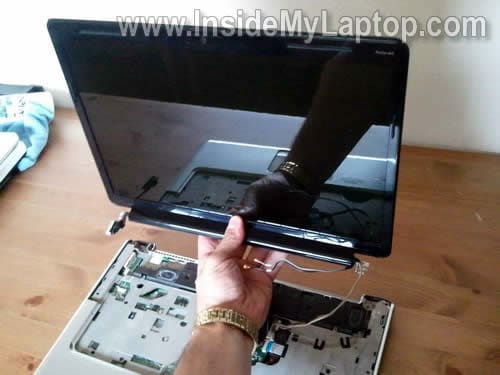
In this guide I explain how to remove screen from a HP Pavilion dv5 laptop.
In order to remove it, you’ll have to separate the display panel from the base.
OK, let’s assume the display panel removed and now it’s time to take it apart.
STEP 1.
You’ll find two screw covers on the bottom part of the display assembly.
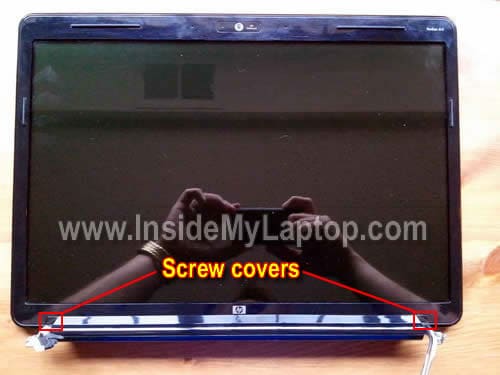
Remove both screw covers with a sharp object.
After that remove two screws.

STEP 2.
Start separating the bezel with your fingers.There are a few hidden plastic latches securing the bezel to the cover.
Insert fingers under the bezel and lift it up.

STEP 3.
Continue removing the bezel.

STEP 4.
The bezel has been removed.

STEP 5.
Disconnect the backlight cable from the right side of the inverter board.
Remove four screws securing the mounting brackets to the display cover.

STEP 6.
Carefully separate the screen from the cover and place it the front side down on the table.
Now you can disconnect the video cable.
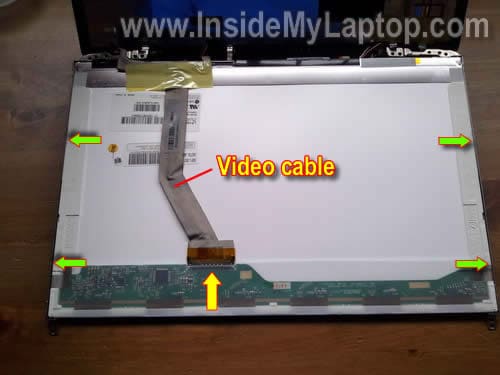
Finally, remove four screws securing mounting brackets on the sides (green arrows).
Now you can remove the LCD and replace it with a new one.
You’ll find the screen model number printed on the label.
Michael
Thank you for this guide. I think it’s better than instructions in the HP manual. Helped me a lot.
Matt
Firstly I wanted to tell you how great your site is, keep up the great work!
I stumbled upon your site while trying to find some more info on how to replace the LCD screen I cracked in my DV4 notebook, everything in your writeup looks to be exactly the same as for my notebook except for for one thing the Flush Glass bezel (which I believe also came on some dv5 notebooks as well). From what I could see the notebook you were working on had the standard display bezel correct? I began to take the Flush Glass Bezel off as I would any other bezel but found it to be much more firmly attached and wouldn’t simply snap off (nor easily peel back when gently prying under with a flat object and in fact began to crack in one area near the web cam). As such I wanted to see if you or anyone reading this might know what I’m doing wrong or be able to give me some pointers.
Thanks again,
Matt
Greg2600
Matt, I have discovered that the flush glass lcd screens are a giant debacle and a horrible idea. The bezel does not come off. It’s glued on the screen. I unfortunately had the bottom of the bezel break, along with the hinges, and have found this thing is not replaceable, which is ridiculous. HP = GARBAGE.
maged
Please i want to know the type of the original screen in the (hp dv5) for example if it is (LG or samsung) & and what is the Best on to buy……thanx
IML Tech
maged,
Most likely HP uses different screens. If you want to buy an exact replacement, you’ll have to disassemble the laptop and take a look at the LCD screen label. It has screen brand and model number.
luca
Hello,
great site. The step-by-step tutorial is very simple to follow. I have a question for you. I cracked the display of my DV5, and I thought of using the laptop with an external monitor. But the laptop’s display was in the way and I decided to remove it. Problem now is that when I connect the external monitor to the VGA connector there is no image coming out. Is that because I removed the display? Can I still use the docking station connector without the display? Or is there a way to connect the wires without reinstalling the display?
Thanks
Curtis Ingraham
I have an HP dv5-1010us laptop.
Disassembled completely due to no picture on screen. Found damage in lower left corner of LCD assembly. Slight crack in side bezel and a piece of “white” metal had snapped so I know it’s had a blundt hit.
All reassembled.
Can see image extremely faintly especially by flooding screen with an LED headlamp.
How does one determine if the lamp (which I now understand is at the bottom of the LG LP154WX4 TL AA panel) vs the inverter is bad?
I suppose it’s safe to assume the very fine florescent bulb is damaged but are there some tests to confirm? For example, does the CCFL cable have some sort of ohms resistance? Does the inverter produce a 500+/- DC or AC voltage regardless whether the tube functions?
Where’s a good place to go for these questions?
Thanks.
curtis
Dan
The greatest visual instructions.
Thank you guys for your helps.
I am trying to replace the broken dv5t-1000 LCD screen.
I have one problem that I need your help on.
I can’t get the LCD screen off the cover as described in Step 5. Something seems to be still holding the bottom of the LCD screen even after I unscrewed the four screws as instructed. I am afraid that I will break something if I force it. Any tricks on how to take off the screen off the cover?
Thanks a bunch.
IML Tech
Dan,
I’m not sure why your laptop is missing. Take a closer look at the hinges, maybe you have more than 4 screws securing the screen.
Also, you can download the HP service guide for dv5 laptop. Maybe your laptop is different from one I was using in my guide.
Dan
Thanks for your prompt reply. I was able to take the LCD screen off after I unscrewed four more screws on the hinges (two screws on each side in the bottom of Step 5 photo in addition to two screws indicated in the photo). Thanks.
Jen
Thanks for another great tutorial. I’ve got my laptop apart in what seems like a million pieces, and now know exactly what is broken, but no clue what part it is I need to order… the screen works fine, but the metal frame within the plastic casing snapped near the hinge at the base… so for example, in step 6, where the bottom two screws are to be removed, the metal has cracked at each corner that holds the screen assembly to the hinge attachment and the laptop body. I’ve found lots of parts for a screen, but I think I need the entire lit assembly. Any advice?
IML Tech
Jen,
It’s hard to tell what you need without looking at the laptop.
Download official HP service manual.
The manual has laptop parts breakdown with HP part numbers.
Find the part which is broken, find the HP part number and google it or search on eBay.
no whiz kid
this info worked to a “T” just like it said, would recommend it to any one. use guitar pics to pry the screen cover, also you do not have to take the whole dam lap top apart to get your screen out. bottom screws, pry apart, disconect wires, then screen bracket on each side has screws, take those out, peel off tape in back, diconnect carefully, waaalaaaa.
George
thanks for the tutorial. It was really helpful. But i have another query. I also own a hp dv4 1106em laptop which has flush glass on the display. Could you pls provide me with a solution as to how to remove the flush glass. The flush glass scratches easily and i have loads of scratches on them.
IML Tech
George,
Take a look at this HP manual for HP Pavilion dv4 laptops. The manual explains how to disassemble the display panel.
http://h10032.www1.hp.com/ctg/Manual/c01868623.pdf
Does it help?
Martin
Hi,
does anyone know if the dv5 LCD display is compatible with the dv6 laptops? I own a dv6397ea, I need to replace the display, and the only ones being sold now in Czech Republic at the moment are dv5 displays.
Thanks a million
mhdbash
can i change the frame of LCD screen and the metal part on which the screws are fixed? this part of my laptop (hp compaq nx7400) is broken… can you please help me?
jim
I have a an hp pavilian dv5-1134ca. have to replace the screen and cable but the dissassemble is different than what you describe do you have andother version of dv5 available
terry
Does the whole laptop have to come apart to take the screen off I’m still a newbie to this.
Harprit Singh
How can we convert this screen into a touch screen. I know we can put a touch screen layover kit but whichnone to put and from where to get one. I am planning to convert this laptop to a touch screen to use windows 8 which is a multitouch,
Jonathan N.
Thank you for the information. I have a quick question though. My screen was cracked, and I replaced it. Now, the screen stays lit for about 30 seconds on start up then the backlight shuts off. I can see the screen output with a flashlight, so it is still working wtihout the backlight. Also, once it shuts off, If I close the screen and open it again it will illuminate for about 5 seconds then shut off. It does this everytime I open and close the laptop. The cracked screen always stayed illuminated, so I am wondering if this replacement is defective. Thank you again for your help!
IML Tech
@ Jonathan N,
Most likely the new screen is defective but also could be the inverter board failure.
Test the laptop with the old cracked screen again. If the backlight in the old screen works properly, the new screen is defective.
James
Thank you for this guide, it’s given me a little confidence for opening up my laptop.
Is there really no other way to access the inverter without going through steps 1-21 in the previous guide and having to remove the entire screen itself?
There’s so many things that can go wrong with having to remove so many things so I’m very intimidated. On my other laptop I merely have to remove the bezel and it’s right there!
My story – a few days ago my screen started flickering slightly and intensified for about 20 minutes before totally blacking out permanently. The machine is five years old and there were no symptoms or warning, it all happened very fast. If I shine a light directly onto the screen, I can see the image it still there, it’s just not illuminated. Because of this, and based on some searching, I feel like it’s more likely to be a failed inverter rather than the bulb itself.
Amber
Can i just remove the display panel from the dv5 and replace with my display panel from my dv6?
IML Tech
@ Amber,
No, you cannot. They are two different models.
Cami
Wonderful information. Do you possibly have the disassembly information for the other screen without a bezel by any chance, before I break it to pieces trying to just clean it?
IML Tech
@ Cami,
What is your laptop model number? Maybe I can point you to the disassembly guide.
CJ Hg
There is a 15.4″ screen that comes apart completely differently. The bezel is actually partially behind the front glass, and the metal frame that holds the screen to the lid (front? top? back?) also holds the hinges and is 3 sides of a square–left, right and bottom. Sorry I don’t explain it well. The glass has a black border itself, so it doesn’t need the plastic one like the g50 does. Let me see if I can find a good manual. Go to H P.com, support, troubleshooting manuals. The instructions are sometimes skimpy, and the pic not detailed enough, but it helps.
TA Ca
How do you do screen replacement on dv5-2129wm laptop?
star lord
Hey guys, thanks for the useful comments and the clear cut, easy to follow instructions.
I have a dv5-1000us and by my measurements, it’s a 16 inch screen. I can’t find any specs online which support this. There are plenty of 15.4 inch screens available for cheap, and I was wondering if I can rig together a 15.4 inch screen. Thoughts?