

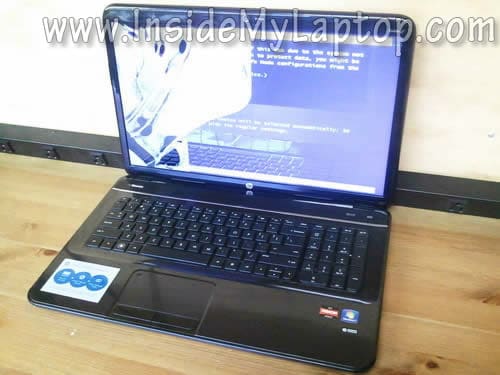
In this guide I show how to remove and replace damaged or failed LCD screen on a HP Pavilion g7.
As you see, in my case it’s broken. It’s cracked badly and the left side doesn’t show any image.
Make sure the computer is turned off before you start the disassembly process.
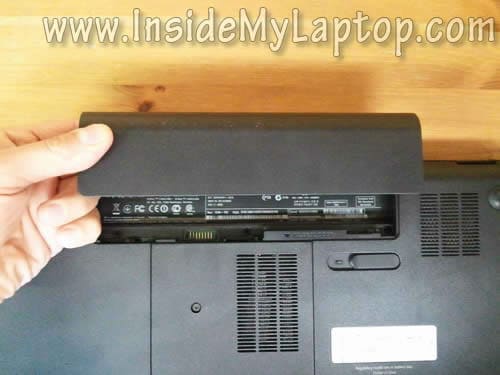
STEP 1.
Remove the battery.
STEP 2.
You’ll find two screw covers on the lower left and right corners of the display bezel.
Remove the left cover with a sharp object.
Remove the screw.

STEP 3.
Remove the right screw cover.
Remove the screw.

STEP 4.
Now start separating the bezel from the display back cover.
For separating the bezel I’m using the guitar pick. You can use any other piece of plastic.
Insert your finger between the bezel and back cover and at the same time work with the guitar pick to separate the bezel.
You’ll have to wiggle the bezel to unlock hidden latches.

STEP 5.
Continue removing the bezel with your fingers.

STEP 6.
When the bezel removed on the upper side of the display panel move the lower side.

STEP 7.
Close the display. Using the guitar pick separate the bezel from the cover on the back side of the laptop.

STEP 8.
Now you can remove the bezel completely.

STEP 9.
Remove two screws from the right mounting bracket.

STEP 10.
Remove two screws from the left mounting bracket.

STEP 11.
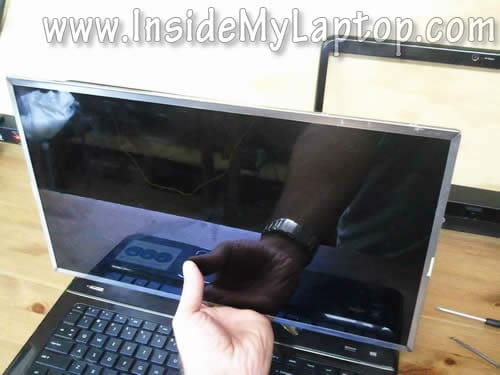
Separate the LCD from the display back cover and place it face down on the keyboard.
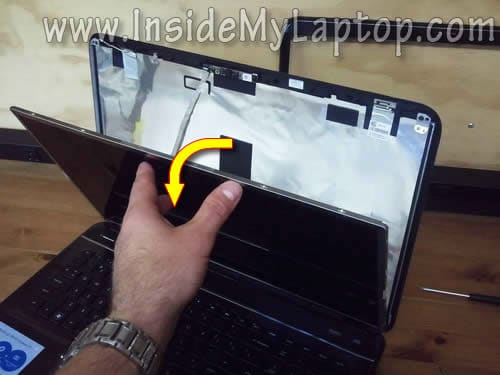
STEP 12.
Now you can access the video cable on the back.
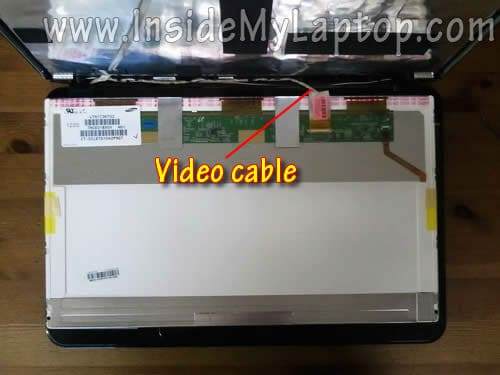
STEP 13.
Remove clear tape securing the connection.
Unplug the video cable connector.

STEP 14.
Remove the damaged LCD screen and replace it with a new one.
Assemble everything back together following all steps in the reverse direction.
You can search for a new replacement LCD using the model number from the original part.
My HP Pavilion g7 I had the a screen with the following model number: LTN173KT02.

My next guide for HP Pavilion g7 explains how to disassemble the body.
Raj
I never thought, replacing a laptop screen is this easy.. Thank Q so much for this article with screen shots. 🙂
khaled mohammed
please show me how replace the keyboard of this type ???????
IML Tech
@ khaled mohammed,
What is the full laptop model? HP g7-????
khaled mohammed
i have g6-2160se which has the same shape of keyboard of this type,the built in mic vibrates inside my lab and i want to disassemble my lab to fix this problem but i can’t disassemble the keyboard!!!!
please help me,
thanks in advance.
IML Tech
@ khaled mohammed,
I haven’t created a guide for this HP g6 type yet but you can get help in the service manual.
Here it is: http://h10032.www1.hp.com/ctg/Manual/c03277661.pdf
khaled mohammed
thanks a lot
can u help me to convert from dynamic mode to fixed mode for my switchable graphics
thanks in advance
bptb
The dis-assembly for the new Pavillion G6 or G7 2000 series (2012 model) with chiclet keyboard should be similar to this –
https://www.insidemylaptop.com/pull-apart-hp-pavilion-dv6-3000-series-laptop-guide-3/
But yeah, we should wait for the official disassembly for these laptops.
Bullsat
I have a problem with my Laptop of this type (HP g-7). The fan keep on going and somethimes it is running at full speed and being very noisy and annoying, Which is rly bad when im at school. (Last semester and exams in 4 days *-* ) even tho i dont do much on it. It is like it have a mind of its own.
P.S
When im doing a lot it does run fast as well which is good.
IML Tech
@ Bullsat,
Probably the heatsink is clogged with dust and the fan runs full speed because the laptop overheats. Try cleaning the cooling fan and heatsink.
Find an air compressor or buy a can or compressed air and blow it into the fan grill on the bottom and side of the laptop. Test the laptop after that.
Iain
Hello,
I posted this on another area as well, but thought this may be more fitting.
I am having problem with my screen flickering (sometimes so bad i cannot see anything on it!) I have used this guide to remove and replace the screen, which was perfect in itself, but the new replacement screen is having the same problem.
Would you put this down to the cable, as i assume? In which case i thought i would find out how to check/replace the cable here https://www.insidemylaptop.com/taking-apart-hp-pavilion-dv7-laptop-guide-3/comment-page-4/#comment-988900…
Any help would be greatly appreciated, it is driving me slowly insane!
Regards,
Iain
IML Tech
@ lain,
First, I would test the laptop with an external monitor. If the external video works fine and flickering occurs only on the laptop screen, most likely it’s one of the following:
1. Bad connection between the video cable and motherboard.
2. Defective video cable.
3. Could be motherboard related failure but most likely it’s either 1 or 2.
Does it flicker when you move the display back and forth? If yes, probably it’s bad cable.
I would try reseating the video cable first and if it doesn’t help, replacing the cable.
tyler
Hello my HP g7 laptop has a BIG problem with the screen or the laptop on the 25 of october i was letting my brother use my pc for homeschooling and he spilt water on the left side of the computer and the next day of using it and drying it my PC had crack that was’nt on it on the right side of hp is there anything that goes to the pc monitor on the left side.
IML Tech
@ tyler,
I do not understand what is wrong.
If the screen is cracked, it has to be replaced.
Also, when you spill something on a laptop, it’s necessary to disassemble it for liquid spill diagnostic.
Aimee
OM! Thank you, kids dropped my laptop and the screen was all garbled. Followed your instructions and replugged in the video cable and it all works. My day is rainbows now, THANKS!
Frank Rudd
Hi
Just looked at the screen repair as mine broke this morning . my HP-G7 has no screws to undo in the laptop lid and cannot see how to split the screen apart
thanks
Frank
IML Tech
@ Frank Rudd,
What is full laptop model number? HP G7-???
Frankie
My HP Pavilion g7 2000 series model has a crack on both hinges. It is now starting to get to the body. Please help me! Is it a defect with my model? I’ve seen lots of hinge problems in my model.
Phishin81
Thanks for the write-up. Just finished replacing my cracked screen and the new ones working fine. Getting the bezel off was a bit of a pain, trying not to break it, but then again I’m a truck mechanic so when things give us a problem we break out hammers, torches and other implements of destruction to get things apart so finess and patience are tough for me. But I got it done without breaking anything, thanks again!