

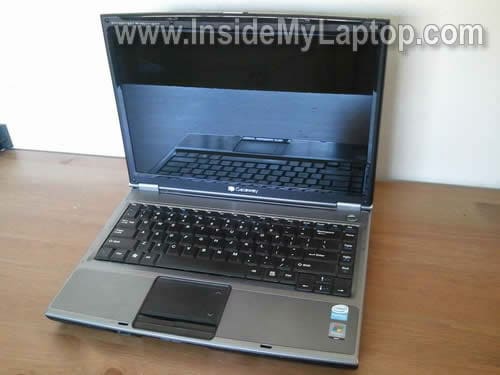
In this guide I’ll be replacing a failed LCD screen in a Gateway MT3000 series laptop.
To be precise, I am working with a Gateway MT3707 model with failed backlight.
Problem description:Â It starts with a reddish image and after a few seconds the backlight goes completely off.
Turn it off, unplug the AC adapter and remove the battery.
STEP 1.
There are six screws securing the display bezel. These screws hidden under six rubber plugs.

Remove all six plugs with a sharp object.

Remove six screws securing the bezel.

STEP 2.
Start separating the bezel from the back cover with your fingers.

On the bottom the bezel is glued to the screen with sticky tape. Carefully separate the bezel.

STEP 3.
Remove it.

STEP 4.
The inverter mounted on the lower part of the display assembly.
Carefully disconnect the screen backlight cable from the right side of the inverter board.

If you are replacing the inverter board, you’ll have to disconnect one more cable from the other side.
If your backlight problem related to the inverter, you can replace it now and assemble everything back together.

STEP 5.
Remove four screws from the left and right hinge mounting brackets (two screws from each side).

Carefully separate the LCD from the cover and place it on the keyboard.

STEP 6.
The video cable taped to the back.
Remove the tape securing the cable.

Disconnect the video cable.
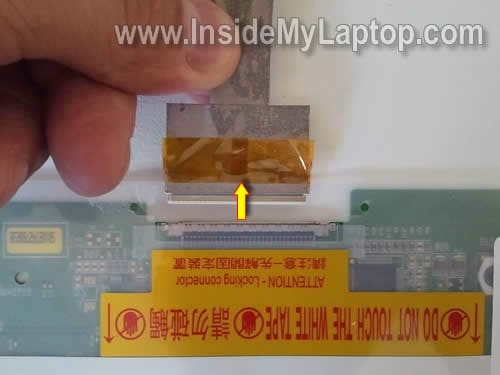
Now you can remove the failed LCD screen from the laptop.

You can find a new replacement LCD using the model number. This number is printed on back.
In my case the LCD model number was: LTN141W1-L03.

Theo Logan
When you tested the backlight on the Gateway laptop to determine it was a bad LCD, how did you actually do the test? I have the exact model you demonstrated with and I wanted to reach the same conclusion before ordering a LCD replacement. Thanks in advance.
IML Tech
Theo Logan,
I have a test backlight lamp I removed from a cracked LCD screen.
In order to test the backligth failure, I disconnect the laptop screen backlight from the inverter board and plug in my test backlight lamp.
After that I turn on the laptop and let it run for a while. If my test backlight stays on, the backlight inside the screen is bad.
Theo Logan
Gotcha. Thanks for the info.
M. Kim
Hello.
Recently, My MT3707 had a similar problem(failing LCD).
However, in my case, I think the problem might be ‘lid close switch’ (Sorry, I am not sure whether this is correct name or not) because
1. When I use external monitor, it works fine. So VGA must be OK.
2. The image is still on the screen, though it’s very weak. So LCD itself could not have a problem.
3. No reddish so far. When I repeat open/close the cover, the screen recovers sometimes.
Of course, it might be still inverter or backlight which causes the problem. Anyway I want to check the switch first as I don’t have additional parts.
The problem/question is that I can’t find on where the switch is.
Can you point out where it is? It would be very helpful to me.
Thank you very much.
IML Tech
M. Kim,
I don’t remember this model off the top of my head, but if you cannot see a physical button somewhere close to the hinges, most likely you have a magnetic lid close switch. Older laptops usually had a regular physical switch button but newer laptops come with magnetic lid close switch.
Here’s how it works.
There is a small magnet installed inside the display panel. There is a switch located somewhere on the motherboard. When you close the display, the magnet activates the switch and the laptop goes into sleep/hibernation, etc…
You can find the magnet location by moving a small screwdriver along the bezel and the screwdriver will stick to the place where the magnet installed.
If you have a magnet switch, I don’t think this is your problem.
Most likely it’s either bad inverter or faulty LCD screen backlight. You cannot tell which one is causing the problem without testing the laptop with a known good inverter board.
If you have to guess, try replacing the inverter board first. If it doesn’t help, try replacing the LCD screen.
M. Kim
Thank you for your kind, precise, and concise explanation.
As you expected, it did not seem the switch problem.
So I followed your recommendation and ordered an inverter; Now I’m waiting for it.
Hope this guess would turn out to be true.
Again, thank you very much!
IML Tech
M.Kim,
I hope it works. Let me know if your new inverter fixes the problem.
jb
HI,
i own a gateway mt3707 and i noticed it gets hot easily.
i believe that the fan is filled with llinth
can u make an instruction on how to access the fan of gateway mt3707
thanks ;D
M. Kim
It works! 🙂
It was indeed the inverter problem. I’ve just replaced it with new one.
The whole process took only a couple of minutes; However, I had ordered new inverter at e-bay, and it took about 2 weeks for shipping. It was quite cheap though.
Thank you very much again!
godchaser1967
i have a gateway m6843 and power plugs was little loose i disassemble laptop and touchup solder on plug put everything back together and it powers on but nothing on the screen. i have used and outside monitor no show , i used only mother, board power with and with hard drive still no show. i have disassembled and reassembled to make sure everything was done correctly, Any thoughts???
IML Tech
godchaser1967,
Did you remove memory modules during the disassembly process? Make sure memory modules connected correctly.
Homero Iracheta
Mr. I have a Gateway M7 3707 ( Iam a spanish so the english in some parts I dont understand at 100% ) .
I read all the comentaries, and I confused, because I think I need to buy only the inverter and then my problem its resolve but in this moment I dont know if its the inverter if its the backlight or the lcd screen.
My problem:
I turn on my laptop, showme a few seconds the screen and then go dark… ( sometimes the image go back again for a few seconds and then go back dark again ) sometimes, no much times, but sometimes I can see a image in the dark, but sometimes… why I can explain this? because I conect my laptop to an external monitor and I see all my desktop and all what I do on my laptop… so I can work with a external monitor and work and in that period of time, the screen on my laptop go back the image for a few seconds or in any moment ( few moments ) the image can be visible for a 3 o 4 minutes..
so my question its, please Mr. can you helpme to decide what part I need to buy ? becasue for me its very expensive to buy a part and maybe its not the part for my problem, because how I dont know correct the english, I failed to learn what you say in your post and the comentaries and buy a part what I dont need it.
please can you helpme on this.
thanks
IML Tech
Homero Iracheta,
Most likely it’s either bad inverter board or failing backlight lamp inside the LCD screen.’
Which one is bad? I cannot tell without testing the laptop. Both have very similar failure symptom – no backlight on the screen or it’s flickering.
In order to figure out which part to buy, it’s necessary to test the laptop with another inverter or backlight.
If you have no spare parts, you’ll have to guess. I would suggest try replacing the inverter board first, it shouldn’t be very expensive. If it doesn’t help, replace the LCD screen (the backlight lamp mounted inside the screen).
It’s possible to replace just the backlight lamp without replacing the whole screen, but it’s very difficult.
Homero Iracheta
Thanks Mr IML Tech.. many thanks for your explanation, right now I buy on ebay an inverter, to test first ( hope this can fix the problem ) and if its not, well I need to replace all the lcd screen, becasue what you say its difficult to change only the backlight.
but Iam happy with your repply, first for your time to respond, second for your website with images explain to change the bad parts, because its good to me, and have the courage to make my own job in my laptop… ( some people do the job but its givme an expensive amount, thats scare to me…. 190.00 dlls … and I think, my computer its old , so its better if not repair and buy a lcd screen separatly to buy in walmart for 100.00dlls and thats its less than sent to repair ).
again thanks for all, and only wait for the part to do the job..
regards
Homer
IML Tech
@ Homero Iracheta,
Good luck! I hope replacing the inverter board will fix the problem.
Make sure to buy inverter from a good reputable seller with many positive reviews.
Homero Iracheta
Mr. IML Tech… Please when you read this post if you need to delete, please do it… ( because Iam not see to post in other way )
on this day I not recive the inverter… but Iam still waiting… but until yesterday, the laptop givme another problem…. and I put this post to know if you can givme another idea…
the “on” button its hard to respond ( I push several times and spend several times ) until the laptop its start on… Im afraid next time dont turn on the laptop… please do you have any idea what the problem its… because soon the inverter its came, and hope this fix the problem with the screen… but if the laptop cant turn on ?
thanks ….
IML Tech
Homero Iracheta,
What happens when you push on the power button?
1. The power LED turns on but nothing appears on the screen
or
2. The laptop doesn’t react at all. No LED light, no other activity. The laptop appears to be dead.
Homero Iracheta
Mr IML Tech say:
2. The laptop doesn’t react at all. No LED light, no other activity. The laptop appears to be dead.
I need push the on button several times, until the computers starts on… because when I push the button the laptop its on number 2… I see this, (maybe .. I dont know certain of this ) but if I push the on button to start the laptop on, I push the button on one of piece of the button on the left around ( not on the center ) and stay pushed the computer its on… but not on all times…
today the laptop continues turn on ( pushing several times the buton ) but what I say, Iam afraid one day the laptop never start on……
thanks and regards
.
Homero Iracheta
Not, its not the inverter, I put the new one, and the screen its black, some times I can see the desktop but darker…
well I need to do 2 things… 1.- buy the whole lcd screen, and second, I need a new cable ( the left what as atached to to inverter ) because when I try to disconect again the new inverter to see the exact number of my lcd screen, well I put excese force and I disconect two black wires from the “White head cable” and I dont know were to put inside again back…
Mr IML Tech, in the step 4 you say “Carefully disconnect the screen backlight cable from the right side of the inverter board” that cable its ok, but if you see in the same steep , you say “If you are replacing the inverter board, you’ll have to disconnect one more cable from the other side of the inverter” that cable I broken, because some wires its out from the end of the cable, thats its the broken cable..
Please can you tellme where to buy it, or the number of the cable, because my problem its the English I cant explain how to say the correct cable to buy it…???
thanks for your reply
IML Tech
Homero Iracheta,
I don’t know the part number. Take a look at the cable installed in your laptop. Does it have a sticker on the cable? The part number could be printed on that sticker.
Find the sticker and google all numbers you can find on it. You should be able to fine a new cable this way.
Homero Iracheta
I buy the cable from the number what you say…, but please, can you tellme if the start on button can fix ? I try to start on pushing with a fine point and after several times the computers turn on ( that are before I broken the video cable ) … did you think can I fix it or its a big problem ? thanks for all
David
I have a mt3703 laptop and the screen just goes black after a few minutes after I turn on the laptop. Is it the inverter or the backlight that needs to be replaced? I used a monitor to make sure I still have video and it works, and once in awhile the laptop screen will flicker on and I can see the screen for a few seconds or so. if this helps to tell me weather it’s the inverter or the backlight? The image on the screen isn’t visible at all when it goes out
.Thanks for any help