

In the following guide I explain how to remove and replaced damaged screen in HP Pavilion dm4 laptop.
This is second part of the HP Pavilion dm4 disassembly guide.
In the part one I explained how to remove display panel.
STEP 1.
There are two screw covers in the lower left and right corners of the bezel.
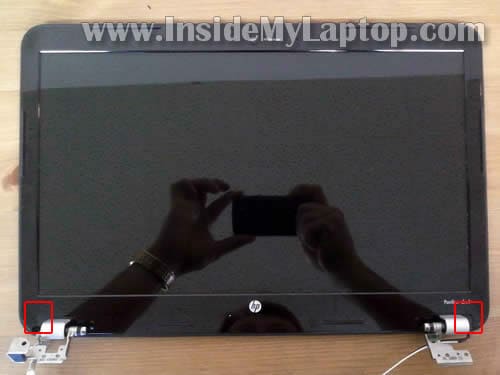
You can remove both covers with a sharp object.
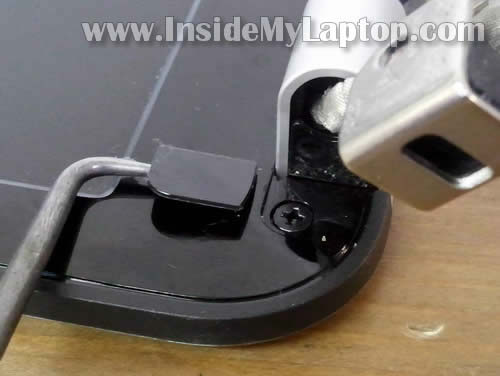
On the following picture I’m removing the left screw cover.
Remove the screw.
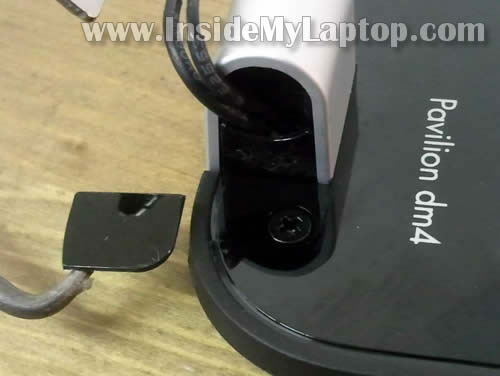
On the next picture I’m removing the right screw cover.
Remove the screw.
STEP 2.
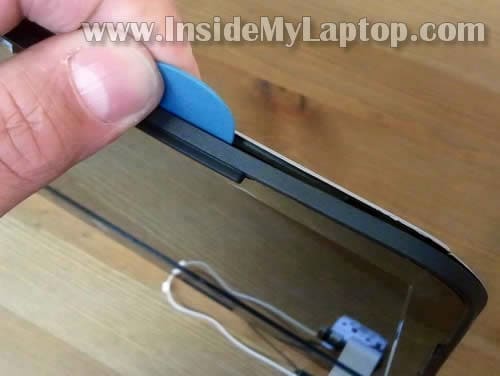
Insert a piece of soft plastic under the bezel and carefully separate it from the cover.
I’m using my favorite case cracker – the guitar pick.
There are some hidden latches securing the bezel to the display cover. You’ll have to wiggle it in order to unlock the latches.
STEP 3.
Continue separating the bezel from display cover.
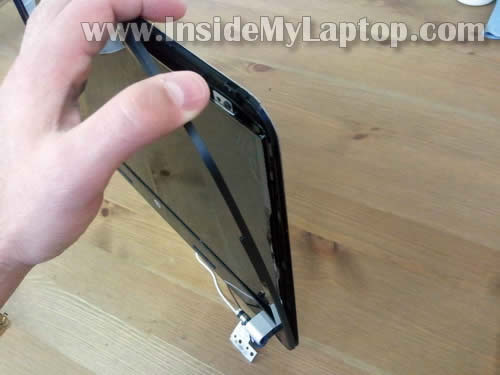
STEP 4.
The bezel separated on the top of the display assembly. Now you can move to the bottom part.
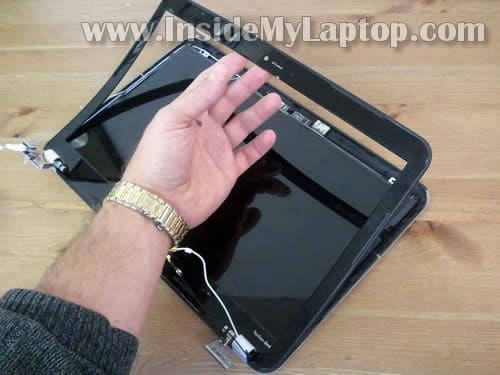
STEP 5.
Finally, the bezel has been removed.
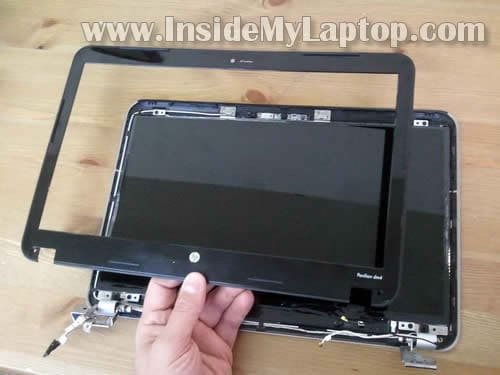
STEP 6.
Remove four screw securing the LCD.
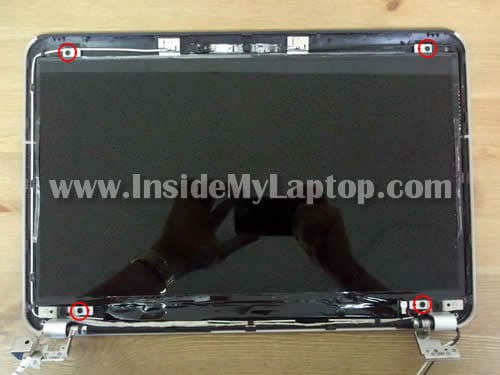
STEP 7.
Carefully separate the LCD from the display cover and place it face down on the table.
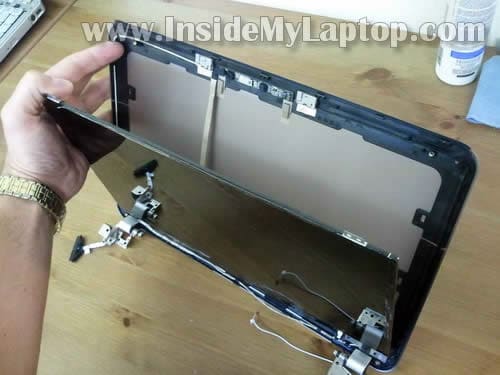
STEP 8.
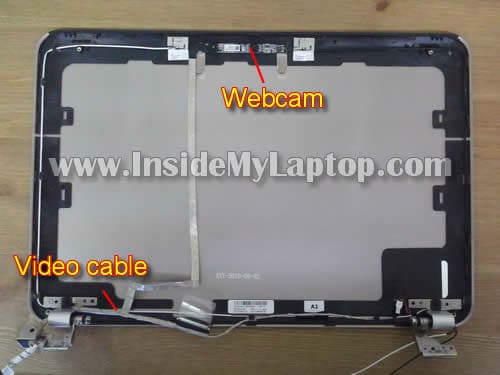
On the back you can access to the video cable and webcam cable bundled into one harness.
The webcam cable glued to the back of the screen with double sticky tape. Unglue the cable.
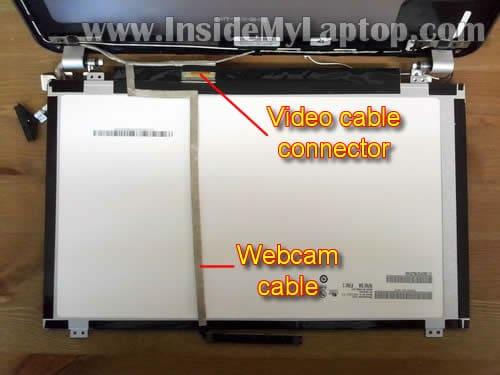
STEP 9.
Unplug the video cable.
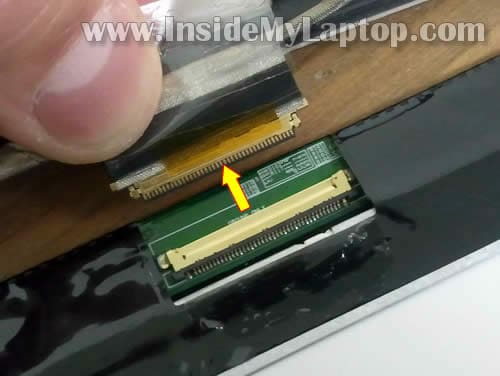
STEP 10.
Now you can remove the screen and replace it with a new one.
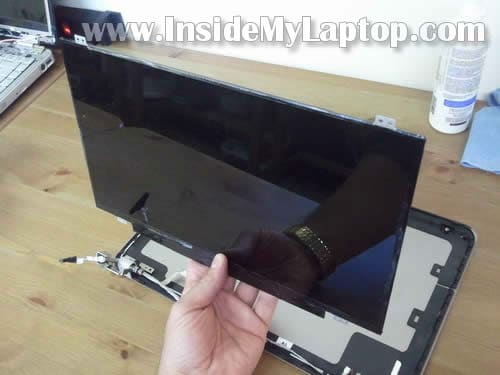
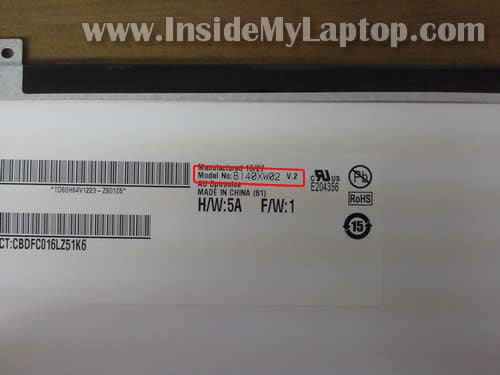
You can search for a new screen using the model number printed on the sticker on the original part.
In my HP Pavilion dm4 I had the following LCD installed: B140XW02. It’s version 2 but I don’t know if the version number makes any difference.
On the following picture you see the display back cover.
Nelson
Hi thanks for the advice here. I had cracked my screen on my hp laptop and was at a loss, I called hp and they wanted 395.00 (are they totally off their rockers?) anyways , I took your advice and got a laptop screen replacement from laptopmart.ca and they installed for almost half the price with 3 years warranty. So my advice to anyone out there – it will save you money at this repair shop. Thanks once again , you saved the day.
Eve
Thanks for the great guide!
My only question is this: Why is it the LCD replacement can’t be done with the display assembly still attached to the laptop base? (I definitely believe you when you say it can’t; I just don’t understand from the instructions and photos why that’s the case.)
Thanks again!
IML Tech
@ Eve,
Because the screen bezel is secured by two screws on the bottom (shown in the step 1). You can remove these screws only when the display is separated from the laptop base.
If you can figure out how to remove the screws without separating the display, probably you can replace the screen too.
Eve
Ah, gotcha — thanks for clarifying! (I’m going to be fixing a friend’s computer, but don’t have it in front of me at the moment.)
Markus
Very detailed instructions, thanks! Following your guide, it only took me about 45 minutes to swap in the new lcd screen without a hitch!
Montrel
If it doesnt work the first time keep trying it. It took my screen about 4 re connections to the video cable before the screen would even light up and then another 5 or six before color would show up and then another 4 before its fully functional.
Jerry
Lap top Tech, Thank you so much, you have saved me a lot of time with this, I will pass on your site only way to know shortcuts is to spend hours figuring this stuff out–Dell is so much easier BTW to fix!!!! Thanks again, Jerry
Tim Laing
I found your information usefull, but I also looked at a video on Youtube that showed how to remove the LCD without taking the computer apart. SO DO NOT TAKE YOUR COMPUTER APART YOU DO NOT NEED TO!!!!! I have replaced the screen without taking the computer apart. Simply pop the 2 lower screw covers off using a sharp pick or small screwdriver. The screws exposed are Phillips screws. You can not remove them using a phillips screwdriver due to the space limitations and angle of the cover to base of the laptop. Use a very small straight blade screwdriver.,( I bought a real nice screwdriver set at Harbor Freight Tools part number 93916. It is a 34 pc set that was on sale for $5.99 normal cost $7.99) I used the 1.5 or 2.0mm straight blade screwdriver sideways on the screw heads. The screwdriver blade will go into 2 of the four slots of the philips head, you will do partial turns to get the screws out. The screwdriver shaft will be at about a 45 to 60 degree angle to the screw head. It works I did it with no problems. Once the screws are out, I used an old creditcard to pop the plastic bezel off. There is double sided sticky tape holding the bezel to the screen, I used the credit card to work the tape loose as well. Bezel off then just remove the 4 screws holding the screen in and pop it out. Follow the instructions above about removing the tape and unplugging the screen. This job was real easy to do.
TL
Tim Laing
More info. I did make the huge mistake of purchasing the screen from HP $258 with shipping. It was supposed to come with instructions on installation. When I looked on the web I found out how badly I was getting screwed. So I called HP to return the screen. I am still going around and around with them. Next call to my credit card company if HP doesn’t get this cleared up. Well in any case the screen they shipped me as the replacement was a SAMSUNG LTN140AT12 this is a LED lit screen 12″X7.4″ WXGA (1366×768). I bought my screen from Laptopscreen.com and they offered a MATT version for a little more than $5.00 more. I hated the glossy screen I don’t want to look at the light behind me or the windows behind me. The matt screen is GREAT!!!. Screen cost was $65.99 and shipping from Canada was $17.52. Screen fit perfectly and is working great right in front of me now. 3 year warrenty on the screen.
The old screen in the computer was made by AU Optronics part number B140XW02 V.2
I hope this helps. Go with the matt it is much better!
TL
Vasilica
Removing just the hard drive (to save the data) will make my warranty void? Or I can still put it back and take it to the service repair?
IML Tech
@ Vasilica,
Is your laptop purchased in the United States? If yes, removing the hard drive shouldn’t void the warranty. There are no security seals on the laptop case.
JJ
Thank you. Thank you. Thank you. I watched the screen surgeons video but I could not see how it was possible to access the bezel screws. The angle is impossible. I had to dismantle the laptop. Took about 20 minutes. When I arrived home from work today, the new screen was here. took me about an hour to remove the old screen from the display panel, install the new screen and reassemble the laptop which I am using to type this. When my screen died, I thought that was it, new laptop. But for less than a c note and two hours including the initial research, my laptop is as good as new. I donated. Thanks.
Radder
Thanks man! Awesome tut! Tok me 25 min the second time i did it.
ermin
I just replaced my screen on my hp pavilion dm4 and i just get a black screen and nothing else. Help anybody?
Barry
Hi, do you know what that black skeleton frame holding the bezel to the lid is? the one that still attached to the lid in that last pic? I need to replace that also but I don’t know the serial number or what it’s called.
Thomas
Nice tutorial, thank you. I hate the laptops that require more than removing the bezel, because of the screws set below the hinges, but better than a MacBook 🙂 Thanks for taking the time to do this.
Tyler Smith
just have one question, what are the two wires going up the sides of the screen that were under the bezel? Cant seem to find those out anywhere lol
David
Quick question….When changing ONLY a cracked screen. Will I have to take apart the HDD, Dvd drive, keyboard, etc.?
Or could I just take the screen panel apart from the body?
ejk
Very useful tutorial!
My screen was messed up because of a problem which started with the mechanical failure of my left hinge cover, which led to a series of issues ending with a cracked frame and ruined screen. I don’t really want to purchase a new screen and all new parts so I was considering removing the display completely and hooking up the bottom part of the laptop to an external monitor and using it that way (of course, I’d get a new working laptop as well). Do you think this is possible? Would I run into any problems with running the computer without the monitor/head?
IML Tech
ejk,
Yes, it’s possible. Actually I’m using a setup like that at home. It’s great for watching youtube, online TV, etc… on your TV.
When you remove the screen you’ll have to disconnect wireless card antenna cables (they are running inside the display). It means you will not be able to use internal wireless card but you can use LAN or buy an external USB wireless card.
There shouldn’t be any problem.
Sagar B
Hi..I’m having the same HP dm4., but the problem is its lower left clip/hook which helps to open laptop got broke as I used to open it from upper left corner, results the pressure got only on left side of screen.What should I do then ? Do I have to replace the whole screen or just that clip ? Its not in Warranty period.Need Help !!
Sean
hey so how do i disconnect the webcam to be able to replace only the back. i need to take the old webcam off and fit it onto a new back
thanks for all the help
IML Tech
@ Sean,
Lift up the screen bezel as it shown in the step 4 so you can access the webcam.
Disconnect the webcam cable.
Remove the webcam module. I’m not sure if it’s secured by screws, sticky tape or plastic latches. You should be able to figure it out.
Replace the webcam module.
Michaela
Replaced LCD screen and the display cover (black part mounded to display cover) a piece broke and screw on the left botton side has nothing to screw into. My question is can the black part o the display cover be replaced or does the whole display cover need to be replaced?
IML Tech
@ Michaela,
You confused me with too many display covers. 🙂
Are you talking about the screw anchor on the display BACK cover?
If the screw anchor is broken and because of that the entire display is loose, you’ll have to replace the BACK cover.
I hope I understood you correctly.
Michaela
The srcreen is working properly and so is the webcame and speakers. Its just secureing the screw to the bezel and display cover.
Brian
I have found sites that sell the screen itself but what if I need the display cover. The bracket where you remove the first screw is busted on my laptop.
IML Tech
@ Brian,
HP Pavilion dm4 display covers available on eBay.
Bendik
Anyone now where I can a replacement for the video cable that runs from the webcam and LCD? My LCD is fine but I think the cable is wonky as the image sometime freezes but resolves when i tilt the display. Cheers
Daisy
I am having the some what of the same problem as Bendik, My screen is coming on and it looks like it works fine but the graphics are coming out green and purple. when I took apart my laptop to reconnect the screen I noticed that the video cable connector was a little bent but fit right in. Could this be the problem? and could that be replaced? and where do I get one from? Thanks BTW your tutorial was awesome!!! if only i didnt have this small problem.
Fabi
Hi, i’m having an HP dm4-1042tx. i recently had my laptop fan cleaned by a friend of mine. but after that the brightness start to act weird. the display seems too bright although its in default position (50% brightness) and the color seems kinda blur (not to contrast). the point is the display is not the same as before (with the same settings). i tried to uninstall and reinstall the graphics driver, but no results..
is this a hardware or a software problem? what can i do to fix this.
thanks for the help
Adam
Hi there!
First off, thanks for the great guide. Installed a new screen on my dm4 and it works like a charm. So empowering to be able to have done this myself (and great to have saved so much money).
Just one problem… I lost two bezel/hinge screws (the ones under the plastic covers shown in step 1).
Do you know what size these screws are exactly? I’d like to replace them but I’d like to avoid purchasing an entire replacement screw kit.
Thanks!!
Best,
Adam
neenee
My LCD in HP is black but all the other lights are on the LCD will not turn on. I turned it on and off, I took the battery out. I turned it on it went completely black. I am now in the process of taking off my screen and trying to fix the problem. Any help?
Sriharsha
My DM4’s glass has a crack…n the back cover(mounted to the LCD display) is also broken n few plastic pieces have fallen off 4m it..!!! i want to replace my screen and the cover..!!! can anyone tell me the approximate cost of it?? Cost in INR would be awesome.!
Thanks,
Nick
Thanks for the how-to. It worked perfectly.
Chris
The installation guide worked very well. Took me 2-3 hours to slowly do the screen replacement but my hp Pavillion dm4 screen is now replaced and working great.
Thanks… saved me $50. Laptop guy said he would install it for $60. I donated $10 to you… and was glad to do it.
David
First, thank you so much for this guide. It is very clear and detailed. Now, my issue. We had the right hinge (side near ‘delete’ key) replaced recently while traveling out of the USA. After working fine for a few days, we came back to the USA and the display suddenly stopped working. It is all white with some dark black & blue smudge in the bottom right portion of the screen. I checked the display cable wiring and all connections are secure. Do you think it is the screen, or cable itself, or something else that needs to be replaced? I can send photos if needed…would greatly appreciate your help to see if it is fixable or not!
Calvin
Thanks very much for the guide, it was very helpful. I have one other question though. I’m trying to convert this laptop screen into an external monitor for another computer. I know that I need a LCD controller to hook up to the LVDS cable, but all the tutorials I’ve looked at for external monitors mention I also need a power supply for the display backlight, and I don’t see anything about the cable that provides that in this tutorial. I’m really confused, because I would assume you would also need to use that cable for replacing the LCD screen. Is the power cable included in the video cable you were talking about, or is it something else? Thanks very much
Lika Shembilu
Thank you.
Tom M
I’ve just replaced the screen on my HP DM4, but have a question about the webcam. It came loose when I removed the faulty screen. How do I position it under the bezel? I’m holding off on securing the bezel until I know.
Hayor David
Please I need a replacement for my system screen but am finding it difficult to get a new one hither.
Tim
I see this is a rather old post, but I’m curious about something. I’ve looking at doing as many upgrades as possible to my laptop and I was wondering if it would be possible to replace the LCD screen with a touchscreen?