

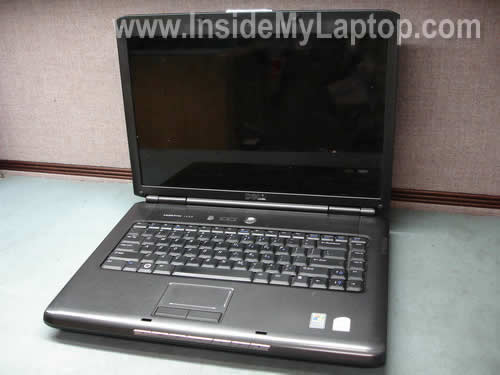
In this guide I explain how to remove and replace damaged screen on a Dell Vostro 1500 laptop.
In my case the LCD panel was cracked it could not be repaired.
This set of instructions will work for Dell Inspiron 1520/1521 and many other Dell models.
Before you start do not forget to turn off the computer, unplug the AC power adapter and remove the battery.
STEP 1.
On the display bezel you’ll find six screw seals. Four rubber seals and two plastic seals.
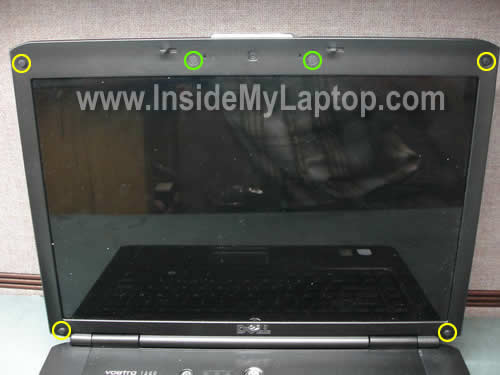
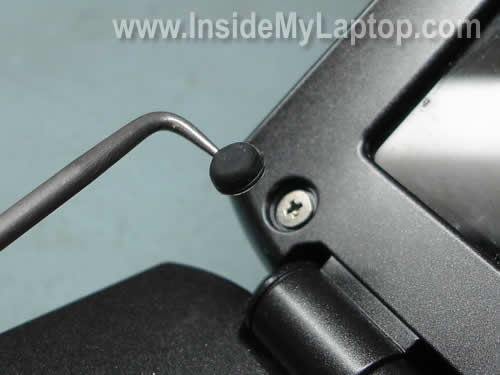
You can remove these seals with a sharp object.
Remove all six screws found under the seals.
STEP 2.
Start separating the bezel from the display cover with your fingers.
You can use a piece of soft plastic to separate the bezel.
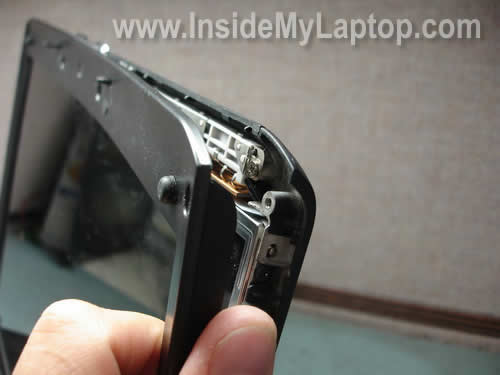
Continue separating it on the top of the display and after that move to the lower part.
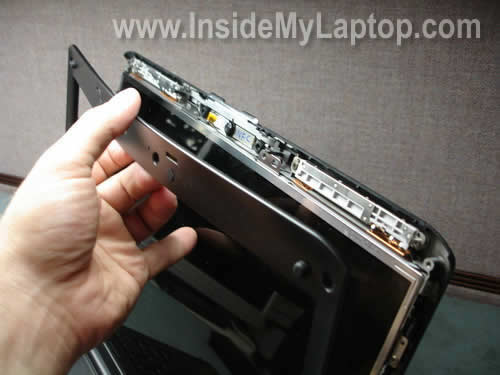
Finally, remove the bezel.
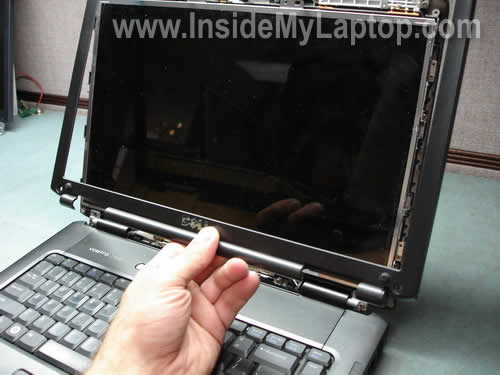
STEP 3.
Remove four screws securing the LCD panel to the left mounting bracket.
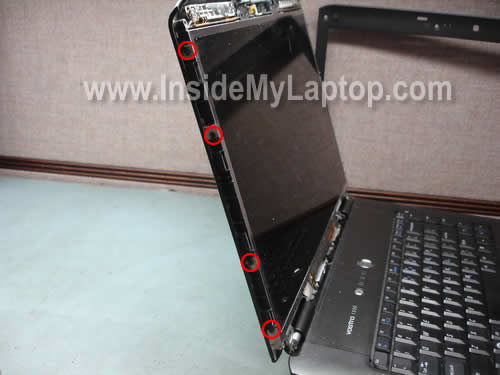
STEP 4.
Remove four screws securing the LCD panel to the right mounting bracket.
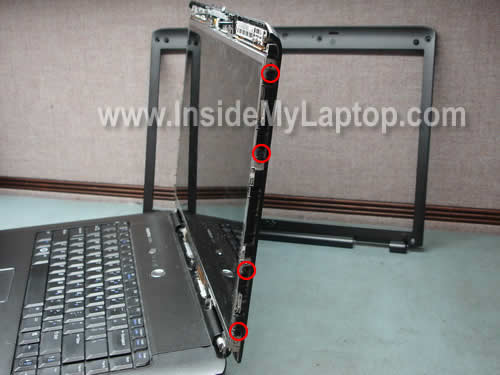
STEP 5.
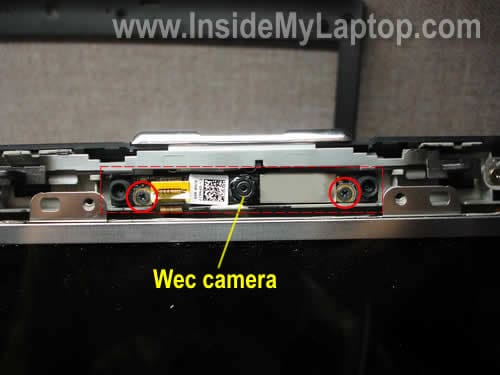
Remove two screws securing the web camera.
STEP 6.
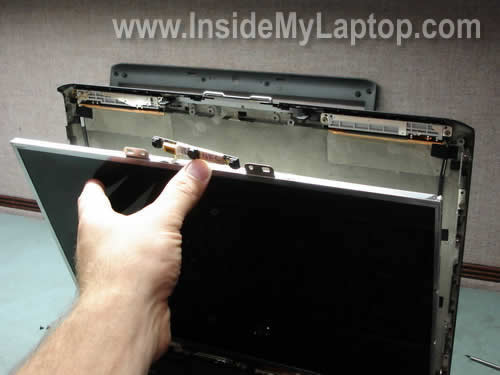
Separate the screen assembly from the display cover.
As you see, the web camera is still attached to the screen assembly.
STEP 7.
Place the LCD upside down on the palm rest.
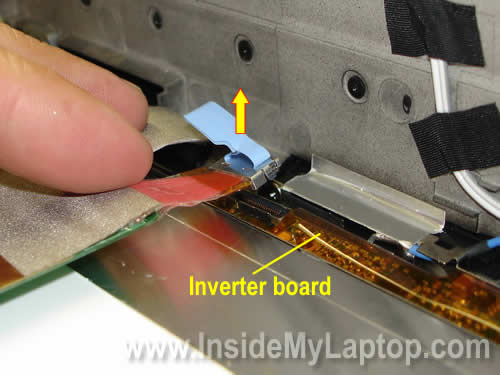
The video cable has two connectors.
One is connected to the LCD and another one to the inverter board.
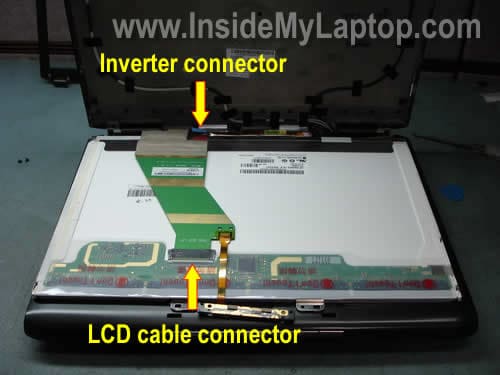
Carefully push on two latches on both sides of the connector, release the cable and disconnect it from the screen.
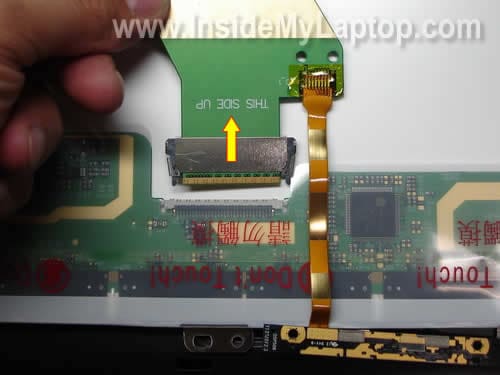
Pull the second connector up and disconnect it from the inverter board.
STEP 8.
Remove the screen assembly (LCD and inverter).
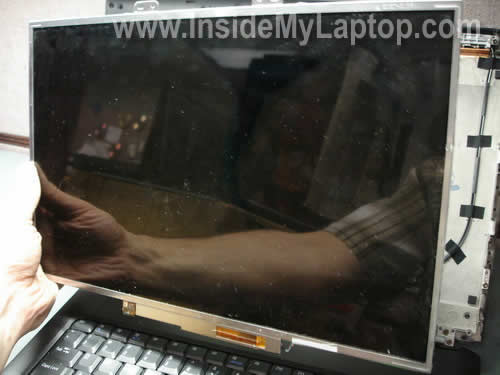
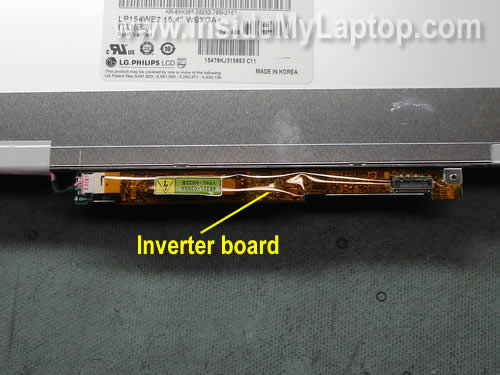
The inverter board is attached to the bottom part of the LCD frame.
The inverter can be replaced separately.
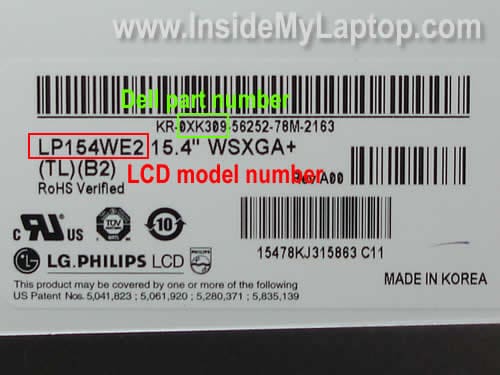
The best way to find a new replacement screen is searching by the model number or Dell part number.
Both numbers can be found on one sticker with a barcode.
Put it back together following all disassembly steps in the reverse order.
vik
Your guide is really cool. Can you please explain how to remove the inverter card attached to the bottom of the screen. I have opened my system following your steps but now I am stuck at the last step as I have a faulty inverter. Any help is greatly appreciated.
Thanks
Vik
IML Tech
vik,
I didn’t take pics for removing the inverter, but I think all you have to do is remove one screw and unplug cables. After that you release the inverter from the metal casing on the screen.
Devon
Thank you very much for your illusterated instructions on the repair!
I have the same model Dell Vostro 1500 with the same exact problem -cracked LCD still working with 30% black blue screen – that needs replacement.. My question is howevre,
Do I need to replace Both inverter and the LCD screen?
IF YES, then
Do I have to look for both parts seperately or do they come togeather?
like LCD screen comes attached with inverter?
And if my current inverter is working fine, would it be compatible with the new LCD screen?
Thank you
Devon
IML Tech
Devon,
No, it’s not necessary to replace the inverter but usually new Dell screens have a new inverter attached to it. It depends where you buy the screen.
If you can find just the LCD screen, replace just the LCD screen. The old inverter should work with a new screen just fine (I assume you buy the same type of screen as the broken one).
If your new screen comes with the inverter than it’s easier to replace both.
Devon
Snagged one more problem??
What do you do with the cam???
WIll the old Cam fit right onto the top of the new LCD screen?
Just like the inverter issue… please advise …
Thank you!
IML Tech
Devon,
The webcam is attached to the video cable. When I replace the LCD screen, I leave the webcam in place (attached to the cable) and replace just the screen. You are not replacing the webcam when replacing the LCD screen.
kirk
hey i have a dell inspiron 1520 and i found it on your link to ebay but it says 1500 or something else but yea, i wanna get the right screen but would rather wait to take it out until i get the new one thanks abunch!! will those screens work with mine
IML Tech
kirk,
I cannot tell without looking at your original screen. You have to make sure that the replacement screen is the same type and has the same resolution.
To make sure your new screen works with the original cable, I would suggest buying the exact replacement.
Before you order a new screen, remove the old one (it takes only 10-15 minutes) and look for the part number on the back of the screen. That’s how do it.
Kamone
Your instructions seems easy to follow. I have a dell inspiron 1521. This the second time my screen is going bad. The first time happen only a month after i bought the computer (should av taken it as a sign). Only 1/2 my screen is showing; the bottom 1/2 have white lines going horizontally across it. The first replacement was covered under the warranty. The warranty is now up! I have notice now that on both occasions the problems with the screens are identical; could it be that my computer have a problem beyond what simple replacing the screen can fix? In other words: Could the faulty lcd be a symptom of something else? Cause i don’t want to replace the LCD and it end up with the same problem. Thnaks
check
I’ve been researching replacing my dell screen (vostro 1500/inspiron 1520) and have not been able to find out this info, so maybe the community here will know.
when you replace the screen, is it possible to upgrade it in resolution? (from 1200×800 to 1900×1200 for example) or does it have to be the exact same screen?
Thanks in advance.
jOEY MAGGS
Hi,
I just bought a DELL LATITUDE D531 FOR £40 ( US$ 90 ) , the SCREEN was history i.e. cracked! , but the rest of the laptop was as new! , so I bought a screen off ebay.co.uk for £70 free postage, installed it using the above guide , and voila! my laptop works fine , all i now is to re-install XP! I also needed a charger for a d531 , again I used my favorite acution site ebay , bought one for £16.99 free postage.
Thank You.
Regards
JOEY
Jill
Thank you so much for your pictures! I have a Dell Vostro 1500 and the screen wasn’t lighting. You could faintly see the items on the desktop, but the screen was very dark. My computer repair person said it was probably the screen going bad, but it wasn’t worth fixing. A little research on the net led me to believe it was the screen inverter and not the screen itself, since it was working at times and/or the screen would flicker. Your pictures gave me the confidence that I needed to try and replace it myself. I found the inverter for under $9 with free s/h on ebay. With the help of your pictures I was able to replace the inverter and now my screen lights perfectly!
Julian
Hi, I have a question similiar to what someone else asked. I am replacing a cracked screen and i’m finding cheaper WSXGA+ dell vostro screens than WXGA+ screens. Can i upgrade, and if so, do i need to replace both the screen and the inverter, or can i just replace the screen.
Bobby B
Thanks a lot for the detailed instructions. The only problem was how to deal with the invertor portion at the end. My new monitor did not have little metal brackets to house the invertor or the camera. I was able to squeeze everything in and it seems to work just fine.
BB
David Herbst
Many thanks for the clear and accurate instructions for replacing a defective inverter board on my Dell Vostro 1500. Even working slowly and carefully so as not to damage anything–I had the entire job done in 20 minutes.
Should your travels bring you to the San Francisco Bay area, we’d love to have you as a guest(s) at Osprey Peak B&B–on the house. We’re on the Marin Coast surrounded by the Point Reyes National Seashore.
You saved me time and money and I appreciate it very much.
J Apple
I can’t seem to get two screws out…now what do I do?
Thanks
IML Tech
J Apple,
I cannot tell without looking at the laptop.
J Apple
Sorry Inspiron 1520…as you are looking at the display, the top left screw and the screw to the right of the webcam….thanks
W Allen
I was following your instructions on my Vostro 1700, and all was going well.
I do not have a camera, so I ignored the part about unscrewing 2 screws for camera (step 5), but the ribbon cable still went up there and then snapped out when I folded screen down. Does not plug in, looks like some kind of tape, but beyond my capacity.
If I go ahead and get my inverter, and replace it, and reassemble, without this “camera” wire attached, should the rest of it still work seeings I never had a camera attached in first place?
IML Tech
W Allen,
From your description it’s not very clear if the cable is damaged or not. If the cable is not damaged, it should work fine I think.
W Allen
FYI – On Vostro 1700 there are 2 more screws at bottom of screen, sorta step #4.5, after taking 8 screws out of side of screen. I guess larger screen required more support.
Also, in possible repair of my own problem, I snapped the cable back in place, maybe it will hold where it goes, but if connection is not their, still wondering if the rest of system will work w/o camera that doesn’t exist anyway?
Jenn
Hello,
I cracked my LCD screen on my Vostro 1500. I bought a replacement on e-bay, which did not come with an inverter. I was able to reassemble, but the screen is dim, almost like it is in a lower power saving mode. I tried to adjust the brightness through the FN arrow up and arrow down, and it is almost random versus by darker and brighter in degrees), The power options are also at maximum performance. I have corrected colors through the Intel(R) Graphics Media Accelerator Driver. Is there anything else I can look at or do you suppose the screen is faulty??
Thank you!!!
Alicia
I would like to know how to obtain the replacement screen. In particular, do I need to search for exactly the same part number?
If I don’t have the original (broken) screen, how can I find out what the part number should be?
Also, would other LCDs of the same size be compatible? I imagine that even if they can physically be put in, there might be a problem of the inverter and backlight not being compatible. Do the inverter and backlight components always have to match the screen? And can the motherboard supply only a particular type of inverter?
That’s a lot of questions. Hope you can help.
A.
mayank
Hi,
I have Dell VOSTRO 1500 and the screen of the laptop is totally gone..Its totally BLACK. When I switch it ON, Lappy is ON as I can see the hard disk light and the noise from HD but like I said before LCD is BLACK and I can’t see a single thing.
What should I do? Should I replace the Inverter or the LCD screen? Or Both?
What are the specs for the Inverter for VOSTRO 1500?
Brian
Hi
Great guide! But I have a problem. The 3rd screw from top in Step 3 is a stripped screw. What do I do? I definitely cannot drill into it. Any other option? All other screws have been unscrewed but this is the last screw to remove and it is frustrating. What do I do? Please help.
IML Tech
Brian,
Google “screw extractor”. This tool might help to remove the stripped screw.
Andy
My daughter has a vostro 1500. The screen is dull but still viewable but the viewing area has also shrunk leaving a black band down th right and bottom. It works fine when plugged into an external monitor. Does anyone know if this is just an inverter issue?
IML Tech
Andy,
If the backlight still works (even if it’s dull), most likely there is nothing wrong with the inverter.
Have you tried increasing the screen brightness using the keyboard shortcut – Fn key and Up arrow key?
Enter the BIOS setup menu and find out if you can adjust the screen brightness in there.
Check the display settings. Play with the screen resolution.
Gordon
Great site! I have an issue almost identical to Jenn’s above (post 22). My screen got cracked and I took it to a repair shop to get it replaced. They replaced the screen but not the inverter. Now the screen is noticeably dimmer and murky. The Function up/down is also messed up where the brightest setting is in the middle of the progression (sounds like that’s what Jenn is also describing). I also used the Intel utility but just can’t get it to brighten like it used to be. I can think of three possibilities:
1) The screen they sold me isn’t compatible with the Vostro 1500 other than it fits.
2) The screen the supplier sent was faulty.
3) Something else was damaged (it fell screen first into the corner of a table…don’t ask!), maybe the inverter needs to be replaced?
Can you please address this problem since two people now apparently have had the same issue? If it’s likely the inverter, where would I get one and how do I know it’s the proper one for this laptop/screen combo? Or does that matter?
Any help would be most appreciated!! Thanks!
IML Tech
Gordon,
Try reinstalling the video driver.
Gordon
One additional detail to my last posting. I went into the BIOS and found that the brightness slider mimics the Function up/down problem – it’s brightest is at 5, roughly the middle of the range. It dims again from 6 to 8 (8 being maximum).
Gordon
When I went into Device Manager, I found two Display Adapters. I disabled one of the two (the second, figuring it was added last) and now the screen is back to its normal brightness! That’s:
Start > Control Panel > System > Hardware > Device Manager > Display Adapters
That’s for Windows XP. Not sure if it’s the same for other versions.
Jason
Having same problem as a few of you listed. Replaced cracked screen, now screen will be blank/white during POST/BIOS. If I then FnF8 the screen will work fine with the exception of the brightness going back down at approx 70%. I have ordered a different inverter to try. Have any of you had any luck solving this issue?
IML Tech
Jason,
Check the device manager. Do you see two display drivers installed. Try removing them and let the system re-detect the LCD screen.
Try reinstalling the display adapter.
Let me known if it works. I knot that this method worked for some other guys. I doubt that replacing the inverter board helps in this case.
Jason
No there is only one listed in the device manager. I suppose I could try uninstalling that one anyway. I did order a new inverter that should be here in a few days.
The part that boggles me in this case is the white screen during POST. It has a vertical purple bar also which would normally indicate some sort of hardware failure. Very strange. I’ll be back with any updates…and more suggestions are very welcome!
robyn
I am having difficulty removing the inverter connector.. im not sure if im not pulling hard enough or if there is something else i should be doing?
IML Tech
robyn,
Not sure why you are experiencing this problem. There is no trick to it.
I guess you are not pulling hard enough.
Yakup
I had inverter problem and bought one from ebay. New inverter worked one week and gone. I bought the second one and tried to use that, not really working. When it works, there is a noise at right lower corner ( I mean the lower right corner of the lcd screen ). I even see very small sparks there. So, screen sometimes work sometimes not. Sometimes, it tries to work makes a clikk noise at that corner and does not work. Do you think st is not ok with inverter, not really compatible or problem is st else ?
Thank you,
Yakup
Ed Baker
Do I need to remove the LCD screen to replace the inverter board on a Vostro 1000? I took the bezel off and can’t seem to get at the inverter board. It’s covered with a metal piece. Thanks.
Robert
I used your photo instructions for a Vostro 1000 and they were great. Thanks for posting the photos. Keep up the great work, it helps a lot of people. Thank you…
Brian
I have a Vostro 1500 and I have a problem with the replacement LCD screen. My kids cracked my screen so we ordered one. It came last week and I installed it. When I powered up the computer I got 8 screens come up and then it would go blank. It would only keep going if i went into safe mode, but still showed the 8 screens. I hooked the broken one back up and it works fine.
Emailed company, they rushed me out another one. Hooked it up and same thing. The oem is a Chungwha and the replacement is a Chi Mei. Both 1280×800 glossy.
I am stumped!
Orlando
I have Dell Vostro 1500 and my problem is the LCD screen looks white and look like a big crack all the way down with a big ink spot (but the screen is not crak from the outside). Wich one is the problem: the LCD screen or LCD inverter.
IML Tech
Orlando,
Sounds like the LCD screen is damaged and has to be replaced. A broken (cracked) LCD screen cannot be repaired.
You said the screen is white and I assume the backlight still works properly. It means the inverter board is OK.
DavidHW
Many thanks for that – it’s works for the Dell Vostro 1400, with some differences. I’ve listed the differences here – with some photos: http://www.heath-whyte.info/david/computers/replacing-dell-vostro-1400-screen
Thanks again
Sarah
Please somebody help me:
I have problem with my dell laptop model, Vostro 1500 as soon as I start my laptop it shows dell screen after couple of minutes the screen becomes so fade but operational; how can I fix the problem? Will I have to replace the screen or it might be some other problem as well?
With Regards,
Sarah
Paul
Unfortunately I did not find your web site until after my repair. I think this would have helped me. I replaced the inverter on my Dell Vostro 1500. I did not remove the screen and hence had a very difficult time accessing the screws that attach the inverter cover to the bottom of the screen. Based on your instructions it looks like it would be best/easiest to remove the screen to obtain good access to the screws that attach the inverter cover. At least one person commented on the difficult of removing the attachments to the inverter. I had a similar problem due to a lack of understanding of the cable attachments. The wires on the right clearly just pull off to the right. However the cable snaps directly onto the board.
Johnny
I replaced my inverter but I did not realize the web camera was connected to the screen so I accidentally yanked out the connection. When putting everything back together, I tried to place the little orange strip back into the connection for the camera, but I don’t think that worked since my camera is not working even after re-installing the driver.
Is there any trick to placing that power connection into the camera?
Thanks.
IML Tech
Johnny,
First of all, remove yellow tape securing the connection.
After that unlock the connector on the webcam board.
Insert the ribbon cable into the connector and lock it.
Ethan
I recently replaced the inverter for the Dell Vostro 1500, which light up the screen again, but the screen was blinking and created a buzz in the inverter area, and then it just turn dim again, so I decided to check the connection to see if something was loose. After so, I turn on the laptop again, to see that everything was going on okay, and everything seem quite smooth but the buzz was still there Do you have any idea what’s going on here? Is this the result of randomly used inverter sold on ebay? I did try to remove the ebay inverter which is identical to mine with my old one and the old inverter doesn’t make any buzz (maybe because it was dead) and still dim, so my guess is my inverter really broke and the ebay inverter have some buzz issues or I did something wrong when I was replacing it …
Jac
I replaced the display on my Vostro A860 with these instructions and it worked great! Less screws, no webcam and the inverter board was attached to the laptop and not the LCD. I went with glossy instead of the original matte and I’m pretty happy with how it turned out.
Shobhit Kasliwal
Thank you so much … This Article really helps me to fix my laptop …..
Thanks a Lot ……
Mark
Hi, I would like some advice. I ordered a new LCD screen for my Laptop: a Toshiba Satellite 1400 S152. The supplier sent me what was supposed to be a compatible screen. When I came to install it, the cable connector is smaller and therefore does not fit the screen’s socket. Same issue for the ccfl connector but this should not be so much of an issue.
Is there a way of connecting my cable to the wider socket of the screen? Are there any “adapters” available? Do I need to replace the cable/ connector?
IML Tech
Mark,
The new screen is not compatible. All connectors have to match.
Nope, you have to return the screen and replace it with a compatible one.
Nas
I just followed these instructions for a friend’s Vostro 1500 and everything worked out great. I did not have the exact inverter so I bend some of the small metal flaps that hold the inverter in place.
I appreciate you for putting this page together. Thank you.
Paul
Hi,
I’m trying to fix my vostro 1500 with a similar issue.
There is a purple haze, as well as some static, over all of the menu bars in windows/firefox/etc. It’s very annoying. Also, on the windows startup screen there is a very curious looking white ring that kind of pulsates with static.
I’ve done a system restore, reinstalled video and bios drivers, opened the laptop and jiggled the lcd cables to see if there is a break, blown dust off the motherboard, all to no avail.
To my knowledge, there are three culprits left: lcd, inverter, or motherboard. I have my suspicions, but if anyone can offer any advice please do.
Thanks!
Dealitem
Thanks for your instructions. Very well with picture by pitcure.
Replaced the screen of Dell Vostro 1500, which was cracked while travelling. Don’t leave your Laptop in handbag if they ask you to check-in on boarding a plane. Probably it is too late if you are reading this post.
Bought on eBay and came perfect with 2 years warranty.
abhinav
thanks a lot !! It worked for me, it took me only 30 minutes to change my broken screen ))
IML Tech
abhinav,
I’m glad to hear that! I really enjoy when my guides help people.
Deal Fan
Thanks for the step by step. Made replacing my vostro screen a lot less painful.
Spnutbell
I removed my damaged (bottom right corner does not work, crystals “leaked”) LCD screen and got the part number to order the the new screen. I put everything back together and screen worked fine (except for damaged area). Rec’d the new screen – identical to the old one including all adapter connections. Removed old screen, took off inverter placed on new screen, connected other connections, booted up computer. On start up the screen is illuminated (greyish white). After about 2 mins the screen dims -not quite black, but close and nothing ever comes up on the screen. – If I attach another monitor to go into device manager would that work? Or is there something wrong with the new LCD screen. – I did try all connections three times- made sure everything was hooked the same. – Also took new screen out and put inverter back on the old screen and hooked everything up-Everything works fine on the old screen (still damaged in lower corner 🙂 So I know I didn’t damage any of the connectors. Help! – Thanks a bunch.
FJC
Thanks for this handy guide. I was able to replace the screen in our damaged Vostro 1500 in about 30 minutes, taking my sweet time.
Jessica
Thanks for this. I’ve been sitting on my replacement screen while looking for the proper instructions & didn’t find them until I stumbled across this site.
I wouldn’t say it was a painless process. The screws on the webcam were stripped to begin with– which didn’t make it any easier getting the blasted thing out. And the LCD connector latches are almost microscopic. I have small hands & it took me about 25 minutes (with doing deep breathing to prevent a freak out) to reconnect the connector to the new LCD. I guess Dell uses child labor to put these things together.
I only lost 1 screw & the bezel is intact with no cracks. The new screen works fine– so I’m happy.
I’d just caution people to a)take their time (if you rush, you’ll crack the bezel & can damage the delicate connectors) b)make sure you have the right screwdriver — a #0 phillips. Anything larger will strip the screws.
Thanks again!
Vams
Hi, Thanks for the post
I’ve an issue with my Vostro 1500 LCD. May be due to rough use some connection got lost in LCD.
Now I should hold it tight to get it work. otherwise screen goes white/ shaky/lines.
I bought a new LCD green cable and repaired but still the same issue. Cable is not the issue. I think its because, I see some wires that are on LCD Holder are not providing proper earthing to LCD.
Does any one have anything like this. I want to fix this .. Thanks in advance.
-Vamshi
Stuart
Thanks for excellent breakdown, changed my damaged screen Vostro 1520, only had to undo the external and screen frame screws, camera part of laptop not screen, so the change was easier. Initial start up screen was grey with lines, started in safe mode and rebooted allowing for drivers to be installed. Next start-up all was fine. Thanks again.
Kumar
Hi there, I have a problem with my Dell Vostro 1500, when I switch it on, my screen is black i can’t see anything except the sound from the machine. Do I have to replace the LCD screen along with the inverter? Can you help me?
Thanks!
IML Tech
Kumar,
Test your laptop with an external monitor. Can you get image on the external screen?
This could be video cable related problem.
I would try reconnecting the video cable on the motherboard first.
Kevin
I have a 1500 and I am experiencing a very dark screen but can vaguely see the activities of the screen when in bright environment. I tried to adjust the light intensity but it remains very dark and it is not the kind of dark when you lower the light intensity all the way down it is much darker than that. Should I just go ahead and replace the screen as instructed in this post?
Thank you,
Kevin
IML Tech
Kevin,
Most likely it’s either bad backlight lamp (inside LCD screen) or failed inverter board which is shown in the step 8.
Which one is bad? I don’t know. You cannot tell without testing the laptop with another known good screen or inverter.
If you have to guess, try replacing the inverter board first. Make sure to install same as the original one. If it doesn’t help, the next step would be replacing the LCD screen.
Also, your problem could be related to failed video cable or even motherboard but it’s not very common.
I would try replacing the inverter first.
Cameron
Thank you so much for this walk-through! I replaced my girlfriend’s screen in about ten minutes and it only cost me about $90, I don’t even want to know how much a computer shop would’ve charged for this. The pictures were a nice touch and made it even easier 🙂
Thankful person
Dell Vostro 1320 – replaced successfully, thank you!
Notes:
The web cam cable needs to be disconnected (since it is not attached to the screen)
I left the old monitor cable connected as the inverter connector was not as easily removed
Jay
Hello, after following these wonderful steps to replace the lcd my 1 year son cracked. The screen only display light when charged into the AC adapter now. The dell logo at startup still displays when on battery without the ac adapter being plugged in. Once I hear the windows 7 sound at startup the screen goes black unless ac adapter in plugged in. I have tried to change my display settings to a lower resolution on safe mode, but to no avail. Someone please help I will donate via paypal if someone can help me resolve this matter.
IML Tech
Jay,
Strange problem. Does it work OK in Safe Mode?
Try reinstalling the display driver is Safe Mode.
Did you install a 100% compatible screen with same native resolution?
scott o
My vostro 1500 has a very dim screen, screen seems to be OK, works fine with alternate monitor, so video card is OK. Am I correct to assume it is the inverter board? I have also seen CCFL bulbs on eBay, but did not see one on my 2007 vostro.
IML Tech
scott o,
No, you cannot. This could be bad inverter board, failed backlight lamp or even motherboard failure (not very common though).
If you have no spare parts to test the laptop and have to guess, try replacing the inverter board first.
Make sure to buy exactly the same inverter as the original one. Probably you can find part number printed on the inverter.
Clement Ting
Keep up the good work. The photos helped me out for my Vostro 1400. This is the first time I changed the LCD for notebook & it was done with success. Thank you.. from Sibu, Sarawak, Malaysia.
Jay
REPLY TO POST 72:
Strange problem. Does it work OK in Safe Mode?
YES IT WORKS IN SAFE MOOD
Try reinstalling the display driver is Safe Mode.
I DONT HAVE THE DRIVER FOR THIS ON WINDOWS 7, I GUESS DRIVER WAS AUTOMATICALLY UPDATED AFTER INSTALLTION OF O.S. (SYSTEM ORIGINALLY CAME WITH VISTA 32 BIT)
Did you install a 100% compatible screen with same native resolution?
I AM NOT SURE WHAT THIS QUESTION IS ASKING!
Coeli
What do you call the 2 little circuit boards on the left and on the right of the camera/speaker module that are screwed into the cover?
Thanks.
John
Hello,
my Dell Vostro 1400 is two years old and always worked fine.
From one day to another, I got a Blackscreen when I switch it on. Hardware and Windows boot normally except the Display it remains black.
Now and then the LCD displayed the boot process, but at the Windows User Log-In Screen, the picture vanishes slowly and doesn’t return.
The Inverter should be okay, because I can vary the backlight.
When I connect the Laptop to an external monitor, it is okay. So it is not the NVidia Chip
I bought a new LCD Display including an Inverter – doesn’t work.
Then I bought a new LCD cable. Doesn’t work either.
What can I do?
Cheers,
John
IML Tech
John,
You said the display works fine on startup.
What if you enter the BIOS setup menu and leave the laptop like that for a while. Does the screen work fine in BIOS?
Archeos
Does the Dell Inspiron 1015 has an inverter that can be replaced?
Thanks in advance
IML Tech
Archeos,
Did you mean Dell Vostro 1015?
It depends. I searched for a replacement LCD screen for Dell Vostro 1015 and it looks like there are two types available.
1. Regular LCD screen with CCFL backlight lamp. If that’s your screen, it does have an inverter board.
2. LED-backlit LCD screens. This type of LCD screen doesn’t have inverter. This screen plugged directly into the motherboard.
The Lacz Producciones®
Hey, thank you very much!
Remove the LCD display never was than easy (excuse me for my english, i’m venezuelan)
Now, only need to remove the mainboard to finish with this Laptop. Thank you for help me.
Nice website!
IML Tech
@ The Lacz Producciones,
Here are instructions for removing the motherboard.
cpan
thanks! used your instructions for my vostro 2510. basically the same, with a few differences. i posted my process for 2510 on my blog here: http://thepanthatcan.blogspot.com/2011/07/replace-laptop-lcd-screen.html
Chris
Worked like a charm. Thanks very much.
Sean
I have a Vostro 1500. I can see the screen if I shine a flashlight on it, so it does still work but the light source is not working. Do you think the problem is the inverter board or the video cable/ribbon? Thank you very much for any help.
Sean
IML Tech
@ Sean,
Most likely it’s either failed inverter or bad CCFL (backlight lamp) inside the screen.
Here’s what I would try:
1. Reseat connection between the video cable and inverter board.
2. Replace inverter.
3. Replace LCD screen.
Also, it could be bad cable but more likely it’s one of the three mentioned above.
It’s hard to troubleshoot backlight issues without spare parts.
Ramiro
Thank you very much for posting this! I was able to fix my display, it got unplugged somehow.. 😀
jeff
I have a vostro 1310 and I just replaced the LCD Cable, due to the wires being broken from normal use (open and closing the screening). I made sure all the connectors were seated properly and I put it back together. When I went to start the computer up no splash screen only a dull gray screen. I did hook up an external monitor and the computer starts up fine. So what should I check now? Do I have a bad inverter? Thank you in advance.
IML Tech
@ jeff,
No, this is not inverter related failure. You can see the gray screen, it means the backlight turns on but there is no data signal.
Are you sure the new video cable is compatible?
It’s possible your new cable is for a screen with different resolution. Make sure you got the compatible cable.
jeff
Ok that really has me scratching my head. The cable I used is the same part number and serial as the original. Is there anything else I can check? Thank you!
IML Tech
@ jeff,
The “new” cable can be defective. Is it a used part?
Michelle
Hello,
I have a Vostro 1500. The screen works great except I am getting a hot spot in the lower left hand corner that turns the screen black and grows like a blob the longer the screen is on.
I don’t know if this is a screen issue, or a wiring issue?
Any input would be appreciated!
IML Tech
@ Michelle,
I think this is LCD screen failure. The video harness doesn’t fail like that.
Anna
Hey, This was really helpfull, I changed the LCD in a Vostro 1320, and it gave me the basics as to what to do.
Thanks.
Andrea
Thank you for this post first of all.
I had a problem with my screen when moving it, so I thought that was a problem with the inverter cable and so it was. Touching it the screen works perfect until I leave it. After three or four times testing it, the dimension of my desktop were reduced to about 60% of the screen and at the end of the all screen appeared a white line about 1 cm weight. I know I have to change the cable but do you think I have to change something else??
Terry
Hi, great sight. I was wondering about my screen, it makes a buzzing noise and the whole right side of the screen is getting dark. I had recently taken my lap top apart to fix a fan issue and had disconnected the wiring from the mother board assembly. When the screen stops making the noise, the color seems to start returning. I re-dissembled the lap top checked all the wiring, seemed to be good. My lap top is old but is upgraded to a point that it is comparable to a new $400 laptop. I’m thinking the back light is going out, and the screen is cheaper than a newer laptop, or building one from scratch. I don’t want to buy a new screen just to find out its a wiring issue. Any thoughts would be greatly appreciated. Thanks!!
Terry
Well I figured out it was the inverter board, I used a strong earth magnet to reset the inverter, screen works perfectly now.
G
Work also with a VOSTRO 1700: just two more screw at the bottom of the screen between STEP6 and STEP7.
Thanks !
Gerald Davis
I successfully replaced my wife’s broken Vostro 1500 LCD with same model LCD, newer glossy version. When the computer boots, I get a dull grey screen (no splash screen). If I connect an external monitor, I get video out, and then finally when WinXP boots, the LCD starts working fine (it is a little dimmer than was before though). But anytime the computer is rebooted, I have to re-connect an ext. monitor to go through this cycle to get the LCD to work. I can’t get the LCD to work while booting.
Charlie Hand
I’m working on a Vostro 1500. There’s something else holding the bezel on the bottom. If I pry any harder on it it’s going to break the bezel. There’s some kind of fastener on both sides of the bottom of the bezel. I’ll post again when I find the fasteners. I’ve got three sides of the bezel loose, but there are additional fasteners somewhere on the bottom.
PAUL VICTOR C. PLAZA
What is the exact size of the connector of the LCD of DELL VOSTRO 1520?
Daniel
The hinges on my Dell Vostro broke, and I need to replace them.
Can you point me to where I can see how to replace my hinges with a new set.
Thank you,
Daniel
IML Tech
@ Daniel,
Replacing hinges on Dell Vostro 1500 should be very difficult.
1. Remove the screen bezel as it shown in this guide. STEPS 1-2.
2. Remove the keyboard cover. Here’s an example. Take a look at the STEP 8.
After you remove the screen bezel and keyboard cover you should be able to access and replace damaged hinges.
robert
Hi I have a Dell Vostro 1520. The screen goes dark but I can still see my info in the back ground. I found out from your web site I need an inverter. Do you have any in stock.?
Jonny
Hello, I fitted a new screen to my Vostro 1500 as per the instructions above, but when I turn on the laptop, the screen lights up a dim grey colour, and after about 30 seconds the screen goes blank?
The original screen was cracked at the corner, but was still working before I fitted this onn.
IML Tech
@ Jonny,
Possible connection related issue. Try reseting the video cable on the back of the new screen and test again.
If the problem still there, try connecting the damaged screen back to the laptop again.
If the cracked screen still works fine but the new one shows just gray screen, it’s either defective or not compatible screen.
Ray S,
I just saw something about resetting an inverter with a rare earth magnet. Can you explain that to me? I have a black screen, no image visable, laptop works with an external monitor. What can I try before buying parts? Thanks for any help,,
ray
ali
hi their i have a dell vostro 1520 and in my admin account the screen is black i could see the mouse moving around but mu switch to the guest account everything works fine
peter
when replacing the inverter, does it matter which way the cable goes in? mine has a red and white cable.