

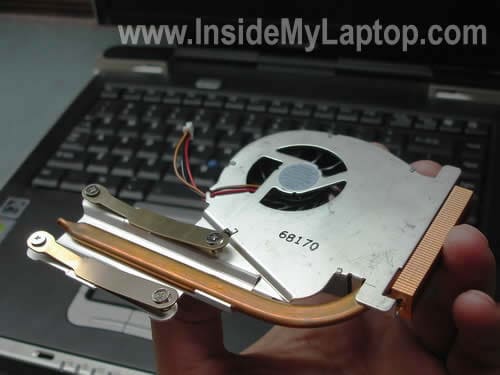
In the following guide I explain how to replace the cooling fan in a Toshiba Tecra S1 laptop.
The fan is a part of the cooling assembly, it’s permanently attached to the heatsink. If it started making noise, you’ll have to replace the entire cooling assembly.
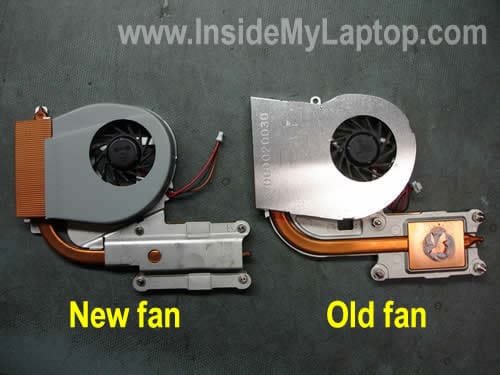
There are two different assemblies out there. The older assembly has part number V000020030 and newer one has part number V000020970. You can use either of them because they are interchangeable.
First of all, remove two screws securing the cover on the bottom remove it.

Now carefully unplug fan cable from the motherboard. Loose four screws securing the heatsink.
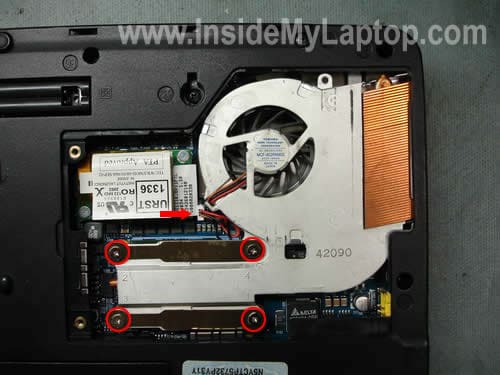
Lift up and remove the heat sink assembly from the motherboard.
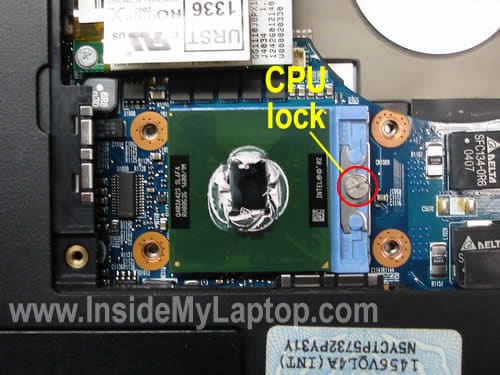
You’ll see some white stuff on the top of the CPU, it’s thermal grease.
If thermal grease dried out, you’ll have to replace it. If it looks soft, you can reuse it.
It’s possible you can pull the CPU out of the socket while removing the heat sink. I recommend reseating it just in case. Unlock the socket with a flathead scredriver, make sure the processor is seated properly and lock the socket.
On the picture below you can see the newer heat sink assembly on the left side and the old one on the right side, they are a little bit different.
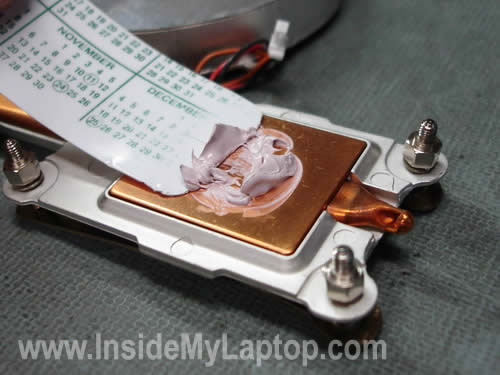
I’m going to reuse the thermal grease. On the picture below I’m collecting it from the old heat sink.
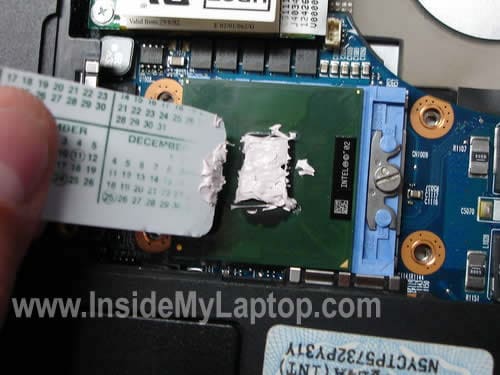
Reapply thermal grease on the top of the CPU.
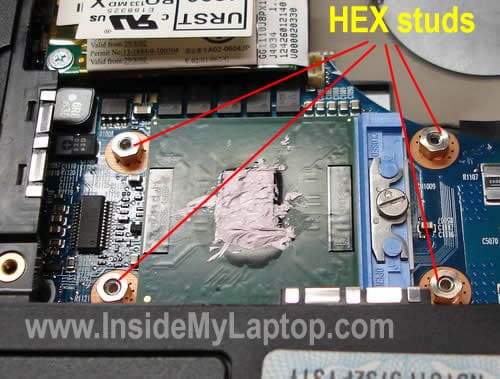
When I was ready to install the new cooling assembly back on the motherboard, I noticed that it’s missing HEX studs.
They came out with the old heat sink. I removed all four HEX studs from the old heatsink and installed them on the motherboard.
Finally, install the new fan assembly into the laptop. Do not forget to connect the cable to the motherboard.

Parhat
Hi,
I’m using Toshiba S1, my fan is too old and noisy! Do you have this type fan? I would like to buy one if you have it. Thank you!
papa_other AT hotmail DOT com
IML Tech
Parhat,
I don’t have the fan but I can help you to find the part number for a new fan (if you have a US model) so you can research online. Give me the laptop model number, it’s on the same sticker with the serial number.
Parhat
Thank you very much!
serial-number: 63023500 v
there is number, i don’t what is that: it is: PT831T-11Q4L.
IML Tech
Parhat,
This is not a US model, so I cannot find a list of part for your particular model, but I believe all Tecra S1 laptops are similar and you can use the same cooling fan across many different models. Here are part numbers for the fan assembly: V0000020030 or V0000020970. You can use either one.
Google the part number and you’ll find it.
dee
Hi
My cooling fan does not spin at boot up on my tecra 2100-does this mean I need a new coolin fan? it seems to be plugged in properly..thanks
please email me
IML Tech
dee,
I don’t remember off the top of my head if the cooling fan in Tecra 2100 starts spinning when you turn on the laptop. On some laptops it starts only when the CPU is getting hot.
Does it feel hot on the bottom under the place where the cooling fan is located? If the laptop is hot and shuts down after 5 minutes but the cooling fan never starts, most likely it’s bad fan.
dee
also-(im sorry i forgot to add this)
the laptop keeps shutting off after 5 mins…so im thinking its overheating due to the fan not spinning-(its not a windows problem..it happens even in bios)I have since replaced the power adapter..plugged in the laptop with the fan exposed and it does not spin..any advice? thanks again
Alex
Where is the difference between the 10 and the Eat EAT main board 20 in Toshiba Tecra Laptop
TechGuy
HI there,
I have this Toshiba Tecra S1 model’s fan acting weird. The fan would come on when you turn on the laptop. Then it will stop spinning. I think it suppose to start spinning once the cpu is hot. The user complains that this laptop gets really hot and it just freeze. My first reaction is that the fan is not working. So I odered new fan and follow this website instructions to replace the old fan. I notice that the new fan would start up during boot up too…then stop spinning. I guess is that it will start spinning once the laptop cpu is hot. However, I do hear/feel the NEW fan spinning after using the laptop for awhile. Could there be other issues with the laptop for not detecting the over heating cpu?? I reused the old thermal grease. Should I use new one? Onche the cpu is hot, I notice that part of the fan is also hot, but i does not come on. If you havea any suggestions, that would be great. Where can I get thermal grease?
Thanks,
Guy
Damo
Hi There I am having a similar problem with Techguy’s Issue, The fan starts up at boot time but when it gets in windows, the CPU fan stops, I don’t think its got anything to do with thermal grease as that only keeps the CPU cool. You can get thermal grease tube from any computer store for about $5. I’ve even tryed loading a ubuntu live CD and it does the same thing, the fan doesn’t seem to be working at all, any ideas?
IML Tech
Damo,
Does your laptop shut down or freezes?
Take a look inside the heat sink, maybe it’s clogged with dust and the laptop overheats because of that.
IML Tech
TechGuy,
1. Make sure the heat sink is clean and there is no dust inside.
2. Use new thermal grease.
3. Make sure the laptop runs the latest BIOS.
laptop freak
Hi
thx 4 sharing. very informative
I have a problem taking out old HEX studs as they r kinda blended with the old fan. very crazy.
any help?
ruvarac
Hi there!
I have old Tecra S1 (2006 I think…)
The cooling fan is very, VERY noisy lately. I am afraid it will stop working,
and CPU will overheat…
Can you help me where can I find the fan?
This is the number from the back of my laptop.
Serial # X3019080SU
Part # PT831U-14E5T7X
P.S. the “5” and the “S” are so similar that I hope I’ve read it right…
Thank you in advance!
IML Tech
ruvarac,
Here’s the cooling module part number: V000020970 (heatsink and fan together).
kevin chun
hello i was wondering if you knew what ype of cooling fan that i aquire for my toshiba satelite P300 laptop. i need a replacement due to laptop over heating and shutting down.
Can you help me where can I find the fan?
also i have noe model number or anything coz it been scarted out sorry 🙁
shakir
i i have tecra s1 laptop and i have problem with my display manye lines have been apper on my dispaly and coul,t see properly some itme display secreen is clear but some time its so manye lines are apper and the colling fan sotps some time will u plz help me what should i do ?
can i change the vga ? or is there any fan problem whit laptop tell me about plz
IML Tech
shakir,
First of all, test your laptop with an external monitor. If the external image has same problem, this is the video card failure.
The video card cannot be replaced because it’s built into the motherboard.
Mathew
I i have tecra s1 laptop and i have problem with my display manye lines have been apper on my dispaly and coul,t see properly some itme display secreen is clear but some time its so manye lines are apper and the colling fan sotps some time will u plz help me what should i do ?
can i change the vga ? or is there any fan problem whit laptop tell me about plz
Raj
Hi.
I have Lap top Toshiba tecra S1, I opened the laptop all major parts like motherboard and all, I have problem in display and and experts says that there is problem in graphic video card, and I want to heat it up and fix. unfortunatly i could not recognize which one is graphic card. Please help me to recognize the video card.
There are three chips, one I can recognize that is processor. Other two are covered with silver plate and another one covered with copper plate , out of these two, which one is video card?
Please help me to find it.
Thank you.
Ludwig
Dear Sir,
I have a question about the Toshiba Tecra S1 Laptop…..can you please tell me where to find the CMOS Battery in this model? And how to exchange it?
Thank you very much for your answer to my emailaddress,
greetings from Germany,
best regards,
Ludwig.
IML Tech
@ Ludwig,
Visit irisvista.com/tech/ for disassembly guide.
The SMOS battery shown on the step 12, it’s located on the lower side of the bottom cover. Do you see the green part on the bottom? This is the battery.
In order to access it you’ll have to go though steps 1-12 and remove the palmrest assembly. Unplug the old CMOS battery from the motherboard and replace it with a new one.