

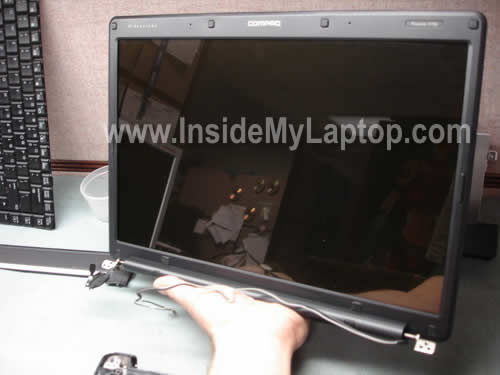
In this guide I explain how to take apart the display assembly on a Compaq Presario F700 laptop.
All disassembly steps will be similar for Compaq Presario F500, HP G6000 and some other HP/Compaq models.
I will show how to remove the screen, inverter board and display hinges.
If you want to replace the screen or inverter, it’s not necessary to separate the display panel. You can do that while it’s still attached to the base.
On the other hand, for hinge replacement, Â you’ll have to remove the display panel first (follow steps 6-12).
STEP 1.
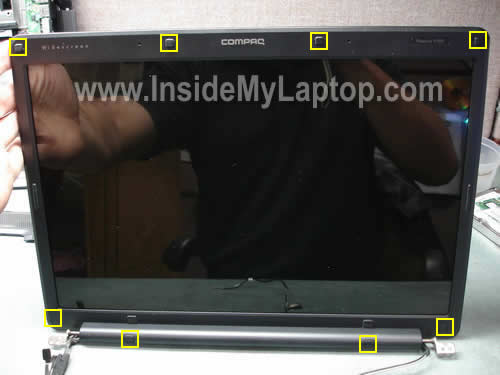
Using a sharp object remove eight screw seals from the display bezel.
Remove eight screws found under the seals.
STEP 2.
Start separating the bezel from the display cover with your fingers.

Continue removing the bezel.
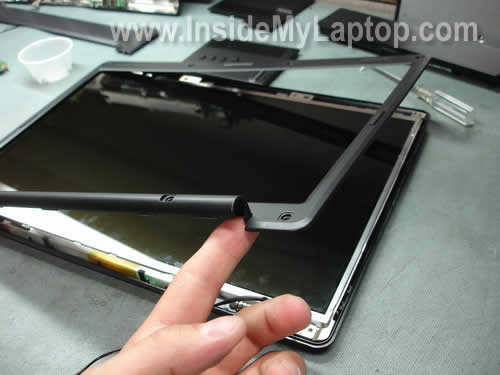
The display bezel has been removed.
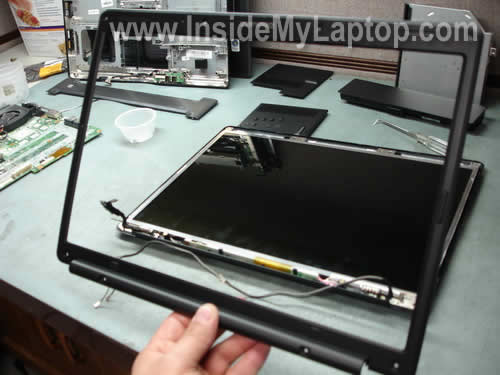
STEP 3.
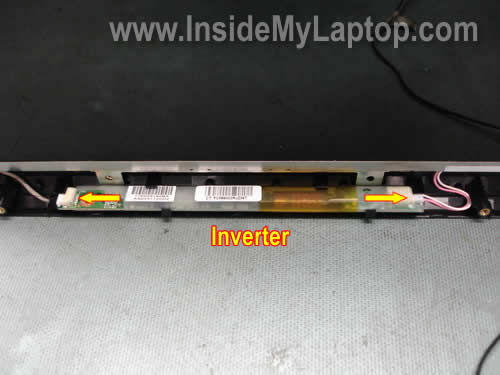
The inverter board is mounted on the lower part of the back cover.
Disconnect cables from both sides of the inverter board and remove it.
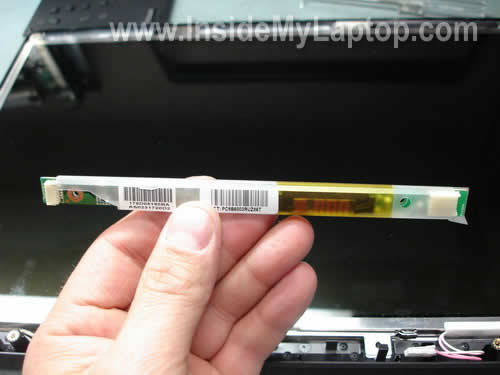
The inverter has been removed.
STEP 4.
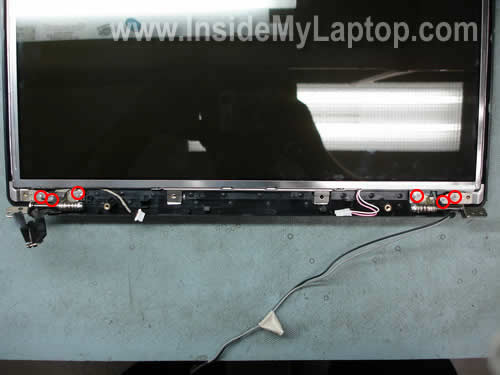
Remove six screws securing both hinges to the display cover.
STEP 5.
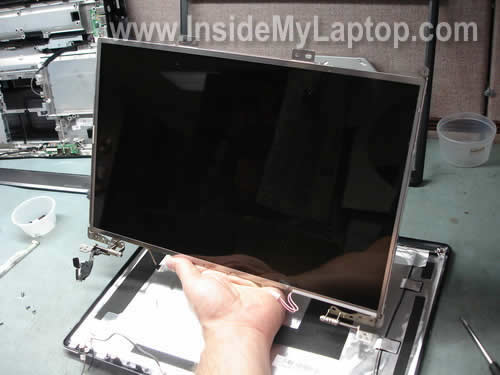
Now you can remove the LCD panel assembly from the cover.
STEP 6.
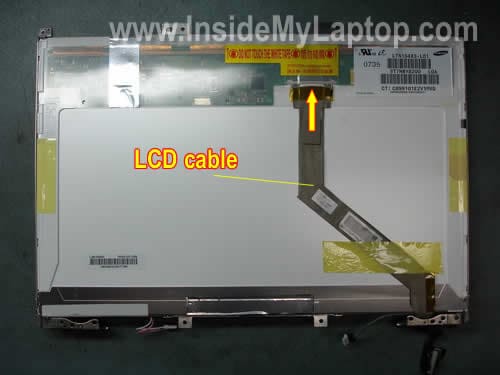
Access the LCD cable on the back side.
– Unplug the cable.
– Remove yellow tape securing the cable.
– Remove the cable.
STEP 7.
Remove two screws securing the left hinge mounting bracket.
Remove two more screws from the right hinge bracket.
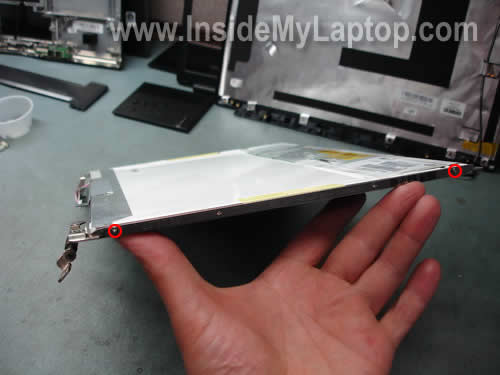
Both display hinges have been removed.

STEP 8.
Now you can replace the screen with a new one if necessary.
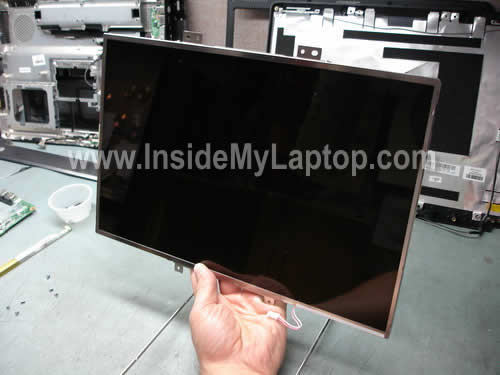
You can find a new replacement screen using the model number printed on the back side of the original one.
Slash
How do I remove the front bezel without removing the entire screen??? You said it was possible but there are no pictures or instructions for that. I got the majority of it off but the last part where the hinge is does not want to come off since it does not lay flat. How do I continue with the removal? please email me back asap if possible at guitarrocks15@yahoo.com
thanks in advance.
IML Tech
Slash,
You can remove the front bezel if you remove the keyboard cover first.
Take a look at this disassembly guide: How to disassemble Compaq Presario F700 notebook.
The keyboard cover removal is explained in steps 6-10.
Demetre
Thanks so much.
aaron
hey, my inverter is goin out. so im tryin to order a replacement
do u know the product number for it?
or a site where i can get a good deal on it?
Vijay
I dropped my laptop and the screen was dim…I just opened the bezel as laidout and just pushed in the inverters pins and it worked :)..thanks for the post with steps..
IML Tech
Vijav,
I’m glad it worked for your. If you accidentally drop your laptop and video stopped working properly, the first thing to try is reconnecting the cable.
KJ
Kim
Hi I accidentally broke the wire ( the one with two little black and red wires that connect to the chip near LCD cable)
Do you know how to fix that?
Thank you
Hardy
Hi,
thanks for this good guide.
I completely disassambled the laptop as described in another of your sites until the step where the hinges were acessable. I finally put all together but the laptop does not start up nor do I see any activity of the hard drive.
Could you give me a hint what may went wrong?
Thanks
Hardy
Jess
I need to replace the backlight in my Compaq Presario F700. Do you have instructions for this?
Thanks,
Jessie
IML Tech
Jess,
The backlight lamp is mounted INSIDE the LCD screen and it’s not easy to remove the lamp without damaging the screen.
dan manson
Dude I just wanted to say a HUGE thanks for your website and descriptions…last night I swapped my smashed LCD screen off a F500 and replaced it…theres no way I could have done this so easily and fast without your pics…love to donate $$ but recession means times are tight sorry…..thanks again tho!
winnie
sir my laptop is acer 4715z are these steps applicable. The screen keeps on flickering and yesterday nothing comes out of the screen. But when i tried to connect it to a desktop monitor everything was fine. can u help me diagnose the problem sir.
ill wait for your reply. either here or in my email gen4116@yahoo.com.
thanks so much. Pastor winnie
SEO Service
Hi my compaq v2000 series laptop creating problem in display. No problem in any other part. I am hearing Beep sound and windows starts but during boot I am seeing a whitish scheen and narrow black lines in it. Some problem in display .
Bob
These instructions were very helpful and key to a successful LCD replacement on my Presario F700. First the tip on the cost and source of the LCD was very good. Mine was $87.33 with shipping and handling from ebay, and was specified specifically as compatible with the F700. The first site I got on a Google search wanted over $200. I got the matte finish screen, so this was actually an upgrade for me.
I was able to easily remove the screen bezel without removing the keyboard. Once the inverter and the LCD cable were removed I unscrewed the four screws holding the hinges to the screen and the screen came right off. The replacement went very smoothly. The only concern I had was that the top bracket was not included on the replacement screen and the screw holes did not align so I couldn’t reuse the old one. A sheet of paper included with the screen said that the top bracket was not really needed, so I went ahead and assembled without. The completed install seems very secure – so I don’t have any concerns.
Anthony Bruno
I have taken apart my Presario C700 to see why my display does not illuminate. I found a lose wire
(#1) which connects where the display and base are hinged, but cannot find where it should be connected. Also, I cannot find the connection for wire (#2) which had disconnected.
I am hopeful connecting all wires will fix the problem.
Can you direct me to where I can see pictures to guide me..
jeff ellias
hi- my compaq presario f700-the display goes 3/4 bad with grainy lines, but If I wiggle the lcd it goes full.
I have ruled out the computer via connecting an external monitor.
How can I diagnose which one I need- the screen, lcd cable or inverter?
thanks,
Jeff
IML Tech
jeff ellias,
This is not inverter related problem, that’s for sure.
I really doubt that this problem is related to the video cable failure either. A bad video cable would affect image on the entire screen, not just 3/4 of the screen.
To me your description sounds like the LCD screen failure.
Danny
Hey!
Thanks a lot for the tutorial!! It was great help! I Appreciate it very much, and it was very easy to follow! Thanks again and God Bless!
OneMixDJ
Greetings IML Tech,
First, many thanks to you for a great tutorial.
I was able to change the LCD screen on a Compaq F700 without breaking anything.
Unfortunately, after changing the screen and then (later on) the inverter, the laptop still doesn’t turn on. At this point, I’m at a loss as to what’s next in line to troubleshoot. 🙁
The screen is a brand new replacement and the inverter was pre-tested.
Any guidance to move forward in troubleshooting would be greatly appreciated.
Thanks!
Boostlee
First and foremost, thanks for the fantastic tutorial!!
I took my laptop apart and put back together in about 3 hours this past Friday and everything still works (well, atleast what was working previous)
But, here is the problem.
I have the issue of the black screen on boot up. Everything works fine (hard drive, fans, all power lights, etc). But, the monitor stays black (or just simply does not power up)
Now, I have connected the laptop itself to an external monitor and everything works and boots up just fine. it is just he lcd that does not power up at all
My question: Before I go buying a new lcd or inverter, is there any way of checking to see if the inverter, cable or lcd went bad?? If there is no way, I might end up taking it to a local shop to see if they can test it for me
Thanks much
Brian Savage
I have the same problem that Boostlee has. The screen was cracked (you can tell by the bleeding of the screen). When i powered it up on the old cracked screen there was no display. I replaced the screen and the new one seems to have the same issue. It’s just black. I checked on the back of the monitor and it seems that there’s another connector that could be for power but i’m unsure. Any help on this would be appreciated.
IML Tech
Brian Savage,
Did you purchase a compatible replacement screen?
Can you get video on an external monitor attached to the VGA port on the laptop?
If there is no video on the external monitor, it’s possible the cracked screen is not the only problem.
How did you crack the scree? Did you drop the laptop? If that’s the case, possible that memory modules got dislocated. Try reseating memory modules.
dom jackson
i have a c700 when i boot it up the screen goes grey with lots of multi coloured lines down it i changed the screen and it has the same issue the computer works fine on external screen! any clue as to what to change next??
IML Tech
dom jackson,
Could be defective LCD cable. I would try replacing the cable first.
If still no help, there must be a problem with the motherboard. Maybe the connector where the LCD cable connects to the motherboard is bad. That would explain why the laptop still works fine with an external monitor.
Try replacing the LCD cable.
Shal
Just used this on my Presario F756 to switch screens from the glossy screen to the matted one.
Steen
Got 2 problems with my f700: the video on the motherboard is fried – the screen won’t work (an external monitor works though). I’d replace the motherboard but problem #2 is I accidentally cut the red and black wires that connect the screen to the motherboard. What do they do? Can I get a replacement?
Gene
Thanks for the great info. I had what seems to be a common problem with my C769US,
after about 1.5 years of use the screen started to intermittently malfunction, depending on
the position of the cover. I figured either a loose LCD connector or some problem with
the cable. It got annoying enough that I decided today to take it apart and see what was up.
There were two wires in the bundle going to the LCD that had nearly failed from repeated
pinching when the cover was opened and closed, and when I disassembled the unit they
completely failed. I took some old 30gauge wire-wrap wire I had around and soldered a piece to splice together each of the broken wires. For lack of anything better to insulate it
with,I wrapped it with teflon plumbing tape. Then I put it back together and it works!
I found an outfit on eBay selling a new cable for $20 so I ordered one so the next time I
have to open the unit I can replace the cable completely.
The only twist on your directions I had to make for my unit is that the two screws on the
lower left and right of the screen bezel were not under a rubber plug, but appeared to be
just under a blank plastic square. I stared at it for awhile, then got the guts to lightly drill
that area and sure enough the screw heads were exposed. Not sure why the mfgr did that,
other than to make it obvious if someone had opened the display.
Anyway, thanks again for your website!
Jackie
Is it necessary to remove the battery before replacing the LCD screen? If you do remove the battery, do you lose your programming?
IML Tech
Jackie,
Yes, it’s necessary to remove the screen.
Not sure what you are talking about. Are you asking about data on the hard drive?
Heather Miller
Million thanks for this website. I usually have bad luck dealing with laptop repairs, and stick with just fixing desktops. But thanks to you, I was able to save $50 that I was going to pay to a specialist to install my new screen. One thing I have noticed:
For those having issues getting the bezel off because of the hump with the hinge and inverter, I mostly closed the laptop lid so the seam was visible from the laptop rear. Using a small plastic prybar (the kind that a lot of battery replacement kits have) pop open the latches between the two pieces. After that is done, open the lid and use a flat screwdriver to gently push the corner of the bezel towards the top of the screen. After about a 1/4 inch or so the bottom of the bezel should start popping off. Go to the other corner and repeat, and the whole thing should pop off at that point.
Fawnet
Thank you very, very much for these instructions. Especially the pictures, that makes the whole thing invaluable. Thanks to you, I was able to repair my sister’s laptop–it had been dropped (not very hard or far) and the inverter board had become unplugged at one end. It is now working again, thanks to you!
And also thanks to Heather, up above me. Getting the humped part of the bezel off is indeed tricky, and I had to attack it from behind/underneath with a little screwdriver. The whole time you’re working on it, you’re hearing these tiny snapping sounds, and you don’t know whether you’re detaching it, or just breaking it. But it went back on quite easily!
Hannah
Amazing instructions on how to replace the screen! I had stepped on the screen on accident while it was on the ground and the screen was all cracked. I lived with it for about a year, until I got sick of it and decided to replace it. Instructions were easy to follow and the pictures and labeling really helped with the taking apart process. Thanks for making this!
Irony
Thanks for these instructions. The step-by-step with pics are about as good as you can get. One extra hint – If you’re removing the screen while still attached to the laptop removing the rounded bottom section of the bezel is easy by inserting your small philips screwdriver between the bezel and the laptop base and prying the bezel up. It snaps free pretty nicely.
Thanks again.
Rupps
Excellent instruction. many, many thanks. Only took 15 minutes to replace the inverter. Now I can see whats on my laptop again.
mike gibbs
thank you i was able to transfer a screen from a hp dv6000 to compaq f700 thanks to your site and i did it all in like 30 min start to finish
Tom
My f700 stopped working (the video part) but still works if I plug in an external monitor. I tried replacing first the inverter, then finally bit it and bought a new screen. Still, it won’t work. I checked the connections at the screen, inverter and even opened the small panel up right above the keyboard and looked that the connection of the main cable to the screen there too. What else could it be?
IML Tech
Tom,
Does the laptop screen turn on at all. Do you see any faint image? Does the backlight work?
Could be failed video cable.
Mikkel
Hi, i got a Compaq presario cq62. Do you have any idea where to find a new screen for it?
Mikkel
IML Tech
Mikkel,
Available on Amazon or ebay.
vins
i had a problem of my lcd. there some lines on the display below. what is the possible problem?
Mikkel
Yea, but the problem is that i dont know what comes after presario CQ-62. Do you think that they all fit? Sorry for being a newbie 🙂
Sc.david
I actually want to share what helped me also. I did it myself.
My presario c700 screen goes black, though you can see images and everything else which shows that it’s running fine, only the the screen goes black.
this happens tilting the lid at certain angles, and sometimes closing and re-opening the lid seems to work, but temporary. In my case the situation worsened, that i had to do so in less than every 2mins, and it wouldn’t respond sometimes.
The solution:
I had to open up my laptop lid. just the same step as our friend taught using the picture representations.
But i didnt remove the LCD, all i did was retouch the cable behind the LCD, also i removed the inverter, and did some minor cleaning within the lid.
Additionally, i unplugged my lappy, removed the battery, press and held the power button for about 20secs, waited for 1mins and replaced it.
I powered laptop, and it’s running fine so far. I can til any angle without the screen flickering and going out.
I hope this helps, also.
Thanks.
IML Tech
Sc.david,
Apparently you had bad connection between the video cable and LCD screen. That’s why reconnecting the cable fixed the problem.
terry
PRESARIO c700. Open the screen and its full of lines. Move lid up and down a little and they move. If you barely open it the screen is fine. Would this sound like the video cable between mother board an inverter? If so where could I get just the cable?
IML Tech
terry,
This could be just connection issue.
Before you replace the cable, I would try reconnecting it on both ends.
1. Reconnect video cable on the motherboard and test.
2. Reconnect video cable on the back of the LCD screen and test.
If reconnecting the able doesn’t help, try replacing it with a new one.
Gregg Taylor
I have acquired an old Compac Presario F558US laptop with a smashed (cracked) screen that doesn’t work correctly–it displays an altered image. The laptop will work, however, with an external monitor.
If I don’t want to try to replace the screen (I don’t know if such a fix would work, because I don’t know which components are damaged, if any, in addition to the screen), could I simply remove the top half of the laptop–the lid and screen, and tape off the leads, and just use the laptop with an external monitor?
Or would removing the screen and taping off the leads alter the circuitry so that the feed to the external monitor would not work, and/or there would be a safety hazard caused by the taped-off leads, by altering the circuitry (e.g., by removing the load associated with the laptop screen)?
IML Tech
Gregg Taylor,
Yes, you should be able to remove the entire display assembly and use the laptop with an external monitor. I’m running a laptop like that at home just for watching videos on my big screen TV.
Here’s the catch. Most likely you have wireless card antenna cables running inside the display panel. If you remove the display, you’ll have to disconnect those antenna cables from the wireless card. It means the internal wireless card will not work when the display is removed.
If you need connection to the internet you can use LAN port or buy an external wireless USB adapter.
lalith
My laptop display(compaq presaio F 700) is not working but when I connected to out side cable with other LCD it is working properly . Please , advice me to recover above problem.
IML Tech
lalith,
Take your laptop to a dark room and turn it on. Take a closer look at the screen.
Does it change from completely black to gray or stays black all the time?
Can you see a very faint image on the screen?
Also, try using Fn+F4 key. This key combination switches video between internal and external modes. Maybe your laptop is stuck in the external mode.
Hold down the Fn key and press on the F4 key.
jay
my presario f 700 screen is cracked do I need to by a screen can you advice?
Joshua
yea i have a question my laptop is a compaq presario cq-615 and the my laptop fell on the right side and on the corner of the right side it has a crack and its showing a white spot i can’t see my wifi signal or battery on there the screen size is 16.9 also it don’t have the screw holes so do i need to take it apart or is there another way to get to the screen and do i need to buy a new screen
matt
My F700 started flickering a few months back. i took it apart, cleaned it, and then it went back to normal. then it started doing it again, replaced the lcd cable, it didnt help. then it went back to normal again. i know, weird. now it did it again, and nothing is fixing it. external video works, and the lcd is getting power. it is lit up, but black/blank. nothing seems loose, wiggling wires does not make it flicker.
replaced the cable, and inverter so far.
Ankit Gupta
Hi Sir,
I have compaq laptop. When i opened it initially for a time of 1-2 min its display shows properly but after a minute around, its display got very very fainted and can visible in complete dark. I shown to the HP center in Agra, they said that Laptop LCD have to be replaced. Can you please tell me the exact cause of this problem. I dont think so that there is any problem in LCD or LCD cable ?
What should i do, please help?
Thanks,
Ankit
IML Tech
@ Ankit Gupta,
I don’t think this is LCD cable failure.
Most likely it’s one of the following:
1. Could be bad connection between the video cable and inverter board. You can try reseating the cable before replacing parts.
2. If reseating the cable doesn’t help, try replacing the inverter board. The inverter board located below the LCD screen and works as a power supply for the backlight lamp. When inverter fails, the backlight fails.
3. If replacing the inverter board doesn’t help, most likely you have failed backlight lamp inside the LCD screen. In this case you’ll have to replace the screen.
Trev
Thanks for very informative website. The guide for Compaq Presario F700 worked for my HP G6000, which had a horizontal flickering screen. I bought a 2nd hand screen, casing, VGA Cable and Invertor. Replaced screen, still same problem. Replaced invertor and used both screens with same problem. Then I swapped VGA cables over and my HP screen worked. Through process of elimination I have resolved the problem using your tutorial. Once agin, thank you.
Hitesh Panchal
Hi I am having compaq v5000 presario laptop. I have purchased it almost before 8 years and now somehow the hinges has broken. I need to replace the complete body housing of it. So can you please tell me where can I get it? Please reply I have searched much but still I didn’t get it please help!!!!!!!!
IML Tech
@ Hitesh Panchal,
Here’s official service manual for Compaq Presario v5000 notebooks.
You’ll see all parts illustrated on the page 3-2.
Find the part you need, find the part number and google it or search on eBay.
araxni
I recently turned on my laptop and the screen was black. After a while when it booted up, the screen came on as normal and then flashed out about 10 seconds later. I can shine a torch on to the screen when it boots up and see windows and everything but it’s obviously too dark to use. I replaced inverter and lcd panel but the problem remains…
How should I go about fixing this?
IML Tech
@ araxni,
Is it still turning on for about 10 seconds with the new screen and inverter and fails after that?
This could be faulty video cable or motherboard related issue.
I cannot tell without testing the laptop with KNOWN GOOD parts.
aaron
i have a presario 700 and am wandering if there is away to directly acces the back of the screen with out taking it out. like takeing off the front of the laptop?
IML Tech
@ aaron,
Yes, it’s possible. It’s not necessary to remove the display. Follow steps 1-5 and you should be able to do that.
Tony McG
Hello
I have a Compaq Presario F700. My laptop screen is flashing and now wont flash and has gone black. I was reading online that the LCD Screen LCD cable and inverter could be the cause of this. Should I replace these? My laptop is four years old.
Thank you
IML Tech
@ Tony McG,
It’s up to you. Are you ready for a new laptop?
Presario F700 is old and not the best one.
Joe C
Im kinda new at all of this stuff so i was just wondering, after taking the screen out completely is there anything else that can be done with the screen
PhilP
“If you want to replace the LCD screen or inverter board, it’s not necessary to remove the whole display panel as it shown on the picture above. You can do that while the display panel is still attached to the laptop base.”
While I would like to believe the above statements, they simply are not true. You can NOT remove the screen bezel and access the power inverter without removing the screen from the base. It is just BARELY possible to remove the screws in the lower 2 corners.
IML Tech
@ PhilP,
If you cannot do it, it doesn’t mean my statement is not true. Is it easy? Probably not. Is it possible. Definitely yes.
Just out of curiosity I found a F700 laying around and was able to remove the bezel in 5 minutes.
Don’t get me wrong. I have many years of experience fixing laptops. Something easy for me could be impossible for you.
Here are key points:
1. Remove all screws from the bezel.
2. Close the display and separate the bezel from the back cover on the bottom with a guitar pick or another piece of plastic.
3. Start removing bezel on the top.
4. Lift up the bottom side of the bezel and separate it from the back cover with a small screwdriver.
LOL. That’s the easiest part in the entire disassembly process. If you cannot remove screws stop right where you are. Close the laptop and take it to the repair shop.
Michael
Odd situation.
F700, color was going bad (green frames on web pages, green tints). Took it apart, killed it.
Ordered new, supposedly functional screen off ebay.
Ok, now, when you slide the plug in, you get a brief “good” disply, then it dims to the traditional “need a flashlight to see it”.
Before I mess with an inverter…is that the real problem???
Thanks.
Benjamin Finley VI
Hello Everyone. I have a Compaq Presario F572US and I have been using the wrong charger with it because my old one broke and now my screen backlight does not work. Can someone tell me where I can buy a replacement inverter for less than US$10? My wireless card also works sporadically, and I would appreciate it if someone could tell me where I can get one of those too. Thank you all!!!
Dustin
Hi, I just wanted to say thank you so much for the awesome tutorial. I replaced the LCD on my Presario C700, which was slightly different, but almost identical to the F700. I was so happy to find out that you were correct in saying we don’t need to remove the entire screen to replace the LCD. It was a little tricky, but definitely do-able!
Arlo James Barnes
This was very useful, thanks – I used it to remove the cracked screen of an F500 my friend gave me so that it would default to an external display in order to fix . Once you figure out to tilt the screen full back and to press up gently on the bottom corners to expose those lower screws, Compaq/HP makes it easy… eBay not so much.
Thanks again, though!
Herb Ayars
Hey IML Tech, concerning the F700 screen bezel removal while on base. I agree with you 100%. Its a breeze with experience and ‘tlc’.