

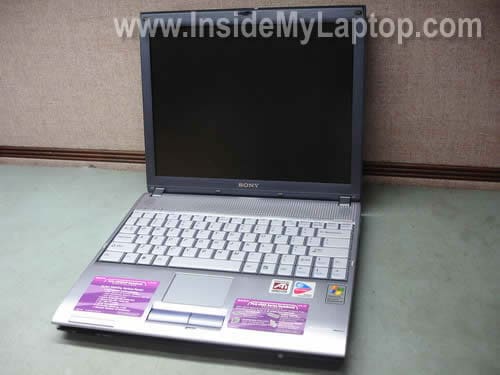
In this guide I explain how to remove the keyboard and access both memory modules in a Sony Vaio PCG-V505 series laptop. The whole process will not take more than 10-15 minutes and can be done even by an inexperienced user.
Before you start do not forget to turn it off and remove the battery.
STEP 1.
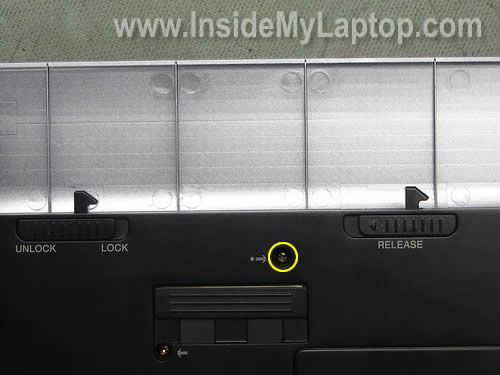
Remove one screw securing the keyboard. This screw is located between the lock/unlock and release latches.
STEP 2.
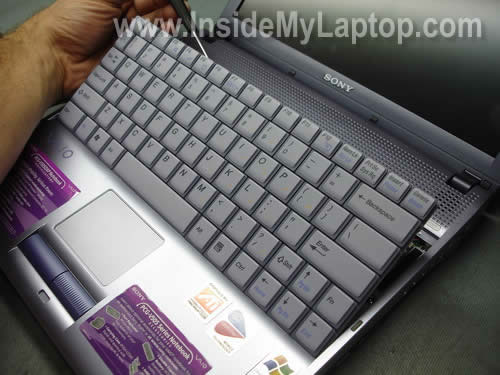
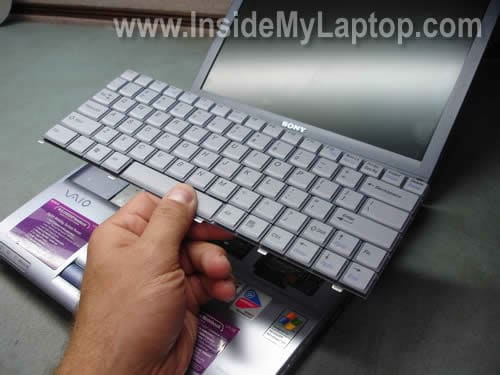
Insert a small flat head screwdriver under the keyboard and carefully lift it up as shown on the picture below.
STEP 3.
Move the keyboard towards the display panel.
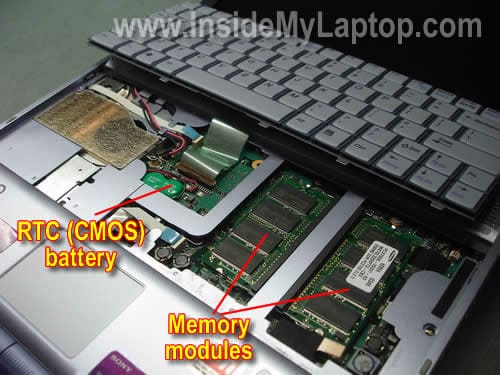
Now you can access both memory (RAM) modules and RTC (CMOS) battery.
Sony Vaio PCG-V505 can handle up to 1GB RAM total. You can install up to 512MB stick into each slot.
You should use PC2100/PC2700 DDR SODIMM modules.
If your laptop looses date and time each time you restart it, apparently it’s time to replace the RTC (CMOS) battery.
You can easily unplug the RTC battery from the motherboard and replace it with a new one.
STEP 4.
Before you remove the keyboard, you’ll have to unlock the cable connector on the motherboard and release the cable.
On the picture below you can see the cable connector in the locked position.
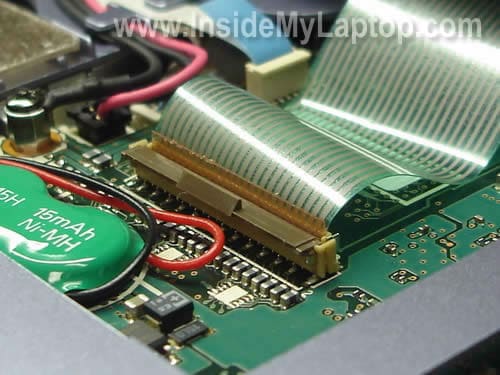
Unlock the connector and release the cable.
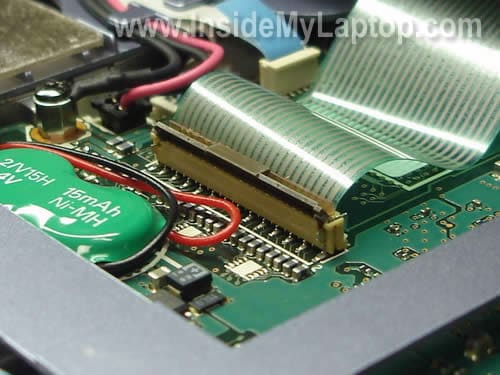
Now you can remove the keyboard and replace it with a new one if needed.
Also read how to replace the hard drive on the same Sony Vaio PCG-V505.
Mary
Thank you very much! I wanted to upgrade memory in my laptop for a long time but didn’t know where slots are hidden.
Stefani
Are you great. Thank very very much.
Raj
Thanks its working i removed and reconected Ram.
Jak
how to remove the whole bottom cover of this laptop? i want to check my PCI card coz it always prompt everytime i boot the unit. thanks
Micheal
Thank you. you are awsome dude. I have been struggling for months trying to locate the mem. my labtop will not boot because of 1 bad ram which i had read from other post. so i try to remove 1 and test the theory and it work but before that i could not find the mem location.
thanks again you are truely great.
Dee
Hi! I have a PCG-V505DX and think I need to replace the sound card. When I record myself I sound very high pitched. Also, after I have unplugged a headset into the jacks on the left side (red, green jacks), my laptop speakers don’t play sound. I can only hear sound through the headset.
Do you have a tutorial on how to access and replace the sound card and these jacks?
Any help is appreciated!
Dee
IML Tech
Dee,
I don’t think that you have a problem with the sound card. Try adjusting the microphone and speaker volume while using the microphone.
Turn down the speaker volume when using microphone. This might help to avoid high pitched noise.
nec
thanks… helps a lot……
1 .i tried to open it from bottom, and now the lights in the left corner panel dont work… any idea what i did? and how to fix it?
2 . i have a PCG- V505AX, and found that i CAN and CAN NOT use a memory upgrade above 512.. is that true? and if I CAN.. could i use 2 of 1 GB memo and wichs kind ?
Thanks
moid
how 2 remove bios password in sony pcg v505-BL
and i wanted any of u to paste the pic of jumper on the vivo moterboard!!!!!!!!!!
Melissa
I took the keyboard out and popped off one of the function keys and can’t seem to get the key back on, do you know of any tricks to make that happen?
g-man
thank you!!!
Dee
Hello IML Tech,
Thank you, I tried the suggestions, but no change. Most recently while I was unplugging my headphones, the speakers began to work. AFter a time, I finally figured out why they no longer worked. The green connector is a bit loose. If I nudge and hold the green jack toward the red jack, I get sound. So, it looks like all is well, but I need to secure the connectors. I’d love to see you make a help sheet on how to replace or reattach these connectors. I appreciate the help!
Dee
Jonathan
Thank you so much!!! I have been dying to find out how to access my whole laptop! The farthest I have gotten was the optical drive removed and harddrive but I never knew how to reach the RAM slots or remove the keyboard. With this guide I can finally order a new keyboard since my old one is missing all the keys.
Just visited this site and Im already geting sucess! Thank you forever!!!
Kyle
Thanks alot dude but there is only one problem i had for a long time my sound works if u put the laptop on an angle but when you put it back it just stops im pretty sure its a loose wire but i dont know which wire it is or where it is
nick glynn
hi i have a sony vaio pcg-6q1m. Any ideas how i remove the hard drive safely? Mine has crashed. Any help much appreciated!
IML Tech
nick glynn,
Read other guides I posted under “Sony Laptops” category. There are a few different models in there. Maybe you can find a similar one.
APJ
Hello and thanks for your useful guides. I just bought a 505DX to use around the house and on trips it came with 1gb of ram and I see on the internet companies say this can be upgraded to 2 gb. As i use Photoshop a lot is this correct can you install 2gb in the 505DX ?
Thanks for your time Andrew
IML Tech
APJ,
What laptop you are talking about? There are a few different brands when I google 505DX.
APJ
Sorry I meant –
Sony Vaio PCG-V505DX
IML Tech
APJ,
This laptop can take up to 2GB RAM. You should use PC2700 DDR333 SODIMM modules.
There are two memory slots and you can install up to 1GB RAM module into each slot.
Both slots located under the keyboard. Yes, you’ll have to remove the keyboard in order to upgrade memory.
Here’s official user guide for Sony Vaio PCG-V505DX laptop. It’s a PDF file.
You’ll find memory upgrade instructions in the manual on the page 135.
You are correct, it’s better to run Photoshop with 2GB RAM.
Good luck!
Chazman
I have a Sony Vaio PCG-V505 ACK. It seems to be getting very hot. I do not hear any kind of fan. Is there a fan? Can you tell me how to access it? Clean it or replace it? Thank you
Bill S.
I sure hope IML Tech or someone else reading this can help…I’ve got a V505BX here that’s very sickly. If I switch it on without the (effectively dead, won’t take a charge of more than a few minutes) battery in, the battery and power lights blink once then nothing. The laptop won’t boot. If I hold the power switch in the ON position, the two lights blink steadily, but no boot. If I install the battery and charge it, the laptop will run for the allotted 10-15 minutes then shut itself off when the battery dies, then it goes back to the behavior I described first until the battery takes the minimal charge that it can.
So the motherboard IS drawing power, but apparently only from the battery. I have replaced the DC jack (a simple 3-wire affair, one screw-down Ground and the other two are on a one-directional keyed Berg plug, so no getting that wrong).
I’ve unplugged the CMOS battery and let the system sit for a minute, then plugged it back in and plugged the system back in, to no avail.
Help me, IML Tech, you’re my only hope!
IML Tech
Bill S.,
When I started reading your question I thought this is DC jack failure.
But after you said the DC jack had been replaced, I think this is motherboard failure.
Bill S.
Okay, I *might* be in luck (you tell me): on this particular model of Vaio, there’s three components that deal with power-in: the DC jack (replaced), the video card (yes, some engineer at Sony routed the DC connect male berg plug onto the video card rather than directly onto the mainboard), *and* this part: PWS-24 1-687-499-11 – a DC power board located on the “underside” of the mainboard.
THAT part is easy ($ wise) to replace. Think that could be it?
And thanks a million regardless.
-Bill
mike martinez
my vaio laptop keeps rebooting by itself, have changed hard drives and reseated memory mod.
can my memory modules be bad and is there a way to test them, the laptop of course is afew years old but is in great shape, never abused. sure hate to lose it and hope motherboard is not bad.
any thoughts?? thanks
mike
IML Tech
mike martinez,
It’s very unlikely that both memory modules failed at the same time but I guess possible.
Have you tried removing memory modules one by one and test the laptop with each memory separately?
Michael
Hey Guys, Please tell me how to remove this CMOS battery from Sony VAIO V505, same model which is shown in this article. I have already opened the Keyboard and can see the CMOS battery but not sure how to take it out as its fixed in some socket and connected with red black wire.Please someone suggest me, how to take this battery out and I have to reset my BIOS password.
Picture would be great, if possible.
Many thanks.
IML Tech
Michael,
The CMOS battery wires have a connector. You should be able to unplug it from the motherboard.
The battery itself probably fixed to the motherboard with double sticky tape.
caschneider
Hey Guys,
I have a Sony Vaio PCG-V505BX that the wireless LAN is not working. The wireless switch is on and the green light is on but I get a message that the wireless radio is not on. I thought the mini card might be bad, but I looked under the keyboard and I don’t see it. So if you know where the card is and what the problem might be, I’d sure appreciate it.
Thank You!
IML Tech
casshneider,
Take a look in the BIOS setup menu. In some models you can enable/disable wireless in the BIOS.
Check the device manager. Make sure the wireless card is enabled.
I don’t remember off the top of my head, but if it’s not accessible through the bottom door and not under the keyboard, most likely it’s located under the top cover assembly (palm rest assembly).
JD
Hey,
I have a Sony Vaio PCG-V505BP and the problem is that it won’t turn on.
I’m pretty certain the battery is dead, because when i keep the battery in it doesn’t turn on.
When i connect the charger to the laptop (without batter) the amber light flashes twice pauses and flashes twice and carries on doing so.
When i keep the battery in and charger in also in constantly flashes with brief pauses? any idea whats wrong and how to fix it?
Joe Dang
can i get a instructional guide for disassembling a PCG-V505EX or something similar to it, because i’ve been trying to get to the DC Jack but i can’t open up my laptop.
Tarun
hi mike martinez,
first you should check the compatibility of memory modules becouse it matters a lot, if you don’t use appropriate memory then it can create problems in you pc!
Steven
Great instruction on removing the keyboard.
Do you know how to install Windows XP and get the OS to assign the drive letter “C” to the hard drive rather than the card reader
Thanks
Tony Revell
Please can you advise how to remove th keyboard on a Sony VA10 PCG – 9U1M
Where would the best place to buy another keyboard
Many thanks Tony Revell
Qban0
Thanks – though as an FYI, it will support up to 2GB (or at least, my PCG-V505DC2K will)…