

Lately I’ve been seeing exactly the same problem with the power socket in some newer Toshiba Satellite L305/L305D and Satellite L355/L355D laptops.
I don’t know if it’s a poor design or people just not careful enough with their computers, but the power socket in these models breaks very often.
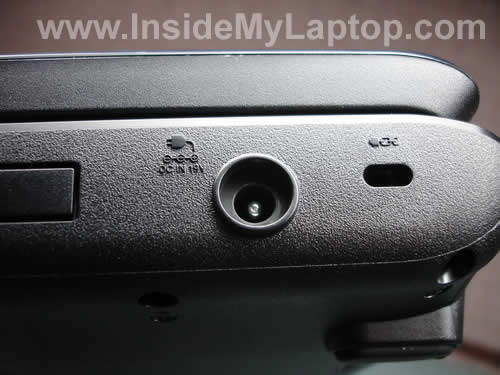
On the picture below you can see a good working power socket. The power jack is seated correctly. It’s tight and will not move when you plug in the adapter.
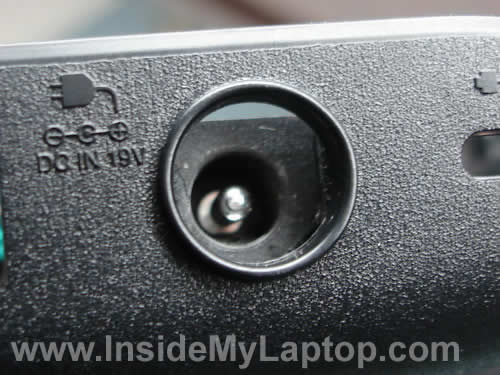
On the next picture you see a broken socket. There is a gap between the power jack and bottom case and when you plug the AC adapter inside the jack it feels very loose.
In some cases, the power jack separates from the case and you cannot plug in the power adapter at all.
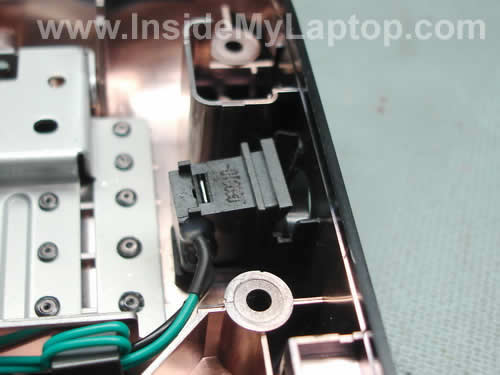
In order to understand what’s going on it’s necessary to remove the top cover and take a closer look at the power jack.
As you see on the picture below, the power connector is not seated correctly and separated from the case.
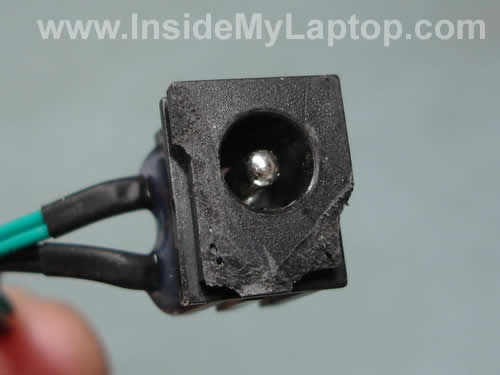
In some cases it happens because the DC-IN power jack gets broken.
In other cases, the DC-IN power jack is OK but the bottom case is broken.
The power jack mounts between two plastic brackets inside the case. If one of the brackets is broken (the left one in my case), the DC connector will not seat correctly.
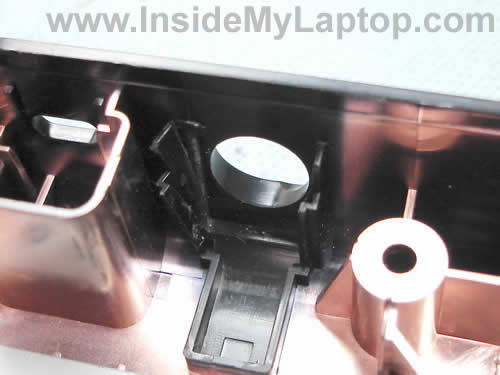
But in many cases you have both parts broken, the power jack and base assembly.
WHAT CAN YOU DO TO FIX THE POWER SOCKET?
1. If the power jack is OK but the base is broken, you’ll have to replace the base assembly.
Search for IrisVista guides on google for Toshiba disassembly instructions.

2. If the base assembly is OK, but the DC connector is broken, you’ll have to replace it with a new one.

3. In the worst case scenario you’ll have to replace both parts, the base assembly AND power jack harness.
UPDATE!
I just published a guide explaining how to repair broken power connector yourself.
Tim
I had exactly the same problem with my Satellite L305 laptop. I didn’t think that this will be covered by the warranty but I took it to the Toshiba repair center. They fixed it at no charge!
Mary
I also have a broken socket in my laptop, it’s a Satellite L355. Is it a common problem with this model?
Matthew
I have the same problem. It doesn’t charge at all anymore. I was careless in the beginning. I had an incident that loosened the socket…then it wore out with the times I’ve charged it. Hopefully I’m as fortunate as Tim.
IML Tech
Matthew,
Believe me, you are not alone. I’ve seen many different L305/L355 laptops with exactly the same problem.
Steve
So i have a versa premium, trying to google what part (power socket) i need but cant find anywhere…ideas?
Tracy
I have a Satellite L305, which is only a few months old. My base assembly & AC jack were cracked; Toshiba Repair Center said these items are NOT covered under warranty, because the problems are considered “customer neglect”. These are expensive repairs for a “budget” computer:(
IML Tech
Tracy,
I think it’s just not a really good design and cheap plastic make it even worse.
Call a different service center.
IML Tech
When I have time, I’ll make a guide for fixing this problem using a generic power jack.
Basically, you buy a metal jack in RadioShack, mount it inside the case, cut off the old jack and solder wires to the RadioShack jack.
Gwynn
The same thing happened to my Toshiba satellite, it was a little loose to begin with, but then got worse and couldn’t charge.. they said it was “physical damage” (i.e. it was me who did it) and charged me $250 to repair it- I had to buy a whole new bottom casing and pay for the technician time. What a huge ripoff for something I probably could have fixed myself.
IML Tech
Gwynn,
Be careful with the jack, the same problem may occur again. I’ve seen a few laptops coming back with a broken jack and base assembly a few month after I repaired them.
Thadd
Ok, I cannot actually endorse my solution, as I did it today, and am not sure how it will work.
First, open your case up as per instructions above.
Second, use the best epoxy you can get to reattach the front of the jack to the side of the laptop. Though, it should be something you can remove if ever absolutely necessary.
Third, if you look at the top panel, you will see that a speaker is right behind the jack. On the side against the jack, epoxy some sort of cushion (I used cardboard), in order to add support for the jack.
Lastly, put everything back together again.
Not the best way to fix it, but since I can’t be without my computer for a day, and I don’t have 235.00 it will do until I return from the field.
IML Tech
Thadd,
I’m not sure if this repair will last for a long time. I would think that replacing the original DC-IN jack with a generic one from RadioShack would be a better solution.
mike
Thanks very much for publishing the how to, plus the pictures. The jack was jiggly on my wife’s Toshiba L305 laptop. There were a few differences between your instructions and the L305, but they were minimal and I was able to follow your sequence because you laid it out clearly. The Rado Shack part was $3.00 and I was able to accomplish it in approx 3 hours. A lot of the time was spent getting the various tools in the garage. The issue was to get a small enough plilips head screwdriver. The end result was that I was able to accomplish this task and get my wife back up and running in much less time than packing up the computer and waiting for a couple of weeks – and also having the possibility of having the repair rejected or costing me $200 to get it fixed. This is just fabulous and I want to say THANK YOU for putting this on the web.
Your repair is better than the original design. THANKS!!
tracy h
The dc-in port on my Satellite L355 has just broken again, for the THIRD time. The first two times this happened it was still under warranty and was repaired at no charge. I was told this is a rampant problem with this model, and given advice on how to carefully insert and remove the power connection – which I followed knowing the laptop was going to be out of warranty. Any word on a recall from Toshiba? This is my third Toshiba Satellite model over the years (15 years), and I am very disappointed in the apparent design flaw.
In the meantime, thanks for the suggestions on home repair.
IML Tech
tracy h,
I repair a LOT of these laptops with the power jack problem. Sometimes a few of them a day.
Sheila Piper
My toshiba L305D did not quite make a year bought last December. Power jack
was always a loose from the beginning and now no power at all. I didn’t get
the warranty but looks like the don’t cover the problems they know we will
have anyway. Obviously there was a problem with my power jack was there
from the start I was aware the should be snug. So no power at all. Disappointed!
Andrew Barker
same problem but i went a diffrent route and got a whole new cable and [luged in the power in the new jack and it still wont charge any idea what the problem might be now?
Mark
This is a known issue with Toshiba L300 series of laptops and will be repaired at no cost by Toshiba service center, even if your warranty expired, so if you your laptop has this issue contact any service center – I took it to CSS – cssnow.com in New York, they did great job fixing it and it still works.
IML Tech
Mark,
Yes it is. I fix it almost every day, sometimes a few laptops a day.
julie
We replaced the power jack with the one shown on your page but now the charger dont seem to fit the jack..do we need to get a new power plug and what size would that be
IML Tech
julie,
Apparently you got a wrong one. Did you use Toshiba jack or generic one from RadioShack as I explained in this guide?
justin
is there a recall on Toshiba l300 i just had it 12 months and the screen is loose and hinge is about broke is there a recall
IML Tech
justin,
I haven’t heard of any recalls.
Riky
I have problem with my laptop. My laptop is toshiba A205. When the laptop off and the battery charges with the AC adapter plug in the laptop. But when the laptop on and I try charge the battery with the charger plug to laptop, and what happen ? My battery can’t charge and suddenly my system of laptop hang / error ( I can’t move my touch mouse and type the key). Please help Me ?
Clyde D.
I have a L355 that won’t power on but the power jack doesn’t appear to be pushed in as in your repair guide nor does it seem loose. I have checked the DC output and its good (19v). Could it still be the power jack?
Colette
I am so glad to hear that others have the same problem. My laptop wasn’t even one year old yet when my jack feel into my computer. I, too, like many above, was told it wasn’ covered under the warranty because it was “customer abuse”. How absurd! The only thing I ever did was plug the power cord in and then take the power cord out. I am very careful with my laptop because I use it for work (I am a teacher). I fought for coverage and did get it fixed at Toshiba’s expense. I was told, however, by the service center that I was lucky that they paid to have it fixed and not to count on it again. I suspected that it had to be a common problem because of how quick Toshiba wanted to distance themselves and blame the customer. If you can’t plug in your power cord without the jack breaking, then there is a serious design flaw. I’ve been through design flaws with lemon products years ago with Chrsyler. I will never buy another Toshiba (this one was given to me as a b-day gift), not because the product is sub-quality, but mainly because of Toshiba’s refusal to stand behind their products. My son has a cheaper and smaller Toshiba laptop and has never had a problem with anything including the power cord. He’s a college student so I’m sure he isn’t as particular about his laptop as I am about mine. I am convinced it is a problem with this model. Has anyone else had the outside cover on the power cord split open near the battery? That’s my latest defect.
Joseph
Unfortunately my Toshiba Laptop Satellite L305D-S5881 had the same problem experience by many of you, in most cases, just after the warranty is expired. I truly believe that this is a manufacturer’s design problem Just like Toyota, Honda and many other manufacturers who are recalling their products because of manufacturing defects, Toshiba should take responsibility to address changes to the design of these Laptops with specific reference to the power port, and should be held accountable to refund customers who had to pay for repairs cost out of pocket I feel the urge for all of us to band together to forward a complaint to a consumer affairs agency to get representation to ensure Toshiba change the way they do, or don’t do business.
In the meantime, I had mine repaired, a job well done, by Technicians at:
NEW PCS Inc. Brooklyn NY
Bob
I have a two A215-S7428’s and also have this problem with both of them and have been reading about this problem for at least 1 year ever since my problem started !!!!!!!!!!!!!!!! I agree with you Joseph : ( We should alllllllllllllll send a nasty gram to Toshiba about this obvious manufacture’s FLAW ( defect, brain dead design,etc………..) ! How stupid do they think we are ! I personally have not only sent my personal objection to this mind boggleing issue to Toshiba for not fixing the problem a long time ago, but I have also sent it to BBB ( better business bureau ) for not covering it under their warranty !!!!!!!!!!!!! (SOUNDS LIKE ANOTHER JAPANESE COMPANY DOESN’T IT !!!!!!!!!!!!!!!!!!!!! )
Wasconet
My toshiba freeze when i plug in AC but works normal in save mode any help? Thanks
texxs
Okay, Can anyone tell me how to get the top cover off and what the name of the special tool I need for the one funky screw on the bottom is? (we’re having the same problem but can’t even get the case open).
Thanks!
Jeff
just get someplastice epoxy and glue it in place. This way you do not have to take out the motherboard. This is common problem in a lot of Toshiia Laptops
Gary Harrison
I am currently repairing two Toshiba L300 s with the same power socket problems. On one, the plastic support on the base has snapped off allowing the socket to come lose. I should really replace the base but the customer doesn’t want to pay, especially as I explained that I could not guarantee it would not happen again. I have glued it back in using Araldite Epoxy and told the customer to be gentle with it. On the second, the sides of the socket have snapped off allowing it to slip out of its supports. I have ordered a replacement Power Socket / Jack from ebay.co.uk for £6.99.
I think it is a great idea that that manufacturers have started to put the power sockets on a seperate ‘plug-in’ mini harness due to the fact that the the older style power sockets that were soldered to the motherboard were always breaking and very fiddly to replace. However, it is a shame that Toshiba has not designed these very well and have not provided adequate support / strength. Their is a stong metal plate for the kensington cable lock socket only millimeters away from the power socket. this could easily have been extended to provide a very strong support for the power socket which then would not break.
Todd
I have the same problem as Texxs…I cannot for the life of me see how the heck you can get the top panel off. There is just no easy to separate it as far as I can tell. Even with something thinner than a guitar pick. Help before I throw this f****** through a wall.
IML Tech
Todd,
Make sure all screws are removed.
Now take a knife and insert the blade between the top cover and base somewhere on the side of the laptop. Lift up the top cover. When the gap is wide enough, continue removing with your fingers.
Again, make sure all screws are removed from both sides.
nat
my machine is going on and off, can anyone help me.
IML Tech
nat,
Check memory modules. Try removing memory one by one. Test laptop with each memory modules separately.
Mary
I have this computer, and 3 mo after I bought it the DC adapter inside the computer broke off as you are showing here. When I took it to Best Buy where I bought it, there was another woman there who had the same exact computer with the same problem. I ended up sending it back to Toshiba and they supposedly fixed it. I have now had it 1.5 years and it became lose. I called Toshiba and complained because I hardly even use the computer and they fixed it again and said it would be the last time!
I think they made a faulty dc adapter. I think that the computer should have been recalled and I am NOT happy about the issue since I spent 700.00 on the laptop only a year and a half ago.
I will NEVER buy another Toshiba computer again.
Brian
Hey guys,
Just spent about an hour figuring out how to get the laptop apart safely, its rather easy. Like the other guys said:
* make sure you get every single screw you see on the bottom of the laptop off first, even the bay for the hard drive (take the hard drive out as well), and the bay to the ram, which there is one or two screws to remove there.
*on the top, with the screen open, just above the Function keys you see the smooth glossy plastic piece about 11.5″ wide and 3/8″ thick, pry it off carefully with a flathead screwdriver, start at the sides to avoid breaking the piece down the middle.
*there are 2 screws to remove under that thing plastic piece
*you can then wiggle the keyboard free and carefully lift it out, it obviously has a short ribbon connected to the MB
*release the ribbon by pressing both black tabs on the ribbon connection to the motherboard downward
*remove all the screws you find under the keyboard and gently pry the rest of the top panel off.
*again, make sure ALL screws are removed before pulling top panel off.
Hope that is accurate of what i did earlier..
IML Tech
Brian,
Thanks for the description but I posted a link to the disassembly guides in this post.
zack
Hi there,
I also faced with the same problem. My laptop can power-on with battery support but will not when the adaptor is plug in. If the adaptor is inserted and power is switch on, my laptop will either gets hanged or it will poweroff.
Any idea what rectification can I take to solve this?
Thanks.
IML Tech
zack,
There are three components in the chain: AC adapter, DC jack harness, motherboard.
1. Test your laptop with another adapter. Your adapter could be defective.
2. Examine the DC jack harness.
3. If the AC adapter and jack is good, this is motherboard related failure.
Cassie
I got blamed for not being able to charge mine as well. I think mine was just 6 months old. I bought a new cord and it worked again. Just tonight my screen popped off on the left side where that funky screw is. If I take that to Best Buy where I bought it can they fixed that or should I even bother. My computer is 3 years old, but runs great otherwise. How much do you think they would charge for something like that to fix? Thanks for your help. Very interesting to read.
IML Tech
Cassie,
I doubt that BestBuy fixes hardware problems like that. They can replace a failed hard drive, RAM, but I don’t think they repair the hinge.
Is it physically broken? Or just loose?
Cassie
Whoops I meant right side in my post I just posted..where the hinge is and one screw. The metal part popped out and the screw popped out. I can’t bend my monitor to close it now.
cecile manangkil
Good day…
I just want to inquire where I can buy the spare parts of my Laptop..The problem is the dc in power jack is broken.I want to replace but I don’t know where I can buy this spare parts of my laptop..
Pls help me…and don’t hesitate to inform me..
Thank you..
vincent juliano
I am a laptop repair specialist working on major brand lap tops such as dell, apple, Mac, Compaq, acer, etc. I can repair or fix just about any laptop that resides on the market today. I am also a php programmer programming dating web sites trading web sites. PHP Mysql PHP Myadmin.
The Toshiba lap top satellite L355D-S7825 AMD 64 unit is a defect it was shipped with a 17 screen AMD turion processor with 3gigs of memory 667 MHz bus speed/ 250 gig hard drive. from my technical standards I have replaced three system boards in this unit the first one lasted from factory about 12 months. I asked for repair Toshiba said it was going to be fixed I ended up paying for it $350.00 at the time lap tops were 600.00 at the cheapest. I then had to replace a second system board really making it the third being shipped with the unit. After replacing the board twice and it dieing again I gave up on the unit with a total waste of $1500.00 I personally recommend apple lap tops none other is visable in my point of view. I also repair apple computers as well and have never received a repair for any of them. You get what you pay for.
Susie
To heck with replacing a broken base assembly or DC-IN jack. I know nothing about fixing laptops; I just removed all the screws, opened it up and Super-Glued the broken jack and base together in the correct position and it has been working fine for months. By the way, shortly after that my AC Adapter quit working. Toshiba and the stores in my area wanted $60.00-$100.00 for a replacement. So I browsed thru E-Bay and found many similar adapters for much, MUCH cheaper. Believe it or not, I paid $1.95 + $7.95 s&h for a brand new, off-brand adapter that has been supplying my laptop with power for a year now! And we use it a lot every day. I am still stunned. Can’t remember the name of the company but they had plenty more of them.
Martin McCormick
Toshiba Lap Top turns on and immediately turns off again. No screen display or fan. Turns on for a second or two, then turns itself off.
Its not the power adapter or the jack. I plug the laptop in and the battery indicator light comes on as well as the plug symbol. The battery holds a charge as I can take adapter off and can turn it on however it turns itself off again.
I know its a power issue, obviously. Geek Squad told my friend (its her computer) that it sounded like the HDD, LOL Yea okay, the hard drive prevents it from turning it on…
Anyway, any ideas? My guess its the CPU/motherboard any ideas or others with this problem?
Martin McCormick
BTW, my computer is also the Toshiba 305d
ZNOP
Anyone have a part number for the L305D-55881 power jack harness?
Dianna
How much would it cost to get this problem looked at & fixed on my Toshiba Satellite L305 by a professional? I’m really wanting to take it and get it done but I don’t have a whole lot of extra money to be blowing on it since I’m expecting my first little one soon. Any advice as to a reasonably priced way of getting it fixed would be much appreciated.
IML Tech
@ Dianna,
It depends where you take your laptop for repair.
A local repair guy probably can do it for $100. If you take the laptop to a professional repair shop, most likely the repair bill will go up to $150-200.
Here’s how to fix it yourself: https://www.insidemylaptop.com/repair-damaged-power-jack-toshiba-satellite-l305-l355-laptops/
Requires some tech skills though.
Richard Luff
I have two L355 laptops (two kids). Both had the plugs broken. It is a bad design. A metal plug can be obtained at Radio Shack at low cost. You will have to have some basic electronic skills. Use a Dremel or a rat tail file to widen the hole in the plastic. Push the metal plug through the hole and tighten the nut. Solder the old wires onto the new plug. It will take about 40 minutes. You will never have the problem again. My son has not been able to break this fix.
Bisdex
L3505. We have gotten in three this week with broken jack sockets. We replace the power jacks with new ones and none will power up. We install a charged battery and it powers up. I suspect the MB failed and the customer kept trying to jiggle the ac adapter.
Is this a known issue with this model?
Joe R.
I have the same problem but I can fix mine eventually. What all of you need to understand is that building laptops is like assembling a car. All they are concerned about is how to build (it) cheaply and quickly. Real-world design experienc e is not a factor. The cheaper they can make something (which includes low assembly overhead), the more profit they can get out of it. Things under the hood/under the keyboard are not built with the end-user’s satisfaction in mind. They look at having to fix something under warranty as a loss of profits and will only do it once to avoid financial losses. Sucks for us but that’s the way they do it.
Dolan Gallier
Yes, I too have the same damn problem. Shame on TOSHIBA for missing this defect in workmanship! They should know better than that because of the many different laptop designs
they have had in the past!! So here is how you can fix this little problem. Go to the hardware store and get some 30 minute epoxy, You know the 2 part kind….OK, We are on the same page here! remove all sections of the laptop including the dvd drive. Now you can see the jack and the the broken slot rail. Mix up a small amount of that epoxy and commence to put a small amount on each side or the jack rails. slide the jack back into place and wedge a small stick between the jack and the battery bulkhead. Leave this to set up for an hour and “WALA”, She’s a done deal. This will be much stronger than the engineered Toshiba rails.
Wade Potter
Great article. It only took about 45 minutes to fix thanks to your detailed explanation and quality pictures.
Thanks!
Miguel
This happened to my sister’s laptop. Yes, the plastic that holds the jack breaks. I just opened it up and put some “strong” glue on the parts where the harness and jack touch. Cost $1. It didn’t occur to me to buy a new part(s)- the problem would just reoccur.
sunday
thank you so much for the article
m.johnwilson
hello sir I am system engineer your website is very useful me and step to step method is very good and want to detail about chip level service if u have any idea kindly send me