

Let’s say your laptop does not start at all. You plug in the power adapter and press on the power button, but the computer will not react. It’s dead and the power or battery charge LED will not light up.
What could be wrong? Is it bad power jack or the motherboard is dead?
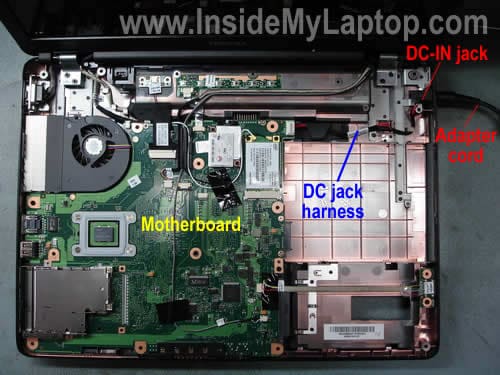
By the way, the power jack (DC-IN jack) is the power socket on the side or back of your computer where you plug the AC/DC power adapter.
I’ll explain how to perform basic troubleshooting and find out what is wrong. This is only for experienced people, who know how to disassemble laptops.
First of all, test the AC/DC power adapter with a multimeter. It’s very likely that there is noting wrong with the laptop and your problem is related to the power adapter.
If the adapter tests fine and output correct voltage, disassemble the computer and remove the top cover.
As you see on the first picture, in my example the power adapter plugs into the DC-IN power jack which is connected to the motherboard via a harness.
In some models the DC-IN power jack is soldered directly to the motherboard.
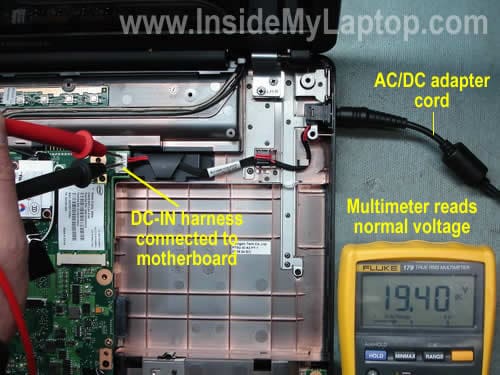
Plug in the power adapter and measure voltage at the point where the DC-IN jack or DC harness (like in my case) connected to the motherboard.
If you are reading the same voltage as on the AC adapter, it means the power jack or harness works properly and the problem is related to the motherboard.
If there is no voltage, most likely there is a problem with the jack or hardness and it has to be replaced.
Most replacement DC jacks available here: https://ebay.to/2OLfQiq
By the way, in some case the problem could be related to the fuse which is usually located somewhere very close to the power jack/harness connector. You can test the fuse with a multimeter.
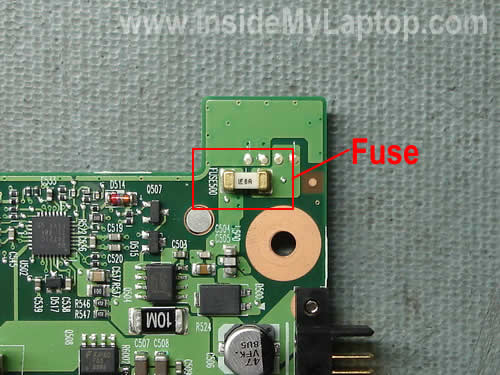
If the fuse is bad, the motherboard will appear to be dead even if there is nothing wrong with the power jack and AC/DC adapter. If that’s the case, replacing the bad fuse should fix the problem.
Hector Cardenas
I PURCHASED A DC HARNESS JACK FOR A PCG K45 SONY VAIO LAPTOP.ALSO ADDED A NEW BATTERY.PLUG IN FAN SPIN FOR 5 SECONDS MAYBE 10 AND THEN DIED.NOW NOTHING HAPPENS.ANY SUGGESTIONS?
Marian
Hi,
I’ve got a Asus k501ux, i7. The DC power adapter pin was bent, didn’t know and plugged it like that. After a while the laptop didn’t turn on. Please can you tell me what the issue can be? Motherboard? Dc power adapter, fuse? Thank you.
Marian
IML Tech
Hector Cardenas,
It’s really hard to tell what’s going on with your laptop without testing it.
Does it turn on at all? Do you see any LED light flashing when you press on the power button or plug in the AC adapter? Do you see any sight of life at all?
ken
I have a gateway mx6214 laptop, i was plugged in using it one night and all of a sudden the charging to the unit stopped, it kept working but would no longer recognize the charger.Would a bad motherboard function properly like this or should i have the jack checked? Thanks in advance
IML Tech
ken,
Could be just a failed power supply. Can you test your AC adapter with a voltmeter?
Kaliy Tech
Hi.. do you have more information on how to replace the fuse on a motherboard ? I wasn’t even aware there was such a thing 🙂 Have a laptop in with no power whatsoever.. no lights.. no sounds..nothing. battery tests at 100% when pushed.. but doesn’t power at all. Thank you.
IML Tech
Kaliy Tech,
Unfortunately I don’t have any tutorial on this topic (yet). First of all, you’ll have to find the fuse. It’s usually located close to the power jack. After that you test the fuse with a multimeter and if it’s open, replacing the fuse might help.
Louise
Hi, i have a Hi-Grade laptop with 2GB RAM. Recently it has been freezing completly and ctrl+alt+del wont work. So I’ve turned it off via the power button. But now it wont tun on at all. The power light and the wireless light stay on when the power button is pushed and the fan comes on. I have tried replacing the memory modules and stil the same problem. What else can i do? Also my data is not backed up because I was in the process of doing so.
IML Tech
Louise,
1. Turn off the laptop, unplug the adapter, remove the battery. Wait for a few minutes. Plug in the AC adapter and try turning it on.
2. I assume you tried replacing RAM with a known good module, so it’s not the RAM problem. Try removing DVD drive, hard drive, other devices you can access and start the laptop without them. If you still experience the same problem, apparently you have a bad motherboard or video card. I don’t know if in your laptop the video card is a discrete module or it’s integrated into the motherboard.
Amber
So, I happen to know the problem with my laptop. Somehow, the DC-in jack is loose and will only register the adapter if it’s pushed in a certain way. Does this mean the jack is completely broken, or can I fix this myself somehow? I don’t want to fool around with it unless I know I can fix it.
Thanks!
IML Tech
Amber,
It’s hard to tell if your jack is broken without looking at it.
1. This problem could be related to the power cable connected to the adapter plug. Maybe there is a short inside the cable and when you move the plug, you actually shorting wires inside the cable. Before you take apart the laptop, test the power adapter with a multimeter. Make sure the adapter outputs correct voltage even when you move the cable.
2. Is your jack soldered to the motherboard? In most cases you don’t have to replace the jack. You can fix the problem by resoldering the jack back to the motherboard.
Charles Saunders
I have a Hp Laptop that will not turn on. I got it brand new and after a year it just went dead on me one night after leaving it on the bed running,. Im thinking that maybe it overheated and turned off because it did that before but this time its not turning back on. When i press the power button the led’s will turn on and the fan would spin but then it goes right back off. What could be the problem and how can i fix this ?
Aza
Hi. You said that the problem can be in the jack or the fuse. In either these cases, does the Power LED is ON? Thanks.
Aza
Hi.
My computer does not turn on as well.
I tested the jack and got 19V.
I tested the fuse, but 0V.
The Power LED of the laptop is ON.
Is the problem with the fuse, even the power LED is on?
I appreciate any help.
Thanks so much.
Davison
1: if your Jack tested 19v that means that jack is okay, then if the fuse tested 0v that means the fuse might be bad and for you to know if the fuse is bad try bleach the fuse together to know the reaction sometimes it cut light and sometimes the laptop will power..noted will doing it make sure you plug in the charger..
2: try to observe with your finger on the motherboard when plug in to know if any chip heating up.
3: observe if any physical damage occur on the motherboard
maycon
Hi,on my laptop hp dv9005us, i have a light in power jack but don`t have any light on front panel,no light like charging, when i try to turn it on i have no response.
i teste the power jack and got 19.2V but i could`nt find with fuse is…… or if have one.
Itoy Venturina
I just want to give you some points here. I am an electronic technician for more than 30 years. I deal with all kind of electronic gadgets including computers and laptops. One thing I want to make a point here is about testing the output of the power supply or adapter. All adapters used for laptops are all switching power supply. A switching power supply output can not be tested unless they are under load. Means they must be connected to the laptop and the laptop must be ON then you can actually use your multi-meter to measure the voltages. However, do you realized that all the desktop computers used switching power supply with cooling fans attached to it? And why? Because all power supply creates a tremendous amount of HEAT !!! Now think about this, why in the world that the power adapters for laptop has a sealed enclosure and no ventilation system? This is the secret of the electronic designer. The more you use your laptop, the more you ruin (not knowingly) your adapter because of overheating. This in turn, slowly killing some of electronic parts of the motherboard. That’s why after one year, you will experience some problem with the laptop just because of the lack of ventilation of the power supply. The switching power supply inside the adapter is composed of a transformer, diodes, capacitors, resistors, transistor and voltage regulator. The last two components are the one resposible for discharging HEAT into the two metal heatsinks. If there is no ventillation inside the plastic enclosure, this two semi-conductors will suffer and the mother board will be affected. To fix this, try to pry out open an adapter with utility knife. Be carefull not to cut too deep into the grove. Once you open it up, drill holes around it. Then put it back together using any kind of plastic glue. These holes will help to dissipate the heat inside the enclosure and will reduce definitely any electronic problems of the laptop. But don’t forget to do some maintenance on the exhaust system of the laptop. The heat sink of the laptop must be clean of dust/lint atleast once a year. Only few people knows about this.
Marcy
This note is to Charles Saunders. My Hp Dv6000 laptop did the same thing. It would overheat aLOT and then finally one day while I was sitting with it on a board on my lap while playing a game, it just went out. I let it cool down for a good couple of hours or more and went to turn it back on and nothing. I still have nothing today. Same thing as you, the lights would come on and the fan would run briefly and then off again and nothing else. I took it in to have a ‘tech’ look at it at a local Staples store and he felt that it was the motherboard damaged from overheating. He says it would basically cost me as much to buy a new laptop as to replace the mb in this one. I find that hard to believe. Now I sit and wonder if this really could be the problem or if it is the power supply as mentioned in a few other articles above. I don’t really want to spend the money on another mb if this really isn’t the problem and I find that HP is not to inclined to release parts for your laptop unless they install it. If someone could give us the answer to this problem, it would be greatly appreciated.
Davison
Yeh that’s possible but my question is..what kind of processor is the laptop using…is it Amd or intel core i
2. Which graphics card does the pc use?
Todd
I have a Toshiba Sat R15-S822. When the power plug is on I can see all the lights. But when I press the “power on” button nothing is coming up. Is it that my motherboard is dead? Thx…
IML Tech
todd,
Nothing comes up on the screen or there is no activity (like LED light) at all?
hery
hi…
My computer dell xps m1210 does not start up
if push the button on, the led is on
but few second the led is off
and can not run
what the problem?
please help me
Thanks so much.
jennyz
I have a Toshiba laptop that is also given me stress The Led comes on and the computer does not come up and sometimes if you try to put it on it will come on but it will not booth, what could be wrong with it.
The power light and the wireless light stay on when the power button is pushed and the fan comes on. I have tried replacing the memory modules and stil the same problem. What else can i do? Also my data is not backed up because I was in the process of doing so.
Deborah
Hi,
I have a Presario 2175us. The battery charge led comes on when the power adapter is connected, and when the power button is pushed, the power led comes on for a second then goes back out again and nothing happens. This is an intermittent problem, and it happens with more than one power adapter. I have taken the laptop apart and checked the soldering of the dc jack, but it looks fine. I was wondering if you might have an idea of what could be the problem. Thanks so much for your help.
mokryun
I have Sony fxa63 and it started not to start several days ago.
When it finally starts, everything is fine.
If I restart, it will do so.
However, if I turn it off and try to on afterwards.. no no no..
I’ve read though some websites and found that it might due to the condenser on the motherboard. So, I unplug everything for 5-10min to discharge that condenser than carefully starts again. Till now this took my chance up.
Not so sure how long it will work and how to find/buy right condenser for it.
Anyone has any idea?
mokryun
Well. I fixed it today.
mimmer
I have a HP pavilion ze4600 (ze4610us) WhenI plug it in the battery charge light is flashing. I push the power button and then both the blue power light and the yellow charging light are flashing on and off. That is all I get. I have disassembled and reassembled it 3 times tried it without memory battery,hdd etc. The only thing that changes anything is when I push the function buttons media keys over and over and pretty quickly it changes the flashing blue power lights flashes it will start flashing with how I am pushing these keys. Could the whole problem be in that power board?
IML Tech
mimmer,
Does this laptop have a power board. Usually it’s integrated into the motherboard and your description sounds like a problem with the motherboard.
Jawed
Hi,
I have an Acer Aspire 5570z laptop. When i plug in my adapter, the laptop doesnt respond(does not charge battery, doesnt turn on, leds do not respond…etc). Ive tested my adapter with a multimeter and it shows the normal voltage,ie, the adapter is good. What can be wrong with the laptop? Plz help me.
IML Tech
Jawed,
If the laptop is absolutely dead even when you use a know good power adapter, most likely you have a problem with the motherboard.
Does the power LED flicker if you wiggle the power adapter plug inside the power socket? If it does, there could be a problem with the power jack. If not, most likely it’s bad motherboard.
mimmerfy
IML Tech, Hi,
it has a separate power button board and the quick buttons for email,internet etc. are also on that board
IML Tech
mimmer,
The power board and power button board are two different things. I think in the comment 24 you asked about the power button board but called it power board.
I think you have a problem with the motherboard.
Sia
I have a Sony laptop FXA63. When turned on, the screen shows “Sony” logo and then a short blinking “-” at top of the screen and then nothing, screen dark. I opened it and noticed that fan comes on for and then stops, and the housing containing the fan heats up tremendously with fan not working. Can you advise on what to test next? Thanks.
IML Tech
Sia,
Bad hard drive? Can you remove the hard drive and start the laptop without it?
Find out if video will stay on the screen when the hard drive is removed.
Gateway
i have no power when i try to start my gateway laptop.
at first, it would power up and then immediately power down.
now, i have nothing power light doesn’t light at all.
Stefan
Hi,
I have a sony TZ150N dropped on the floor which does not power on anymore. Either on battery or power cord it blinks the power led once and nothing happens. I was thinking to buy a new motherboard but what if that is not the problem. Any ideas? I have unplugged all cables from M/B except power button cables and power jack. Same…power led blinks once. Is that the ultimatum test to see if M/B is dead? Should at least the led stay ON if M/B was ok?
Thanks.
AK
Hi folks,
I am having a Toshiba Satellite M305D-S4829, with Vista 64-bit. When I switch on the power on button, NOTHING happens. There is no display. I inserted the Recovery DVD to re-install Vista, and I could hear the DVD being ‘read’ by the laptop, but nothing happens. Tried pressing and holding “C”; tried FN key + F5, as well as F12.
I need help a.s.a.p.
Any input is helpful, as long as it does not involve using multimeters and tinkering with the motherboard.
Thanks,
AK.
IML Tech
AK,
You’ll have to disassemble the display panel and take a look at the video cable. If it’s made by CMI, I would definitely try replacing the cable first.
IML Tech
ÐК,
It’s possible that your laptop doesn’t start because one of the memory modules is bad.
You have two memory modules installed, correct? Try removing them one by one and test the laptop with each module separately. If one of the memory modules is bad, the laptop should start with video when only a good module is installed.
Stefan
Hi IML Tech
Can you please answer to my post as well?
Thank you.
Regards
Stefan
stephen
hello, i have a d600 latitude. i didn’t have a power supply for it so i rigged one from an old laptop with the same power ratings. i ended up switching the polarity by mistake though. a small cloud of smoke came out next to the jack and now it doesn’t work at all im sure its a fuse but not sure where could some one help me out please?
IML Tech
stephen,
Usually in laptops fuses are soldered to the motherboard. You’ll have to remove the motherboard and search for the damaged fuse. I think it’s soldered somewhere close to the power jack.
latricia
i have a dell latitude d600. the power comes on and then shuts down, no fan comes on, no booting up, nothing. help!? what is wrong?!
IML Tech
latricia,
It’s hard to tell, but could be memory related problem. Do you have two memory modules installed? Remove them one by one. Test the laptop with each module separately. This way you can find the faulty module.
Mick
Hi folk
I have a Sony Vaio VGN-BX297XP laptop which doesnt start up. When I connect the power lead the battery charging light starts to flash, If I press the on button the charge light stops flashing with nothing else happening.
Emily
I have a HP pavilion ze4600. My laptop worked fine last night. I shut it down, and it installed it’s updates and shut off like normal. This morning, I plugged it in and tried to turn it on, and NOTHING. The charging light blinked yellow/orange for a bit and then turned green, like it’s charging. That is the only sign of life though. No fans, no blue lights, nothing.
IML Tech
Emily,
Try the following steps:
1. Turn off the laptop.
2. Unplug the AC power adapter.
3. Remove the battery.
4. Wait for a couple of minutes, than plug the AC adapter and try turning it on.
Crystal
I have a HP Pavilion dv6000, my laptop is having some issues. I turned it off 1 night and started it up like normal and it froze as soon as i opened a program, now when i turn it on there is no Bios screen and it just keeps restarting itself. Have you had a case like this? I been searching the internet for solutions, and i found this website.
IML Tech
Crystal,
Could be memory module failure.
Do you have two memory modules installed? Pull them from the laptop one by one and test the laptop with each module separately. It’s very unlikely that both memory modules failed at the same time, and if your problem is memory related, the laptop will start properly when the bad module is removed.
macris
my compaq presario V6310US just “died” it seems. it won’t power up. it won’t turn on..
what is the problem?
IML Tech
macris,
Any lights when you plug the AC adapter and push on the power button? If not, check the power adapter. It could be bad.
Ben
Hi there!
I have an OKI laptop
This is my problem……. Yesterday all of a sudden it just cut off…. electric,screen everything…..
Now when i try to turn it on, the lights all come on and the fan starts up….but no screen or anything?? then the fan stops… but the power light stays on …… it lets me open the cd drive but wont let me switch off unless i take out the battery…..Plz help!!!!????
i took it to Pc repair shop and the guy says its the CPU (Motherboard) that is wasted…… i hope not?
Any second opinions would be greatly appreciated before I go and spend a smaLl fortune on another notebook…..
Ben
IML Tech
Ben,
Could be memory failure.
If the guy tried replacing the memory module already, probably he’s right. I would say most likely this is the motherboard failure. CPU failures are not common.
Again, play with memory first. Try reconnecting it. Try moving from one slot to another. Try removing modules one by one if you have two installed.
If nothing helps, most likely you have the motherboard problem.
Gordon Turibamwe
Iam Gordon from Uganda, East africa, i do have a tropix laptop, it doesnt show anything on screen when i start up. The power, and battery lights show, DVD rom runs but shows nothing, i have tried to observe it and it runs then stops, removes the power light then starts again but without displaying anything.. Please help and let me know What the problem could be?.
IML Tech
Gordon Turibamwe,
Your problem description is very similar to Ben’s description (previous comment).
I think it’s either bad memory module or motherboard failure.
robb
i have acer extensa 5630 ez. It wont power on with battery or mains supply, At first it would power on after waiting 5 mins , this then extended to hours then days and now its weeks before i can power it up again. I have noticed that it will power on from sleep mode or if i press restart but if i close it down or put it into hibernation it will be weeks before it will power on again.pressing the power on button when its on mains power just causes the green light to go out. On battery only if i press power button on rapidly about 5 times an led orange light flickers I have tried the so called power reset and reseated the ram but these remedies have no effect. Have been on net and there is lot of people having this problem with this model…. i would appreciate any help.. Thanks
IML Tech
robb,
To me that sounds like a problem with the motherboard.
Danny
Hello, I have an Alienware m15X, he suddently sopped working. When I plug the ac adapter into the wall ac power outlet; the light on the ac adapter is solid green at that time. As soon as I connect the ac adapter’s plug into the laptop the light on the ac adapter blink and make a clicky noise until I unplug the ac adapter from the laptop. At the same time system does not power up from only the battery.
I tried with no battery, only the AC Adapter plugged in it and its don’t work…
What would be the cause of this problem?
I have remplaced the memory, Hard drive, removed the DVD Rom, its still dont work 🙁
IML Tech
Danny,
It’s possible that your AC adapter failed and the battery doesn’t have enough charge to start the laptop.
Test your laptop with another known good AC adapter. If you still experiencing the same problem with another adapter, most likely this is the motherboard failure.
Danny
Hello, I have a little gauge on my battery and its still at 4bars.. the battery should be able to start the laptop. Ill try another AC Adapter but I dont think its the problem since I can’t start it with the battery.
If its a motherboard failure, do you think its repairable? What would you check first to see where is the problem.
Does a bad power jack would make it unbootable with the battery?
Thank you!
IML Tech
Danny,
Ohh, I didn’t know that. If the battery is charged, I guess replacing the adapter will not help.
I guess it’s the motherboard failure.
Sorry, cannot help you here. I don’t work on the component level. If the motherboard fails, I replace the whole unit.
Very unlikely.
Malik TOKA
Hi. i have Acer tm 5520. im geting voltage throughout the mboard. slightly low when i check for ac. and corect with dc. i used another working tm 5520 for this test..
but im not geting any power indication and it wont start up. i have checked for bad conectors, loose wires, and almost everything i can think of, its been two days im checking it.. what do u suggest?
i did power restart by presing power buton for 30 seconds like explained on acer website.. but that didnt work. so i removed the mainboard cell and tried power restart again. but i only got a ticking sound inside the mboard…and it faded away… nothing after that…
IML Tech
Malik TOKA,
Sounds like you have a failed motherboard. Sorry, I cannot help you to fix it. I don’t work on the component level. If the motherboard fails, I replace the whole motherboard.
ladoks
My acer aspire 5315 shows no light when power on. Only the battery light on when plugged to electricity. Occassionally, when power light on, the fan rolls for 5sec, with no sound and nothing on display. could it be the motherboard or processor?
IML Tech
ladoks,
Processor failures are not common. I’ve replaced hundreds of failed motherboards and only very few failed processors.
If you have to choose between the motherboard and processor, go with the motherboard.
Tenzin
I have a acer aspire 5630 for while, but now its not working properly, when I tried to start it, the fan runs only for 5 to 10 seconds and after that there is only power led on but nothing else is going on, i can’t hear hard disk sound etc, any suggestion??? I think its fan problem but am not sure about this, you help will be very appreciated, thanks a lot
IML Tech
Tenzin,
I think your problem could be related to the memory (RAM) failure.
You have two RAM modules installed, correct? Try removing them one by one. Try starting the laptop with only one RAM module installed.
If it starts fine with one module but not with another, the second one is bad.
LH
My Dell Inspiron 600m will intermittently not power on. Does not seem to matter whether the laptop is running on battery or AC. The LEDÂ indicates a charging battery when plugged into the wall. I push the power button, nothing happens. Push it again over and over, eventually it will power on. Runs normal when powered on, and if I do a soft restart, it shuts down and powers up normally. But if I shut down completely, the next time I hit the power button I have to hit it over and over until one time it works.
So, could it be the AC, motherboard, power board, or something else? How do IÂ diagnose the problem?
lee hennessey
hi there my laptop is a dell latitude d600 it starts up and gets to windows xp loading bit then goes back to the start does it all the time can you help
IML Tech
lee hennessey,
Sounds like software related problem. Could be corrupted registry.
Can you boot in Safe Mode? Try using Last Known Good Configuration too. You can access both if you press F8 as soon as Dell logo appears on the screen.
If nothing helps, you’ll have to reinstall Windows from scratch.
BM
Hi! I have a dell inspiron 6400. My laptop doesn’t start. The adaptor light blinks when I connect it to the power supply, but as soon as I plug the jack into the laptop socket, the light on the adaptor goes off. And my laptop doesn’t start. The battery gage shows that it is charged. I have tried removing the battery and running only on AC power, but it shows the same symptons. I have tried removing every component and powering the motherboard directly, but with the same results. I am assuming that the motherboard is faulty; where can I directly purchase a new one; can i purchase a particular model of motherboard directly, or will i have to deal directly with Dell? If a particular component soldered on the motherboard (like power jack) is faulty, is it possible to remove it, purchase a new one and solder it back? Thanks a lot.
IML Tech
BM,
Is it normal? I believe it has to be on all the time when connected to the wall outlet, isn’t it?
Before replacing the motherboard, I would suggest testing the laptop with another AC adapter. Maybe the adapter is bad.
Did the laptop work on the battery power before?
It’s not likely but possible that you have a damaged DC jack inside the laptop. Maybe it shorts something when the AC adapter is plugged.
You can remove the cover and take a closer look at the jack. Maybe the jack has to be resoldered. Just a guess.
The best way to find a new motherboard is searching on the internet by the part number. Usually in Dell laptops you can find the motherboard number on a sticker glued to the memory slot. There is a long string of number on the sticker separated by dashes and one part of number will look like CN-0MD666. This is the motherboard part number and you can google it or search on eBay. The number could be different for your motherboard.
It’s not necessary to buy a new motherboard directly from Dell but buy it from a reputable seller.
ixr
Hi
I have an Acer Aspire 6920G which has an unusal fault. It will not power up buy has a faint ticking sound. I stripped the motherboard bare & still the ticking sound persists. I have removed various caps, coils, resistors etc but still cannot work out where the sound is coming from! Is there an easier way to try pinpoint the source of this fault? I have tried listening all over the board by ear but the ticking sound seems to be the same – neither louder or softer. Are there components on a motherboard that would be more prone to tick when they have failed?
There are a few caps that are shorting in circuit. I removed & tested all of these and they are good but there still is a short. Strangely though this short does not affect the power supply to the motherboard ie. by turning power supply off or indicating there is a short (flahing led).
This is actually the 2nd motherboard I have come across with the same fault & still cannot solve this problem.
Any advice will be greatly appreciated!
Thanks in advance..
vince
I have a Acer Aspier 4720Z. The problem I have is the compter wil not charge the battery or work when plugged in (if the battery is removed). I think it’s the DC board and input, the ac adapter is ok. I could easy replace the board but I don’t know how to get to it.
IML Tech
vince,
Here’s service manual for Acer Aspire 4720G, 4720Z, 4720 and 4320 series.
Now you know how to get to the power jack. 🙂
Good luck!
Ali Ahmad
i have an acer tm 5520. with pomona motherboard. my battery was broken and laptop cudnt power on. i checked few things, assembled it back, and it was running again ( without battery ) i poured some glue on the power jack to fix it in the casing because it got loose. next morning i tried to fit in battery, but it didnt power on. and when i hooked it with adapter without battery it was dead. no l.e.d no power. its been dead since. i had it checked in the market but they cannot figure out the problem. when i check for ac voltage with a multimetre, it seems to get same volts on the ac jack as from adapter, but when i go further, multimetre detecs low volts.
i have another laptop same model. unlike above, it shows same voltage from adapter to ac jack and to battery terminal.
does anybody have any clue whats wrong with my computer? can u suggest me anything? thanks
Korben
Hi,
i have same problem…. pc works only with battery but not works with AC adapter,this one don’t charge the battery!
So i found the fuse, but it is ok… the tester sounds when i test it! 🙁 Help me!
IML Tech
Korben,
Did you test the AC adapter? Maybe the adapter is not working properly when loaded. I would suggest testing the laptop with another known good AC adapter.
If the problem still exist, most likely this is the motherboard failure.
Korben
Sorry… my pc is hp pavilion dv6693el.
korben
Sure,
ac adapter works!
I can try to change the fuse?? But i don’t fount PF1 or F1 pin on motherboard pcb! Help me 🙁
Jasun
Hello, I have an Acer Travelmate 2480 and my computer just won’t turn on. When I push the pwer button, an orange light flickers in the front by the speakers. This happens with and without the power adapter plugged in. Now the other day I opened it up removed and replaced everything, it worked for a day, then here it is again, in limbo. Any suggestions?
Mark
Hi,
I have a HPDV9000.
I just sent it for a complete repair of the graphic chip, I then booted my laptop, everything was fine, image on the screen was normal; 30 minutes after it began to vibrate quite loudely somewhere around the fan or the hardrive ; I just pulled the AC/DC adapter right away and the battery was not plugged in. After that I tried to boot it but no reaction just the blue light where you plug the adapter.
I checked my ac adapter and the DC-IN harness, voltage is fine.
But I can’t locate the fuse on the motherboard, anyone has a pictures or a website that I could use?
How much does a fuse coast and is it easy to replace?
IML Tech
Mark,
I don’t think that your problem is related to the fuse.
Usually the fuse is located somewhere close to the DC jack (or DC jack harness). The fuse is soldered to the motherboard. In order to replace the fuse, you’ll have to desolder the failed one and solder a new one. Before replacing the fuse test it with a multimeter.
Mark
Hi,
I can’t find the fuse on my HPDV 9000 do you have any website or manual guide I could use to locate it?
Thanks
storm57
I have a Presario F700 laptop that has a mind of it’s own. Whenever I hit the power button, the thing turns itself on and off several times before it finally reaches the POST and boots. What are the possibilities for the problem? The battery, and adapter test out fine. And once it boots, it works without any hassles, until I shut down or reboot.
IML Tech
storm57,
It’s hard to tell without testing what is causing the problem.
In order to start any laptop with video you need three main components: motherboard (with video card), CPU and memory.
From my experience, CPU failures are not common, so most likely it’s either motherboard or memory failure.
1. Try reconnecting memory modules.
2. Remove memory modules one by one and test the laptop with each memory module individually. One of the modules could be bad.
3. If you still experiencing the same problem even with known good memory, this could be motherboard failure.
By the way, run Memtest86+ (multiple times) and test memory. Maybe one of the modules fails intermittently.
emy
i have hp pavillion dv6000.The problem is its just black screen and 3 short beeps.Can you help me to fix it?.thanks!
IML Tech
emy,
Could be memory failure.
1. If you have two memory modules installed, try removing them one by one and test the laptop with each memory module individually. It’s very unlikely that both memory modules failed at the same time. When the bad module is removed, the laptop should start properly.
2. If reseating/removing/replacing memory modules doesn’t help, most likely this is the motherboard failure. You’ll have to replace the motherboard.
Petrus
Hi i have Hp Compac 6735s. Dead. Stripped it to your site. Pc shops says motherboard but i see nothing. Fuse? Does not switch on even with all the power and reset stories. If battery is charged i get 7 led signals when trying to switch on and power led blink and go of again. that is it. What do you think.
carmine
compaq presario v2000 it wont turn on nothing not a sound please someone help. no lights nothing how can i find out whats wrong
IML Tech
carmine,
First of all, test the AC adapter. It’s possible the laptop will not turn on because the AC adapter is dead and the battery has no charge.
If the problem is still there even with a new AC adapter, probably it’s bad motherboard.
Ervin
I have an HP Pavilion dv6500 laptop, it does work with charged battery but not without battery and with charger on. I tested with a good charger and it still doesn’t receive power.
Could it be the power connector board (DC input jack and circuitry that transfers the power to the motherboard) or the motherboard itself? If something is burned in the motherboard, is there a chance to repair it?
mdfrustated
Hello, I have Lenovo 3000 N200 Laptop. My laptop is not working at all, it wont power on or shows any lights…. it is totaly dead. Please help me. Thanks in Advance.
Krishna
Hi,
I have Problems with DV5000 model HP laptop. Recently it is having problem with the start button. when i connect the indicator is showing as the battery is getting charged. but when i press the start button there is no action.
could you suggest a solution ofr my problem?
Thank you,
krishna.
IML Tech
Krishna,
Could be memory failure. Try reconnecting memory modules, try removing them one by one.
Could be motherboard failure.
Also, unplug the AC adapter, remove the battery, wait for a few minutes. Now plug the AC adapter and try turning it on.
Diego
Hp pavilion Dv4-1274mx
My computer does not charge the battery when it’s plugged in but it does recognizes the charger, the led lights up and the computer says it is plugged and charging. but if I take out the battery and try to charge it directly it does charge. and if try to turn on my computer while it is plugged in but the battery if out, it doesn’t turn on and the battery led does not light up either.. and it is suppose to turn on if it’s plugged no matter if the battery is out.
..what could be the damage then? I already changed the charger and the power jack of the computer itself!
IML Tech
Diego,
Not sure what’s going on, but I would test the laptop with another AC adapter. Maybe your adapter is not working properly under load.
If replacing the AC adapter doesn’t help, it’s possible you have motherboard problem.
Diego
I already changed the AC charger and the power jack!
what could be the motherboard problem??
will I have to change it?
thank youu!
Shaun
I am working with a pavillion dv4. The LED light next to the adapter will not turn on. It will briefly blink once while pulling out the adapter. I have replaced the motherboard, AC cable, and triued different adapters and it still has the same issue. Not sure what else to check.
Thank you,
Shaun
Leta
Hi,
I have a Toshiba Satellite A105 (which I bought in June 2006), which shut down on me last a week ago. I had been working on it for about 10-15 minutes on a Word Document, when all of a sudden there was a “beep” sound and the screen went blank. There was no other sounds coming from the computer, no LED lights on (that show the battery charge, and such), and basically, everything looked completely dead. I had my AC adapter tested and it was fine, including the connection. I was not able to start my laptop since then.
Also, I don’t know if this has anything to do with it, but for the last month or so, my laptop had been using up it’s battery power very quickly (it was down from about 50 mintues to only about 15-20 minutes on a full charge).
Do you have any idea what might be wrong with it, and if it is fixable? And if it isn’t, how can I get most of my data off the hard drive?
Thanks!
IML Tech
Leta,
If the AC adapter is OK and all connections are good, most likely this is the motherboard failure.
Here’s something to try.
Disconnect the AC adapter, remove the battery and wait for a few minutes. After that plug in the AC adapter and try turning it on.
If it doesn’t help, probably you have a bad motherboard (again, I assume the AC adapter is good).
Ben
My laptop was not working because of a bad power jack. So, I took the laptop apart and semi-dissected the DC-IN jack. Well, I actually get the thing working but here is my new problem:
When I plug the power cord in, the laptop start’s up, by itself without me pressing the power button (it NEVER did that before). I see the fans starting up (the laptop is still opened up), I see the lights on the front of the laptop, and the disc drive, blink. Also, I will sometimes (i have tried starting up the laptop multiple times) hear a single electronically muffled beep sound from the speakers (the actual speakers aren’t causing this muffled sound). I do not see anything on the screen (in fact the laptop screen does not turn on at all). Any suggestion on what to do to fix this?
P.S. the laptop screen is NOT the problem
Thanks for the help,
Ben
IML Tech
Ben,
First of all, make sure the laptop is assembled correctly. Check all connections, make sure CPU, RAM seated correctly, etc…
If everything looks normal, try turning on the laptop in minimum configuration: motherboard, CPU, memory, external monitor.
If the problem is still there, could be bad motherboard.
ANDY
Hi, sorry for my english.
I have an old Dell Inspiron. It doesnt start, no leds, no fan, nothing,
AC/DC adapter is fine. i don’t have the battery, anyway.
i disassembled my laptop, plugged in and tested the dc-in jack with a multimeter, and it reads around 7V, a lower voltage than measured on the AC/DC adapter conector (19,5).
Does it means dc-in jack is the problem?
Could it be the power button? Maybe is stupid but i don`t know if the measure is affected by the fact that laptop is turned off (although plugged )
Thank you
Klasiq
i have this toshiba L305-S5919, (same as the pictures you have used to illustrate). the problem is the fuses are okey, no IC is Physically damaged (cracked, or visibly burned). the power adapter is okey, but when i the laptop is inserted nothing happens, all the power indicators are not showing. in short the laptop is dead, though when the power jack is inserted in the is power on the battery terminal meaning it should be charging but the indicators are not showing that anything. is there a way i can trouble shoot the board and get the problem.
IML Tech
Klasiq,
Maybe the DC jack harness is bad?
You can disassemble the laptop, plug the AC adapter and using a voltmeter test voltage on terminals where DC jack harness connected to the motherboard. If there is no voltage, the DC jack harness is bad and has to be replaced.
Take a look at these guide for some pictures: https://www.insidemylaptop.com/repair-damaged-power-jack-toshiba-satellite-l305-l355-laptops/
Again, find out if motherboard gets any voltage from AC adapter.
Stel
hi. i have a Hp Paviliion DV9000 laptop. i plug in the charger and the light shows blue, but it actually is not charging. i try to turn on the laptop and it would not turn on at all. at first i thought it could be the battery. so wht i did was use my friend’s laptop’s battery(shes got the same laptop) and the laptop turned on, the charger was plugged in but it was not charging. so at this point i dont know wht could be the problem. can u plz help me out here. thnx
Amr
I have a strange problem recently with my hp laptop
although the battery is charged it doesn’t start when I try to start it with the battery only.
When I plug in the DC line it starts, I can even remove it after that and continue on using the battery.
any idea??
Christina
Hi,
When I turn my laptop on the screen is black. The lights turn on (on the keyboard) and I hear the fan running, but my screen is still black. Recommendations?
Thank Yoyu
Christina
IML Tech
Christina,
First of all, I would check RAM (memory) modules. Could be memory failure.
1. Try reseating memory modules.
2. If you have two modules installed, try removing them one by one and test your laptop with each modules separately. The laptop should start properly when the bad module removed.
Gary
I have an HP DV9820US laptop. Strange problem, when I turn it on it turns back off after 1-2 seconds. Then does this over and over until I remove all power. Nothing shows on the screen at any point. the fan turns on and off with the cycles. I only hear the hard drive spin if I plug in the power while holding the power button. But it still does the same thing.
Any ideas? all this happened after I did a system recovery. everything was working normally and I was going through and installing all the windows and HP updates. On the HP site there is a recall for batteries, I shut down the computer and removed the battery to check the #’s, after that the problem started.
IML Tech
Gary,
Could be memory failure.
1. Try reconnecting both memory modules.
2. If it doesn’t help, try removing memory modules one by one and test the laptop with only one memory module installed (try different slots). It should start properly when the bad module is removed (if you have a bad module of course).
Both memory modules can be accessed from the door on the bottom. Take a look at this guide for HP dv9000 series:
https://www.insidemylaptop.com/remove-hard-drive-memory-wireless-card-keyboard-hp-pavilion-dv9000/
gary
thanks for the reply. I tried doing as you said, with every possible combination (2 cards, 2 slots) still the same problem. I saw in your link that there was a factory repair offered for 24 mo with these same symptoms. Too bad I missed that by a month. Any other ideas? Is it motherboard time?
IML Tech
Gary,
If it’s not memory, most likely this is motherboard failure.
I don’t think you missed it because dv9800 series wasn’t included.
Just in case, try minimizing the laptop as much as you can. Remove the battery, hard drive, wireless card, DVD drive and try turning it on from AC. If the problem still there, most likely the motherboard is bad.
Gary
If I hold down F11 during startup the power will stay on. But there is no action from the monitor or the hard drive light.
Gary
Thanks, I’ll try that. I dont know if this is related or not, but about 1 mo ago, the sound stopped working. I kept getting “No Audio device is installed” message. It came and went for 2 days, then was gone altogether.
Gary
well… nothing seems to work. I guess I’m motherboard shopping. Thanks for the advice.
Bones
hi i have a hp dv9518tx , The laptop stopped charging the battery now when i plug in the adapter i have a led light on …but when i try to turn the power on i get nothing …this happens when the battery is in or out of the laptop…so i purchased a new battery the laptop started up straight away..but when the battery went flat same thing …how do i fix this recharging And power problem thanks
IML Tech
Bones,
It’s hard to tell what is causing the problem.
You said the laptop started properly with fully charged battery, so I assume the motherboard in your laptop still works properly.
Your problem could be related to:
1. Bad AC adapter. Maybe it still supplies some voltage (enough to light up the LED) but doesn’t work properly when loaded. I would recommend testing the laptop with another AC adapter.
2. Power jack problem. Maybe the jack is bad and has to be replaced.
3. Motherboard failure.
I really cannot tell which one is causing the problem without testing your laptop with good spare parts.
Yonette Woolford
hi l have a sony vaio VPCEE2Fx E series ,l workon it just this morn ing after shutting it down .when l try putting it back on nothing happens no lights nothing , even when l connect A/C adapter to the laptop there’s not light nothing comes on so can u tell me what is wrong
IML Tech
Yonette Woolfard,
Here’s what you can try:
1. Unplug the AC adapter.
2. Remove the battery.
3. Wait for a few minutes.
Now plug the AC adapter and try turning it on again.
james
i have a hp dv2500, i have removed vista which it came with and installed xp, during the process, i ducked out for dinner, upon returning, the computer will not start, no lights anywhere,
the computer was pluged in at the wall during the installation, and doesnt start with or without wall power
Thanks, James
IML Tech
james,
Does it start with the AC adapter plugged? If not, it’s possible the AC adapter died while you had dinner. The laptop was running until the battery discharged. Now you cannot turn it on because the AC adapter is dead and battery has no charge.
Can you test the AC adapter with a voltmeter? Find out if there is any voltage. If not, try a new adapter.
James
Thanks for your reply, will try a new adapter.
Thanks!
Nicholas Oxhøj
I have a 3 year old Amilo Xa1526, which have started frying power supplies.
A couple of weeks ago, the laptop suddenly stopped charging and finally ran out of power. I noticed that the LED indicator on the original power supply had stopped working. I thought that the power supply had just “died a natural death”, so I ordered a new (unoriginal) power supply on the net. Both the laptop and the original power supply are marked as 20V 4.5A , so I found a new one marked 20V 6A, which should be just fine. After plugging in the laptop with the new power supply, everything looked fine – for about 15 minutes. Then the laptop stopped charging, and the power supply seemed dead. Thinking I had just been unlucky with a bad specimen, I returned it and got a replacement, same model. Plugging in the laptop once again, everything looked fine – for about 2 days, when the new power supply also died. Thinking that maybe it was a shoddy model, I ordered a completely different “universal power supply” from a different source. This one was also listed as 6A at 20V. So after adjusting it to 20V and finding the correct jack, I plugged it in – and after 15 minutes it died!
So within 1 month, my laptop have killed 4 power supplies. Do you have any idea about what the problem could be? And what could possibly be done to fix it?
I tried measuring the resistance at the DC in on the laptop as desribed on http://www.fonerbooks.com/laptop11.htm
It was almost 4kΩ, so it doesn’t look like a short circuit…
Frank
Hey IML Tech,
Have a Toshiba P205D. Its basically dead showing no power (the light up front don’t like up when it plugged in). The power cord is good. I took it apart thinking and hoping it was he DC jack. I checked the voltage at the harness on the motherboard and it showed 19.6 Vdc. So the DC jack is good. The fuse gave me 0.03 Ohms. Would you know if that’s within margins? If so, I take it the motherboard is dead? Any info/ feedback / other options would be appreciated. Thanks.
IML Tech
Frank,
Cannot help with the fuse margins. I don’t fix motherboards on the component level and my knowledge is very limited here.
The following could be a bad idea but… if you have nothing to lose, you can short the fuse with a piece of wire and try turning it on (with AC adapter plugged in) while the fuse is shorted. If the laptop starts fine, it must be a bad fuse. 🙂 Again, not sure if this is a good idea.
Nanle Stephen
It’s just wonderful, but my problem still unsulve. mine is a laptop too, a Compaq notebook computer with Model number;CQ62-23OEI and Widows-7 operating system. it bliks onec, when the power botten is press; even when hard reset is done. I will be very graetful if you can help me, while increasing your knollage, God bless.
IML Tech
Nanle Stephen,
It’s not very clear how your laptop fails. Please provide more details.
Can you see any video on the screen? Does your laptop work with an external monitor? Will it power up at all? etc…
Matt
Hi I have an HP dv2500. I came home one day and the laptop had shut down on it’s own and I no longer receive any solid Led lights. When i have the power cable attached I get a very slow and dim but steadily flashing blue light almost imperceptible. the power button has no effect and i have really no idea what to check or test next. I have performed all the battery removal and discharging tips with no effect or change. I have little faith it is the power cable so i an trying to avoid purchasing a replacement one. Let me know if you have any suggestions. Thanks
IML Tech
Matt,
Maybe you should check voltage on the AC adapter. It’s possible the adapter failed and not outputting correct voltage. You can check voltage with a voltmeter.
Ken
Great guide. I followed your other guide to disassemble a Compaq F755US. Someone spilled a glass of wine in it. When the power button is depresses the light comes on and you can hear the hard drive spin for a second then the laptop shuts down. there is no sign of the fan spinning. I have it down to the motherboard and a stick of memory only and the same thing happens. I tested the power adapter at the plug end and got the voltage but can’t find where to test on the motherboard. Any ideas? Thank you
Mido
Hello,
I have a Toshiba L505-es5034 , the device is dead and have no reaction when I press the power button , the led lights of the battery and the dc-input lights when I connect the power jack but it never turns on, I took the laptop apart and took a look at the mother board but it shows no physical damage, the story is that i spelled few droplets of the window washing liquid on the keyboard and i then used an air dryer to dry it after that by 1 hour i turned my computer off and removed the battery for the purpose of cleaning but from that time it never turned on again, I tried removing the keyboard but it still does not power up, i tried removing memory and swapping slots also.
PLEASE HELP!
IML Tech
Mido,
It’s hard to tell what is wrong with the laptop.
You can try taking it apart to barebone system and see if it works.
Disassemble it as much as you can at test with an external monitor.
Basically, all you need is motherboard, processor and memory to start your laptop with video.
Beth
I have an acer about 2yrs old when I plug the charger in the battery light will turn green for a second then it goes to yellow and it will not charge or power up. I have done the rundown with the power cord and the jack its all good. Got any suggestion?
IML Tech
Beth,
Remove the battery and try turning it on just with AC adapter. Can you start the laptop when the battery removed?
Beth
No it will not turn on with power supply alone.
IML Tech
Beth,
you said:
1. I have done the rundown with the power cord and the jack its all good.
2. No it will not turn on with power supply alone.
So, the AC adapter is good, power jack is good but the laptop with not turn on when battery removed.
This sounds like motherboard failure to me.
Beth
My daughter has an acer to the she uses everyday and it wont work without battery . I did notice that when i first plug it in the battery light will be green for a minute then goes to solid orange
viraji
Hi ,
Im using a HP dv2500 laptop. its not switching ON at all. but when i connect the power cable (without the battery) it shows the battery charging LED. when i connect the power cable with the battery connected the LED not blinking.
What you reckon the prb could be? Motherboard or fuse?
IML Tech
viraji,
Does the battery charging LED have to blink when laptop connected to AC and battery installed? I believe it should light solid.
If the laptop doesn’t turn on at all and all you get is battery charging LED, this could be bad power switch board or failed motherboard.
It’s really hard to troubleshoot a problem like that without seeing the laptop.
sean
Hi! I have a Dell Inspiron B130 that crapped out on me mysteriously. It is completely dead. No LEDs light up no matter what i press. When plugged into the computer, the AC adapter blinks. When not plugged in, it is a solid green light. I tested it with a multimeter and found it was fine at 19 volts. I also bought an extra battery, but the laptop did not power on so I don’t think that was the problem (although I wasn’t able to confirm this since I couldn’t measure their voltage).
As for the power jack, the voltage drop from the positive pin (the one perpendicular to all the others, i am thinking) and all of the negative ones was only between 3 and 4 volts, significantly below 19 of the adapter.
My questions:
Does this confirm the diagnosis of the power jack? Would 4 volts be insufficient to give me any response from my computer whatsoever? I couldn’t tell if the soldering on the jack was damaged or not, or what else could be wrong with it. Or perhaps I didn’t put the negative test lead of the multimeter in the right spot while measuring? I put it on all the pins except the positive one, and they all measured the same. If it is a motherboard problem, shall I begin salvaging the parts or is it repairable?
btw, I have also read your tutorial on the B130 DC power jack repair.
Please let me know what you think.
Thomas Snipper
Hi , i have a gateway nv52 with power adapter plugged in only a blue light will come on no power gateway tech support does not have a clue however this a know issue you see all over the internet brought from vendor there tech does not have a clue was wondering if this is a bad dc jack or muti function power button board or power cable any advice will be helpful
IML Tech
Thomas Snipper,
I cannot tell without looking at the laptop. Normally, you’ll have to disassemble the laptop and test voltage on terminals where the DC jack soldered to the motherboard. If the voltage is the same as on the AC adapter, most likely it’s not the jack failure.
By the way, very soon I’ll publish a guide explaining how to access and replace the DC jack on a Gateway NV series laptops.
Nitin
HI i have a acer 1460 which is not powering. there is no light not even a charge light. i have tested the adaptor and am geting around 19v but when i plug it in and test the jack pins -+ i get under 2v.
i have removed the jack and put the power cable in and tested, i am geting 19v at jack pins when it is out of the MB.
i have tested the fuses near by which are working. so i am not sure what to do??
Thankx
Nitin
IML Tech
Nitin,
First of all, I would test laptop with another adapter. It’s possible your adapter fails when loaded, I’ve seen a failure like that a few times before.
If the laptop still doesn’t turn on even with another adapter, most likely this is motherboard failure.
Nitin
i have tried a new adapter but still no luck. any more guess? im not sure which pins are ment to be ground on the jack. thanx
sean
Hi! I have a Dell Inspiron B130 that crapped out on me mysteriously. It is completely dead. No LEDs light up no matter what i press. When plugged into the computer, the AC adapter blinks. When not plugged in, it is a solid green light. I tested it with a multimeter and found it was fine at 19 volts. I also bought an extra battery, but the laptop did not power on so I don’t think that was the problem (although I wasn’t able to confirm this since I couldn’t measure their voltage).
As for the power jack, the voltage drop from the positive pin (the one perpendicular to all the others, i am thinking) and all of the negative ones was only between 3 and 4 volts, significantly below 19 of the adapter.
My questions:
Does this confirm the diagnosis of the power jack? Would 4 volts be insufficient to give me any response from my computer whatsoever? I couldn’t tell if the soldering on the jack was damaged or not, or what else could be wrong with it. Or perhaps I didn’t put the negative test lead of the multimeter in the right spot while measuring? I put it on all the pins except the positive one, and they all measured the same. If it is a motherboard problem, shall I begin salvaging the parts or is it repairable?
btw, I have also read your tutorial on the B130 DC power jack repair.
Please let me know what you think.
IML Tech
sean,
I think most likely this is motherboard related failure. With a bad DC jack, the laptop should still start normally from the new battery (I assume it was charged).
No, 4 volts is not sufficient to start the laptop.
There is a chance that your laptop doesn’t start because the AC adapter is failing. Maybe it’s not working properly when loaded (connected to the laptop). I’ve seen failures like that before.
Let’s say both batteries has no charge and the AC adapter fails when connected to the laptop. In this case the laptop will not start because it just not getting any power. Replacing the AC adapter might fix the problem.
In short, test your laptop with another known good AC adapter. If it doesn’t help, most likely this is motherboard failure.
Charles R.L
I have a Toshiba A200 Notebook, it won’t turn-on (led lid n fan on for about 3-5sec then off again) while plug to AC (with or without battery). If i use battery, the notebook run well, when plug-in again the windows Freeze. i have tried to replace it with new adapter n Battery. still got the same problem, there is something wrong with the mainboard. how Can i fix it? Thanks u Very much.
J.r
I have HP DV 6000 series Laptop, everything was working fine till last month while playing game screen suddenly filled with color stripes, I turned it off and restarted again, everything went fine for sometime and later same thing happened. Now when I try to turn it on led and fan runs for a second and goes off and again after some second led and fan runs and again goes off. Nothing shows in the screen.
Here are no HP care centre, local maintenance shop says it’s motherboards fault and needs to change whole board.
Is this really a problem of motherboard?
Do I have to change whole board?
How do I solve this problem, sir?
marsha
I’m in need of some advice. I have a Dell XPS 1530, that when plugged in and powered up, the only lights that come on are the battery charging light and the wifi light. The fan also comes on, but no lights on the power button and the screen is blank. Any suggestions of what it might be?
Heather
Hi,
Thanks for all the great information here! My Presario C700 laptop won’t start and has a symptom that I haven’t seen described anywhere:
With the battery installed and AC adapter plugged in, the LED light on the power jack and some indicator lights on the keyboard are on. When I press the power button, the power button also lights up briefly, and then all lights go dark and stay off. If I press the power button again, nothing happens, and the lights don’t come back on. The lights only come back on if I unplug the adapter from the laptop and plug it back in. I tried the reset procedures recommended by HP, and there are no blinking lights or other diagnostic clues.
The laptop died suddenly while I was using it, with no weird noises or indications of overheating. The battery was fine at the time and the adapter was plugged in.
I can borrow a multimeter but haven’t yet. Does this sound like a replaceable component, like a bad power button board, power jack, or fuse? Or does it sound more like a dead motherboard? Thanks!
IML Tech
Heather,
First of all, I would test the AC adapter. It’s possible the AC adapter is bad and the battery has no charge to start the laptop.
Make sure the AC adapter outputs correct voltage.
Also, I would test the laptop with another known good adapter. Why? It’s possible that your original adapter outputs correct voltage BUT doesn’t work properly when loaded (plugged into the laptop). It’s not a common adapter failure, but I’ve seen it happening before.
What happens if you remove the battery and try turning it on just from AC adapter? Same brief light flash and then dead?
For proper diagnostic, it’s necessary to disassemble the laptop and check voltage on terminals where jack connected to the motherboard. This will help to find out if the jack is good and power goes to the motherboard.
If the motherboard gets power but the laptop will not start, probably it’s bad board.
IML Tech
marsha,
Possible memory (RAM) failure. Do you know if your laptop has two memory modules installed? Try removing them one by one. If one of the modules is bad, the laptop should start properly with the second module.
Unaib
Hello,
I have an Acer aspire 5741. Just got it back from Acer as I claimed the warranty on it. The original problem that it wasnt charging and the power led and charging led were blinking. First Acer refused to repair it and asked cash for a replacement of motherboard, though writing letters to their CEO, country manager did the trick and they sent it back to me after repair.
Now the problem is, as soon as it came back, I plugged it in so it could charge. But after 5 to 10 minutes the charging led on laptop started blinking. The laptop also didnot boot up. the power led would come on for a second and woud not turn on. Moreover, there was some strange sound coming from the laptop and the charging led on laptop started blinking again. I turned off the charger, but the power light kept on blinking. Then I took out the battery and placed it back. It seemed to charge like normal for 10 minutes then the charging led started to blink. Then after 10 mins it started to charge normally but again after 10 mins or so the charging led started to blink.
Another funny thing is when I turn off the charger and reomve the cord from the d/c jack, the charging light keeps on blinking.
I tried another charger but same result. Another funny thing is when I turn off the charger and reomve the cord from the d/c jack, the charging light keeps on blinking
Nikku From Uttrakhand
i have compaq nc6230 its on by bettry but not on via dc power i was very confuse after that i resold isl power ic but i could not get more help after i procced just now ….
Nocturnal Lunacy
I have an Acer Aspire 5100 that has some major issues. When I turn it on it gets almost past the boot screen and I get two beeps and then the laptop goes to the error screen saying that it can’t find the hdd, but yet lists the hdd number and all and asks me to continue or cancel which powers off. There are times when I will get a boot message saying that PCI 4 is trying to use the wrong power or whatever. I can’t remember. But if I press on the laptop next to the touch pad directly under the sticker that says AMD, it will boot fine. I have to press hard, but sometimes it won’t. Sometimes I don’t have to press on it at all and it’ll boot fine. I have taken the laptop apart and found that where I was pressing is the CMOS which is attached directly to the MOBO and found that it was slightly loose, not disconnected, but loose so I re-soldered the battery back to the MOBO and then the laptop booted fine for a while and then it started doing the same thing. I noticed that the ground of the battery was facing the underside of the PCI slot and when it gets pressed down, it makes contact with the CMOS battery. Could it be that when I press down on the PCI slot housing and ground the CMOS battery, that that is the reason for the boot problems, cuz the CMOS battery has a bad ground on the MOBO. What do you think?
IML Tech
Nocturnal Lunacy,
It sounds like motherboard failure. I think when you apply pressure on the palmrest, you actually applying pressure on the motherboard.
It’s possible the motherboard has a crack somewhere and flexing it (applying pressure on the palmrest) fixes it temporarily.
Here’s how to narrow down the problem:
You can disassemble the laptop and test motherboard outside the laptop base. All you need is the motherboard, CPU, memory and external monitor.
If it still fails when you apply some pressure directly to the motherboard, most likely you have a bad board.
Phillip
Hello, I have a HP DV7-1273. The laptop was droped, and broke the dc adapter, but would still work on the battery. I have since replaced the dc adapter port, and the adapter itself. My issue is now I do not get any power to the laptop at all. I have tested the adapter and the connection to the motherboard to ensure I am getting the same volts, which I am. Does the dc port need some sort of ground for it? When I pulled the old one out it was twisted up fairly bad, and when I replaced it, I had to tape it in with some foil tape so it did not move around much as there was no place to secure it to. If not, then could the fuse have gone bad during the drop as the laptop would still run on battery I do not believe the motherboard is bad. If there are any other suggestions please let me know. Thanks.
Phillip
Heather
Hi again,
Thanks for your advice in comment 151. I did as you suggested. Tested the adapter: looks good. Tried removing the battery and running on adapter alone: no change. I stripped everything down to just the motherboard, power jack, fan, and power button board. I plugged in the adapter and tested the voltage where the power jack attaches to the motherboard, and it reads 18.65 (the adapter is labelled 18.5). So the power adapter and power jack seem to be working, and the motherboard is getting power. With the AC adapter plugged in, when I press the power button, I get the same response: a brief flash of lights, then everything goes dark. I tested the one fuse I found, and it’s good.
So, I guess I just need to replace the motherboard. But before I order a replacement for $70 on eBay, is there anything else I should try? Is there any chance that it’s the power button board? I’m suspicious because of the way that pressing the power button causes everything to die, but maybe that is common for dead motherboards.
weezgirl
I have a one year old Dell Inspiron, 15. Last night at 8 pm (march 1, 2011) it got attacked by “system tool” which i am assuming is a virus. I began installing eset scanner and it shut the entire computer off half way through, I restarted in Safe mode with networking and repeated the step several times with it shutting down every time. Now it will not turn on at all. What do I do Next?
Vinnie
Great post. I’ve been toying with my Acer Aspire d150 all night and I’m left scratching my head. The power cable outputs 19v (ish) like its suppose to. When I connect the adapter to the DC IN and then test the back of the DC jack, it reads like .001v. So, by this post, it would suggest the cable is bad. So I disconnected the plug from the motherboard (so its just supply, DC jack, and about 6″ of wire), and I test it the same way and it reads 19v. For some reason, when I connect the DC cable to the actual motherboard there is a drop in the supply voltage. Any ideas?
IML Tech
Vinnie,
Not sure what’s going on but it’s possible you have a short somewhere on the motherboard and it’s shorting the jack.
This is just a guess.
Kevin
Hi, I have a problem with my HP laptop g60-445dx. I dropped it about a year ago and damaged t he adaptor but everything has worked fine, bar maybe having to plug the adaptor in at a certain angle.
However, last month the adaptor stopped charging the battery, my laptop would quite happily switch on and off until the battery died so I assumed a damaged DC jack and ordered a replacement part. I have since replaced the DC jack harness and still the battery wont charge or the laptop wont run attatched to the adaptor.
I have tried testing the adaptor with a voltmeter and i get a reading of 15v from it. On the back of the adaptor it should be 18.5v. Do you think this could be a problem with the adaptor? Another faulty DC-jack? fuse?
Im really hoping it isnt the motherboard as my laptop was working fine after the battery stopped charging, or is it possible it couple be a certain section not working which deals with the charging bit? Any help or suggestions would be greatly appreciated.
Thanks
IML Tech
Kevin,
If the AC adapter rated 18.5V, it should output around 18.5V.
If your adapter outputs 15V, it’s not normal. Most likely it will not work when loaded (connected to the laptop).
Before you do anything else, test your laptop with a known good adapter.
Melina
First of all, thanks for posting these DIY tips and tricks!
My problem…
I have an HP dv4-1147cl laptop (the bronze one)…with the symptoms as described on this posting. The power adapter that came with my laptop appears to have gone haywire. It was beeping and not charging the laptop…so I safely shut down the laptop and reordered a new power adapter, not thinking much of it. When I got the new power adapter I plugged it in to the wall and laptop and got nothing. No blue LED next to where you plug in the ac adapter to the dc in jack. The laptop is not powering up at all. Not even a blip of life. I tested the new power adapter with a multi-meter and it has power and is reading ok.
So, next I dissected the laptop to get to the motherboard and see if there was power to the dc harness. It appears that there is…but just to the red and black wires. Do you know if any of the other wires should have power?
Also, wondering if you know…does the motherboard on the dv4-1147cl have a fuse on it? I looked and looked…and just don’t see it. I had wondered if there is maybe a fuse built into the dc in jack instead??
I am really bummed, and not sure if I should order another dc jack and harness first…so if that works…and if not order a motherboard. I was really hoping there was some sort of fuse on the motherboard or maybe that dc jack…
Thanks…any help is greatly appreciated!!!
IML Tech
Melina,
Did you buy an original HP adapter or generic one?
I don’t really trust generic adapters.
I’ve seen a problem like yours before. One of my customer had a similar problem powering up his HP laptop with a generic adapter. The adapter itself tested fine but the power jack light wasn’t coming up. The problem was fixed as soon as I plugged an original HP adapter.
I cannot tell if replacing the AC adapter will fix your problem but in cases like that I always test laptops with original adapters.
It’s possible your AC adapter doesn’t work properly under load. This is just a guess and I could be wrong.
joe.
laptop is a 1905 toshiba. power on button has gone from intermittent to worse. any easy repair here? everything works fine when the button finally turns on. nothing looks unusual when I popped the button cover off.
IML Tech
Joe,
It’s likely the power button itself is bad. I’ve seen it happening before with Satellite 1905 laptops.
I think you have a good chance to fix the laptop if you replace the power button board which located under the keyboard cover. It’s easy to replace this board. There is only one or two screws securing it.
Mohsinreja
i have HP Pavilion dv7-1240us laptop..since some days it is not power on..and no respons..i have allready change battery.but still same problem..please give me some solution with picture..i m waiting for your respons….
IML Tech
@ Mohsinreja,
Does it turn on at all? Does the power LED turns on when you push on the power button?
I would check laptop memory. Could be failed memory module.
Simon
Thanks for the information in the post… I have an HP Pavilion dv6500 series laptop. The laptop will not power on when plugged in with the adapter alone. If the battery is fully charged, the laptop will power on, but the AC adapter does not charge the battery. The blue LED lights up when AC adapter is plugged in… The power jack/harness measure 19.xx V across both wires AND to the MOBO (that is, where the plug connects to the jack soldered on the mobo.)
I do not see anything specifically spelled out that it is a fuse on the mobo.
Assuming that the MOBO is shot or shorting out somewhere… But just looking for a second opinion.
Josh
Hi i have a Compact Presario f700, it was working three days ago but now for some reason it just stop working, when i press the power bottom, all the lights come on and five second later it turns off; it turns off so fast that my laptop screen doesn’t have time to turn on. also it seems that the fan tries to turn on but it quickly goes off. I don’t know what is happening. Please if you have any ideas off what could be wrong, i would be really thankful.
bill
hey there
i have an acer aspire 5820t. it was working fine recently but stopped working a week ago. i have tried using the battery alone, no good, and the ac adapter alone, no good either. when i press the power button while using the battery or the adapter, the little blue light on the button blinks once and goes, same with the power light.
what could cause this problem?
thank you
Jin
i have acer aspire 4732z
i used it once and i think i fully drained the battery while i was at work,
then when i get back home i charged it for a couple of minutes and try to turn it on but it was not responding, then i removed the battery and put it back then charge it again for a couple of minutes then it turned on but after the acer logo it turn of the screen but the power indicators are still on, i did the same time for a couple of time and same thing happened. then i just let it charge for an hour and it worked just perfectly. then i shut it down and didnt used it for 2days. then when i tried to turn it on. it wont turn on, when i plug the charger the battery light turn on to blue which means its fully charge.
i tried to remove the battery then plug the charger it wont still turn on. but i notice that the somewhere in LAN socket has light turned on. and the power indicator was blinking, bu while i tried to do the same thing now the power indicator wont blink or turn on.
any idea?thanks…
sankram
I severe laptop starting problem .My model is Emachines e725.The moment when i press the powerbutton the blue light glows and immediatly shuts down.Some times it starts.When it starts it runs for as many no of days ikept itlike that it runs perfectly.
I go around the service center for two weeks.Finally he said that it is mother board problem.
Ivexed up and finally i myself made an experiment of updating bios.It works out and my laptop is working perfectly.Some times even the bios problem gives the starting problem.Actually now recent model laptops are coming with AHCI and IDE mode of operations.At the starting time when there is any conflict between these modes laptop could not start.When AHCI is not changed to IDE Xp could not be loaded in to laptop.It gives the blue screen error.
hazel
hi i have acer and it is really dead.If i plug the charger on my laptop,the green light blinks and the those LED do not light. it is really dead.i also tried using without the battery but still it didnt work :(. pls help me ..
Khurram
I have Toshiba Satellite L300-217 Part Number : PSLB8E-0H0007EN laptop.
My niece spilled tea on the laptop and it does not power up any more. I have checked the charger works fine with volt-meter, the DC jack is ok too But the laptop does show any sign of life even with battery or charger.
You mentioned fuse in your picture of motherboard. can you help me find out where the fuse is on my mother board and how can I make sure that the MB is dead.
Kind regards
private eye
hello there. i have a HP Pavilion dv4-1435dx series..the battery is has gone 0% so i can’t check it out..i think the A/C adapter is the prob,because there must be a light on the laptop if the A/C is working but in my case it’s not lighting..what should i do??where is the problem? Help me with this..
Curtleigh
I have a laptop and whenever i switch my laptop on the green light goes on but the screen shows nothing.Someone when i put it on the it works but 5-10mins later the laptop freezes totally,then I have switch it off again.How can I solve the problem?
meno
Hi,
Your analytical description of whether a bad power jack or motherboard is prohibiting the laptop to startup has been very informative, and describes the situation that I’m facing ever since I plugged in my MP3(via USB) to recahege my device. The D/C in jack is in fine shape, but the power supply adaptor has gotten blown out. When we tried a new power adaptor or the charged battery to try and start up the laptop it showed absolutely no signs of life and is completely dead. In your descrition of whether a bad power jack or motherboard is causing the malfunction you did not mention anything about the battery, does the battery power up to the laptop following the same route as you have described to power on the laptop as does the A/C adaptor and is there a separate fuse for that? Does the fact that the battery is not turning the laptop on any indication that the motherboard is the culprit after all? I sure would appreciate your response?
hpmah
hi,
i m using dell xps m1530 for last 4 yrs. Now my laptop is not getting started even on battery too. When i do connect adapter, the LED light on adapter remain on, but there is no LED on laptop. It also do not take start on battery too. Is it due to motherboard fuse?
ano
Hi
I can’t find the fuse on my DELL D600 motherboard .
Does existe absolutly a fuse near the power jack/harness connector ?
Thanks
Thamer
I have a Dell laptop (XPS M1330). It will not turn on even though the battery is fully charged! When I do plug in the charger, the light on the charger turns off and stops working. Just flicking the switch at the wall turns it on again, but as soon as I put it back in the computer it turns off again. I tried to turn it on while it was plugged in but no battery and it didn’t work.
IML Tech
@ Thamer,
Sounds like motherboard related failure to me.
joe
can you show us how to replace the power fuse please? because looks like is soldered directly to the motherboard.
IML Tech
@ joe,
How can I show? If you know where the fuse is located and know how to solder, you just desolder the failed fuse and solder a new one. 🙂
nathan
what the same can replace it…
nathan
sir what is the compatible fuse if idont have one of that….
phoenix
sir my laptop compaq presario c700, has no power, ive check the power adaptor ok, ive check the power jack ok. ive check the continuity of the button flex it fine. then i keep on looking the fuse but i did not find any. now my laptop totally dead, please help. thanks
Filesponge
The fuses are usually, but not always, near to the power socket. But luckily most fuses do look just the same – white rectangles with power rating printed on top.
It is still possible for a laptop charger to show its normal voltage but to break down instantly or after a certain time, when under load running the mainboard, so just checking with a meter for 19v or whatever it may be rated as is not a guarantee its 100% a good/bad one. I find it’s mostly DELL and SONY chargers that do strange things when faulty.
A few here have asked if it’s there fuse? If charger & battery do work, and you still get no charging-up light, its 50% certain a fuse has gone…..but……
some laptops have 2 fuses, one for powering up, and another for the charging circuit, though on most modern laptops, they are so cheaply made now, the 2nd fuse is no longer bothered with.
Out of all the faults on laptops, the mainboard fuse is about the last thing to go though. Even direct burn-out short on a DC socket will rarely blow the fuse – a fuse is supposed to be a ‘weak point’ in a circuit to avoid further damage, yet I fix many many boards with major blown chips & components, yet only 5 have had blown fuses in the past 7 years I can remember of.
I’m currently working on an external battery charger to power up dead boards that cannot get charge – should allow for far faster diagnosis, well, that’s the theory anyway 🙂
*** Nathan, the rating should be written on top of the fuse, usually just giving an AMP rating 5 or 5A as an example, and a letter to indicate if fast blow or one of the several other kinds. Tracking down a fuse rating with no markings is far more complicated though 🙁 and often easier to find another board of the same and take it off that.
terry
Hi , i have a HP g62t core i5 laptop. it suddenly stoped working (it would not switch on) i plugged it in the charger but no LED light indicating charging. after playing around with it (opening and closing it) i plugged it in and surprisingly the charging light was on and the battery was recharging. but still it would not turn on although the battery was charging ( it was a bit warm). what could be the problem? motherboard or power board maybe? or could it be that fuse earlier talked about?
I appreciate your help.
IML Tech
@ terry,
First, here’s my guide on HP G50/G60/G70 laptop disassembly.
https://www.insidemylaptop.com/remove-motherboard-from-compaq-presario-cq50-cq60-cq70-laptop/
This laptop has no power board. The power jack plugged directly into the motherboard.
It’s possible there is a problem with the AC adapter, DC jack harness or motherboard.
Can you test the AC adapter?
Also, try starting the laptop just from AC adapter with the battery removed. Will you get any lights this way?
There could be a problem with the DC jack.
sam
hi i have a problem with my laptop the fuse went behind the dc jack i replaced it but as soon as i plugged it in it i seen a glow coming from the fuse and it went again
IML Tech
@ sam,
Apparently there is a short somewhere on the motherboard and it keeps burning fuses. Sorry cannot help with this problem. I don’t fix motherboards on the component level.
stig
Is it possible to connect Dc volt direct to the poles for the battery. It is a Acer Aspire 7736 with 7 poles. Because the Acer dont work with the adapter on and the battery is flat. The adapter is OK, and so is the computer with a filled battery.
IML Tech
stig,
I don’t think you can do that.
Maybe you should fix the DC jack?
Kostas
My Travelmate 4021wlmi as soon as I pluged it in a 220v wall socket, a huge lighting occured in the terminals and the adapter (100-240v) was burned for some reason and the laptop was dead. Using a new adapter still the unit is not working. Can it be a burned fuse inside of it or something else?
IML Tech
@ Kostas,
If the laptop doesn’t work with another adapter, probably the motherboard was damaged.
Make sure the new AC adapter is compatible with the original one. Can you test new adapter with a voltmeter? There is a chance the new adapter is defective.
jesus
Hello, I have a HP G61, it doesn’t start, the light of the dc jack is on about 5-6 seconds and after turn off(with and without battery). Could be the dc jack?
Thanks in advance
IML Tech
@ jesus,
First, I would test the laptop with another AC adapter. It’s possible your adapter is failing and the battery doesn’t have enough charge to start the laptop.
If the adapter is good than yes, this could be bad jack (or motherboard failure). The next step would be replacing the jack. If it doesn’t help, most likely you have bad motherboard.
eddie
I have an Dell Inspiron E1505. I tried using a different AC adapters (with & without the battery) and I get the same result which is blinking lights for about 5 seconds. There is just one thing, when I use the AC adapter with battery the battery LED does not turn on… is it possible that is just a fuse or the motherboard? How can I tell the difference? Thank you for help.
IML Tech
@ eddie,
This sounds like a problem with the motherboard but I cannot tell which component is failing. I don’t fix motherboards on the component level.
Chris Walsh
Hi there,
I have a Sony vaio VGN-CR420e, I broke the safety tab of the USB port…..and then plugged an external hard drive in to that port, upside down causing a short. The computer instantly shut off.
The USB port was part of USB Port & Power Switch Board so I hoped by changing that board out would solve my problem…still dead I cannot locate any fuse any wear on the boards neither any literate of such. I was hoping for any ideas…
Thanks Chris
CSS
I have a HP DV7 Entertainment Laptop 1132NR and it no longer turns on, the more I read online.. the more confused I get! I stumbled onto the post/idea/thought that a motherboard failure could be misdiagnosed when the real culprit is the power jack inside the laptop?
Here is my history…. and my question ………..how likely that my below explained “mother board failure” diagnoses could simply be a problem with the jack? If in fact the jack is bad… is there a way to test the motherboard anyway or vise versa? How likely that it could be both?
1st I thought I had a problem with the physical battery (don’t recall whether or not the charging light was on constantly or not…) but the battery would go dead. So I began using it plugged in all the time, as well as purchasing first a new batt, then a new charging cord b.c it appeared frayed…. during all of this it would periodically turn off and though I could see it physically plugged in it would not charge at times. Ok, then some months ago it decided it would no longer completely boot up… it would act as if it was booting up (normal fan sounds etc.).. by blinking the orange light at me… then within a few seconds power back off. I took it to a local computer shop who told me it was the mother board and it was my call if I wanted to replace it- cost vs. conveinience… basically, I told them I would get back to them. I purchased this laptop specific to the features it included and did get it on a pretty great sale for what it was based on the fact that it was a refurb… which I now wonder .. if that was a good idea, anyway. They advised, if I just drop the $ for the new mother board the laptop would turn right back on exactly as it was (software, shortcuts, data) the day it turned off, so I recently decided that I was willing to spend the money basically for the convenience of not having to reinstall programs…blah blah blah… so today I went online to price shop and order a new motherboard. But then, I noticed today when plugging it up after several months of sitting.. that it isn’t turning on at all.. thinking that maybe the batt has simply completely lost charge, having not been used at all, I plugged it up to charge and now I notice that the power cable when pluggin in only blinks at me 1 time after being wiggled around in the jack and I have stumbled upon your site advising of symptoms and solution for a bad jack…. which makes me wonder if it could have just been that all along??
As you can tell I do not completely trust the computer repair center that I took it to originally…I am of the opinion that I may know close to nothing about computers but that alot of people claiming to know alot are fooling themselves, and though I can’t pinpoint why I think this way of this particular “repair center” I have learned to trust my instincts. THANKS FOR ANY HELP AT ALL!!
IML Tech
@ CSS,
It’s possible.
In a HP dv7 notebook the DC jack attached to the power cable which can be easily unplugged from the motherboard. The best test would be replacing the DC jack harness which cost less than $10.
I published HP dv7 disassembly guide here: https://www.insidemylaptop.com/disassemble-hp-pavilion-dv7-notebook/
New replacement DC jack harness available on eBay.
olusegun
my laptop HP g61 does not power on either
with battery or when connected to the
mains supply(AC). whenever i press the
power botton the battery lit in the front of
the system will only blink for about 3
seconds without the system been power on
(the fan,the keyboard light nor the power
botton lit will not on) i try to remove the
battery nd press the power button for 30
secs before putting it back,still their is no
respond. but i discovered each time i
remove the battery and plug it to the
Mains,the indicator power light beside the
plug of the system will lit for about 3
seconds before it went off again.i have
checked it with another charging adapter all
to no avail. pls ,help me out.
IML Tech
@ olusegun,
This sounds like motherboard failure to me. I’m afraid there is not much you can do besides replacing the motherboard. Probably the laptop not worth it.
Satyam
Hi,,, I have Hp HDX 16t. What did happen???
It was working fine. One day battery died and it went to hibernation by it self as i set so. After few hours i tried to restart without charger plug in (as i did not remember that battery died) and it got stuck in middle of process. At that time it was showing speaker panel light and CPU light steady. So i plugged in charger but the charging light ( at front near by light indicating cpu function) did not turn on even though the light nearby plug in socket was on. Then i tried to turn off by pressing start button for a while but it did not turned off. SO i removed battery. Since then its not showing any light at all.
What may be not function???
DC POWER JACK??
FUSE?
MOTHERBOARD???
Does mother board can get crashed in such a way????
any idea what should do??/
yaro
Mate you’ve just made my day. I stripped my laptop int small piees and couln’t figure out what’s wrong with it. Power likght blinking but nothing when pressed the power button. Then I found your excellent article and I thought I test the PSU… 12V instead of 19. Connected another one and now all works perfectly. Many thanks
IML Tech
@ yaro,
You are welcome.
You should have started with testing the AC adapter though. 🙂
Sam
How do I replace the fuse?
IML Tech
@ Sam,
Fuses soldered to the motherboard. If the fuse failed, it’s necessary to locate it and desolder. After that solder a new fuse.
Sorry cannot help here. I’m not fixing motherboards on the component level.
Doug
Mate I have a CQ50 and it won’t charge….unless I slowly pull the powerplug out of the socket and hear a few clicks and then plug it straight back in…or sometimes if I change power outlets completely. THE HELL??? lol. Any ideas?
I’m || this close to ordering a new motherboard but want to know 100% what other problem it could be. Any help would be much appreciated!
IML Tech
@ Daug,
Most likely it’s either bad AC adapter or failed DC jack inside the laptop.
1. Test your AC adapter with a voltmeter. If voltage cuts off when you move the cable, probably there is a short inside. Replace the AC adapter.
2. If your AC adapter works properly, most likely there is a problem with the DC jack.
Take a look at this guide. It explains how to access and replace DC jack harness on Compaq Presario CQ50, CQ60 or CQ70 laptops.
https://www.insidemylaptop.com/remove-motherboard-from-compaq-presario-cq50-cq60-cq70-laptop/
The DC jack harness shown on the last picture. Try replacing it. Do not replace the motherboard. Try replacing just the DC jack harness first.
hichem
Salut, pour ma part j’ai un présario v6000 et depuis quelques jours il ne démarre pas, meme s’il est sous tention et que le ventilo tourne meme le DD est en marche mais rien sur l’écran.
Est ce le problème vient de CPU ou de l’écran?????????????
IML Tech
@ hichem,
1. Test your laptop with an external monitor. Can you get external image?
2. Try removing memory modules one by one. Test the laptop with each memory module separately. Could be memory failure.
If replacing memory doesn’t help and nothing appears on external monitor, this could be well known video card failure.
Ashley
I have got a Sony Vaio VGN-NR160E when I press the power on button the green LED glows. There are 3 LED’s one for Power, one for Battery charging and one for HDD. The power LED and the battery LED glows..The HDD LED turns on momentarily when I press the Power button but goes off after a second or two.
There is absolutely no activity on the screen, no power logo. no bios prompt and no boot up.Just a blank screen without any backlight… as if its off…
The fan does not run too. What might be the problem? Could you help me out ? please?
IML Tech
@ Ashley,
This could be memory related failure. Sony Vaio VGN-NR160 laptop has two memory slots accessible on the bottom of the laptop.
I published disassembly guide for this Sony laptop here: https://www.insidemylaptop.com/disassemble-sony-vaio-vgn-nr-laptop/
Try removing memory modules one by one. Test the laptop with only one memory module installed, try different slots.
Munjesh
When i push startup button,does not start when battery power reaches 5% ,when plugged with adapter no change occur.what i do
Sarah
Hello, I hope you can assist me. I have a Dell Inspiron 1564 laptop. I have had it about a year and a half with no problems. Last week the date and time kept resetting back to random dates. This happened anytime I logged off and on or shut down and switched back on. I ran checks (Norton, Dell and a diagnostics check) all said there were no problems. Then the next day my laptop would not switch on at all. When I had used it the day before it was fully charged but I tried plugging in the cable to see what would happen and the charge light flashes on then off again. Do you have any idea what might be causing this probelm?
I don’t know much about computers but when I researched the date/time issue most things I found said it’s a problem with the CMOS battery, but said that this shouldn’t cause it not to switch on.
Any ideas?
IML Tech
@ Sarah,
This could be CMOS battery related issue. Maybe the battery has to be replaced.
The battery can be access on the bottom of the laptop. Here’s how to remove the CMOS battery on Dell Inspiron 1564 laptop.
Try this. Disconnect the AC adapter, remove the battery. Now push on the power button for a few seconds. Plug in the AC adapter and try turning it on again.
Normally the CMOS battery shouldn’t cause the system not to switch but you can try replacing it just in case. It’s a cheap battery.
faizan
hi! all i have read all the comments but i don’t think any of u are facing the problem i m facing.. my laptop has a weird type of a problem . some times when i push my ON button it starts at that instant and some times it start after 50 to 60 tries. CAN any one tell me what is the problem with my laptop?….
IML Tech
@ faizan,
This could be memory related failure. Maybe one of the modules is failing of has bad connection with the motherboard.
Try reseating memory modules. Test the laptop with only one (either one) module installed.
crackweezy
can G50 motherboard fit into CQ50 laptop case
IML Tech
@ crackweezy,
I think G50 and CQ50 models are identical. Probably they have different names for different markets.
Here’s the motherboard removal guide:
https://www.insidemylaptop.com/remove-motherboard-from-compaq-presario-cq50-cq60-cq70-laptop/
umar
@ SARAH. …. I understand your problem.. please check you need to replace CMOS battery… That problem held because your CMOS battery dead…
Patrick
Hi there, my sister has dropped her acer 5551 and it now does not power up with the battery in. but it powers up using only the AC adapter fine.
is it likely that something inside is damaged or shall we risk buying a new battery first?
thanks
IML Tech
@ Patrick,
Have you tried reseating the battery?
Steve
After hours of google’in I have come across this webpage.
This one is a little complicated, but I will try my best to explain.
I have a HP DV9700 (DV9823em)which has a power problem, it will run fine on battery, but it will not run on DC via adapter.
While in Windows;
If the adapter is plugged in it will act as though it is working properly.
The battery icon will say it is charging when it isn’t, battery level drops.
The auto power option will put it to maximum performance / full brightness.
When the adapter is pulled out it will dim the display and set the auto power options to the battery saver.
If the battery is pulled out when the adapter is in it will instantly turn off, completely dead.
The laptop will only power up when a battery with some charge is being used.
I have tested multiple parts.
It is not the battery, as I have 2… These are being charged using a faulty laptop mobo.
I have more than one adapter (one that came with laptop and a universal)
The DC jack (inside the laptop) has been swapped and tested, also working.
All the parts have been cleaned and I have tried to find any blown/faulty/missing parts on the motherboard to no luck.
I’m taking an assumption that the power is being read going into the laptop but stops/gets drained before it gets anywhere.
Help would be greatly appreciated.
-Steve
IML Tech
@ Steve,
First of all I would check the AC adapter.
Do not trust the universal adapter.
Also it’s possible your original HP adapter not working properly under load. I’ve seen it happening before.
I would try to find another adapter for test.
If it’s not the adapter than it must be the motherboard related failure.
liz
hey i have a gateway laptop and my problem is that it wont stay on, it turns on for like a minute then it turns off and on by itself. i want to do a restore on it but i cant access it from my other working laptop. What should i do?
IML Tech
@ liz,
Do you see any video on the laptop screen while it’s being on?
How can you run restore on a different laptop? By the way, it sounds like hardware related problem so running restore will not fix anything.
steve O
compaq cq50, I installed a new dc jack harness, works great now , charges battery….everything reassembled perfect..this morning around 3am worked great, went to bed and woke up. Went to turn on and it requested startup repair, started it , it shut down and now won’t turn on , no response and NO led on dc jack…ANY Options, even tried the hp/compaq hard reset….no avail on that either….HELp , I am a techy guy but am currently stumped..not even sure as to why it wanted a startup repair
IML Tech
@ steve O,
Did you test the AC adapter? It’s possible the laptop started with “Startup Repair Option” because it shut down improperly at night (because of AC adapter failure).
steve O
I am back…tried a few things unseating and reseating memory …tried to boot w/ hdd and w/out hdd , checked power switch contacts and voltages…. No luck, but i did notice in the attempt that when i press the power button the ethernet lights for a second, only light that comes on at all lol
steve O
well i am back, the dc jack wires seem to be slightly worn(new harness) it seems as if the heat sink is causing the damage. The heatsink and board seem to be hotter than normal… ac adaptor works perfect/proper voltage [x] dc harness w/ ac plug attached /fine[x] well it did it again this morning ..turned off at 2am woke up around 8am to power on …and nothing. Is it possible the solder could be heating and cracking or is it possible i need to reapply thermal compound to cpu? aside from that the fan is working properly on cpu heatsink, I believe when the dc jack went bad , i believe it may be part of a bigger issue ..i mean the laptop is 4 years old lol
IML Tech
@ steve O,
I don’t think so.
The laptop should start even if you have no thermal compound applied. Running without thermal compound can damage the CPU but at lease the laptop should start with video for a while.
steve O
also how i got it to work today was unusual…I actually slightly tweaked/twisted the whole laptop and now the light stays on and the laptop runs…its seems like a solder issue …i dont know hehe
IML Tech
@ steve O,
This could be one of the following:
1. The laptop wasn’t assembled correctly and there is a short somewhere inside the case. Maybe the motherboard (or other internal component) touching the laptop case.
2. There is a crack somewhere on the motherboard. It means the motherboard has to be replaced.
In order to troubleshoot this problem it’s necessary to disassemble the laptop and assemble it outside the laptop case. Just basic components: motherboard, CPU, memory and test it with an external monitor. If you can make this system work only after twisting the motherboard, most likely this is motherboard related problem.
On the other hand, if the system works fine outside the case, probably it wasn’t assembled correctly in the first place. Start installing components into the case and test after each step.
bhushan
I have download updated BIOS
from the dell site for my Inspiron
15R N and run it but the laptop
gets hang, neither allowed to get
responce on pressing any key nor
shutdown then i remove the
battery then it get switch off.
Then i put the battery and press
key to turn on, it fails to turn on.
Now its not getting turn on.
Please someone provide solution
to this problem.
IML Tech
@ bhushan,
I’m afraid the laptop doesn’t turn on because the BIOS got corrupted. If that’s the case, there is not much you can do besides replacing the motherboard.
Rita
Hi hope you can help? I have replaced the jack socket on my sony viao and now for some reason the laptop will not boot up. The power light is on and the hard-drive light comes on very briefly. Then thats it… No screen at all! Not even a blue screen? Any ideas would be gratefully recieved.
I have reseated the memory and hard-drive to make sure they are connected properly which they are so im a bit stuck now as to what the proplem is?
Many thanks
Rita
gerfex
hi there, i have an hp nx 6310 and i plugged charger in it and led turns from orange to green in just 1 or 2 sec then i saw smoke near the charger plug (input) now my lappy wont turn on/charge and some 1 said could be the fuse blown out but i dont know where i will locate it.. your pics are almost the same mobo (bit different) but i saw many things the same and i cant find this fuse to see if its blown or not.. i wont throw away my lappy for just a fuse, if u can help me i really apreciate
thanks
gerfex
IML Tech
@ gergex,
Did you test the AC adapter? Maybe it’s just bad adapter.
Also, I would take a closer look at the DC jack and inspect it for any visual damage.
Normally you should be able to find a fuse close to the DC jack. It’s soldered to the motherboard.
Bonnie
My laptop will no longer work on any of the of the electrical outlets in the bedroom. I moved it to the kitchen and it booted right up and worked fine until the power went out due to a storm. The laptop will no longer work with that outlet. I took it back to the bedroom and nothing. I tried in the den nothing. it booted up at the bar but couldn’t leave it there so I took it back to the kitchen to the same outlet and nothing. Took it back to the bar and it will not work in the outlet that it was working in before I had to move it. I tried in the living room and it works. This is driving me crazy. Please help.
Danny
I have a toshiba Satellite L655. When plug in the Dc power jack The LEDs for Battery and Power plug lights on, but when you press the power button nothing will happen. Do u think its the motherboard or the DC cord inside?
Thank you so much!!!!
gerfex
hi,
first of all thanks for your fast reply,
yes i checked everything and the charger is a new one and i saw just the leds blink once and smoke. i open apart my lappy and i cant see any visual damage. the problem is that i cant locate the fuse because i see alot tiny things with the same colour (brown) and there is nothing written “fuse” just letters with numbers like :c11, c3, r14 etc im kinda confused now
thanks again
gerfex
hello,
i locate the damage it was an IC burnt from underneith the the battery connection (when u flip upside down motherboard > opposite side of cpu< ) i will try to change that and i will let you know if its worked or not.
thanks again u helped alot of ppl
Rob
Hi! Just got a Sony Vaio PCG-FXA47 Motherboard. When I go to plug in the cord into the ac dc. I get no power. Plus, I notice a little spark. Let me guess. Bad connector. What should I do. Please respond. Thank you!
Cal2
Hi,
Terrific website here, thanks! Its a great service you
do. On to the problem:
My Lenovo 560 is dead, wont turn on, leds won’t
light up with adapter connected. Battery has been
dead for a long time, but always ran off the adapter
without a problem. The night before it died, it started
shuting off automatically from slight shifting of the
power cord. Adapter seems to be working correctly.
Im assuming from this that the DC jack
is the problem? Also, a week before its death I used
an adapter that was rated at 18.5v, 6.5a when the original
one was 19.5v 6.15a for about two days. Could that have affected it? Thanks!
Olix
hello, i av a aspire 4520-400512Mi. Model Z03.
It does not turn on and after much research i have come to the conclusion that the motherboard has to be changed. How do i get the motherboard number or model so i can purchase the correct one?
Thanks,s-
Olix
IML Tech
@ Olix,
Usually the motherboard has a sticker with the part number printed on it.
Look in the memory compartment. Maybe the sticker located in there.
The motherboard part number might look similar to this one: MB.AHS06.001
Find the part number and google it.
Justin
I took apart my hp pavilion dv5 1388nr just to clean the fan and now that it put back together, it does not work. I took it back apart multiple times trying to figure this out. When i press the power button nothing happens. The only lights that show up are the charging ones when it is plugged up to a charger. I did the volt test and i got 0 readings but im not sure if i did it right. On the plugin where the charger plugs into, i get 42. I have tried different things such as reseating a lot of things and i dont know what is wrong with my computer. Nothing is un plugged or broken so please help!!!
IML Tech
@ Justin,
Check out my HP Pavilion dv5 disassembly guide.
https://www.insidemylaptop.com/take-apart-hp-pavilion-dv5-laptop/
Maybe you forgot to connect the power button cable shown in the step 17?
Justin
There is also no signs of anything burning on the inside or out. It just does not work
Cal2
Hi again,
I dismantled my Lenovo Ideapad Y560 and found that my dc jack isn’t soldered
to the board, but rather has a sort of harness that connects from the jack to a
connecter on the motherboard. The harness has 6 small cables, 3 positive, 3
ground… the problem was that the 3 positive cables apparently broke off (or shorted
and melted together, or something) from where
they were soldered at the jack. The separated wires at the jack end aren’t readily visible…
is it possible to solder this back together into working condition? Apparently it’s
not as easy as I thought finding cheap Lenovo replacement parts. Thanks!
barbara
i tried to turn on my dell vostro 1520 and it will not power up.
when it is off i plug in the power adapter and the light shows blue indicating power to unit….when i press the power button the charging light and power light blinks on and then goes off. the power doesn’t even show being plugged in anymore. any thoughts to the problem?
olushile
i have acer aspire 5360,it does not charge the battery.plz what can i do
Carlyle
Hi. I had a problem with my HP G62. I noticed the power light had gone out on the power input though the power adapter was plugged in & switched on. The laptop continued to operate until the battery went flat. Expecting it to be an adapter failure I bought a new one. Still did not work. Following a tip I removed the battery & plugged in the adapter, first holding down the power switch for about a minute. After running the machine for a few minutes I reinstalled the battery while leaving the machine on. The light stayed on & the battery recharged. I have been advised to remove the battery when plugged in & using the machine via the power adapter to avoid this problem. Hope this helps others.
Maddog
Tech …..I have two nice computers, both out warranty, and both are door stops!
The 1st: Toshiba L635-S3030. I’ve performed a couple power tests like changing the power supply, changing out the RAM chips, but it seems like power is not getting to something on the board. I have check the power at the DC port and I am getting 19.4V on the board side of the jack so I know power is going through the jack. There’s 2 fuses on the board, I tested both of them, and I’m getting tone on my multimeter from both. However, I don’t have any lights for the battery, power, nothing!!!
The 2nd: Gateway M6750. Almost identical problems as laptop 1. I’m getting power to the board through the DC jack but I still get nothing to work, nothing to come on. I’ve changed the RAM chips, power supply, even tried to start without the screen plugged in. Nothing works! Fuse seems to test okay as well! I don’t even get a power light or the battery light. Nothing visually wrong with this board either!
Help!
IML Tech
@ Maddog,
It sounds like both motherboards are getting power though the jack but will not start. Most likely you have bad motherboards in both laptops.
Sorry cannot help here. I don’t fix motherboards on the component level.
Bayu candra
What about HP Pavilion DV7, can you please tell me what label/text there that shown where is the fuse. Because i cant get any label text “fuse” or “R00”. Have suggestion please?
IML Tech
@ Bayu candra,
I do not repair motherboards on the component level but I believe the fuse is located somewhere close to the DC jack connector.
paul
hi, i have hp g62-b23sa problem is ,when battery was 54 % with pluged adapter but not charged ,when unpluged power adapter battery drain, and now hp shuts down and want turn on, when i remove battery and plug power adapter try power on and nothing, when insert battery and pluged power than just blinking power led three times and nothing more, same with unpluged power with battery,just blinking, i checket with multimeter battery terminals its showing 3.3v ,from power supply, showing 2 red wires 19v and one brown , probably coming from power cord middle and its showing 15 v when i plugged to hp brown wire showing 5v from 15v ,but before when battery was charged working fine with power suply ,when i unplug power suply battery was 5% and shuts down , and not power up., maybe you how to fix it? thanks
IML Tech
@ paul,
Maybe the AC adapter not working properly under load. Have you tested the laptop with another AC adapter?
paul
yes,i tried different power supply but still nothing.
IML Tech
@ paul,
Sounds like the motherboard failure. Sorry, cannot help here. I don’t fix motherboards on the component level.
Emmy
I have a dv4 laptop that’s not starting up. When I push the power button. The led lights up for 2 seconds and goes blank. Tried with battery power. Same thing. Tried direct AC power with no battery. Still nothing. Changed the RAM. One funny thing is, there’s no error blinking code on the numlock led. Someone please help me out here.
IML Tech
@ Emmy,
Did you test the AC adapter? It’s possible the AC adapter is dead and the battery discharged.
You can test the AC adapter with a voltmeter or try another known good AC adapter.
binay
I have a DELL STUDIO 15 laptop. When I press the power button , the LED lights up but no display from the screen , seems the screen is dead. But after trying the same thing after a few hours , the system works perfectly. The problem still continues when I tried to boot the system in next time.
I have performed the pre-boot system assessment test and after the completion of test the message displayed “No Diagnostic Utility Partition identified.Please select OK to reboot your system”
Can it be due to loose connection of the hinges or is there any hardware related issues?
If is there any other test that can be performed to diagnose the problem , please inform.
IML Tech
@ binay,
First of all, I would suspect laptop memory. It’s possible that one of the memory modules failing.
You have two memory modules installed, correct? Try removing them one by one and test the laptop with each memory module separately. Will it fix the problem? Does it run properly with only one memory module installed? Try either module.
Athar
Hi, I’ve got an acer aspire 4710g. I had my motherboard repaired a few days back. There was some problem in its power distribution. Now the laptop is fine but its not charging the battery. Works fine with charger plugged in off course. I want to add some further details that when i got my laptop back from repair, whenever i plugged in the charger the charging light turned on and stayed on even if i disconnected the charger. to turn of the charging light i had to take out the battery and put it in again. So i think he damaged some soldier points while fix the mobo but i want your technical opinion on it whether which part of the mobo is not working. I’ve checked the charger and the battery they’re both fine. while the charger is pugged in taskbar even indicates that the battery is charging but its not and its all dried up. im only running on power supply.
IML Tech
@ Athar,
What was the problem? What they fixed?
From your description it sounds like a problem with the battery OR power jack.
Thee is no way I can tell what’s wrong without looking at the laptop.
anthony
i have a lenovo n3100 and it’s power adapter is working well but when i try to charge it dosent charge up and shows a power low led on & it’s not starting due to low battery,also not working on power supply
IML Tech
@ anthony,
Why do you think the power adapter is working well? Did you test it with a voltmeter?
Sometimes the power adapter outputs correct voltage when not loaded but as soon as you plug it into the laptop it fails.
The best way to test the laptop would be trying another known good power adapter.
Kesha
my acer laptop was first saying that i needed to replace the battery even when charged. Now, i can not plug the adapter into the jack. it is not connecting. what is going and can it be fix?
IML Tech
@ Kesha,
What do you mean by cannot plug the adapter. Is the jack physically broken? Loose?
Sami
I’m using DELL inspiron 1545. I have to charge my laptop atleast for 4 to 5 hours otherwise it doesn’t start, even in those 4 to 5 hours when i put it on charging the power LED does not light up, it lights up only after charging for hours. But once it starts it works fine as if there was no problem at all. But i face this problem everyday because once i shut down or put it on sleep mode the next time (when there is a gap of more than 4 hours) i face the same problem.
Can anyone please help me out with this.
IML Tech
@ Sami,
This is a weird problem.
I guess the laptop works fine when it is warm and doesn’t start when it is cold.
What if you remove the battery and try starting it just from the AC adapter. Do you have the same problem?
Nilmani
I have a compaq presario 327-tu laptop which is now 3 years old.today when i was doing some task laptop appears good, it was charging, battery led was also on, ac adaptor led also was glowing but suddenly laptop shuts down automatically and when i restarted the laptop, even though the adptor was connected to ac socket no power was shown in laptop(means ac adaptor led was not glowing, battery led was also off even when electricity was there). Please help me with it. What i shouid do to recover from it.
Nilmani
Reference to my previous query. When i restarted the laptop it was working on battery
Alienware
Great post. Very helpful. I’m troubleshooting 2 Alienware laptops. The one shot a few sparks both times when I plugged the correct and properly functioning charger into the DC jack (tested on identical laptop). Before breaking this down, I wanted to get your opinion. It is a very high end gaming laptop that demands a lot of juice (if that matters in this case). Assuming its a short in the DC jack? I will be sure to donate upon your reply. Thank you!
Devin
Hi.
I have a Gateway NV53 that has an odd problem. I bought it with a bad motherboard and changed it for a working used one. It worked just fine for a few weeks until one day it stopped getting power from the wall. It worked on battery, though. If assumed it was the the dc jack and bought a new motherboard. After changing it out worked for about another month and then the same thing happened again. Doesn’t anyone have some input?
Jeman
My ASUS U31SD notebook cannot boot into bios and windows, when pressing power button on, the lights for power, numlock, capslock, wireless, and scrl, are all turned on and the notebook cannot boot into post bios and into windows at all.
Please advice.
IML Tech
@ Jeman,
This could be memory related failure. If you have two memory modules installed in the laptop try removing them one by one. Turn on the laptop with only one module installed.
callaina
I’ve been having the same problem as Sami, I think. Once the laptop has been turned off, it sometimes won’t turn back on. If I try to start it without the battery, just on AC power, it does not turn on at all. I tried unplugging it, taking the battery out, and holding the power button down for 30 seconds, to remove static charge, and now it will not turn on at all no matter what.
It is an old computer, it overheats, and I know I’ll probably have to get a new one when I can afford it, but I still want to find out what it is.
IML Tech
@ callaina,
It’s hard to tell what is causing the problem without testing the laptop.
First, I would suspect memory failure. It’s possible that one of the memory modules failing and the laptop has intermittent startup issue because of that. Try removing memory modules one by one. Test the laptop with each memory module separately. Try different slots.
If removing/replacing memory doesn’t help, this could be motherboard related failure.
kevin
I have this same problem with a sony vaio fs790p tried holding for 30 seconds, doesn’t work. tried holding while pluggin in ac adapter and battery… doesn’t work. I’ve used a multimeter to test dc in and it reads 19 volts. The problem is I don’t know where the fuse is, or if it is even the same design as yours.
Jeman
Thanks IML Tech, but I think I have found out that this laptop has a reset hole, which I tried and it boots up as normal. The issue might have been caused by somebody pressing the power button twice and it went into this kind of freeze.
Cheers,
Jeman.
drake
My L310 Power LED and battery charge LED flicker . When it plugs the battery indicator shows unplug and plug in continually showing the screen brights up then bright down my screen. could you help me?
IML Tech
@ drake,
It’s not very clear if you have any image on the screen at all. Does it shown the image when the laptop turned on?
Neha Agrawal
Hi….I hv a lappy of COMPAQ 610 and from few days I m facing this problem that when I press the power button,initially after clicking it 15 or 20 times(numlock,bluetooth ,cd writer but nt capslock button is turned on)after clicking 15 times power button the capslock button starts blinking and then my system started bt now only power button blinks and no button flashes….so whats the problem behind this…will u suggest me please??
IML Tech
@ Neha Agrawal,
This could be memory related issue. Maybe one of the modules is bad or not seated correctly.
Try reseating memory modules and test the laptop again. If it doesn’t help, try removing memory modules one by one and test again.
Try replacing memory with new modules.
If nothing helps, this could be motherboard related failure.
Nestor
My problem is this. When i connect my AC/D adapter there is a sounding noise from the mother. I disconnect and open the laptop. And i connect the power only to the mother i remarq that the noisy is making near on a component on which is written 3R8 M77.
How can i repair it
IML Tech
@ Nestor,
Test the laptop with another AC adapter. If the noise is gone, probably your adapter not working properly. If the noise still there, this is motherboard related problem.
mohit
i have a toshiba laptop L-300 satlite mah prblm is system being restarted when i put in charge wen i loose d ac adapter..system works properly.. n there is no fix tym for restarting..
plz mention me d prblm..its motherboard or charger…???
kumar
Hi, My acer laptop 5733Z-4851 stopped working, it doesn’t light up anymore, i have noticed an orange light coming up slightly, the last time. now nothing apart from the fact that it the cooler part where the fan is becomes very hot sometimes after plugging the charger, What can i do to solve the problem, PLEASE HELP ME.
kumar
Hi, what it wrong with the second DELL laptop, the power supply starts blinking when to plug it in the jack, please IML Tech help me
Alexandre Aslanian
hi mohit , for your case , goto device manager and disable both CPUs and reboot 🙂
your problem is a NEC chip over heat .
AustinC
I have a Toshiba Satellite T135D. I know it had a recall but my DC-IN jack works fine. I can plug it in and the lights for charging work and when i push the power button the power light turns on but it doesn’t run. I don’t have much money so if you can help i would like to get a few more months in of use until i can get enough. Thanks in advance.
mike
BGN-BX760 does not turn on. No lights no sounds.
The AC adapter tests at 19.1V instead of required 19.5V
Can this be the reason for computer not to turn on?
Diego
So, I have exactly these issue on a Sager NP5160. It simply shut off while I was using it, and now there’s no response at all in any of the 3 possible combos w/wo DC power and w/wo battery. I tried opening it, but there’s one piece which seems to be glued and I don’t want to force it open. I should also add that when I plug in the DC, the charger light starts blinking and making a sort of clicking sound.
Does the DC jack close the power circuit for most models? If the DC jack was bad, could it cause the computer not to respond at all on battery? (I know the battery is fine).
LK
The USB bent and A small chip broke off inside the input. My laptop suddenly turned off and won’t start back up. What should I do!? I read that it may have affected the mainboard and I absolutely cannot lose the memory on this! Really worried please respond ASAP!
Ruel Rubio
when i press the power on button, the fan and processor will run but no display den in 5 sec the prcessor/fan will stop but the power on button LED is still ON or light up still,i reset the BIOS already unplug and plug again the battery but still not, i checked and replaced the hardisk and memory still the same :(,can you suggest what should i do? or your prediction for troubleshoting? thanks much 🙂 pls help me
Robert Harry
I have an Asus K50AB the fan comes on and a green light (far right of the three) nothing else.
Any thoughts?
anthony
i have a hp laptop model: G62-355DX i push the start buttom/power buttom but my screen is totally black i dont know why? what is the problem ? my motherboard or fuse? please help me guys…please
Smart
When I plug the charger the charging light come up but when I try to on it, it won’t respond at all..
What can i do to solve this problem?
karthik
Sir i am having studio 1555 dell laptop . If i connects the adapter , the adapter is goes off. How can i solve this issue
Marty
I have a Toshiba Satellite A505-S6005. I replaced the motherboard and it works perfectly! THen I switched from my universal ac adapter to a replacement I had gotten. now the laptop wont boot. (the battery charged to 100%) When I plug the universal back in the light on adapter brick flashes. unplug it and its solid. This is my 3rd board! I think the replacement ac adapter is shorting the board out.
I found the fuse on the mb. Do I test it with the power plugged in?
If the fuse is bad, where do I get a replacement????
Any other thoughts?
IML Tech
@ Marty,
It’s possible. A bad or cheap replacement AC adapter can kill the motherboard. I would recommend using only original Toshiba replacement adapter.
I don’t fix motherboards on component level and cannot give you a good advice here. To the best of my knowledge you test the fuse with the power off and AC adapter unplugged.
James
I have a Toshiba Satellite C655. Unfortunately I plugged in the wrong voltage (24V DC) into the power jack. Now the laptop work from the battery but even if I plug in the power it works from battery (It shows the battery sign but no charging indicator) . If I remove the battery and connect the laptop to the power jack, it works fine too. My issue is the battery charging is not functioning well. Any idea what I need to look? I am familiar with electronic repairs and tools. Please suggest.
Thanks in advance-
uk
i have a funny problem with my hp 6535s amd athlon 11. when i start only the lights are on but no screen display. after i put it under the pillow for half hour and some times more then some times suddenly the display comes up and the laptop boots up. any ideas.
George Vancsa
My Power -Switch is broken, how do i replace it?
Thank You for the help.
Luis
by the way, let congratulate you, for this unique site “manual” hp laptop, thank you.
Now i have thsi issue, my HP CQ61, wonth power up, i test the ac, the jack, fuse and wire all good, i like to ask you, how do i test the POWER BUTTON, that little board, or can you let me know any trick to do on flat cable they connect the power button to main board, to see if the power button is daed or not?? please let know soon as you can please…reply..
Once again, my best regads to you lovely site (manual) Thanks! keep it up with good work
nimai chand
Hello,
I am having Toshiba Satellite L650 laptop, few days back i.e in December the laptop started showing a message “There is some problem in the cooling system get back to the service”. As the warranty was over i went to the shop from where i purchased it and told the problem. they replied that there was some problem with the cooling chip and couldn’t do anything. after that the laptop refused to start and i returened to the Toshiba service centre. They replaced PMMC chip, Bios Chip and cooling fan. After that the laptop worked well for some 2 months. Now it is not booting. Whenever i am pressing the power button the fan and the lights blinks and start for some milli seconds and then dead. it happens regularly and the laptop is not booting at all.
Is there any problem with the motherboard or battery is damaged or ram slot has any problem or with the power system of the laptop?
Macdonald
hello i have acer travelmate 2350 when i connect dc power there’s a spark & when i test the voltage it shows nothing but when i test power pack on its own there;s power
IML Tech
@ Macdonald,
I suspect there could be a problem with the DC power jack inside the laptop.
It’s necessary to disassemble the laptop and take a closer look at the DC jack for further diagnostics.
vivek
sir i have lenovo g450 …
few days ago my laptop get disconnected automatically nd battery was not charging just for 2 r 3 seconds then it again started charing .
then i removed my battery nd started using it without battery n its ws wroking fine .
but nw my lapotop do not get on .
but it is working on battery power . my charger is working properly .
but charger do not charge the battery .
please suggest me wht to do… ?? and what kind of possibilities r there ???
@deejaysakhiez
Hello I’ve problem with my laptop it doesn’t start, and they told me that the power port on motherboard has burnt but the drive is fine.
So what can I do?
LouAnn
I have an Acer Aspire Notebook. I closed the lid without shutting it down properly because it was frozen on a website and I had to go. The next morning when I pushed the power button it lit up but there was no motor sound (after I disconnected the cooling platform motor that comes on when I turn on the computer) and nothing is on the screen. The power and battery lights are on. I tried taking out battery waiting awhile then putting it back in and rebooting to no avail. Is my motherboard shot or is there a fuse out? Thank you for your time as of course I am down to the wire and trying to finish my taxes on that darn notebook!!!!!
Vante-a
My laptop does not boot but power button just glows for a minute and die!
IML Tech
@ Vante-a,
Try removing memory modules one by one. Test the laptop with only one module installed (try different slots with different modules). If this is memory related problem, the laptop will start when the failed module removed.
Also, this could be the power adapter issue. Not likely but possible. Maybe the adapter not working properly under load. If you can, test the laptop with another adapter.
If nothing helps, probably this is failed motherboard.
lauriepaul
I have a compaq presario f700 i plug in power supply ring around it lights up also also lightning bolt on front glows .Now when i press the power the button lights up and both led’s either side of the lightning bolt i guess the battery and the hdd and fan.this happens for 2 secs and then all shuts off .Tried changing memory,Checked power adapter 15v,reset Cmos,tried diffrent power supply still same .removed battery held power button .Still the same Any ideas??checked hp website for error codes but those lights dont light up either thank you in advance if you can help.
IML Tech
@ lauriepaul,
Sounds like the motherboard failure.
Ajay
Hello Sir,
I have LG laptop and yesterday all of sudden its screen gone off and next moment it got shutdown. Now nor it is starting, even not showing light of power or any button and also its battery is also not charging.
A month ago I got its adapter cable and DC connector(inside laptop) replaced.
What you think might be problem?
Any help would be much appreciated.
Regards
Ajay
IML Tech
@ Ajay,
Did you test the AC adapter? This could be failed adapter.
Aja
Yes, Sir adapter is working fine, i tested it my friends laptop.
Is that a problem with DC harness or recently replaced DC connector
Ajay
Rhea
The dc jack of my Msi cx420 is slightly loose. It was already broken once and replaced.Will it harm my motherboard if I continue using it without fixing it ?
rob
Hi,
I have a ASUS laptop which shows the battery is charger when on, but pushing start button does nothing! The adapter is fine.
Luis
Please, can any tell, WHERE IS POWER FUSE, on this board, compa presario cq61
The lapt top wont power up, only led light powers ups for few seconds, the slowly came of, slowly…
Where is place the power fuse on this motherboard: compaq presario cq61
Regads to you all
Y2J
Can U pleeeeeeeeeeeeeeeease tell me where is the fuse of my perasio f700 and one thing when i start my laptop the power button power up for moment then it turn off but when i disassemble it i and powered it up it was running properly. Please help meeeeee! THANKS
Jackson
My DV9000 does not boot up,
When I plug in the charger, the charging port starts glowing blue light and the system notices the charger working but when I power it on, it just goes of immediately with the charging lights still on… What should I do please…. I am lost!
Luis
Please, where is the fuse of laptop cq61 compaq, is not near the power jack cable?
Any teste on power button cabel, a need to know if is fuse or power button off, first need to know were is the fuse??
Regards sir.
Chaz
Hi IML Tech,
I have a rather rare issue. When I plugin my adapter I see that it gets detected in the notifications but, it doesn’t charge my battery until I push it for several seconds, sometimes with a little bit of maneuvering around before it starts charging my battery.
Any suggestions on what could be the issue. The adapter is working perfect!
Cheers!
Mary Ann
I have a Compaq Presario CQ60-615DX.
My adapter wasn’t powering the computer (DC connector light not on) and I didn’t notice until there was 6% of the battery left. It went into total hibernation. While it was off I tried to plug the adapter into a different outlet on the surge protector (Still no connector light) and then plugged it directly into wall (Still no connector light).
I took it to Best Buy and they plugged in their adapter (Connector light on) BUT when they hit the power button the only thing that lit up was the 3 lights (power, lighten bolt, discs) on the left/front of keyboard next to the Mic and Headphone jacks, blinked 3 times. They said the mother board was dead, asked of there was a power surge, and the replacement costs as much as a new computer.
My questions are……could it be a blown fuse? If yes, where is the fuse located?
IML Tech
@ Mary Ann,
I don’t think this is fuse related problem. With a blown fuse you will not get any lights on the laptop.
Luis
Sir. the image of FUSE on mainboard of HP CQ61 dont match with mine…
Can you post nother picture of it, i also have diagram of this board, but, i can find the fuse that cuts the power when is burn…
Please Sir, send picture of it, more “clear and clean…”
By the way if you need the diagram of CQ61 board, please let me know or email me.
Regards for all hard work!! Thank you!
IML Tech
@ Luis,
Unfortunately, I don’t have a picture of this motherboard.
Asvin Peiris
Hi,
I think your website is amazing. I love that you have clear tutorials for everything.
However, i’m not sure what exactly is wrong with my laptop. I have an hp dv6t Quad edition, and recently when I hit the power button, nothing comes on except for the charging light near the DC in. It is constantly on after I hit the power button even though the laptop doesn’t turn on. Same goes with the battery connected. So every time, I have to remove the battery in order to get rid of the charging light being on.
I took it to a repair shop today, and he told me that it’s something wrong with the DC port and that it’ll cost me 105 $ to replace. I was hoping you could shed some light on this matter so I could save some money and save my laptop.
Thank You.
Regards,
Asvin
IML Tech
@ Asvin Peiris,
It’s hard to troubleshoot this kind of problems over the Internet without seeing the laptop.
This could be memory related problem. Try removing memory modules one by one. Test the laptop with each module separately.
scott
Dear Sirs thank you for your great informative site!
I have a HP pavilion G6 laptop
please noticed I have scoured this forum & internet for fixes before posting and have ruled out a faulty battery and ac adapter as I am using confirmed working ones from friends exact same computer. I have first performed a hard reset multiple times to remove any residual power with no battery or a/c adapter attached and then have tried turning on multiple times with just ac adapter or just battery and both still nothing
the only light that comes on is when the power-supply is plugged in then the whitish blue led on computer next to power supply port comes on. Now when I press power button to turn on the computer this led turns off that’s next to adapter connection and nothing happens with computer absolutely nothing . I have to unplug a/c adapter and re plug in to get the whitish blue led on computer next to power port to come back on
this is the first time this has happened I take very good care of my laptop no drops or spills at first seemed this hard rest method would d be the magic fix or a new a/c adapter or battery but have ruled all those out. I have also jiggled a/c adapter connection to computer to make a/c port led to go off and on but stays on pretty much confirming the a/c port jack on laptop is ok led only goes out when power button is pressed
any help or advise for next step would be greatly appreciated Thank you so much
Scott
Joel
Hey guys, my hp g61 laptop has the power light turnin g on for only 3 seconds when hooked to power, the HDD lights on the front do not respond at all. What could be the problem?
IML Tech
@ Joel,
Most likely it’s either bad AC adapter or motherboard related failure. It’s hard to tell without testing the laptop with another AC adapter.
GEORGE
VERY USEFULL INFORMATIONS.
VERY GOOD PICTURES.
THANKS
Asvin Peiris
Hi, so I tried removing the memory modules and it didn’t seem to work. The guy at the shop said that power is not going to the laptop because the dc jack is not grounded even though there actually is power going in because the charging light is on, and he can replace it for 105 $.
Does it seem to make sense? I’m not sure exactly what to do.
IML Tech
“It’s hard to troubleshoot this kind of problems over the Internet without seeing the laptop.
This could be memory related problem. Try removing memory modules one by one. Test the laptop with each module separately. ”
@ Asvin Peiris,
“i’m not sure what exactly is wrong with my laptop. I have an hp dv6t Quad edition, and recently when I hit the power button, nothing comes on except for the charging light near the DC in. It is constantly on after I hit the power button even though the laptop doesn’t turn on. Same goes with the battery connected. So every time, I have to remove the battery in order to get rid of the charging light being on.
I took it to a repair shop today, and he told me that it’s something wrong with the DC port and that it’ll cost me 105 $ to replace. I was hoping you could shed some light on this matter so I could save some money and save my laptop.
olumide
Pls my laptop hp dv 4000 cable of the screen from the power button sparked and smoke came out, since then the screen is not showing, it will just show blank white. Pls what can i do sir to solve this problem.
Thanks
Kurt
Thanks for the great info! Where can I purchase a fuse if
the one in my laptop has gone bad?
Lloyd Lentz
Toshiba Satelite – no power no lights – battery was alraedy shot. when plugged in with power pack and hold the Laptop to your ear you hear a consistant clicking noise. Power pack is ok. Any Ideas? I’m thinking trash for parts.
wudi
after ordering a power socket on ebay i tested the resistance on the smd fuse and it was zero, so is bust. but how do i find what the amp rating is? its an advent modena m101. i remember reading some smd’s ratings are relative to its size..
Jack
My laptop does not powering on with adapter but works fine with battery.
I am unable to fully test the adapter since it’s too small for my multimeter’s positive tip to fit in. However, when I tested the adapter connected to DC jack and it shows 19.5 volts. I’ve even tested on another motherboard with the same results. Any ideas what it might be? I don’t have another adapter to try.
gene
i replaced the motherboard and now it won’t power up? all lights flash once and then nothing? went back and double checked everything any thoughts?
IML Tech
@ gene,
Try minimizing the system as much as possible. Disconnected everything and leave only the motherboard, processor (with fan) and RAM modules. Try turning it on this way.
If the problem still there, it could be one of the following:
– Failed AC adapter.
– Defective motherboard.
Also, make sure both RAM modules installed correctly. Try reseating them.
Lucas Barth
Hey. So I have a Hp pavilion dv6500 and when I try powering it up it will turn on and off by its self and the screen does not come up, when I plug in the AC adapter the LED light on the side turns blue but the computer will not turn on.
IML Tech
@ Lucas Barth,
Try removing RAM modules one by one. It’s possible that one of the modules is bad and the laptop doesn’t turn on because of that.
Also, try removing the hard drive. It’s possible the hard drive failed badly and prevents the entire system from booting properly.
If nothing helps, probably this is motherboard related failure.
venkatesh
Thanks a lot for this post, I learned a lot from it. Can you please make a complete mother board testing guide. It will be very helpful admin
IML Tech
@ venkatesh,
I wish I can. 🙂 Unfortunately, I don’t repair motherboards on the component level.
Mark
I have a weird problem with my laptop. Firstly, one day it just turned off, and never came back on, no power/charging LED’s, nothing. I checked the ac adapter voltage, 0.3v instead of 19v. I ordered another, plugged it in, still dead. Measured the new ac adapter, 0.3v. I re-checked the old adapter, which had been unplugged for around a week, 19v. I unplugged the new adapter from the wall, let it sit for a few minutes, reconnected to the wall, 19v again. I suspect the motherboard, but any ideas what might be happening here?
IML Tech
@ Mark,
Is it a Dell laptop? I’ve seen a problem like that before.
I think this is the motherboard related failure.
Dotman
Hi, I have a laptop, so mistakenly water poured on it, so I unpluged it immediately and what am seeing is that wenever I plug in the power, there is no indicator and d system will no power on
IML Tech
@ Dotman,
Stop turning it on and remove the battery ASAP.
The laptop has to be disassembled for liquid spill diagnostics.
Here’s an example of doing it on a Mac.
All general diagnostic steps will be the same for a PC.
Oduma
Hi.. I have ths problem with my dell latitude e6430.. It just went off 2 weeks ago and when you try booting it up its just dead nothing even the monitor does not light up. what could be the problem and can i solve it?
IML Tech
@ Oduma,
Does it have any light when you push on the power button. If no lights, no activity, try another power adapter. Could be just power related failure.
Oduma
Yes when you push the power button its the button that lights up for a while then goes off. And by the time i used it last the battery was 100% full. It died sometime back like that and started workinv again after like 4wks. but suprisingly the date and time was as at the day and time it last died.
IML Tech
@ Oduma,
This sounds like a problem with the motherboard.
Have you tried removing the battery and connecting it back?
Just in case, try removing RAM modules one by one and test the laptop with each module separately.
If this doesn’t help, I would call it bad motherboard.
Oduma
It only have one memory module. i did remove and reseat it with no success. So if the motherboard is faulty what could the solution be?
IML Tech
Oduma,
It depends.
A “new” replacement motherboard for Dell Latitude e6430 will be about $200-300 from eBay.
A used laptop about $400-450.
Does it make sense for you to replace the motherboard?
Oduma
what? thats too much. So what am i gonna do with this laptop it is less than 1 and 1/2 yrs old.
IML Tech
@ Oduma,
I just checked spec sheet for Dell Latitude E6430.
It says: Limited Hardware Warranty Standard 3-year Next Business Day On Site Service after Remote Diagnosis. Optional 3 year Dell ProSupport offers premium support from expert technicians and 24×7 global avail- ability.
You should check the laptop warranty and send it to Dell for repairs if it’s covered.
Oduma
Ok. but unfortunately i was told thats only applicable in USA and am in Kenya Africa. Do you think motherboard can stop working and start working again?
IML Tech
@ Oduma,
Unfortunately, if the motherboard has an issue, it will not go away by itself.
If you have nothing to lose, you can try the following:
1. Remove components like hard drive, optical drive, wireless card. Test the laptop without them.
2. Try replacing the CMOS battery. Who knows, maybe it’s related to the failure.
3. Try another RAM module if you can find one to test.
Oduma
Hi.. My laptop has started working again by it self. Was just wondering wat makes it die then wake up after sometime
IML Tech
@ Oduma,
Could be a failing component on the motherboard. Maybe it hasn’t failed completely yet and under some circumstances it works properly.
shrey raj
i have dell laptop has the power light turnin g on for only 3 seconds when hooked to power, the HDD lights on the front do not respond at all.
Ade
Hi IML,
Thanks for all of the guides. I have an issue with my Toshiba Satelite L645D. I noticed that when I plugged in its power adapter and attempt to put it on. The light Indicator on the adapter goes dim and the laptop does not power on. Please kindly advise on what the problem could like be and how best to solve it. I have already dismembered the laptop to its board. Thanks.
IML Tech
@ Abe,
Are you using a generic power adapter? It’s possible the adapter is defective and not providing enough power for the laptop.
I would suggest testing the laptop with another known good working AC adapter. Without this test it’s hard to tell if you have just a failed adapter or there is problem with the motherboard.
Simphiwe
Ive burned the chip of da mother board near the ram,will it be fixeble and how much will it cost?
Hibee
Pls i need serious help, my Toshiba Satellite L655-S5107 is giving me problem.
The last time i used it, it worked perfectly and i tried putting it on again only that the fan rolls 1 or 2 secs with the led lights on and all go off again. If i tried using battery alone the battery led (red) just blinks four times and at a point when the AC and battery is in it will just continue to blink the power led, but most thing is the fan rolls and stops immediately, i had tried removing battery, press and hold d power botton for 30, 60 secs, removing hard drive, reinstalling memory sticks etc etc, but i cant really open my laptop case after i unscrewed the obvious screws cos sths seem to be holding it down.
Pls i am fed up what do i do? Urgent help pls cos i need it for presentation
IML Tech
@ Hibee,
It’s possible the AC adapter failed and the battery doesn’t have enough charge to start the laptop. First, I would test the laptop with another working AC adapter. You can find disassembly guide for your laptop on irisvista.com/tech/
Azn
Hey IML Tech! A couple weeks ago i was playing on my laptop. Suddenly heard a pop and automatically shut itself off without a warning. I sent it over to a friend, he plugged in his charger and it charged good and i used it for 3 minutes when before i went full retard and plugged the old adapter in and then automatically shuts off again. Then i go and order one on amazon. Got it five days later. Plugged it in and smoke started coming out of the power jack area and came out of my killer e220 ethernet port and vga areas too (no sounds). Immediately pulled out the head and grabbed the laptop and started blowing on it. Smelt like korean bbq. (first thought that came to mind :/ ) Now i have sent it back to that friend and he is looking through it slowly. Do you think the laptop is still salvageable? Also, no power on or signs of life. No sounds, nothing when i press the power button. Same as day one of problem.
Laptop:
MSI GT60 0NC-002US (Discontinued)
Also, could this have been a new adapter problem?
Old adapter specs:
Input: 100-240V~2.25A 50-60 GHZ
Output: 19V-.-.-9.5A – O +
New Adapter:
Input: 100-240V (no tilde) DIFFERENCE: 4.0A 50-60 GHZ
Output: 19v 9.5A (no polarity signs)
Thanks so much!
IML Tech
@ Azn,
Could be blown capacitor.
I think the motherboard is damaged. Is it worth fixing? Can you find a new motherboard? Probably not.
It sounds like your motherboard was damaged before using the new adapter. Most likely the polarity is correct.
Ideally, you’ll have to disassemble the laptop to take a closer look at the motherboard damage to confirm the failure.
HP G4 2129TX i7 laptop
i have the same problem.. my laptop wont turn on, so i used the Hard Reset and it works.. my laptop is working fine, but my “a” and “tab” button in my keyboard is not working… thats my only problem that time, but one night, i shut down my laptop.. when i woke up the next day, Its NOT turning on again.. i used the hard reset, now its not working.. can u help me 🙁
IML Tech
@ HP G4 2129TX i7 laptop,
Most likely this is keyboard failure. You cannot fix individual keys. You’ll have to replace the keyboard.
1. I would test the AC adapter to make sure it output correct voltage.
2. I would try reseating RAM modules.
3. I would test the laptop with each module separately. It’s possible one of the modules failed.
Roma
Hi, my power jack was broken and I replaced it, it is not charging a battery. The voltage from power cord (charger) is 18 volts, when I plugged it to power jack and checked the voltage it was only 3.6V. can you help, what is wrong? Did I burn something when I was replacing power jack?
IML Tech
@ Roma,
It’s hard to troubleshoot this problem without the laptop.
It’s possible your AC adapter failed too. Maybe it’s not working properly under load. You’ll have to test the laptop with another known good AC adapter or test the adapter with another laptop.
Aakash
I have a sony vaio laptop… When I connect it to the adapter sometimes the light on the adpater starts blinking and after some seconds the laptop stops working on the battery… Its shows the battery is not detected. As soon as i remove the power adapter the laptop gets switched off. I have got the burnt IC’s replaced 3-4 times but after some time the same problem persists. I even tried changing the adapter but it didnt work. What should i do?
IML Tech
@ Aakash,
Are you using an original Sony AC adapter? If it’s a generic one, this could be your problem.
Aakash
I’ve tried both the chargers. Initially i was using the oroginal one but when the problem occured I thought it was due to the charger. So i changed to a compatible one but the problem still continued. Both the chargers light blink and after sometime Iam left with burnt ICs.
IML Tech
@ Aakash,
Sounds like there could be a problem with the motherboard.
Deerick Danao
My laptop has the same problem but the power jack is working. It also charges the battery. The problem is that when I push the power button. It doesn’t respond. The main reason is that I accidentally pointed something near the power button ( I think it is something connected to the power button) with a metal object which causes it to spark.
Then pressing the button doesn’t budge anymore. Then the part is a bit burned. How can I fix this?
tauhon
Hey there, I am having problem with my laptop. What happened is that I accidentally dropped it when I tried to put it up on my cardboard the screen appeared to be cracked slightly . But the problem was when I went to plug my adapter into my laptop and turned it on from the power switch some of the lights in my house went off ? I dont know if it was my laptop because every time I plug it in and turn it on the same thing happens??
IML Tech
@ tauhon,
Sounds like something shorting inside the laptop. Maybe the power connector got damaged when you dropped the laptop? It’s just a guess. I’ve never seen a damaged power connector affecting lights in a house.
It’s hard to tell what is wrong without testing.
Mo
I attempted to pull out a prong on the inside of my dc power jack, only to have it snap off. I replaced the part, but now it still won’t charge. I know that there is nothing wrong with the screen or lights because before it completely died it would flash after I installed the new part. I just can’t get it to charge. Is it the harness now?
Petang
Hi, how about the power or battery charge LED will light up but still nothing happen when you press on power button?
bob
dell inspiron 5100,i replaced the motherboard with a “refurbished” motherboard,now the laptop will not power-up,it sounds like wants to for a couple of seconds,i have correct power to laptop.defective motherboaed?is there a fuse inside laptop??
appreciate someones help!
thanks
bob
lincoln
I accidentally plug an ac adapter with wrong polarity into my g62 HP laptop and it won’t start ever since. though the battery is dead before it happen and when I press the power button the white light beside the power connector flashes then I charge the battery with another laptop then put it back in. then on pressing the power bottom the power light comes up then back off after 2 second. any help
mkorpoh
my computer was having chrom operating system and i try 2 give windows to it and it stop displying it power botton come on and of after second and of again the fan also turn for second and of
Rodrigo
Hello there,
First of all, congratulations for this noble gesture of goodwill.
I apologize if a similar issue has already been posted here.
My Acer Aspire 5251 started to close the OS down suddenly to black screen but still with power on. This problem started to repeat every time the laptop would boot up to a point, and decreasing the running time until it stopped booting completely. The power and battery lights would always remain ON. ( never blinks ).
Power supply was tested OK.
I noticed that when it stopped booting, the cooler fan works only 2-3 seconds and then stops, every time the notebook is turned ON even being off for a long time. So, I did some tests removing the HD and RAM memories cards, but no changes and any responses as the notebook doesn’t boot at all.
I need to find out the cooler fan issue. I just don’t feel that confident in assembling the notebook’s parts back accordingly.
So, If the cooler fan is not the problem, would there be any others?
I really appreciate your help,
Thank you,
Rodrigo.
Rob
Is there a fuse on the motherboard of the HP Pavilion DM4?
Power supply is putting out 19V and all the wiring harness contacts on the MB are showing 19V through the DC Power Jack.
CMOS battery has 3V.
Anything else I can look at to try and diagnose why the laptop won’t power on in any way?
patricia
Long story short I spilled water on my laptop I let it dry. It was running when I shut it off . now when I turn it on, it starts and goes to the Toshiba spashscreen then shuts off. The fan starts also. I have tried with the adaptor alone and with the battery alone. I have checked the powersupp!y with a multimeter and there is no problem with it. I have to slide my finger across the power button and the panel of buttons to start it? Also the screen had water in it too, but that is okay too. Now I have it disassembled and asking if there is something else I should do while I have it open. I am about to check the inside to see if is getting power.
IML Tech
@ patricia,
It’s necessary to disassemble the laptop and inspect the motherboard for liquid damage.
Here’s an example how to do that.
This example is for a MacBook Pro but you can use same technique.
Itoro Akpan (aitymatt)
hello Guys, my HP laptop battery accidentialy went out while my programs and wireless connections where still ON….. Now the laptop can’t boot… all it does is to ON for 10seconds showing a blackscreen….. Please i need your help… Best Regards, Itoro Akpan
IML Tech
@ Itoro Akpan (aitymatt),
Try turning on the laptop with the battery removed.
Also, try reseating RAM modules. Try removing RAM modules one by one and test the laptop with each one separately.
Patricia
I wanted to get back to you and let you know my laptop is fixed! Thank you! I have never taken a laptop apart and was kinda freaked (my whole life is on here) lol, but wanted to try before I took it to a shop. Your website is way easy to navigate and the instructions were crystal clear. Great suggestions. So amazing, thanks for sharing. Your awesome!
Michelle
I have a laptop where the power light turns on and the light comes on when the power adapter is plugged in. However when I turn the power on, although the light comes on the screen doesn’t turn on. The fan starts up for maybe two seconds and then nothing, just the power light. I have plugged it into an external monitor even though I was pretty sure it wouldn’t work (no fan noise or hdd noise). Still nothing. I’m pretty sure its the motherboard but I would like to know if anyone has any idea of any thing else I should do to confirm.
IML Tech
@ Michelle,
This could be RAM failure. Try removing RAM modules one by one. Test the laptop with only one module installed. Try different modules in different slots to find the faulty one.
Stephanie
I have an HP Pavillion DV6000 and I recently replaced the dc power jack in it because I was getting no power to the computer and the power adapter was fine. I was advised by a local computer store that it was most likely a power jack issue. After painstakingly pulling it all apart, replacing the power jack, and putting it all back together, it still will not power on. The LED light on the power port on the side of the laptop lights up, but the light to indicate the battery is charging will no and neither will any other lights. I have taken it apart again to make sure everything was properly connected, however, there is still nothing when I hit the power button, No light, no sound, nothing. Even when I take the battery out and have it plugged in, it does not turn on. What else could be wrong with it?
IML Tech
@ Stephanie,
HP Pavilion dv6000 had a known issue with the graphics card failure.
If replacing the DC jack didn’t help, most likely there is something wrong with the motherboard.
Honestly, I don’t think this laptop worth fixing.
Rory
Hi I wonder if you can help me with a problem I’m having with a Dell Studio 1737?
The Laptop will not power up on battery only or if the mains adapter is plugged in with/without the battery installed. I know that the adapter is good as I have checked it in an identical 1737. Likewise the battery has also been checked as well as being substituted for another good one.
At first I thought that the Powerswitch was the problem but after some research I discovered that it was possible to switch on these laptops using the Media Button. This I have tried to without success.
I have also tried removing battery and adapter (and any other connections) and holding down the power button for 1 minute to see if this helped but no luck.
I’m beginning to suspect the Powerboard as when the adapter is plugged in the LED Power Light doesn’t illuminate at all.My question though, if this is the case should the unit work on battery or does the power to the Motherboard still pass through the Powerboard?
Regards
Rory
IML Tech
@ Rory,
I believe if the power board failed, the whole motherboard will not work properly. You should try replacing the power board. It’s only $6-10 on eBay and not difficult to replace.
I don’t have instructions for complete laptop disassembly, but this partial Dell Studio 1737 disassembly guide might help.
Atti
Hello!
Do you have any ideas on a Dell Studio 1558? Yes, I know, you’d say its the power button. Nope, its not, but I think it is power related.
I usually fix my own stuff, so when my Studio conked, I ordered a power button and quickly took it apart, thinking it was the old classic problem. I connected the new power button cable to the mainboard and fail. It wouldn’t start.
Measured the voltages on the adapter and the solder points on the mainboard, it checks out – at least at the connection points of the power harness.
I noticed the white led on the dc input jack doesn’t light up. Any ideas? At a close visual inspection nothing seems to be burned.
Atti
Small extra explanation to my last comment: the notebook, Dell Studio 1558 does start up at some point. When it does start, it works perfectly, under heavy load. Then, without modifying anything, just shutting it down and trying to power up again, it refuses to do so.
I honestly don’t understand what I’m dealing with here, since the adapter is good, the power button is replaced (it does the same thing with both the old and new one). I’m thinking of the power harness, since the small white led on the dc jack doesn’t light up even when the notebook does start.
IML Tech
@ Atti,
I think this is logic boards related failure. You can try replacing the DC jack harness. If this doesn’t help you will need a new logic board.
Alex
First off, let me say great post! I will likely have to do this with my unit when I return home.
In the meantime, may I ask your opinion?
I have a Lenovo Y500 that stopped charging one evening while in use and once the battery drained, died. It was on the charger and charging.
I cannot turn it on on AC power at all-the best that happens is the power button light flickers for a split second but nothing else. On battery, she will start until it dies.
The unit does show the battery as charging on the front and Windows recognises it as well but it’s not charging much-5-6% of battery capacity over 24h or more.
My AC adapter brick is cold, and my buddy’s for his Lenovo ultrabook which fits the Y500 (but won’t run it as it’s underpowered) is also cold and charges the same as mine.
Opinion, please? =)
IML Tech
@ Alex,
This could be AC adapter related failure. It’s possible the AC adapter still works but not the way it should. Maybe it doesn’t provide enough juice to charge your battery.
Here’s what you can try. Remove the battery and try turning it on just with the AC adapter connected. Will it start at all? Also, try it with your biddy’s AC adapter. Even though it’s underpowered, it still would work when you remove the battery.
George
Hello,
I have an acer laptop (aspire 5740) and I had a water problem a while ago. But everything seems tobe fine as my laptop turns on (battery is fried and makes problems, but AC works ok).
Now the problem starts. My laptop with AC goes all the way to the windows desktop screen and after 3-5 minutes shuts off by itself. There is no thermal issue as I double checked and applied new pastes and cleaned the mobo and fan. So I thought it might be either the AC plug or the fuse.
Whats your opinion on this? Shall I try your solution above, or just take it to a techy (and pay probs way too much). Is there anything else I could try to troubleshoot?
Thanks in advance!
IML Tech
@ George,
1. Turn on the laptop and listen for the fan. Does it turn on at all? Maybe the fan failed and the laptop shuts down because of overheating.
2. Remove the hard drive and try booting the laptop from a live Linux CD (Ubuntu OS for example). Will it stay on with Ubuntu or shut off as well?
Alex
@IML Tech
thanks for your response.
no, it will not start with the AC adapter, either one, with or without the battery. only on battery power (for the several seconds-few minutes of charge it managed to acquire)
IML Tech
@ Alex,
Maybe a problem with the DC jack? Could be failing jack itself or cable inside. It’s not very likely but possible.
You can try replacing the DC jack, it’s only $10 from eBay.
If it’s not the AC adapter or DC jack, most likely there is a problem with the motherboard. I cannot tell what exactly is causing the problem. I don’t fix them on component level.
Alex
@ IML Tech
thanks again!
a tech specialist on Lenovo forums thinks it’s the DC-IN jack as well, and i’m hoping that’s all it is. it’s reassuring to have another opinion, especially when they are the same. i’m hoping this is the problem because these laptops are known for having power problems (due to battery calibration software) and always it seems to be the mainboard that needs replacing…this option is the cheapest and second easiest of the three so here’s hoping!
thanks again, much appreciated. keep up the good work
IML Tech
@ Alex,
Yeah, no problem. Let me know if replacing the DC jack fixes your problem.
kavin
My laptop battery has 7 pin 10.8v battery , if fuse has burned .Hoow to chaege my latop battey please reply answer to my mail please sir I need your help
kavin
please give circuit to 7 terminal 10.8 v battery charging externelly
Alex
Hi IML Tech,
So, I returned home to find that my Y500 no longer responds to an AC adapter (no indicator light, nothing) as well as the battery is completely drained (won’t charge either). I was able to test it with a multimeter and the AC adapter hovers around 20V as it does testing the DC-IN jack just as you picture it on this page.
I’m not feeling very hopful to say the least.
Alex
James
My compac 620 has no battery light but must be charged as it has the start up sound but a black screen.Please advise me of the best solution.
Manu
Hello,
I have a HP G62, it has a rare issue. The battery seems to be died, so all the tests are without the battery.
The only one way to start it is without the motherboard battery, without the button battery it starts one time, and when i want restart it it doesn´t start again. I have to unplug from AC for some seconds and then plug in again, it will work the first time.
I have changed the motherboard and a small board used in the power, the the problem continues.
Any idea?
Thanks for your help.
The GPU KING
basically im getting a blinkking light at the power port , its a hp dv6 6c41sa , cant boot it help i feel the chips do get warm so that shows power is getting through help i dont know whats wrong
IML Tech
The GPU KING,
Take a look at this HP page explaining different blink errors.
For deep troubleshooting it will be necessary to disassemble the laptop. Here’s what you can try.
1. Try removing RAM modules one by one. Test each module in each port separately.
2. Try turning it on with battery removed.
3. Disconnect all internal components: DVD drive, keyboard, hard drive, wireless card, etc… Basically leave just the motherboard, RAM, CPU. Try turning it on in bare bone configuration. If the same problem still exist, most likely this is motherboard related failure.
aman
Helli IMLTech
can you help please…Lenovo laptop not turning on
i have tried every trick i have read about. i have unplugged the power, took out the battery, held down the power button, and still nothing. the light comes on the the ac adapter is plugged in, as well as a light briefly flashes when i push the power button. but it still doesnt turn on.
Also as suggested by you, i removed battery and turned the power on but the LED is not detecting the power supply as ON. But when i replace the battery and turn on the power supply LED is detecting power supply is on.
IML Tech
@ aman,
This problem could be related to the DC jack. Hopefully it’s not soldered to the motherboard and you can buy a new DC harness on eBay cheap.
Replacing the jack will require laptop disassembly but this is the only way to narrow down the problem.
If you have the same problem after the DC jack replacement, this is logic board related failure.
jpock
HP Pavillion DV6..
Here is something very odd to me. I measure voltage of the power adapter. Its 18.5. Matching the specs printed on the adapter and the laptop. I measure the black and red wires of the power connected to the mother board. 19.5. It has no power at all, no battery connected.. no lights, etc. I suspect a fuse is to blame. But, it’s very confusing to me how the voltage increases. I expected it to be less if anything. No joke. Thoughts?
simon
Hi
I have a HP pavilion g6, if I plug it into the mains, the light on the jack comes on for a few seconds then goes off. The laptop will not boot.
Thx
simon
It won’t power on with just the battery or with the lead only. With the lead in, it flashes the battery light 3 times, the light next to the power socket comes on then goes off. It will power up with the lead in, but in windows there is no sign of it charging, and the HP support software says it is on the battery but it always stays on 100% also the battery light flashes all the time its running windows, which seems to be indicating low battery charge.
Better description
DivaGib
I have a Toshiba Satellite C875-S7344, that will not charge. I had it tested and apparently the AC adapter is in perfect working condition….however when I plug the power supply in it does not charge. I can charge the laptop battery on my other Toshiba laptop and then put it on this one and it boots up and works just fine.. . Tech said my motherboard my be cracked….but if that is the case why does it boot with battery supply?
Matt
At the beginning of this you speak of a fuse how do I find out more about this? I want to see if I have a fuse. I have a no power dead laptop Gateway MX6961. At what point on the motherboard can I check for power? I need to fing out what pins on the jack are + and -. How would I acquire laptop schematics?
Thanks
Matt
can the fuse be tested the same way as an automotive fuse? touching each end with an ohmmeter? If zero it is good.
Mitch
My friend has an ASUS K50AB laptop that does not work anymore. I have tried it with battery only, a/c power only, and both with the same results. The power-on led is lit and the fan is running but no other activity is apparent. The wifi, hdd, num lock, and caps lock led are non-functional. I suspect a fuse issue but don’t know where that is located. Can you suggest a likely cause for this condition?
tia – mitch
Chelsea
Hi,
I’m having a power issue with my laptop. It is a Lenovo G410. It’s not turning on. The battery led light shows that it is still charging though. Whenever I tried to turn it on, the power LED is not lighting up, fan is not working as well and no sounds at all. I tried to remove the batt and press the power button for 30sec but to no avail. I also tried to remove the batt and directly connect the ac adapter and tried to turn it back on but still it wont turn on. Does this sound to be a motherboard failure already?
Nazi
Hello,
I have a sony laptop ‘s’ series and few months ago, I realized I didn’t have sound on my laptop. I was told the problem was with my sound card and I had to either replace the motherboard or buy external sound card. I bought sound card and problem resolved. Some days later, I noticed some lights on my keyboard like caps lock don’t work. Later, the laptop mouse (TouchPad ) stopped working and today the whole laptop died. I mean when I press the start button, nothing happens. No light no sound nothing. What’s wrong with it? Has motherboard broken? Thank you.
Vince
Hi, so i got a new laptop last Monday. It’s Dell Inspiron 14 300, I don’t know the exact model but that’s what I’ve searched. Anyways, the problem is that my laptop isn’t charging, the battery is working pretty well, but when I plugged the charger it’s not working. I try to remove the battery and use the charger alone but it’s not working, I guess there’s no problem with the adapter so I think the damage might be in the unit itself. I don’t know a lot about laptops and computers but I wish someone could help me. Thanks in advance 🙂
dirham
Hii, i got a problem with my laptop, i think the problem is from the charge or motherboard not receive enough power, before i found that my laptop wont turn on, i cant charge my laptop and i tried to unplug and plugin the charge. everything work fine until i turn off the laptop. but after that, i tried to turn on the laptop but it wont turn on the only thing a found its power led and batery is light up no sound of hardisk and no sound of fan.
Richard
Am using a HP Notebook j2t87ea#bh6 model 15-r0005nia. l was using my laptop in the morning after l have install a Bluetooth drive then l restart it after restarting the laptop l shut it down and plugged in the Ac adapter to charge it but l couldn’t see any LED light l try to power on my PC but it didn’t do any thing or react. pls help me l need to turn it back for my project before Monday.
Alexey
Hello. Could anyone help me with eather of issues:
1) was fixing an inner keyboard cable on the laptop, got lazy to unplug it, stupidly used iron tweezers to push it in, accidentaly touched something and it died… Could it be a fuse, or should i fully replace motherboard?
2) spilled small amounts of wine on my laptop, took it apart, dried it, cleaned it, it worked for a few days, then stoped. no lights no noting is working. is it dead or could it also be a fuse?
Unnikrishnan
My Sony Vaio laptop got dead.
Last night i used it to recharge my cellphone.
In the morning, the laptop do not have any respons.
Can’t turn it ON
No led,
The power adapter is good.
Do u have any suggestions to solve this problem???
vibin
I was using my laptop without battery,operating it directly from charger adapter since 3 months…
There was a problems with my adapter it suddently made a small cracking sound.,at that time my laptop was dead..when i checked with multimeter it showed32 volts DC instead of 19 volts..
So has the fuse inside laptop breaken…Or it has affected my motherboard due to over voltage..?? please help,it will be so kind of you
raju
I have an Wipro Laptop which is 8 yrs old. It was working fine till date. But yesterday after a shutdown now the laptop is not starting up. I have cleaned the Dust and the fan And also changed the hitsing pest. When I power on the fan will start and work for 10seconds and then it will stop. Nothing will come on the screen. Moreover the indicator blinking light showing that the Hard Disk is working and when I touch the hard drive I can feel that the hard drive fan is moving.. I have removed the RAM and re-inserted the same, but no luck. It will be highly appreciated, if you can help me on this problem
martinez
am using hp compaq nx6310…i used it few minutes ago…then i switched it off…later i took it to use…but it was not booting….i pluged my charger its not indicating…whats the problem please…i need an answer…
John
pls,my HP laptop just went off and I tried to charge it back,But instead to charge somewhere around the motherboard is getting hotter without charging……. pls what can be the problem and what can I do………Thanks
Abdi
Hi IML Tech,
my laptop wont turn on, checked the attery and ac adapter both working ok. the dc jack LED flickers when you connect the adapter then goes of more flickering is seen when you twist the adapter while connected to the laptop but goes off almost immediately please help
ayodele
dell Inspiron 15 is working fine …..but it doesn’t power up wen o try to charge it…..i don’t know ..but someone said it’s the power IC that got burnt ..pls is dat true