

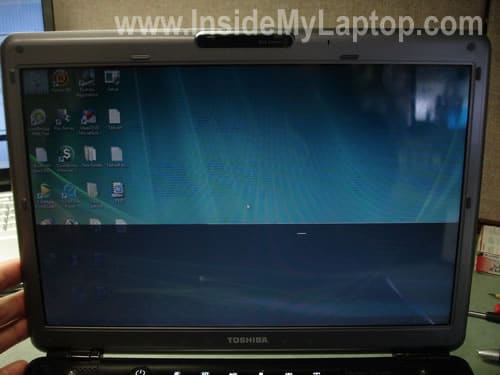
I have seen a few Toshiba Satellite M305 and M305D laptops with exactly the same display problem. When you move the display panel, the image on the screen flickers, some random horizontal lines appear in random places or the image disappears at all. As soon as you stop moving the display, the image ether turns back to normal or the display continue to remain black.
I did some research and found that this problem could be related to the display cable made by CMI.
How can you tell if the display cable was made by CMI? You’ll have to open up the display panel and take a look at the letters and numbers below the barcode on the cable. If first three letters are CMI, the cable was made by CMI.
The following models could have a faulty display cable: Toshiba Satellite M300, M305, M305D and Toshiba Satellite Pro M300.
If you experience a similar problem with your Satellite M305 or M305D laptop, try replacing the display cable first. Visit Irisvista.com for Toshiba disassembly guides. If the problem still exists, even after replacing the cable, apparently it’s related to the LCD screen.
If the laptop is still under warranty do not open the case or you will lose the warranty. Take your laptop to the authorized repair center.
Taras
aras,
When I add RAMs (2×512)all I get is 448 total. I tried different compatible RAMS and still the same problem. Used RAMs as recommended by SONY support and still it did not help. PC works but RAMs total stays exactly 448 instead of 1024.
It’s possible that one of the memory slots is bad and “cannot see†the memory module installed in it.
Test your laptop with different memory modules installed into different slots. If the laptop works fine with both memory modules in the slot A but not in the slot B, the slot B is defective. If that’s the case, you’ll have to replace the motherboard or use the laptop as is with only one working slot.
Thank you for your advice.
Actually, it was just incompatible RAMs. I tried three different “compatible” types and they did not work. Then I ordered the ones from 4allmeory.com (they guarantee compatibility)
and it recognized it immediately. So, now I have 960 of RAMs. I did not expect 1024 to be displayed, since my PC shares RAMs with video. So, problem solved!
daniel
Heloo,
I have this strange problem with my display.
Everything is working fine except on black colour when some red pale lines appear in the middle of the screen.
Do I have to change the panel or only some parts?
I uploaded some photos.
Nobody answered to my question if this can be fixed or do I have to buy a new lcd panel.
The strange thing is that except the black colour is everything ok.
Thank you.
The link with the photos>
http://s656.photobucket.com/albums/uu288/hpdv/
I wait for your opinion.
IML Tech
daniel,
That’s a strange failure. In order to narrow down the problem you’ll have to test the laptop with an external monitor attached to the VGA port.
If both screens (internal and external monitor) fail the same way and you see exactly the same problem on both monitors, it’s not related to the laptop screen. Apparently there is something wrong with the video card.
If the failure appears only on the laptop screen but the external monitor works fine, there could be a problem with the video cable or laptop LCD.
You’ll have to test it with an external monitor first.
chris
this is a f*** cable problem! nothing else.
don`t buy this shit (sorry but that is what it is)
bedjo
to day i sucsesfully repair my m300 by my self..
make jamper groud of inverter to groud of body.
Mark
Hi, my Toshiba Satellite M105-S3041 has developed an issue where the screen dims when the screen is moved up and down or due to some vibration, there is also a buzzing noise when this happens. I have to move the screen around normally to correct it. Does this sound like I need to replace the screen inverter? or could it be the video/display cable that is faulty? or something else? It’s normally fine when there is no physical movement. Please also recommend a site to order the part from. Thanks!
lynchkurvachev
Dear IML Tech
I have same problem with my notebook (m305-s4820). But when in charge the laptop, the screen seem better, but still flicker occasionally. Could that happen because inverter failure. Can you tell me, what can be happened if inverter failure? Maybe more than flickering screen, I dont know.
Thanks.
angus
I have Acer Extensa 2300 laptop. Since last 3 days, he screen displays a vertical light dark mark (about 1.5 inches wide). Does anyone guide me thru steps to resolve this problem. thnx
William
Same here! Monitor SyncMaster 540n 15″
sushant
where can i find a new video cable for M305? i have no idea which company makes the genuine video cable which is not faulty…i dont wanna buy a video cable which will again get fucked up in a few months…any suggestions from where and which brand to buy?i have seen some on ebay but i feel those might be from the faulty lot (and maybe used)
IML Tech
sushant,
I’m not sure if there are many different types of cables for different M305 models, but here’s the part number you can use for search: A000029210
There are three cables listed and I mentioned part number for the latest one. I think it’s a new cable.
Google the part number and you’ll find it.
giorgio
Having same problems with the toshiba screen, m305d-s4380, the screen flickers, i have found that applying a bit of pressure on the borders of the screen the flicker is gone, so i have done a research, everything seems to be a problem of the lcd cable, Question.
How do you know if the cable has to be repalced?
can i fix the same cable? might it be a short o a loosen cable?
what is the cable part number, where can i find it and how much does it costs?
This website was the most helpful one. Regards!
IML Tech
giorgio,
Disassemble the display panel and take a look at the cable. If the part number starts with letters CMI, most likely the cable has to be replaced.
I haven’t tried it myself but most likely you cannot. There are many wires inside the video harness and I really doubt that you can fix it.
In your case (m305d-s4830) the cable part number is A000029210.
Google the part number and find how much it is.
Christine
IML Tech,
I have an M305-S4822 and I’m experiencing the same problems as shown in the photo above. What would the cable part number for my specific model be?
IML Tech
Christine,
Here’s the video cable part number: A000029210
dan
i have m305-s4822 laptop and i am going through same screen problem. After reading this i opened my lcd panel and try to reconnect my cable but it doesnt work it still flickers after so most likely need a new cable. Try to find it on ebay, i found it for 17$ but its used so lets see if its works ok or not
Tou
What is the cable for the screen called??? you guys said u found it on ebay whats it called?
Tou
actually i found it and does it usually run about 100$
pcho105
I bought the cable on Ebay and connected it in to my labtop and the screen seem to be working fine. But if I push the screen down to like a 45 degree angle the screen goes blank, When I push the screen back up right the screen is working fine. I’ll see how long this last before the screen will start flickering again?
Tou
I need some help finding the parts, can anyone give me the website or what to search under on Ebay.
thank you
ps. any ideas on how to fix the UBS port on m305d-4830. do i have to buy the parts separate and solder it in. the port is jammed in.
IML Tech
Tou,
It depends. Which USB port you are asking about?
There are two USB boards on the left side of the laptop. These ports are soldered to the motherboard.
There is one USB port located on the right side of the laptop. This port is soldered to the LAN board.
I doubt that you can find a new USB port separately.
Donna
I have a M305D-4831 and my screen did the same thing as those listed above but NOW won’t work at all. I tested it on a desktop and know the laptop itself works. Do I order the same part A000029210? Thanks for your help. I want to try and fix it myself since it costs about $200 to have someone else fix it for me. Regards!
Dan
I have a toshiba m305-s4819 with the same problem mentioned I have read that you said it was that cable but mine also does it on start up regularly the computer will turn on but the screen stays black and if i shut it off and shake it a bit I can usually get it to come back on the laptop itself works great when the screen cooperates would this also be related to the cable? Thanks for your help
Dan
Also I took it to a computer place and they told me the screen is going but I really don’t believe that because it has a nice bright clear picture
Nicolás Abel Carbone
Hi. I have a Toshiba M305-S4820, and I have a similar problem. The screen flickers when moved, but instead of being all black, it is all white. When I find a good position it works well unless moved. Is this the same problem? Changing the LCD cable will solve the problem? Thanks you
IML Tech
Nicolás Abel Carbone
First of all, I wold check connection between the video cable and LCD screen. Maybe the connection is loose.
If reconnecting the cable doesn’t help, try replacing the cable.
Robin
Hello,
I have a Toshiba M305-S4910, I had minor flicker issues recently and then today while on my computer the screen simply went black. The odd thing is I can still start the computer in windows safe mode and it works perfectly fine, no flickers no black screen. When I try to start it in regular mode the screen flickers and then goes black within about 30 seconds. Does that sound like a wire issue to you? I can’t really return it as I’m currently in Afghanistan. I wish i’d known about this problem before I got this damn computer, 6 months left on a deployment without a computer is a major drag.
IML Tech
Robin,
In order to troubleshoot the problem, you’ll have to start the laptop with video on external monitor. Can you get video on the external monitor in normal (not safe) mode?
Could be, but I’m not sure. If the laptop works fine with video on the external monitor, but the internal screen remains black or works only in safe mode, it could be related to the video harness.
Leander
Hello, my name is Leander, I’m from Brazil, and I have this same problem (the only diference is that the image be all white, and not black. Have more than year that my notebook is bad. Sometimes I need to punch the screen to back to work. Someone can help me to solve this problem? This cable can really be the problem? I’m near to buy another PC… Thank you.
IML Tech
Leander,
You can try reconnecting the video cable on the back of the LCD screen. It’s possible the cable is not making good connection with the screen. Just a guess.
Martin
please tell me, where should i buy lcd cable for my toshiba satellite m305d-s4840, i have the same problem with lcd flicker and turn out black some time, any help would be appreciated, i have display cable was made by CMI, thanks
Eric
Someone on another forum said that everytime they pushed 2 inches left of toshibas name on bottom of screen, the problem would go away. The power cord for the screen is locted right at that spot(2 in Left of Toshiba Name). Everytime i have this problem with mine, i pop the cover off the screen area and wiggle some wires and miraculously it quits. Probably a wire conact problem right there. If you open it up, it is the plug in going straight into the small curcuit board right under neath the screen.
Doughboy
I have a M305 LCD cable that is not made by CMI. It is faulty as it is shorting out my laptop(only power on for a few seconds). I say call Toshiba @ 800-457-7777 and make a complaint. There is no reason Toshiba owners should put up with their faulty components and let them get away with it. Like all banks PC manufacturers are in a conspiracy to take advantage of the general public…..The modo most to be concerned with, get rich off their money.
bob
I have same problem . anybody know how to repair the cable by yourself.Anyway I lost my money. I donot want buy toshiba again.
IML Tech
bob,
I doubt that you can fix the faulty video harness. You’ll have to buy a new one.
Or try calling Toshiba and explain what’s going on. Most likely they will replace the cable at no charge even though the laptop is out of warranty. This is a known issue and not your fault.
Try calling Toshiba first.
Unhappy Toshiba Customer
Same problem here!!
I bought my computer in Aug 2008 and not even a year after started having these problems, but did not think they would get worse…of course, they did. Pressing down near the Toshiba logo does help, but only sometimes. This is the SECOND Toshiba in as many years to have screen problems. I would NOT recommend Toshiba to ANYone unless I hated them – seriously.
DO. NOT. BUY. TOSHIBA.
Larry
M305-S4848 monitor flicker so bad and goes blank for several long seconds that it interferes with my work. It has increasingly gotten worse immediately the PC went out of warranty. It appears the problemis systemic and should be fixed by the manufacturer.
1. Has anyone been able to get Toshiba to fix the problem at no cost?
2. Does anyone know of a class-action suit I can be a part of?
IML Tech
Larry,
Call Toshiba and explain what’s going on. Most likely you’ll get a free repair even though the laptop is out of warranty.
This is a known issue with this model.
brad
my toshiba M305D-S4829 screen just goes completely white. sometimes you are able to see what is on the screen but it slowly fades back to white. any suggestions before i start ordering parts?
IML Tech
brad,
Can you temporarily fix the image if you move or torque the screen? If the video goes back to normal when you move the screen but slowly fades to white as soon as you stop touching it, most likely this is the LCD screen failure.
John
I am in the middle of fixing mine. You tube videos seem to track it down to 4 main problems.
1) The monitor screen’s back light which is a small flourescent light inside bottom of inner screen case. If going bad the white parts of the screen should get pinkish before turning white at start up.
2) The back light inverter located below the screen in the center. It has two wire plugs at each end. When replacing you can slide it out of the transparent sleave and the new one back in the same way.
3) This seems to be the most likely as I was wiggling wires and watching the screen flicker because of it. The Plugs that connect the wires seem to be loose. Either the plugs slide apart or some of the individual wires float in and out too loosely to make a good contact. One video showed that the main rounded black cloth coated cable bundle that goes from the screen or laptop lid into the base of the computer has a larger white plug after a couple inches and that it comes partially unplugged as the moving of the lid on the hinges moves the cable slightly. He wedged a wad of tissue against the wire bundle near the hinge and solved this problem.
4) A capacitor could be faulty inside the computer. If this is the problem perhaps the cost to repair it is more than the value of the computer.
John
UPDATE: Well after I replaced the inverter it would not work and then I pulled the tiny wire plug out of the left end of the inverted and replugged it one more time it worked. Then for good measure I clamped the both pluggs together for good measure at it went black for good. I investigated and found the the green wife in the back of that plug was broken loose. Wow that plug and wires are so tiny I can hardly see them well enough to fix and my fingers are just too large. Even tweezers might be too large for the wires. How do you pull the rubber coating off of wires that tiny?
Dan
I am trying to fix my cousin’s Toshiba’s M305-S4910 laptop and it has the same flickering problem. I have bought an “advertised as new” display cable. Replaced it and still have the same flickering problem. I realized that the cable I used was missing a webcam connection, so I ended up getting a replacement for the right cable. I replaced it again and the flickering still persists. I can’t seem to figure out what’s wrong at this time and it’s annoying as hell.
Original Cable: MECDD0TE1LC000090321. 03/21/09
Replacement: MECDD0TE1LC000080811. 08/11/08
Replacement w/o webcam: MECDD0TE1LC100080417. 04/17/08
Colin
I have a M305 and I tried calling Toshiba and get sent to their customer relations. The lady said that there isn’t a known issue with the screen flickering and said because I was out of warranty, I will have to pay for it myself. Is there a way we can make this use known and recall this crap. I getting tired of Toshiba…
IML Tech
Colin,
Call them again and talk to a different representative. Sometimes it helps.
Patrick
I have a M305D-S4830 which the screen flickers to a blueish green color. I had the screen replaced under warranty for a different type of flicker. Does anyone know which cable I need to replace the connection from the LCD screen to the MB? It is driving me nuts!
IML Tech
Patrick,
The cable part number is A000029210.
Ivan
Hi everyone, i have problem with my Toshiba Satellite m300, the screen completely dark. The laptop works and under light i can see that there is content on the LCD but its just not bright. Ive replaced the inverter but it didnt fix the problem. Do you guys think it might be the lcd lamp, or something else, and do you guys know the part number for the lamp if thats the problem. Thanks alot for the help.
Ken
I bought my M305 in 08. Within six months of purchase I had the same problem. Paid $120 to get it diagnosed and repaired. Repair people said they’d seen the same problem before. They blamed the brand of cable used by Toshiba. It is 7 months since the repair using another brand of cable. The same damn problem has returned.
Toshiba says there is no known problem. Toshiba is purposely lying. They know about this. I always liked Toshibas, but they are not making this right. They are screwing their customers and they just hope this will all go away. I am now an evangelist against Toshiba.
IML Tech
Ken,
Could be bad cable again.
Luke (Warsaw).
Hey guys,
I have had this problem. I was going to buy new cable, but I decided to open my toshiba m305d and check what is up. I have squeezed and pressed out the video cable and now the problem is gone! The screen doesn’t flicker anymore.
The cable is in left top corner, beside left speaker.
Andy Asselin
I Have the same issues only worse the cable sorted out screen and smoked it pretty fryed I talked to toshiba about they agree to look it they bezal looked like it rub all way thought display cable and short out power
it nastyed chared cable I Diffently will be send this site along with that It not safe
Doughboy Says:
March 26th, 2010 at 8:56 am
I have a M305 LCD cable that is not made by CMI. It is faulty as it is shorting out my laptop(only power on for a few seconds). I say call Toshiba @ 800-457-7777 and make a complaint. There is no reason Toshiba owners should put up with their faulty components and let them get away with it. Like all banks PC manufacturers are in a conspiracy to take advantage of the general public…..The modo most to be concerned with, get rich off their money
Christina
I have a M305-S4848…a few weeks ago I noticed if I opened the screen beyond being straight up it would get flickering lines. Now the problem has gotten worse and if I open the screen more than half way the screen goes completely black. I called Toshiba and they gave me the whole out of warranty crap, my warranty expired 12/21/09, told me what was wrong with it and gave me a number for the parts dept. I call the parts dept and am told its an $80 part! I just paid this damn thing off last month and now it needs an $80 part that I am prob gonna need to have installed!!
Michael
I’m on my third video cable. The cable brand doesn’t seem to matter. When I talked to someone at Toshiba they wouldn’t admit there is a problem. Bull!
I can’t reward Toshiba’s indifference. I feel I’ve been cheated. I will never by Toshiba again.
Dominic
I’ve got a M300 which someone picked up by the screen and cracked the LCD display. I got an aftermarket LCD display which fitted fine (using the original inverter cable) and worked without any problems for a few months. For the past couple of weeks the display’s been going grey but coming right if a bit of pressure is applied to the top of the screen frame. I wondered if it was the cable or the connection so opened it back up and unplugged the inverter cable from the display. Next thing there’s no power to the laptop at all, won’t turn on with battery or mains, no lights going on the front of laptop. Any ideas? By unplugging the inverter cable could I have stuffed up the power supply to the whole laptop?
IML Tech
Dominic,
If your laptop doesn’t start after reassembly, unplug the AC adapter, remove the battery and wait for a few minutes. Plug the AC adapter and try turning it on again.
Not likely. I’ve don it many times before (even with AC adapter and battery connected) without any problem.
Howard
I keep seeing people that have a flicker problem with their Toshibas.
DO NOT BUY A REPLACEMENT ANYTHING UNTIL YOU TRY THIS ! ! ! ! !
1. Get your Hot Glue gun warming up.
2. Remove the screen border. it has the normal snap into place keepers along all 4 sides, I used a small flat blade screwdriver to gently pry open the screen retainer ring.
3. Once the ring is removed, Observe near the left side hinge area the cloth covered cable, and then the white plug. This plug goes to the video cable and the monitor.
4. Gently ! unplug the white cable connector plug and then reconnect itself back again. This is to ONLY ‘scrape’ the contacts, and NO other reason. CAREFUL…The contacts are verrrry small.
5. With a toothpick, or similar object press the cloth covered cable into the monitor shell and place a bit of hot glue on the cable to keep it ‘attached’ to the monitor shell.
6. Repeat the gluing process with the white plug assembly.
7. You should now have: the cable near the white plug, and the white plug itself securely hot-glued to the monitor shell. As you open and close the monitor you will observe that there is NO movement to the cable end and the white plug assembly. You WILL notice that the cable exiting from the main body is still very flexible and movement is not hindered.
8. Fire up the computer and observe the “FLICKERING SCREEN”
The flickering screen should be NO MORE.
9. reattach the monitor frame and live happily ever after.
10. If this process did not correct your problem, THEN you may need to buy something.
This is how I fixed MY flickering screen problem. And I did not spend one single dime to get the job done.
ROland
I’m going to agree with Howard, minus the hot glue gun. I for the last 18months have put up with the flickering screen. I did not think purchasing a new cable was worth it. I finally decided to take a look inside. Pry off the cover with a flat small screwdriver, after you remove the 4 screws in the corners. That plug I did remove and replug, instead of hot glue, I just used simple electrical tape and repositioned the wire that has the thermal coating on it so that it has less movement. The electrical tape also had the added benefit of making the screen less “flimsy” feeling and more secure when at a more acute angle.
Hope this helps, and pass the word on!
TOdd
What Ronald says is true I just did it it took me five minutes,,,IT WORKS !!!!!!!
stella
i have brought by toshiba satellite m300 to Tricom, Philippines thrice. Still, they cannot address the contant lcd flicker. If the product is really defective, why don’t they recall this in the market?
Brad
Mine does that too. Everybody says that these are good laptops, and I like mine but I think they’re a little overated.
Matt
I have been dealing with the same issue for over a year. It is clearly a manufacturer defect that Toshiba is refusing to honor. I replaced the cable myself the first time. The problem seemed to be fixed and about a month later re-occured. I brought the laptop to a repair shop to replace the entire lcd screen and inverter and cable. After this is worked for a long time and guess what… its flickering again. I have dumped $200 into fixing this damn laptop. I am never buying Toshiba again.
Ajay
Hello all, I have a Satellite M305-S4910 for the past 15 months. Last couple of months, the screen started flickering It is not the backlight flicker but the actual display flicker. Similar to what you would see on old tube TV’s when the vertical hold is not working. What should be at the bottom of the screen would appear anywhere say in the middle of the screen and go back and forth.
Strange thing is that it happens when the laptop is kind of cold (first 15-30 minutes after the laptop is powered up). After that the flicker is reduced significantly so that I can actually work on the laptop. Seems like heat makes it go away or some capacitor finally gets charged or something.
I took it to a local repair shop and they said they would “try” changing the inverter (US $60) but it does not look like the inverter problem since the backlight is fine. I can also change the brightness without any problems.
Any ideas? I know it is already time to buy a new laptop but I kinda like this one and even if I buy a new one, would like to see this one continue to work.
Are there any parts which can cause the flicker? Connectors, capacitors, power supply filters?
By the way, if I connect an external monitor, it works fine so the problem does not appear to be in the graphic card. Only the LCD flickers badly.
Thank you in advance for a response.
Ajay
IML Tech
Ajay,
1. Check connection between the video cable and motherboard.
2. Try replacing the video cable.
I think it’s either bad video cable (as I mentioned in the post) or LCD screen failure.
I really doubt this is inverter problem because your description doesn’t sound like inverter related failure at all.
Most likely it’s just defective cable.
Here’s part number of the latest revision of video cable for Toshiba Satellite M305-S4910 laptop: A000029210.
Google the part number and you’ll find it.
bubbagump
Hi everyone,
I had this problem as well with my toshiba satellite M305-s4822 and it’s over a year old when I had a system failure and had it backed up. I had it repaired and when it came back, the screen started flickering. I tried getting it fixed and they said it’s the LCD needs replacement. I said that’s BULL crap as a faulty LCD would not flickering problem and it must be a connection issue. scammers…I finally had it and unscrewed the 4 screws under the round rubbers and removed the front casing. after doing that, the screen stopped flickering! my guess is the connection was loose. try doing this…cheers.
Ponciano
I am happy to report that my computer is flicker free!! Thank you Howard, post# 57, and Roland (post #58). After this experience, I will probably never buy a Toshiba.
Larry Grub
I too have same image flickering problem with my Toshiba M305. I called the company for rectification and was advised the unit was out of warranty and would have to pay for the repair. I am as mad as hell and is willing to contribute to a boycott of Toshiba. For me,I will never buy Toshiba again.
jane jean
I have the same issue as everyone else. I just pressed my thumb on the left speaker and the screen will change, so I know the connection must be the issue. When my screen starts fading/ or the lines start the mouse and keyboard also freeze. Like posted above, when it is warm it runs better, but still not right. Wow, too bad there aren’t recalls for this. Obviously it is manufacturer error.
Larry Grub
M305D – S4848.
Good news!!!!!! Toshiba will repair at NO cost to me- even though system is out of warranty.
I got pissed off royally with the frequent flickering and having to move the screen to read the content on the screen. I called Toshiba (again for the 5th time) at call Toshiba @ 800-457-7777. Spoke with the Tech that advised me that my system is out of warranty. I asked to speak to or pass my call to someone in the Customer Relations. On talking to the Customer Relations guy, he advised that Toshiba had issued an alert “a while back” and arranged to shop me a box with a RMA # (Return Authortization) for me to send the laptop in for repair – AT NO COST to me.
Hurray.. Just thought I share this with everyone.
IML Tech
Larry Grub,
Congratulations!!!
Good job! I mentioned a few times if Toshiba declines repair on the first call, try calling again and talk to a different representative.
Jonathan Haws
Hey did anyone find a cable that works long term or another fix that works permanently to the screen white flicker problem? I tried the glue gun trick…. it might have worked slightly but I still get the white flicker.
Help!
Jonson
Hi Everyone,
I live outside of the US. My Aunt bought me a Toshiba M305 for my Birthday during her trip to the States. After 3 months, Several lines appeared at the base of the screen. 1 year down the line I dont have a laptop anymore. Y’all are lucky cause you live in the US. Even before the expiry of the warranty, the cost of sending the laptop to the states is enough to buy me a new laptop, It’s very sad. Toshiba is and has not been a good product. I had a Sony Viao for 6 years and its still works, I regretted giving it away. In my country, I have started a campaign against Toshiba, They are Bunch of fruadsters, if the laptop is not slow, then the power cable is faulty. I m a grahics artist and will never touch a toshiba with a mile long pole.
Raquel
had the same problem, video screen flickered on startup and then went black with a shadow screen I could see & work with if I put my desk lamp close to it. Figured it was the Power Inverter. Pried the screen off and figured I’d let someone else repair it. Took it to the shop. They told me it was the screen after replacing the inverter. After replacing the screen they told me it was the motherboard.
I asked them, “Why didn’t U test my computer with an external monitor before replacing the screen . . . the repairmen didn’t answer my question very good. If the external monitor didn’t work, Ud know it was the motherboard.
Computer is still in the shop all apart. They said it now doesn’t even get the ghost screen. I got really screwed. They want to charge me for their “diagnosis!! Sounds like they’re going to get a lawsuit.
Jonathan Haws
I fixed my flicker problem. It involved taking the entire computer apart (which is not too difficult-there are guides on this website) and unplugging the video cable from the mother board, then plugging it back in. Then I hot glue gunned the cable everywhere i could to keep it from any movement (inside the hinge, mother board area, and inside the screen). Has worked so far!
IML Tech
Johathan Haws,
Please let me know if this repair last for a long time. Maybe you can leave a comment later.
Most likely your screen was flickering because the video cable was loose. In cases like that reconnecting the cable will fix the problem.
But if you have a failed video harness, reconnecting the cable will not help.
Jonathan Haws
Well i guess I spoke too soon. That fix worked for about 2 months. I don’t know what to do next.
If i unplugged the video cable from the mother board then reconnected, and didn’t have problems for 2 months doesn’t that mean the cable is ok, but the connection somehow becomes corrupted?
I heard other people bought new cables then had the same problem a year later. What should we do!!!!!!!!!!
Jonathan Haws
update- I was getting alot of flickering yesterday, I took my computer apart again and disconnected the video cable from the mother board. I reconnected it and that seems to have fixed the problem (same thing i did to temporarily fix the problem 2 months ago). The cable was quite secure in the slot before I disconnected it so I dont understand why this temporarily fixes my issue.
Could It be that for some reason some type of film developed on the pins of the motherboard connection slot and is removed when you disconnect then reconnect? This is the only thing I can think of. Any ideas?
Michael
I have a Toshiba M305D laptop with horizontal flickering problem initially isolated to what I thought was a defective video cable. After replacing video cable with a new one, same problem came back soon afterwards. The video cable serves two functions, and the focus of most of the problem solving I have seen in the posts had to do with isolating the movement of the wider ends of the cable where it attaches 1) to the laptop screen and 2) to the motherboard. This was done by taping the cable down close to the the wide video connectors. That helped me somewhat for a while, but horizontal flickering re-occurred.
I found out the real problem was related to the 2nd function of the video cable, which is to provide power from the motherboard to the power inverter below the display, supplying the high voltage needed for the display to properly operate. This is where there was seemingly a faulty or very poor/loose connection, causing horizontal flickering most often when moving display back and forth.
I solved my flickering problem by glueing down to the display shell the connector from the video cable to the left side of the power inverter (that narrow long circuit board located at the bottom of the display), and glueing down the narrow cable from the video cable to the small 4-prong white connector that attaches to the power inverter. I also stuffied the small cavity on the left side of the Toshiba logo at the bottom of the display with tape, foam material to make sure nothing moved.
The rotation of the narrow portion of the video cable at the left display hinge when the display is moved back and forth exerts a push and pull, and rotation motion on the tiny cable going to the power inverter connector. Glueing down white connector/power inverter connection, and video cable portion leading to the connector solved the problem. Double click on photos 5 and 6 on the first link below will give you a close up of the power inverter connector and cable. 2nd link shows additional steps to remove video cable from display.
This method I describe is also mentioned and was successful in fixing similar problems for others in earlier posts #57 and #58 of this thread.
Michael
Both my original video cable, and the replacement video cable that gave me horizontal flickereing problems were made by CMI.
Further analysis points out to the a CMI cable design problem in the small white connector that connects to the power inverter at the bottom of the display.
Even if there might be solid connection between the small cable leading to the power inverter and the gold contacts inside the connector, and even if the white connector is solidly connected/glued to the power inverter, the gold contacts inside the white connector SLIDE BACK AND FORTH by half a milimiter within the white plastic connector. This can happen when the small cable is moved by the rotation of the display back and forth or by the cable not being glued or taped to the plastic display case. Eventually this tiny movement can cause a momentary gap with one or more pins in the power inverter, which then results in horizontal flickering. Cleaning the power inverter pins may restore lost contact, but more important is to isolate the moving contact between the gold connectors within the white plastic connector and the power inverter board pins.
This can only done by 1) pushing the cable leading to the white plastic connector all the way inside the connector 2) attaching to the power invertwer 3) taping or glueing cable, secured plastic connector and plastic connector from power inverter to the display casing.
I suspect that the answer to Johathan Haws mysterious question in post #77 of this thread might be explained this way: the simple act of disconnecting the video cable from the motherboard and lifting, caused a rotational movement that transferred through the left hinge into the tiny cable connected to the power inverter. Somehow the tiny cable got pushed forward inside the white connector and restored contact between the sliding gold contacts inside the connector with the power inverter pins, at least temporarily until problem re-occurs.
The fact that this flickering problem seems to have affected many other Toshiba laptop models, and changing display, motherboard or power inverter not solving the issue may give valid ground to pointing the problem to the “sliding contacts” within the white plastic connector of the video cable. Video cables where the contacts are NOT sliding within the white connector will probably not have a recurring flickering problem. Someone should test this theory further at Toshiba.
The wide video cable connectors to the motherboard and to the display are quite solid and sideways movement caused by pulling pressure from closing the screen can move one of the ends of the connector slightly away from the connection. Tape down the video cable to the motherboard somewhere to minimize this issue. This taping down is already done by design, on the end of the wide video cable connection to the display.
SAMAIN
HI
I have a flicker problem j’au made ​​several unsuccessful attempts, I This now account straightforwardly remove the connector and soldered directly to the inverter
Baxter DeBerry
Ok i got a side question for yall, even thought i do have the same problem
i was wondering if any of the mb on this series of laptops have died??, my m305d i have has a cracked screen and plan on replacin it, i got the laptop for nothing practically, but im tryin to figure out if its worth fixing, and if the mb is just gonna die then is it even worth messin with??, anyone know if they die alot??, heres the model m305d-s4828
Jonathan Haws
This is a reply to Michael.
You said:
“The simple act of disconnecting the video cable from the motherboard and lifting, caused a rotational movement that transferred through the left hinge into the tiny cable connected to the power inverter. Somehow the tiny cable got pushed forward inside the white connector and restored contact between the sliding gold contacts inside the connector with the power inverter pins, at least temporarily until problem re-occurs.”
Well the thing is I have the wire glued by glue gun to many places inside mother board case as well as in the hinge housing and LCD Bessel. Also it is hot glue gunned all around the power inverter. Rotation of the screen seems to have less affect on this problem then it once did. I have noticed that I have had no flicker until just recently and the flicker seems to only come when I watch movies. As before the flickering starts slowly and gets worse and worse over the weeks. All I know is what always temporarily fixes my problem (for at least a month and a half) is disconnecting the wire from the motherboard, then reconnecting. To me it seems to have nothing to do with the inverter, since I do not touch the connection to the inverter anymore to fix my problem (since that area has been hot glued gunned quite securely). I strictly only disconnect the mother board plug and reconnect.
Munkee
Hi!
So this doesn’t help anyone, but I believe the problem with this laptop model and most of Toshiba’s models is that the cooling systems are absolute butt.
I had my laptop repaired twice while it was still under warranty, and each time they replaced the motherboard(stating that it was overheating because of the shitty fan and had thusly fried it) and everything worked great once again. I think most of this problem is a matter of regular(monthly) vent cleaning as to prevent overheating, but I’m about to open mine up and see if that’s really the case.
I’ll be back!
🙂
Mr B
Satellite M300 – circa 2009 – Australian model
Confirmed Fix – Same problem with flickering screen that had been getting worse over the last year. LCD flickering issue occurred when moving screen, bumping / jiggling laptop and temporarily resolved by moving screen to different position. It got to a point that the problem was fairly persistent and could not be resolved by moving the screen to a different position.
NOTE: following this procedure – while simple – will more than likely void your warranty!
Fixed by
– remove battery
– remove front outer plastic surround of LCD – remove 4 Phillips head screws under rubber stops in each corner and insert fingernail – or similar thin device – around the edge to break seal and then pry off gently – pieces around hinge are tricky.
– remove connector from right hand side of inverter with tweezers and then reconnect firmly.
– use a small piece of electrical tap to further secure wires to decrease movement.
– reattach front outer plastic surround and replace battery.
Flickering has now stopped.
Hope this help someone else.
Michael Miles
I tried everything with this laptop
Cable replaced, inverter replaced same problem as all of you guys.
I touched the right top of the circuit board behind the lcd at top and bam worked
I the folded a piece of paper and wedged between LCD and cover and screwed back the LCD, so that the board behind the LCD is compressed. All is good now….
As always the solution is found by accident
IML Tech
@ Michael Miles,
I guess in your case it was the LCD screen failure. If it starts failing again, you’ll have to replace the screen.
Dennis Flores
holy crap! im not the only one with the same problem! i have a satellite m300 and this has happened to my twice now. first, i bought to a toshiba service center here in the philippines. while it was still under warranty at that time, i felt that wow i was so lucky. but after a year screen started flickering again… random white-outs. i tried opening the lcd bezel and kinda tried to wiggle all those damn cables. working again but still flickers sometimes. i don’t want to bring this laptop to a repairman because for sure, they’ll try to replace everything! last thing you know they’ll even tell you you have a defective dvd drive hahah. what to do with this flimsy laptop??
dennisflores
btw, i’ve been trying to follow the steps on how to remove the lcd. however, i really don’t want to remove the laptop’s (satellite m300) keyboard/top panel. is there a guide on how to remove/reconnect the video cable with just the lcd bezel removoed? thanks!
Luke
Hey,
I have the same problem. I have changed the video cable made by CMI to another one made by different manufacturer with different numbers on it. I hoped that this will help, that another brand produces better quality cables, but after a week when installed it sometimes I can see some random tiny lines on the screen. I think the problem is not with cables itself but in the laptop construction. When the lid is closed the shape of it bends the cable in a weird position so tiny cables inside are destroyed slowly because weak point is exactly there where cable is curved. Nowhere else. The solution is to never close the lid or do it as little as possible.
Anonymous
@Mr B – post 84
Walking through your steps fixed my flickering issue. The only spot our LCD wouldn’t flicker was if it was at full open tilt – anywhere else would either produce ghostly lines or sever flickering. I opened up the bezel around the LCD, removed the three connections around the inverter, reseated them and put everything back together (there was some yellow translucent tape that held one of the connections to a small circuit board, which I used to more tightly secure that connection). THE FLICKERING HAS STOPPED. Thank you! You’ve saved me from completely replacing the video cable, which I thought was my only option. We’ll see how long this fix lasts, but if I have to pop open the bezel once every couple of years to reseat the connections, I can live with that.
Toshiba M305 – S4819 (USA)
Raman
I m also having same problem with Satellite A100
IML Tech
@ Roman,
You can disassemble the display and try moving the video cable while the laptop is working.
If moving the cable affect image on the screen and it starts flickering, probably you have defective video cable.
Ray
Got a M305-S4910 here. Backlight won’t light at all.
Replaced inverter – same problem
Replace LCD cable – same problem
Have a compatible screen pulled from a dead laptop, tried that – same problem.
Checked all connections – no go
System boots, can view with external monitor
Can see image on LCD by shining a flashlight on it.
Out of ideas unless it’s a motherboard issue.
IML Tech
@ Ray,
Sounds like the motherboard related problem to me.
Wilma
Ray, if you can see the image with a flashlight you have to change the LCD’s CCFL light. I have personally done it with my Toshiba. You must take your time doing it very carefully. No need to buy a motherboard now. Search Ebay for the best deals. I suggest buying it with the connecting tables attached already. Good luck!
Got a M305-S4910 here. Backlight won’t light at all.
Replaced inverter – same problem
Remplace LCD cable – same problem
Have a compatible screen pulled from a dead laptop, tried that – same problem.
Checked all connections – no go
System boots, can view with external monitor
Can see image on LCD by shining a flashlight on it.
Out of ideas unless it’s a motherboard issue.
I_swear_it_works
I know this is going to sound janky but please try it. It worked for me (although it is likely only a stop gap). If you open the laptop to use as normal you will see that there is a toshiba logoscript on the the very bottom of the laptop LCD panel. Push the laptop panel back to about a 45 degree angle so that the bottom bezel is a bit more exposed than normal. Press firmly (don’t overdo it and break anything) on the screen bezel approximately 2 inches to the left of the Toshiba logoscript and hold for 5 seconds. What you’re doing is pushing down a plastic connector that leads in to the power inverter back into place. I know it sounds absurd but I promise you it worked for me. Again, it’s almost certainly only a temporary fix, but it’s better than nothing.
The position of the plastic connector relative to the pins of the power inverter seems to be critical, because as you move the display, this causes a push or pull and rotation of the cable going to the plastic connector. Isolating this movement of the cable by using a glue gun, tape and or stuffing the cable cavity with something will permanently solve the problem.
Doug
Do you know how to get a lap top case? No drive’s or MB just case or do you have to buy a cheap lap top that is dead I know it sound’s bad but I have a lap top with a broken hinge
and it has a crack in case from a big fall from table So he say’s. (I think he dropped it from a 10′ ladder)
Thanks
IML Tech
@ Daug,
Are you asking about the bottom case? Is it a Toshiba Satellite M305?
The bottom case cost about $10 on eBay. You don’t have to buy a used laptop for that.
Eman
My satellite M300 has the same black screen problem. It used to come back on by moving the screen back and forth but this time no amount of moving worked so I opened the bezel to fix it. I tapped the wide video connector at the top rear of the lcd and it came on. The problem seems to be either the connection of the ribbon cable to the lcd driver board, or the driver board to the lcd itself. Usually if the flex cables between the driver board and panel are problematic, you’ll get lines on the display but in my case its either on or off. So I suspect it must be the wide connector at fault.