


In this guide I explain how to change screen on an Asus UL30VT laptop.
The guide should work for all models in the Asus UL30V series line.
To be precise, I’m working with is Asus UL30VT-X1.
The replacement procedure is pretty much straight forward and shouldn’t take more than 20 minutes.
Before you start, make sure the computer is turned off.
STEP 1.
Start disassembly with disconnecting the battery.
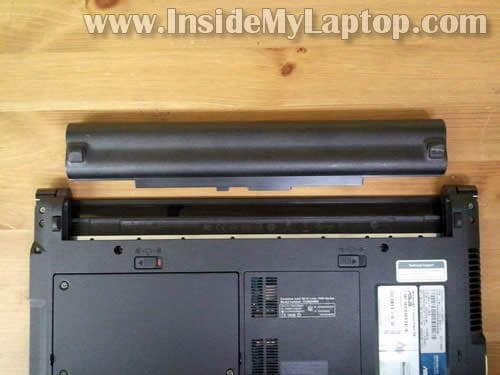
STEP 2.
On the display bezel you’ll find six screw covers.
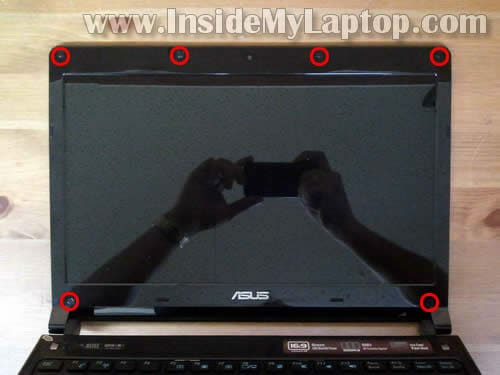
STEP 3.
Remove each screw cover with a sharp object.
Glue screw covers somewhere on the bezel so they don’t get lost (the bottom part is sticky).
Remove all six screws found under those covers.

STEP 4.
Now we’ll start separating the bezel from the back cover. There are hidden plastic latches securing the bezel to the cover.
Insert a piece of soft plastic (I’m using the guitar pick) between the bezel and cover and move it along the side.
At the same time insert your fingers under the bezel and separate it from the back cover.

STEP 5.
Continue removing the bezel on the upper side of the display assembly.
After that move to the lower part.

STEP 6.
The bezel has been removed.

STEP 7.
Now you can separate the screen from the back cover.
There are no screws securing it.

STEP 8.
Place the LCD on the keyboard so you can access the back side.
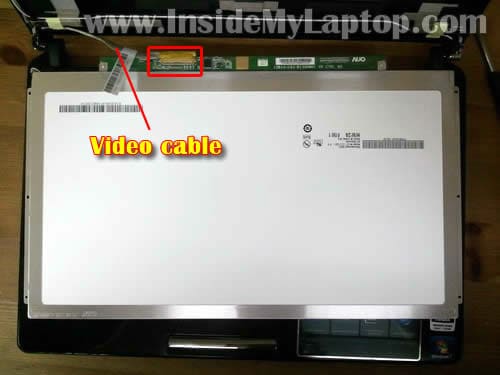
STEP 9.
Remove sticky tape securing the video cable connection.
Disconnect the video cable.

STEP 10.
Now you can remove and change the screen.

James
Hi there, Great pictures on how t replace your screen… I have a 17.0 diagonal WXGA WITH high definition brightview wide screen infinity display. I cant see where my screens R at..Thanks God bless U/
IML Tech
@ James,
Not sure what is your question. Please provide more details about the failure.
Steven
Thanks for the guide.
I have a UL30A (X32A) i assume its similarly made, looks the same. My screen keeps flickering and flashing coloured lines spontaneously and when the screen angle is moved. doesnt stop till i find just the right angle. its not the graphics as its fine on an external monitor.
Do you think this could be a loose or faulty LDVS cable?
IML Tech
@ Steven,
You are correct. If the external video works properly most likely it’s not the video card related issue.
Could be one of the following:
1. Bad connection between the video cable and LCD screen (or motherboard). Try reseating connection on the back of the screen first.
2. Could be defective video cable. Try moving the cable while the laptop is on. If moving the cable affects image on the screen, most likely it’s bad cable.
3. Could be LCD screen failure.
Steven
Thanks for the reply.
Its been sent away twice by carphone warehouse, each time they said they couldnt find a fault. Yet the second time it came back it worked fine for atleast a month, this leads me to think its the faulty or loose cable.
Asus have given me the exact part number for the cable and where it can be bought if needed (at most £20 i think). But first i will build up the confidence to open it up myself using your guide. Always been pretty apprehensive about opening up laptops lol.
Austine
Hi I have a hp nc6000 laptop if I on the laptop is on but after 2 seconds it will restart it self again and off after 2 seconds again I don’t know what the problem please I need a solution to it………
IML Tech
@ Ausinte,
It’s hard to tell without testing but if the laptop turns on and off nonstop by iteself most likely this is motherboard related issue.
archer
Hi have the same laptop and problem as Steven is it possible to just change the cable? Read somewhere it is hard weird to the motherboard / soldered is that true or is it clipped on at booth ends?
GEO
Hi! Great info on the UL30VT – Thanks! My question is – My friend has an ASUS UL30VT and when you open the lid (screen) and power up the machine the screen flickers once then does not display anything. I cam plug a VGA monitor in and it works OK on the VGA monitor. I think the screen is OK (in fact I know it is.) Where or what is the mechanism that the laptop uses to detect the lid (screen) is open or closed? I work on HP and Lenovo/IBM and most all of them have a mechanical button that the lid depresses when it is closed, the ASUS UL30 seems to use another method. I have not torn the machine apart as yet but I am led to believe that it is the problem. (Because of the way I set the power saving features – the laptop does not know the lid is open.) Or the LCD cable going to the mother board came loose. (But when I set it to sleep in one min after the lid is closed and the lid is open the unit goes to sleep! So it must be the sensor!) Any help would be apperciated because my friend keeps asking me if I fixed it yet! LOL Thanks again!
fizz
I know its been a long time but hopefully you can help. My laptop asus UL30A is exhibiting a strange problem. firstly the power led button doesn’t light up and that is the same time when my laptop started going to sleep randomly upon touching in random area / movement. lately slight movements can cause the laptop to power off completely. Do you any idea what the culprit could be?
INYM2
HI,
i am looking for a front LCD COVER of my asus UL30VT Just the same one as on STEP -6-
DO you sell it ?
THANK YOU
IML Tech
@ IMYM2,
No, I don’t sell parts.