

The power button on your Toshiba Satellite A70/A75 or Satellite P30/P35 laptop got broken. It was pushed into the case and now you cannot turn on the laptop. What could be done to fix the problem?
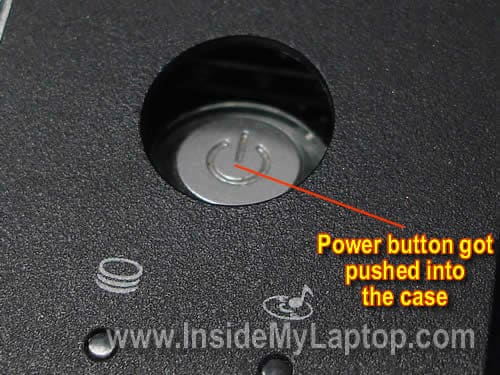
The power button is a part of the top cover assembly. It’s permanently attached to the top cover with a few plastic bridges. When the power button pushed into the case, it means one or more plastic bridges are broken.
In order to fix the power button you’ll have to replace the top cover assembly.
Toshiba Satellite A70/A75 and Satellite P30/P35 are very similar and top covers on both models look almost the same.
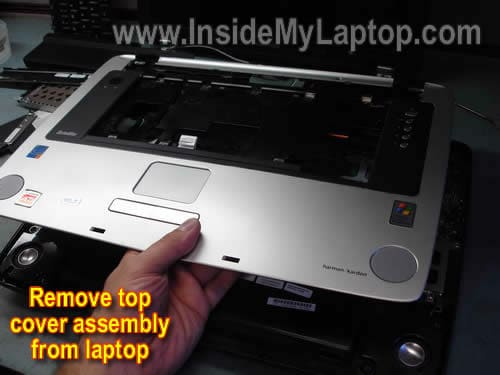
You can remove the top cover assembly using one of the following guides:
You can find compete disassembly guides if you search for IvisVista guides on google.
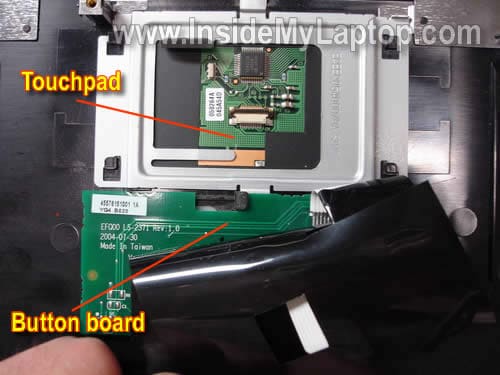
After you remove the top cover assembly, you’ll have to transfer the touchpad and button board to the new top cover.
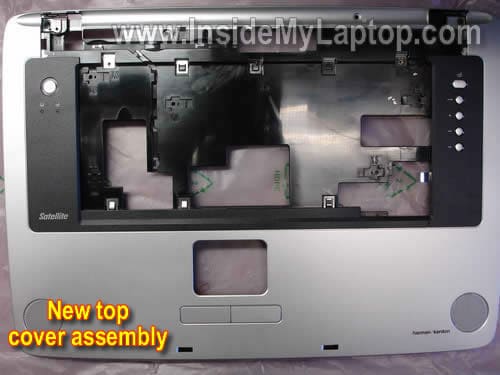
You can find a new top cover assembly searching by the part number.
For Toshiba Satellite A70/A75 use the following part number: K000016190 (with Function key).
For Toshiba Satellite P30/P35 use the following part number: K000017910 (with Function key).
Victor
I have a Satellite A105-S4334 that has the power button pushed in (broken). Does this procedure apply for my laptop as well? I was told all I have to do is replace what is called the 6 button switch board but I can’t find a procedure to do so… Can you help me?
Many thanks in advance!
John Prodger
Hi
I have an Acer Aspire 7720G, the power button is loose, and I am concerned that it will soon break., do you know how this can be repaired or where I can go to get information on how to repair it or get it repaired.
Thanks for the help
John
fernando
I got a TOSHIBA Laptop Satellite P30,and in the Hard Drive Area there ‘s a piece that it missing, where the last 2 pings goes how can I buy it or fix ??? thanks !!
IML Tech
fernando,
I’m fixing a Satellite P35 laptop right now (same as Satellite P30).
Looking at the hard drive bay and not sure what you are asking about. What is broken?
rmckiens
as experienced here i do also have a customer complaining about his power button sliped inside the case and he has no idea of how to restoring it. by my own simple way i just open the laptop then buy a 40 pesos worth mighty bond and bonded the power button attached to the case. that bond serves as replacement to what expert call as plastic bond that connects that power button in issue to the main case.
hope it helps.
majok
i agree with dat lowcost sol…thanks for that!!!!!!!its nice!!!but wen using a mighty bond ensure that the to clean the part u are going to at first for it to bond tightly……….hope thats help!!!!!
Alex
I recently acquired one of these A75 laptops and the power button was pushed in. DO NOT BUY a new top cover I will tell you how to fix it.
Follow the disassembly guide to take it apart to the point you get the top cover off. Things you will need:
Rubber band
Super glue
The power button has come loose because there are two small prongs that hold it in place but have broken. With the top cover upside down, place the power button back in its place so it lines up with the notches. Now cut the rubber band so you have a strip that overlaps the side of the button with three small holes on each side. Place a drop of super glue on either side of the button and glue down the rubber band over the button. DO NOT glue the button. The rubber band will hold it in place but still allow it to move so you can actually push the button.
Hope this helped.
mark jazz
Hi i have a toshiba p30 and the bios is locked what should i do? please help m please i cannot change my o.s
Rik
Hi
Can I use an A70/A75 or P35 on a P30 Laptop please? Thanks in advance.
IML Tech
@ Rik,
Are you asking about using a A75 top cover on a P30 laptop? No, you cannot. Both top covers looks kind of similar but they are different. And size is different too.
You’ll have to find a new top cover. Or remove the existing top cover and see if the power button can be fixed.
Rik
Ah, after looking closely at the different models I can see the difference. I shall strip it down and see if it’s possible to repair before replacing. Thanks for your time…
YY
I just fixed a Toshiba A70 notebook for my neighbour with the same problem. I used super glue to attach the top rectangular section of the push button to the back of the case and it worked perfectly. I think Toshiba designed this button on purpose to be failed after a few years of use or if you push it with a little bit of excessive force. The top part is only attached to the case by two PLASTIC pins with very small diameter with the top portion of the pins melted to hold the button. The central pin is not melted and is used for locating purpose only. This is certainly a purposely made design to fool customers into buying a new notebook from Toshiba a few years down the road by making the customers think that their notebook has failed and is time to buy a new one. In my opinion this is certainly a SCAM from Toshiba because they can absolutely make the button a little stronger to take the load from a finger.
IML Tech
@YY,
Not sure if this repair will last. I don’t think that super glue works well on plastic. If it breaks again, try some glue designed for plastic.
Sharfin
My laptop on …every 3 minite later laptop display ..white screen….then..my laptope not worked..but bios option still,,,plz help me..
IML Tech
@ Sharfin,
Sorry your description is not very clear. Are you getting a white screen?
Test your laptop with an external monitor. Can you get normal image on the external screen?
justice
How to reset bios password on (Toshiba laptop C850) am trying to use Jump
fmstark
i repaired a satelite A75 power button using 5 minute epoxy
rossella
Hello.I have a TOSHIBA Laptop Satellite P30.The butoon is broken.I can’t turn on simply pushing on the black butto without the “cover”.I tried but it didnt turn on so I wonder if it depends on broken button or something else.Thank you