

This guide explains how to apply new thermal grease on a laptop processor (CPU).
Thermal grease (thermal compound or paste) has to be applied on the top of the processor before you install the heat sink. Thermal grease helps to conduct heat more efficiently.
In some laptops you can remove the heat sink without removing the CPU fan. In my case, I had to remove the fan first.
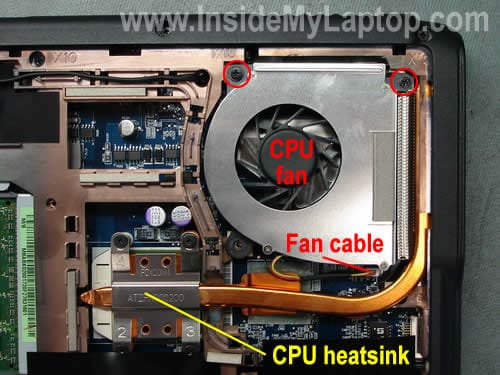
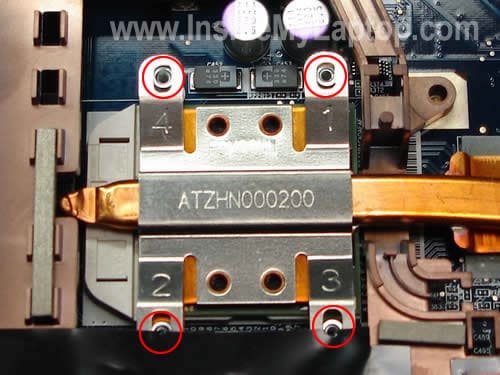
In most cases, the heat sink is secured above the processor by four screws.
You’ll have to remove or loosen those screws.
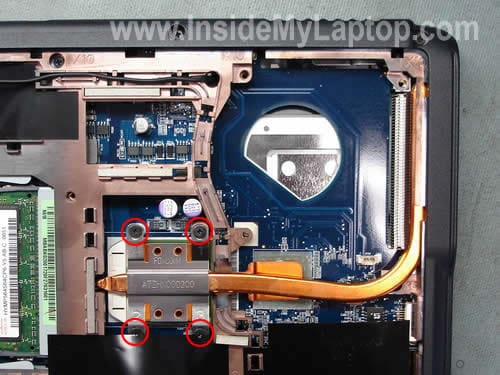
Carefully lift up the heat sink.
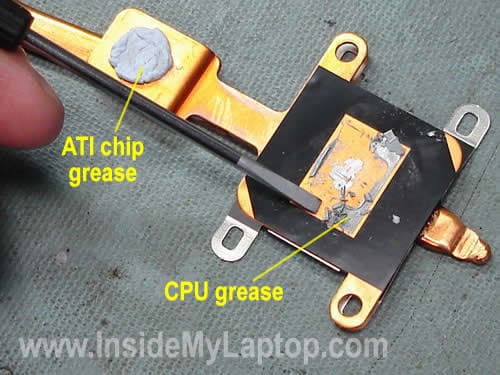
In my example the heat sink covers two chips: CPU and ATI chip. It’s not very common. In many other laptops the heat sink covers only the processor.
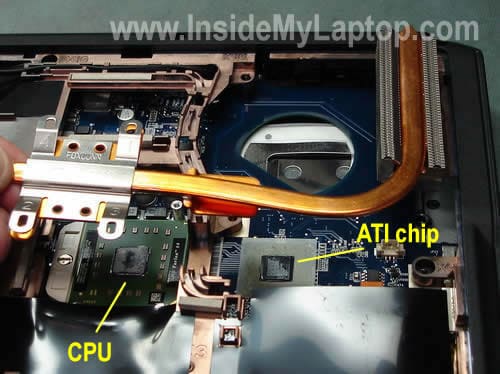
The ATI chip thermal grease is different, it looks like a blue chewing gum. I’m not going to replace the ATI chip grease today because it appears to be soft and looks normal.
The CPU grease, on the other hand, looks dried out and feels very hard. The CPU thermal grease definitely has to be replaced.
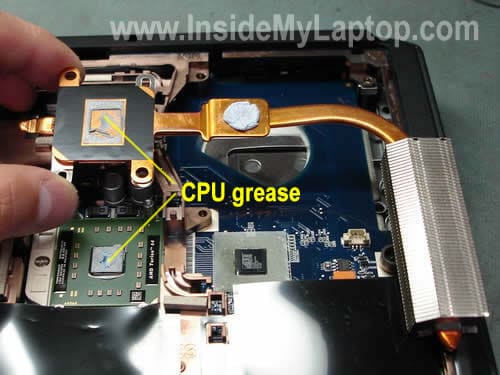
Thermal grease was so dried out that I had to use a flathead screwdriver to remove it from the heatsink.
NOTE: I would suggest using something softer, maybe a piece of plastic because the screwdriver makes scratches.
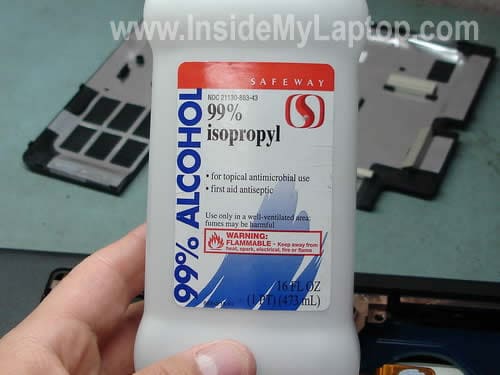
Clean the heat sink and CPU with 99% alcohol and soft cloth.
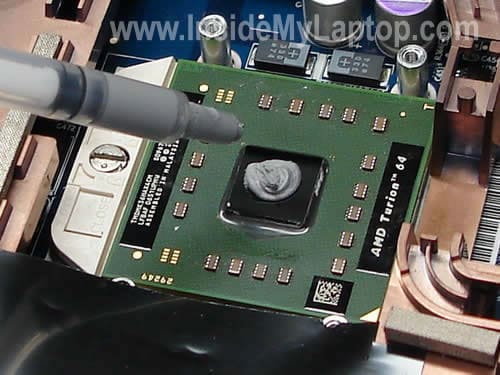
Both, the heatsink and CPU are clean and ready for new thermal grease.

Apply a small drop of new thermal grease on the top of the processor. Apply just enough to cover the CPU chip (black square in the center).
Finally, install the heat sink and secure it by tightening screws in the order 1-2-3-4.
mewa.rules
LMFAO, lil excessive with the grease dont you think? I’d open that think back up and scrap off all the excess thats spilled onto the chip and probably motherboard.
Try using about 2/3’s the amount he put on the heatsink, folks. It doesnt take much.
IML Tech
mewa.rules.
I agree. But it depends on the type of grease you are using. If you are applying Arctic Silver 5 thermal compound than you have to apply just a tiny drop.
I was using compound made for Toshiba laptops and it’s very dense.
As I mentioned in my post:
Jim
This acually works. My Gateway didnt come with an acoustic fan (Can’t seem to find a good replacement without having to resort to enginuity…I stuck this one out)…so the less time its running the better. Thanks for the info laptech
Brian
I did this to my Acer aspire 5100 laptop. I also found the same results the compund for the cpu was all dried up and the gpu was still soft. I could NOT watch movies or play games anymore. Video would become extremely choppy after just a few minutes. Core temp read 55c idle and 85c watching video! after i took the laptop apart and cleaned the airflow and changed the thermal compound to arctic silver my temps were 35c idle and 52c watching video..smooth as silk! Easy to do. Remember HEAT KILLS LAPTOPS!
Kevin
I hoping that the original article writer (IML Tech) will see this. I was wondering what exactly is the name of that thick gray thermal grease that you used in this article because I need it for my own laptop. It looks a lot like the original thermal grease in my laptop before I cleaned it out and the new one I put it is hardly working. Any help would be appreciated.
IML Tech
Kevin,
Are you asking about gray CPU grease? I think you can use this one: X-23-7762-01 (google it). This it Toshiba grease, very similar to grease in the picture.
John Fellet
Hi there,
Thanks for your guide. This is what I am using currently. I accidently removed the grease off my graphics card (NVIDIA) by mistake while cleaning the surface. I tried to apply Arctic Silver 5 on the graphics card chip like many youtube video’s suggested but my temperatures have risen really badly from around 50 degrees to 71-80. Sometimes my laptop even shuts down. I applied a little arctic silver and made it thinner and applied it on the chip surface. My 3dmarks scores have also gone down by 1300 so obviously I did something wrong.
Do you have any advice? Is arctic silver 5 ok for the NVIDIA chip. Do you have any photos on how it should be applied to the GPU? Thanks!
IML Tech
John Fellet,
Maybe you should use thermal pad instead of Arctic Silver. What is your laptop brand and model?
John Fellet
I have an XPS 13.
Can you tell me if Arctic Silver 5 would be suitable, if not then what type of thermal pad should I use? are there any substitutes that can be used?
IML Tech
John Fellet,
I’m not sure what XPS 13 is. Are you sure the model number is correct? Is is XPS M1330?
I would use thermal pad instead of the grease. I think using thermal grease on the CPU is OK.
T4T
Everything is true about the dust build up. However, how do you remove the heatsink safely? Mine feels like it will rip the CPU off if I attempt to lift it carefully (more like a pull) ?
IML Tech
T4T,
Apparently in your laptop thermal grease dried out and glued the heatsink to the CPU.
I know, sometimes it fills like you are going to rip the CPU off the socket and very often it comes out attached to the heat sink.
Let’s say you removed the heat sink and the CPU came out attached to it. What should you do?
1. Very carefully separate the CPU from the heat sink with a flat head screwdriver.
2. Open the CPU socket by turning the screw-lock into the “Open” position.
3. Insert the CPU into the socket. Make sure the orientation is correct. Lock the socket.
4. Now, when the CPU is installed back into the socket and secured, you can clean old thermal grease with alcohol.
Brendan
I am looking to replace the processor in my Acer Aspire AS5100 3949.. It is currently a AMD Turion 54 mk-36 and I was wondering what Dual Core processor’s are compatible with this type of Motherboard.
thanks!
Chris
Hi, great guides here. I have an HP Pavilion 9548 and am replacing the systemboard on it. The HP guides says to use Thermal Pads AND Thermal Paste when replacing any of these components. I have ordered both, but how do I apply both the pads and the paste? I am nervous about doing in incorrectly since heat is what apparently fried the GPU in the first place. Thanks!
IML Tech
Chris,
Some chips require thermal paste, other chips required thermal pads but you don’t use them together.
When you replace the motherboard, you’ll see where HP uses thermal paste or thermal pads. Make some notes so you don’t forget and apply them in the same order.
malik
I have the same Acer Aspire in your photos, and I think its about time to change my thermal paste. You used Arctic Silver. At the moment I can’t get me hands on some Arctic Silver, but I do have another brand called EVERCOOL, Sidewinder Thermal Compound. Can I use it? What do you think?
thanks
IML Tech
malik,
I think you can. I used Arctic Silver just as an example.
laptopNut
Regardless of the viscosity of the paste, that is still way too much to use. When you use too much paste, instead of dissipating the heat, it acts as an insulator instead and can cause unnecessarily high temps.
I notice a few comments about thermal pads, I notice these are used on GPU VRAM but haven’t seen them used on much else. They are used if you need something thicker to offset differences between gaps of the heatsink and the component you are cooling too.
T4T
This may be disturbingly hilarious, but I still have not attempted it yet. As summer is approaching, my laptop is heating up – already. No options now. I am still in fear of tearing the CPU’s head, since the heatsink and thermal greased fused themselves dead-tight on top of it. I need to get this nerving deed over with. I will upload a vid. If I damage the CPU as I separate them let me know where I went wrong. I have two more questions:
# 2: Should I loosen the CPU’s screw before or after?
# 3: Why 99% alcohol?
IML Tech
T4T,
Try cleaning the heat sink and fan before replacing thermal grease. If your laptop overheats, most likely it happens because the heatsink is clogged with dust.
Find an air compressor or use home vacuum blower and clean the heat sink.
Rob
hey labtech, so i got a acer aspire 5100 for my friend and i belive i have the dreaded ati/bga loose chip, and want to resolder it down, or replace the chip, what options do u think i should take?
Rob
and also can u point out the exact chip?
Rob
and actually it does turn on and loads once in awhile, but sometimes it tuns out to be garbled hard drive n bios- but linux will load but windows wont… any idea
Jamesy
Hi IML Tech
i guess you probs know about the problems surrounding DELL and their use of the NVIDIA 8400 and 8600 chipsets? I own an M1530 XPS , and i bought it specifically for gaming , and not knowing much about laptops i thought it would be safe to go through Dell , as i thought they had a good rep?? obviously i was wrong lol.
From what i can see on the forums they installed faulty chipsets in all their models , now….mine is out of warranty , they havent answered my queries and i was wondering if you would know……
* Is it likely that my GPU or motherboards are fried
because……i cannot turn the laptop on anymore….it simply will not start up , and when u run the FN & POWER diag check , the first LED flashes which according to Dell is something to do with the processor “The Microcontroller is handing control of the system to the processor. This code will persist if there is no processor detected”
Is this likely to be the main motherboard?
and if so , will trying to apply new thermal paste help here or is it already buggered???
fast response would REALLY be appreciated 🙂
IML Tech
Jamesy,
Most likely it’s either bad memory or motherboard failure.
First of all, try reseating memory modules. Try removing memory modules one by one and test the laptop with each module installed into different slots.
If reseating/replacing memory doesn’t help, probably this is motherboard failure.
CPUs do not fail very often. I would say on a few hundred failed motherboards you’ll see only one or two failed CPUs.
If the motherboard (or video chip) already failed, re-appling thermal paste will not help.
Jamesy
thanks for the advice….i will check that out. i already tried reseating the memory but i didnt try it with just 1 module at a time in each slot , so i will give it a go and let you know of the impending failure lol
according to the Dell forums , all the motherboards were put together with faulty nvidia chipsets built in , on the 8400 ad 8600 ranges 😐
Highly Educated Redneck
Never thought of this! Pretty clever. Good suggestion. Thanks!
Jordan
I did this and replaced my broken fan, and as a result my laptop is running much better. However while the temperature did go down (from 95+ °C, which was too hot to run the laptop), it only dropped to the high 60s °C. Is this normal? It still seems quite hot.
My laptop is a ~4 year old Fujitsu T4215.
Thanks, and Happy Holidays!
Max
I wanted to apply a new thermal grease on the laptop processor, because it was overheating, but the third and fourth screw on the processor have stripped heads and their screwed in really tight. I have no idea how to unscrew them. I tried putting a rubber band between the screwdriver and the screw head.. that didn’t help. Right now I can’t afford buying a drill or a screw extractor, so is there any other way to get the screws out? And if I somehow removed the screws, would I have to get new ones or I could use the computer without the two screws?
Max
Never mind, I broke the screw heads off… though I still need to buy the thermal grease, because I wanted check if it needs to be changed at first. Thanks for the tutorial anyway 🙂
Mike
I have the same laptop, Acer 5100. I was thinking about doing the same but thought if I am going to go through the trouble to taking my laptop apart, I might as well replace the CPU. Do you know which CPUs are ok to use.
I was thinking AMD TURION MOBILE 64X2 2GHZ – HP PART# TMDTL60HAX5DM as I can get it cheap.
Any help much appreciated.
Thanks
Mike
jdmercy
my toshiba satellite laptop screen is not coming after i cleanes inside the laptop and applied new thermal grease what to do and what would be the reason behind the screen not starting please, send me reply asap,
thanks.
Ant
Hi,
Yesterday I replaced the floppy drive, speakers and volume controls and cooling fan and CPU heatsink (without applying new thermal grease) in my Toshiba S1800-314. Today, my laptop is running at about half the speed of normal.
Just looking again, there’s dried-out thermal grease on both the CPU and the new (second-hand) heatsink. Does thermal grease (or the lack of it) really affect CPU speed this much? Or should it not affect speed at all (i.e. should the CPU just overheat then stop)?
Software-wise, there’s nothing slowing the laptop down: swap file is fine, no suspicious processes, etc.
What are the best recommended greases or types of grease laptop CPU’s?
Thanks!
IML Tech
Ant,
It’s possible that overheating affects the CPU speed. Probably the CPU slows down in order to prevent damage.
Usually I use this thermal grease: X-23-7762
Google this number and you’ll find it.
Ant
Thanks for the reply, IML Tech.
Yes, I discovered that the CPU is ‘throttled’ by my lpatop once it hits 70 degrees. I think this means I’m thankfully unlikely to have damaged the CPU by switching on without thermal grease.
Thanks for recommending X-23-7762. I’ll see if I can get hold of some. In the interim I’ve applied Nano Diamond.
For anyone interested, there’s another good guide on applying thermal
grease on the Arctic Silver website: www.arcticsilver.com/methods.html.
Ant
Agosh kumar
Oh thanks , i too have opened heat sink in my dell inspiron 1525 laptop for cleaning then when i started i have observed that the temperature is increasing to 80+’C and suddenly getting to 48’C . Now i understood what must be the problem . The thermal paste was removed between heat sink and cpu .
Agosh kumar
Where can i get this thermal paste in market or what is its marketing name ?
IML Tech
@ Agosh kumar,
Just search for “thermal grease” on eBay. There are many different brands available.
Just Saying
Dude put too much paste. Less would be better.
shiva
Hey dude,
i hae a dell vostro 1400.. Which thermal greece should i apply…!!! Are all thermal greece the same…!!!??!!
jaiswami
i just removed my fan and then those 4 bolts above cpu
just
to remove dust
i see thermal paste is dried
now m facing sudden failure after 20-25 minutes
is it due to thermal paste
mine notebook iball i1422 is a 2007 modal so wat u thing the problem
victor eialnd
I will donate as soon as I can find the part and try to replace it . I have a compaq presario
C776NR notebook pc. I removed one of the covers on the back. It is the heat sink and copper tube that is so hot. The battery is okay, but I bought the pc in 2004. Their is a number on the heat sink # AT029000100 square box. but what is so hot is the copper tube that is expose and goes under the cove to I guess to the fan. What I don’t know if there is another sensor that fell and making that hot ? I don’t know if the grease will solve the problem are do I need the part. I need to locate the part and theati thermall grease. any help on that.
thank you very much victor louisiana
omnomnom
I have a Compaq Presario CQ61. I bought thermal paste and it has an integrated CPU. Obvious. Now I want to apply my thermal paste and was wondering; I read online too much and too little can damage the CPU. Should I apply an even, medium covering or is too much better than too little?
IML Tech
@ omnomnom,
Apply just a small drop. It should be enough to cover the CPU chip in thin layer when the heatsink installed.
rajneesh
respected sir
my laptop is compaq presario CQ42. Which thermal greece should i apply…!!! Are all thermal greece the same and how much cost of greece .
Vic
@Rajneesh,
Any of the following: AS5, ICD7, Shin Etsu will be fine.
brajesh
sir i have hp pavillion dv4 1506tx laptop which thermal grease shoul i use …cheap and best
plz give link to buy
Animesh Mishra
hi
I have HP-Pavilion-DV6-6116-TX laptop.i want to reduce its heat as it is generating horable heat..can u help me for reducing the heat of mine laptop
IML Tech
@ Animesh Mishra,
Most likely it’s happening because your laptop heatsink clogged with dust. The dust kills normal airflow inside the heatsink and the laptop overheats.
First, I would try cleaning the heatsink and cooling fan. Blow off the fan and heatsink with compressed air and see if it fixes the problem.
Mistawonders
Hi,
I personally think that you put way too much thermal paste on the CPU chip. Indeed the idea is to get a layer of thermal paste between the copper and the chip as thin as possible to maximise the thermal transfer. If you put too much of it, thermal conductivity will be limited, and you will only get small results.
You need to put a small dot of thermal paste on your CPU and GPU chip, that way, you’ll get the most efficient heat transfer possible from your CPU to the heat-sink.
If you are worried about spreading issues on the chip with that much a small area of initial coverage, keep in mind that you will screw the whole thing later, and the pressure applied by the screws will spread the thermal paste.
Otherwise, keep up your wonderful work.
Cheers.
arber
just did this yesterday to my laptop with antec formula 7 I believe, and it made my laptop about 10-20 degrees celcius colder. thanks for the guide
pmn
Sir,
I still wonder at the explaination of 2 types of thermal pastel,one for CPU and te other for A
Is there two types of thermal paste?
One for the CPU and the other for the ATI/GPU?
Why we can’t use the same paste for applaying on the both processors?
IML Tech
@ pmn,
It depends on the laptop model. Most laptop use same paste for CPU and GPU chips. However, some laptops might use a special grease or thermal pad for GPU chips.
Are you replacing thermal grease on a laptop?
When you disassemble your laptop, compare thermal grease on both chips. If it looks the same, you can replace both.
However, if your GPU chip has a thermal pad, I wouldn’t touch it and leave it as is.
waire ogbah
pls sir, i need ur help…
My Toshiba laptop cpu fan is working properly on its own, but anytime i mount the heat sink on top of the processor, the fan immediately stops…i have tried my best but i couldn’t do it. Thanks
Roke Damian
Will heat sink compound used for semiconductors be ok for the CPU chip vice thermal paste?
What type of thermal paste is recommended? Need type name and where available for purchase.
Thank you. Please respond via my email address.
PK
HI,
First of all thank you for the detailed instruction. My HP Entertainment laptop which I bought in 2008 shut off while booting. How much time it takes to shutdown varies. BUt, I noticed anywhere between 1 to 5 minutes. As a result, I could not do any disk scan or any troubleshooting because in between these processes, the computer shuts down. I could hear the fan sound and also the hard disk activity lights shows activity. Is this a symptom of CPU thermal grease is not working? luckily I have a backup 1 week old. But, I would like to get my laptop back. Please advice. Thanks for the help.
IML Tech
@ PK,
Most likely your laptop shuts down because of overheating. It happens when the cooling module (fan and heat sink) is clogged with dust.
Cleaning the cooling module usually helps to resolve the problem and replacing thermal great might be not necessary.
Find an air compressor or canned air and blow off the cooling fan.
Sharka
My computer won’t boot up, it’s an hp dv7. It turns on, you can hear the fan turn on too, but then does nothing. Would replacing the grease fix that?
IML Tech
@ Sharka,
No, replacing thermal grease will not fix this problem.
Most likely it’s either bad RAM or motherboard related problem. Try removing memory modules one by one and test the laptop with one module at a time.
Jezzo
My previos computer was overheating and it heled a lot just to clean the old thermal grease, which was burnt. Better no grease than burned grese.
Manuel
Thank you so much for this helpful guide
baba
thermal heating is a problem of motherboard and processer it cant be rectified.neither by cooling pads nor by replacing thermal paste.in 2010 i bought a new laptop corei5,6gb ram,2gb nevdia gfx,650hd,win7(70k).i m a ultra extreme gamer.within the first month i replaced 3 time the thermal paste cleans the laptop used expensive cooling pads,updates drivers,bios,and any other solution provided in net.i completed all major games released that time.and my problem occures only while playing games.and only solution i found for it is not playing game in it for which i bought it
euhill
I just replaced the so called thermal paste that Dell uses on my Latitude D400. That stuff Dell uses is pure garbage. It was a thin black layer that was found on the underside of the heat sink. There was nothing on the processor at all. Obviously one of the reasons for the processor running hot. The processor used to get up above 200 F. In order to cool it down I undervolted my processor and ran fan control software. That made the processor run between 122 F and 148 F. After replacing the thermal paste it now runs between 113 F and 122 F. I also had to go into the hidden bios Thermal Control Panel screen and shut off the bios’ fan control as it started conflicting with the fan control software I use. As for the fan, it either doesn’t run at all or it runs on low. The high fan speed setting isn’t needed at all now. I strongly recommend anyone with a Dell laptop to replace the thermal paste on the processor immediately.
Colin
Can someone please help and tell me what the black material is on the underside of the Copper HP CPU Heatsink? The Black Layer in the photograph has a rectangle cut in it to allow direct contact between the top of the CPU through the thermal grease to the Copper Heatsink. The material looks like black electricians PVC insulation tape in the above picture. I think the function of the black layer is to electrically insulate any connections to the CPU from the copper. I need to know exactly what this black material is because I need to change it on my HP Envy 15 GPU heatsink. I am assuming it is electrically insulating but thermally conductive and has to operate at temperatures at max of around 110 degrees celcius. I have tried to find out from HP but they only advise re-ordering the entire heatsink to get the “Thermal Material”. I think it may be a special material because PVC tape would burn/melt at 110’C. I am looking at Kapton Tape if I cannot find out exactly what HP uses. Any help really appreciated. Thanks.
Debasish Mallik
By any chance this discussion is still active? Can You (IML Tech) help me producing a guide about how to remove CPU Fan from HCL ME XITE L 1014 Laptop? I found it very tricky because even though I can see and unscrew CPU fan just by removing a part of back cover, but to fully remove the fan and heat-sink I have to remove the whole back cover. and even though I unscrewed all screw thats holding back cover and removed cd-drive, I found that the back cover near hing of LCD display is coming out but it trapped tightly near touchpad. any solution? please!
Farrak
I have a Acer predator g7760
My computer switches on then off then on and stays on with no display
i had a look under the fan on the chipset the grey compound was dry
The fan on it consists of a large fan on the tower and two pipes which connect to a small unit on the chipset